


Package |
Description |
|---|---|
Navigate and subset NHDPlus (MR and HR) using web services |
|
Access topographic data through National Map’s 3DEP web service |
|
Access NWIS, NID, WQP, eHydro, NLCD, CAMELS, and SSEBop databases |
|
Access daily, monthly, and annual climate data via Daymet |
|
Access daily climate data via GridMET |
|
Access hourly NLDAS-2 data via web services |
|
A collection of tools for computing hydrological signatures |
|
High-level API for asynchronous requests with persistent caching |
|
Send queries to any ArcGIS RESTful-, WMS-, and WFS-based services |
|
Utilities for manipulating geospatial, (Geo)JSON, and (Geo)TIFF data |
AsyncRetriever: Asynchronous requests with persistent caching








Features
AsyncRetriever is a part of HyRiver software stack that is designed to aid in hydroclimate analysis through web services. This package serves as HyRiver’s engine for asynchronously sending requests and retrieving responses as text, binary, or json objects. It uses persistent caching using aiohttp-client-cache to speed up the retrieval even further. Moreover, thanks to nest_asyncio you can use this package in Jupyter notebooks. Although this package is part of the HyRiver software stack, it can be used for any web calls. There are three functions that you can use to make web calls:
retrieve_text: Get responses as text objects.
retrieve_binary: Get responses as binary objects.
retrieve_json: Get responses as json objects.
stream_write: Stream responses and write them to disk in chunks.
You can also use the general-purpose retrieve function to get responses as any of the three types. All responses are returned as a list that has the same order as the input list of requests. Moreover, there is another function called delete_url_cache for removing all requests from a cache file that contains a given URL.
You can control the request/response caching behavior and verbosity of the package by setting the following environment variables:
HYRIVER_CACHE_NAME: Path to the caching SQLite database. It defaults to ./cache/aiohttp_cache.sqlite
HYRIVER_CACHE_EXPIRE: Expiration time for cached requests in seconds. It defaults to one week.
HYRIVER_CACHE_DISABLE: Disable reading/writing from/to the cache. The default is false.
HYRIVER_SSL_CERT: Path to a SSL certificate file.
For example, in your code before making any requests you can do:
import os

os.environ["HYRIVER_CACHE_NAME"] = "path/to/file.sqlite"
os.environ["HYRIVER_CACHE_EXPIRE"] = "3600"
os.environ["HYRIVER_CACHE_DISABLE"] = "true"
os.environ["HYRIVER_SSL_CERT"] = "path/to/cert.pem"
You can find some example notebooks here.
You can also try using AsyncRetriever without installing it on your system by clicking on the binder badge. A Jupyter Lab instance with the HyRiver stack pre-installed will be launched in your web browser, and you can start coding!
Moreover, requests for additional functionalities can be submitted via issue tracker.
Citation
If you use any of HyRiver packages in your research, we appreciate citations:
@article{Chegini_2021,
    author = {Chegini, Taher and Li, Hong-Yi and Leung, L. Ruby},
    doi = {10.21105/joss.03175},
    journal = {Journal of Open Source Software},
    month = {10},
    number = {66},
    pages = {1--3},
    title = {{HyRiver: Hydroclimate Data Retriever}},
    volume = {6},
    year = {2021}
}
Installation
You can install async-retriever using pip:
$ pip install async-retrieverAlternatively, async-retriever can be installed from the conda-forge repository using Conda:
$ conda install -c conda-forge async-retrieverQuick start
AsyncRetriever by default creates and/or uses ./cache/aiohttp_cache.sqlite as the cache that you can customize by the cache_name argument. Also, by default, the cache doesn’t have any expiration date and the delete_url_cache function should be used if you know that a database on a server was updated, and you want to retrieve the latest data. Alternatively, you can use the expire_after to set the expiration date for the cache.
As an example for retrieving a binary response, let’s use the DAAC server to get NDVI. The responses can be directly passed to xarray.open_mfdataset to get the data as a xarray Dataset. We can also disable SSL certificate verification by setting ssl=False.
import io
import xarray as xr
import async_retriever as ar
from datetime import datetime

west, south, east, north = (-69.77, 45.07, -69.31, 45.45)
base_url = "https://thredds.daac.ornl.gov/thredds/ncss/ornldaac/1299"
dates_itr = ((datetime(y, 1, 1), datetime(y, 1, 31)) for y in range(2000, 2005))
urls, kwds = zip(
    *[
        (
            f"{base_url}/MCD13.A{s.year}.unaccum.nc4",
            {
                "params": {
                    "var": "NDVI",
                    "north": f"{north}",
                    "west": f"{west}",
                    "east": f"{east}",
                    "south": f"{south}",
                    "disableProjSubset": "on",
                    "horizStride": "1",
                    "time_start": s.strftime("%Y-%m-%dT%H:%M:%SZ"),
                    "time_end": e.strftime("%Y-%m-%dT%H:%M:%SZ"),
                    "timeStride": "1",
                    "addLatLon": "true",
                    "accept": "netcdf",
                }
            },
        )
        for s, e in dates_itr
    ]
)
resp = ar.retrieve_binary(urls, kwds, max_workers=8, ssl=False)
data = xr.open_mfdataset(io.BytesIO(r) for r in resp)
We can remove these requests and their responses from the cache like so:
ar.delete_url_cache(base_url)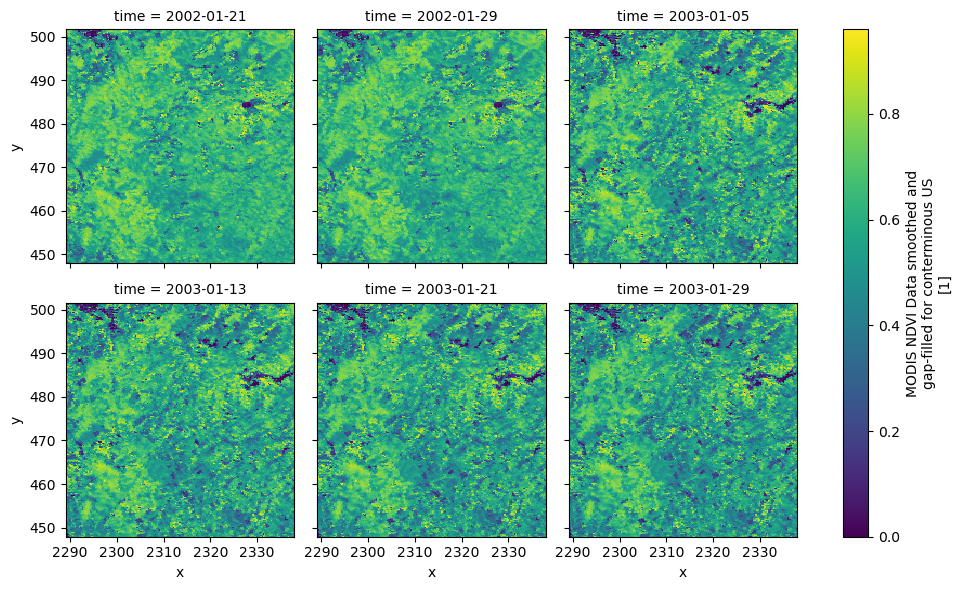
For a json response example, let’s get water level recordings of an NOAA’s water level station, 8534720 (Atlantic City, NJ), during 2012, using CO-OPS API. Note that this CO-OPS product has a 31-day limit for a single request, so we have to break the request down accordingly.
import pandas as pd

station_id = "8534720"
start = pd.to_datetime("2012-01-01")
end = pd.to_datetime("2012-12-31")

s = start
dates = []
for e in pd.date_range(start, end, freq="m"):
    dates.append((s.date(), e.date()))
    s = e + pd.offsets.MonthBegin()

url = "https://api.tidesandcurrents.noaa.gov/api/prod/datagetter"

urls, kwds = zip(
    *[
        (
            url,
            {
                "params": {
                    "product": "water_level",
                    "application": "web_services",
                    "begin_date": f'{s.strftime("%Y%m%d")}',
                    "end_date": f'{e.strftime("%Y%m%d")}',
                    "datum": "MSL",
                    "station": f"{station_id}",
                    "time_zone": "GMT",
                    "units": "metric",
                    "format": "json",
                }
            },
        )
        for s, e in dates
    ]
)

resp = ar.retrieve_json(urls, kwds)
wl_list = []
for rjson in resp:
    wl = pd.DataFrame.from_dict(rjson["data"])
    wl["t"] = pd.to_datetime(wl.t)
    wl = wl.set_index(wl.t).drop(columns="t")
    wl["v"] = pd.to_numeric(wl.v, errors="coerce")
    wl_list.append(wl)
water_level = pd.concat(wl_list).sort_index()
water_level.attrs = rjson["metadata"]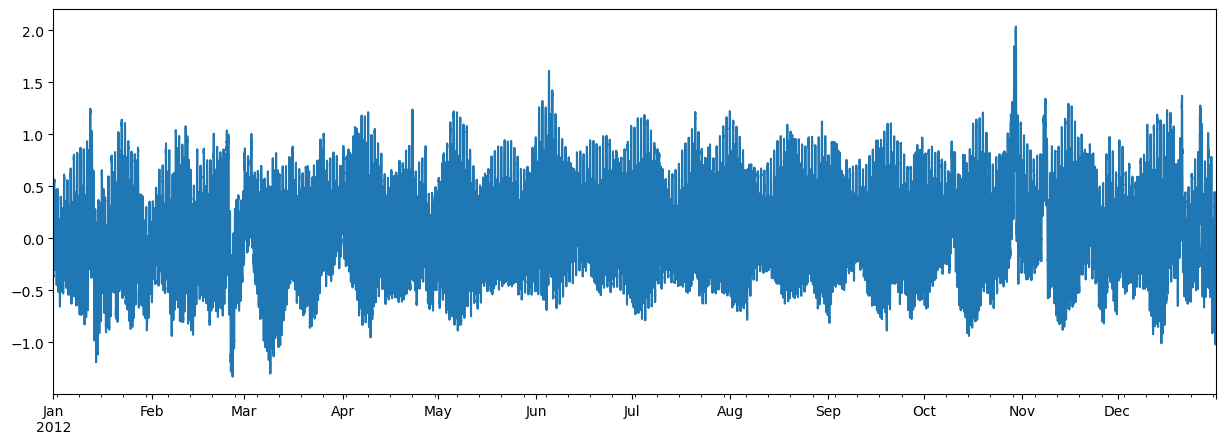
Now, let’s see an example without any payload or headers. Here’s how we can retrieve harmonic constituents of several NOAA stations from CO-OPS:
stations = [
    "8410140",
    "8411060",
    "8413320",
    "8418150",
    "8419317",
    "8419870",
    "8443970",
    "8447386",
]

base_url = "https://api.tidesandcurrents.noaa.gov/mdapi/prod/webapi/stations"
urls = [f"{base_url}/{i}/harcon.json?units=metric" for i in stations]
resp = ar.retrieve_json(urls)

amp_list = []
phs_list = []
for rjson in resp:
    sid = rjson["self"].rsplit("/", 2)[1]
    const = pd.DataFrame.from_dict(rjson["HarmonicConstituents"]).set_index("name")
    amp = const.rename(columns={"amplitude": sid})[sid]
    phase = const.rename(columns={"phase_GMT": sid})[sid]
    amp_list.append(amp)
    phs_list.append(phase)

amp = pd.concat(amp_list, axis=1)
phs = pd.concat(phs_list, axis=1)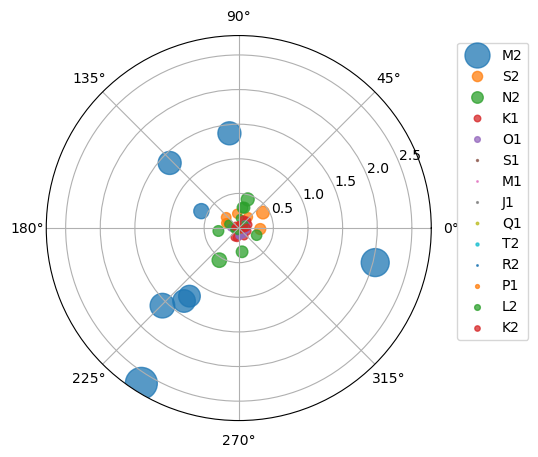
Contributing
Contributions are appreciated and very welcomed. Please read CONTRIBUTING.rst for instructions.
1 maintainer

Metadata
1 maintainer
Release files for async-retriever 0.19.3
For a detailed explanation of source distributions (sdists) and built distributions (wheels), please see the package formats documentation.
Source distribution (sdist)
| File | Size | Uploaded | |
|---|---|---|---|
| async_retriever-0.19.3.tar.gz | 35.4 kB | Details |
Built distribution (wheel)
| File | Interpreter | ABI | Platform | Reset |
|---|---|---|---|---|
| async_retriever-0.19.3-py3-none-any.whl | Python 3 | none | any | Details |
Total release size: 54.0 kB
Release files / async_retriever-0.19.3.tar.gz
| Download URL | async_retriever-0.19.3.tar.gz |
|---|---|
| Size | 35.4 kB |
| Tags | Source |
|
SHA-256 checksum How to use checksums |
22da28f4861f4182240e2a598e93ac3d94af5c3692b566016ff228056267f15b
|
|
BLAKE2b-256 checksum How to use checksums |
89257e1e31dbe75ea867ce844b769ada515fc50883e2d632a3e6bfe363902003
|
| Upload date | |
|
Uploaded using Trusted Publishing? What is trusted publishing? |
Yes |
| Uploaded via |
twine/6.1.0 CPython/3.12.9
|
Provenance
Provenance describes where a file came from. On PyPI, provenance is shared via attestations, which provide a verifiable record of the build or publishing details. View details, limitations and caveats.


PyPI Publish Attestation
PyPI verified that this artifact, at this checksum, originated from the publisher listed below.
Signed by GitHub Actions, verified by PyPI on Mar 7, 2025.
Transparency logRelease files / async_retriever-0.19.3-py3-none-any.whl
| Download URL | async_retriever-0.19.3-py3-none-any.whl |
|---|---|
| Size | 18.6 kB |
| Tags | Python 3 |
|
SHA-256 checksum How to use checksums |
45498ca4a7db428f72ea384a26adc2d4de6d63642ca70b8aa9e02d315781fe5e
|
|
BLAKE2b-256 checksum How to use checksums |
d0b5d1a4dca5fe9ce5b083ee79ac272c6ffe8199f98910b702eecb310a5d060d
|
| Upload date | |
|
Uploaded using Trusted Publishing? What is trusted publishing? |
Yes |
| Uploaded via |
twine/6.1.0 CPython/3.12.9
|
Provenance
Provenance describes where a file came from. On PyPI, provenance is shared via attestations, which provide a verifiable record of the build or publishing details. View details, limitations and caveats.
PyPI Publish Attestation
PyPI verified that this artifact, at this checksum, originated from the publisher listed below.
Signed by GitHub Actions, verified by PyPI on Mar 7, 2025.
Transparency log













