
RESTful, Simple Authorization system with ZERO configuration.




What is Auth?
Auth is a module that makes authorization simple and also scalable and powerful. It also has a beautiful RESTful API for use in micro-service architectures and platforms. It is originally desinged to use in Appido, a scalable media market in Iran.
It supports Python2.6+ and if you have a mongodb backbone, you need ZERO configurations steps. Just type auth-server and press enter!
I use Travis and Codecov to keep myself honest.
requirements
You need to access to mongodb. If you are using a remote mongodb, provide these environment variables:
MONGO_HOST and MONGO_PORT
Installation
pip install authShow me an example
ok, lets image you have two users, Jack and Sara. Sara can cook and Jack can dance. Both can laugh.
You also need to choose a secret key for your application. Because you may want to use Auth in various tools and each must have a secret key for seperating their scope.
my_secret_key = "pleaSeDoN0tKillMyC_at"
from auth import Authorization
cas = Authorization(my_secret_key)
Now, Lets add 3 groups, Cookers, Dancers and Laughers. Remember that groups are Roles. So when we create a group, indeed we create a role:
cas.add_group('cookers')
cas.add_group('dancers')
cas.add_group('laughers')
Ok, great. You have 3 groups and you need to authorize them to do special things.
cas.add_permission('cookers', 'cook')
cas.add_permission('dancers', 'dance')
cas.add_permission('laughers', 'laugh')
Good. You let cookers to cook and dancers to dance etc… The final part is to set memberships for Sara and Jack:
cas.add_membership('sara', 'cookers')
cas.add_membership('sara', 'laughers')
cas.add_membership('jack', 'dancers')
cas.add_membership('jack', 'laughers')
That’s all we need. Now lets ensure that jack can dance:
if cas.user_has_permission('jack', 'dance'):
    print('YES!!! Jack can dance.')
Authirization Methods
use pydoc to see all methods:
pydoc auth.AuthorizationRESTful API
Lets run the server on port 4000:
from auth import api, serve
serve('localhost', 4000, api)
Or, from version 0.1.2+ you can use this command:
auth-serverSimple! Authorization server is ready to use.
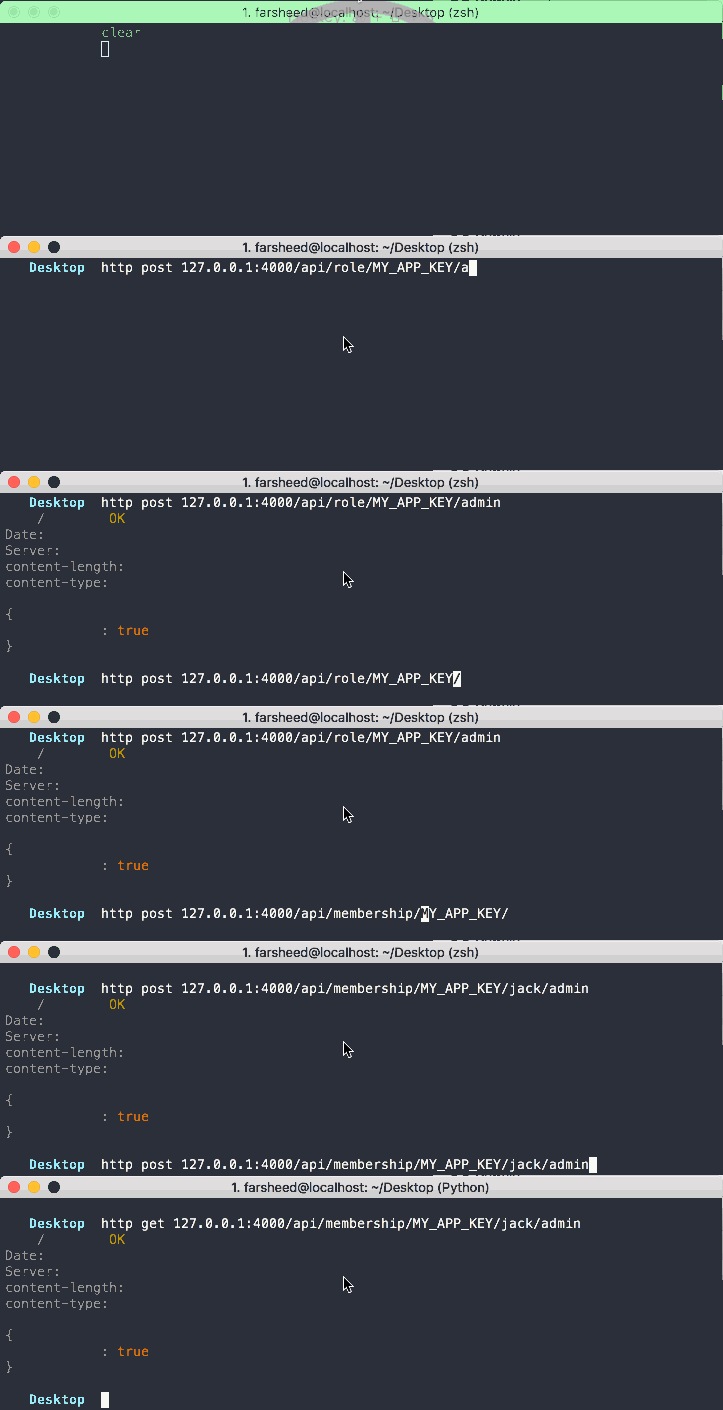
You can use it via simple curl or using mighty Requests module. So in you remote application, you can do something like this:
import requests
secret_key = "pleaSeDoN0tKillMyC_at"
auth_api = "http://127.0.0.1:4000/api"
Lets create admin group:
requests.post(auth_api+'/role/'+secret_key+'/admin')And lets make Jack an admin:
requests.post(auth_api+'/permission/'+secret_key+'/jack/admin')And finally let’s check if Sara still can cook:
requests.get(auth_api+'/has_permission/'+secret_key+'/sara/cook')RESTful API helpers
auth comes with a helper class that makes your life easy.
from auth.client import Client
service = Client('srv201', 'http://192.168.99.100:4000')
print(service)
service.get_roles()
service.add_role(role='admin')
API Methods
pydoc auth.CAS.REST.service/ping [GET]
Ping API, useful for your monitoring tools
/api/membership/{KEY}/{user}/{role} [GET/POST/DELETE]
Adding, removing and getting membership information.
/api/permission/{KEY}/{role}/{name} [GET/POST/DELETE]
Adding, removing and getting permissions
/api/has_permission/{KEY}/{user}/{name} [GET]
Getting user permission info
/api/role/{KEY}/{role} [GET/POST/DELETE]
Adding, removing and getting roles
/api/which_roles_can/{KEY}/{name} [GET]
For example: Which roles can send_mail?
/api/which_users_can/{KEY}/{name} [GET]
For example: Which users can send_mail?
/api/user_permissions/{KEY}/{user} [GET]
Get all permissions that a user has
/api/role_permissions/{KEY}/{role} [GET]
Get all permissions that a role has
/api/user_roles/{KEY}/{user} [GET]
Get roles that user assinged to
/api/roles/{KEY} [GET]
Get all available roles
Deployment
Deploying Auth module in production environment is easy:
gunicorn auth:apiDockerizing
It’s simple:
docker build -t python/auth-server https://raw.githubusercontent.com/ourway/auth/master/Dockerfile
docker run --name=auth -e MONGO_HOST='192.168.99.100' -p 4000:4000 -d --restart=always --link=mongodb-server python/auth-server
Copyright
Farsheed Ashouri @
Documentation
Feel free to dig into source code. If you think you can improve the documentation, please do so and send me a pull request.
Unit Tests and Coverage
I am trying to add tests as much as I can, but still there are areas that need improvement.
To DO
Add Authentication features
Improve Code Coverage
1 maintainer

Metadata
1 maintainer
Release files for auth 0.5.3
For a detailed explanation of source distributions (sdists) and built distributions (wheels), please see the package formats documentation.
Source distribution (sdist)
| File | Size | Uploaded | Provenance | Actions |
|---|---|---|---|---|
| auth-0.5.3.tar.gz | 9.3 kB | Without provenance | Details for auth-0.5.3.tar.gz |
Built distribution (wheel)
| File | Interpreter | ABI | Platform | Actions Reset |
|---|---|---|---|---|
| auth-0.5.3-py3-none-any.whl | Python 3 | none | any | Details for auth-0.5.3-py3-none-any.whl |
Total release size: 23.3 kB
Release files / auth-0.5.3.tar.gz
| Download URL | auth-0.5.3.tar.gz |
|---|---|
| Size | 9.3 kB |
| Tags | Source |
|
SHA-256 checksum How to use checksums |
fbb863640f3070356b833914d9bf12a3d74012e5bb132bc84aa51e41052ace3f
|
|
BLAKE2b-256 checksum How to use checksums |
4afdecd7f79f549a734a7fa904e42251c7169d080f960961b823d76726936efb
|
| Upload date | |
|
Uploaded using Trusted Publishing? What is trusted publishing? |
No |
Release files / auth-0.5.3-py3-none-any.whl
| Download URL | auth-0.5.3-py3-none-any.whl |
|---|---|
| Size | 14.0 kB |
| Tags | Python 3 |
|
SHA-256 checksum How to use checksums |
da6af75ceb503964c5003c2f22a49ac8334e2f1b01941b6cfe6871024654c905
|
|
BLAKE2b-256 checksum How to use checksums |
c6ec4c30e831f53a81930be7996a4384db3cab5bb2155906c8429d68aea29bb0
|
| Upload date | |
|
Uploaded using Trusted Publishing? What is trusted publishing? |
No |
Security for auth 0.5.3
Provenance
Provenance describes where a file came from. On PyPI, provenance is shared via attestations, which provide a verifiable record of the build or publishing details. View details, limitations and caveats.
No provenance found
None of the files in this release were uploaded with provenance metadata.
A note on package security
PyPI is a repository for distributing packages, not a service for auditing them. While third-party security researchers and our staff do their best to detect and remove malicious packages, PyPI cannot guarantee the quality, security or suitability of any given package.
To learn more about protecting yourself from malicious actors, visit our package security documentation.














