
Autochat



⚠️ Warning: Since agentic capabilities are evolving fast, expect the API to change.
A lightweight Python library to build AI agents with LLMs.
Key Features
- 🤝 Support for multiple LLM providers (OpenAI and Anthropic)
- 🐍 Transform python function or class into a tool
- 🔁 Run conversation as a generator.
- 🙈 Handle caching by default (anthropic model claude-3-7-sonnet-latest)
- ✨ And more features including:
- Simple template system
- Easy function and tool integration
- Flexible instruction and example management
- Support for images
- Support for MCP servers
Example (search capability)
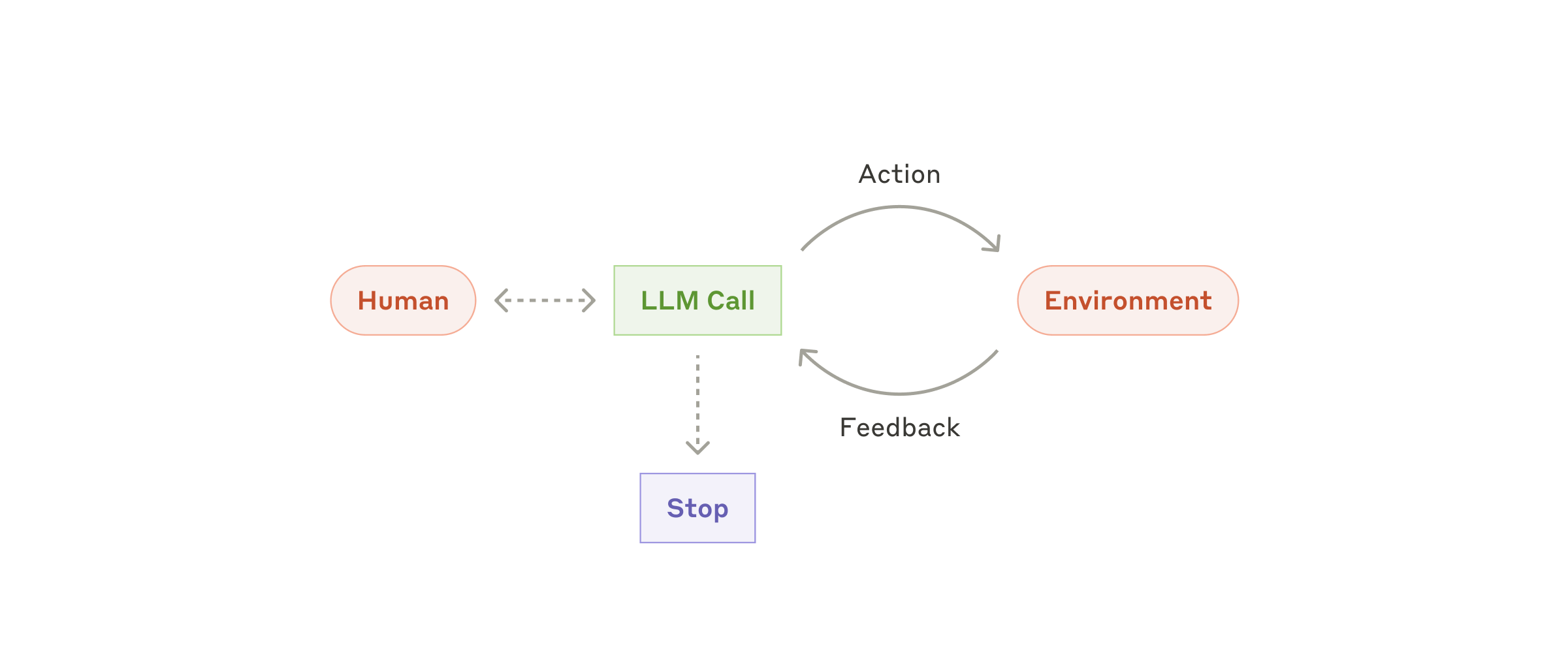
The library supports function call, handling the back-and-forth between the system and the assistant.
from autochat import Autochat

def search_wikipedia(title: str):
    """Search wikipedia for information"""
    import requests
    from bs4 import BeautifulSoup

    response = requests.get(f"https://en.wikipedia.org/w/index.php?search={title}&title=Special%3ASearch")
    soup = BeautifulSoup(response.text, 'html.parser')
    body_content = soup.find('div', {'id': 'bodyContent'})
    return body_content.text.strip()

classifier_agent = Autochat()
classifier_agent.add_function(search_wikipedia)

text = "Since when is the lastest iphone available?"
for message in classifier_agent.run_conversation(text):
    print(message.to_markdown())

# > ## user
# > Since when is the lastest iphone available?
# > ## assistant
# > search_wikipedia(title=iPhone)
# > ## function
# > Result: (html content)
# > ## assistant
# > The latest flagship iPhone models, the iPhone 16 and 16 Plus, along with the higher-end iPhone 16 Pro and 16 Pro Max, were available as of January 1, 2024.
Quick Start
Initialize with OpenAI (default)
agent = Autochat(instruction="You are a helpful assistant")
Simple conversation
response = agent.ask("What is the capital of France?")
print(response.content)
Using Anthropic's Claude
agent = Autochat(provider="anthropic")
response = agent.ask("Explain quantum computing in simple terms")
print(response.content)
Run conversation as a generator
for message in agent.run_conversation("Explain quantum computing in simple terms"):
    print(message.to_markdown())
Async Interface
Autochat provides async versions of its core methods for use in async applications:
# Async version of ask
response = await agent.ask_async("What is the capital of France?")
print(response.content)

# Async version of run_conversation
async for message in agent.run_conversation_async("Explain quantum computing"):
    print(message.to_markdown())

# Async function calls are also supported
async def async_calculator(a: int, b: int) -> int:
    await asyncio.sleep(0.1)  # Some async work
    return a + b

agent.add_function(async_calculator)
async for message in agent.run_conversation_async("What is 5 + 3?"):
    print(message.to_markdown())
Add a function call as python function
def multiply(a: int, b: int) -> int:
    return a * b

agent = Autochat()
agent.add_function(multiply)
text = "What is 343354 * 13243343214"
for message in agent.run_conversation(text):
    print(message.to_markdown())
Add a Class as a tool
from autochat import Autochat

class Calculator:
    def add(self, a: int, b: int) -> int:
        """Add two numbers"""
        return a + b

    def multiply(self, a: int, b: int) -> int:
        """Multiply two numbers"""
        return a * b

calculator = Calculator()

agent = Autochat()
agent.add_tool(calculator)
for message in agent.run_conversation(
    "What make 343354 * 13243343214"
):
    print(message)
Add a MCP server
Experimental feature. Check out the tests/mcp_clients for more information.
Installation
To install the package, you can use pip:
pip install 'autochat[all]'
Image support
from autochat import Autochat, Message

from PIL import Image

agent = Autochat()

image = Image.open("examples/image.jpg")
message = Message(role="user", content="describe the image", image=image)
response = agent.ask(message)
print(response.to_markdown())
Template System
We provide a simple template system for defining the behavior of the chatbot, using markdown-like syntax.
## system
You are a parrot

## user
Hi my name is Bob

## assistant
Hi my name is Bob, hi my name is Bob!

## user
Can you tell me my name?

## assistant
Your name is Bob, your name is Bob!
You can then load the template file using the from_template method:
parrotGPT = Autochat.from_template("./parrot_template.txt")
The template system also supports function calls. Check out the examples/demo_label.py for a complete example.
Environment Variables
The AUTOCHAT_MODEL environment variable specifies the model to use. If not set, it defaults to "gpt-4o" for openai and "claude-3-7-sonnet-latest" for anthropic.
We recommend to use Anthropic / claude-3-7-sonnet-latest for agentic behavior.
export AUTOCHAT_MODEL="gpt-4o"
export OPENAI_API_KEY=<your-key>
or with anthropic
export AUTOCHAT_MODEL="claude-3-7-sonnet-latest"
export ANTHROPIC_API_KEY=<your-key>
Use AUTOCHAT_HOST to use alternative provider (openai, anthropic, openpipe, llama_cpp, ...)
Support
If you encounter any issues or have questions, please file an issue on the GitHub project page.
License
This project is licensed under the terms of the MIT license.
1 maintainer

Metadata
1 maintainer
Release files for autochat 0.19.0
For a detailed explanation of source distributions (sdists) and built distributions (wheels), please see the package formats documentation.
Source distribution (sdist)
| File | Size | Uploaded | Provenance | |
|---|---|---|---|---|
| autochat-0.19.0.tar.gz | 31.9 kB | Without provenance | Details |
Built distribution (wheel)
| File | Interpreter | ABI | Platform | Reset |
|---|---|---|---|---|
| autochat-0.19.0-py3-none-any.whl | Python 3 | none | any | Details |
Total release size: 59.8 kB
Release files / autochat-0.19.0.tar.gz
| Download URL | autochat-0.19.0.tar.gz |
|---|---|
| Size | 31.9 kB |
| Tags | Source |
|
SHA-256 checksum How to use checksums |
45bb5ada38a36ca5639167bf9cc067b1ae31b3e7325e1f6d08385d6aa9321d25
|
|
BLAKE2b-256 checksum How to use checksums |
5dd7f70facbb211c8b7f18d0ee7760349d97c0541f22658930603b0712325761
|
| Upload date | |
|
Uploaded using Trusted Publishing? What is trusted publishing? |
No |
| Uploaded via |
twine/6.1.0 CPython/3.11.11
|
Release files / autochat-0.19.0-py3-none-any.whl
| Download URL | autochat-0.19.0-py3-none-any.whl |
|---|---|
| Size | 27.9 kB |
| Tags | Python 3 |
|
SHA-256 checksum How to use checksums |
0ce3dd96edf31beb80319b72437fb21a5f14527ee40eb7755b0de38e1960df25
|
|
BLAKE2b-256 checksum How to use checksums |
78e7a70116abb265429b78e91465a64202f7c211796fc06c611171fb9f53cedd
|
| Upload date | |
|
Uploaded using Trusted Publishing? What is trusted publishing? |
No |
| Uploaded via |
twine/6.1.0 CPython/3.11.11
|
Security for autochat 0.19.0
Provenance
Provenance describes where a file came from. On PyPI, provenance is shared via attestations, which provide a verifiable record of the build or publishing details. View details, limitations and caveats.
No provenance found
None of the files in this release were uploaded with provenance metadata.
A note on package security
PyPI is a repository for distributing packages, not a service for auditing them. While third-party security researchers and our staff do their best to detect and remove malicious packages, PyPI cannot guarantee the quality, security or suitability of any given package.














