
autocrop




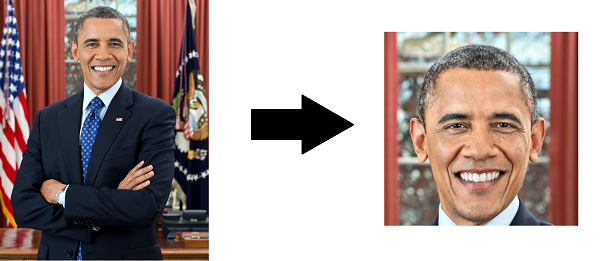
Perfect for profile picture processing for your website or batch work for ID cards, autocrop will output images centered around the biggest face detected.
Installation
Simple!
pip install autocrop
Version 2.0.0 · 2026-10-18. This is a breaking release. Python callers must
read cropper.crop(source).image; the CLI processes one image per invocation.
Read the v1 to v2 migration FAQ before upgrading.
The changelog lists the release changes.
Python 3.10+, OpenCV 4.8+, and Pillow 12.3.0+ are required.
Use
Autocrop can be used from the command line or directly from Python API.
From the command line
usage: autocrop [-h] [-V] [-v] [-n] [--align] [-o OUTPUT] [--json PATH]
                [-w WIDTH] [-H HEIGHT] [--facePercent FACEPERCENT]
                [source]

Automatically crops faces from pictures

positional arguments:
  source                Image file, or '-' to read image bytes from stdin.

options:
  -h, --help            show this help message and exit
  -V, --version         show program's version number and exit
  -v, --verbose         Write timings and basic processing details to stderr
  -n, --no-resize       Do not resize images to the specified width and
                        height, but instead use the original image's pixels.
  --align               Rotate faces so they're level using eye landmarks before cropping
  -o, --output, -p, --path OUTPUT
                        Output file, or output directory for a single input
                        image. If omitted, cropped image bytes are written to
                        stdout.
  --json PATH           Write JSON crop diagnostics to a file, or to stderr
                        with '-'
  -w, --width WIDTH     Width of cropped files in px. Default=500
  -H, --height HEIGHT   Height of cropped files in px. Default=500
  --facePercent FACEPERCENT
                        Percentage of face to image height
From Python
Import the Cropper class, set some parameters (optional), and start cropping.
The crop method accepts string filepaths or OpenCV-style BGR/BGRA np.ndarray
inputs and always returns a CropResult. Its image is an RGB/RGBA NumPy array
for Pillow or Matplotlib,
or None when no crop is produced. Its diagnostics is a CropDiagnostics dataclass.
from PIL import Image
from autocrop import Cropper

cropper = Cropper()

result = cropper.crop('portrait.png')

if result.image is not None:
    Image.fromarray(result.image).save('cropped.png')

print(result.diagnostics.selected_face_index)
print(result.diagnostics.crop_rectangle)
Upgrading Python code from v1? Use cropper.crop(...).image where you previously
used the returned array, and check result.image is not None rather than the
result object itself. Boolean checks, indexing, and unpacking of CropResult
raise errors linking to the migration FAQ. Unreadable files and invalid
configuration still raise.
To level slightly tilted faces before cropping, use Cropper(align=True) in
Python or autocrop portrait.jpg --align > cropped.jpg in the shell. Alignment
is off by default and skips rotation when eye landmarks are missing or the tilt
exceeds 30 degrees.
Autocrop v2 uses OpenCV's YuNet neural-network face detector.
Further examples and use cases are found in the accompanying Jupyter Notebook.
Examples
- Crop one image and write the cropped image bytes to stdout:
autocrop portrait.jpg > cropped.jpg
- Crop image bytes from stdin. This uses
-instead of--because--is already argparse's standard option terminator:cat portrait.jpg | autocrop - > cropped.jpgautocrop -- > cropped.jpg < portrait.jpg
- Crop one image and write to an explicit output file:
autocrop portrait.jpg -o cropped.jpg
- Write crop diagnostics to JSON:
autocrop portrait.jpg -o cropped.jpg --json diagnostics.jsonautocrop portrait.jpg --json - > cropped.jpg
- Print timings and basic processing details to stderr:
autocrop portrait.jpg --verbose > cropped.jpg
- Crop one image and write into an explicit output directory:
autocrop portrait.jpg -o crop
- Convert output format by choosing an explicit output extension:
autocrop portrait.jpg -o cropped.png
- Crop one image but keep the original crop pixels instead of resizing:
autocrop portrait.jpg --no-resize > cropped.jpg
Autocrop intentionally processes one image per invocation. For recursive or filtered batch
workflows, compose autocrop with shell tools.
With find:
mkdir -p crop
find pics -type f \( -iname '*.jpg' -o -iname '*.png' \) -print0 |
  while IFS= read -r -d '' file; do
    out="crop/${file#pics/}"
    mkdir -p "$(dirname "$out")"
    autocrop "$file" > "$out"
  done
Convert outputs to JPEG while batching:
mkdir -p crop
find pics -type f \( -iname '*.jpg' -o -iname '*.png' \) -print0 |
  while IFS= read -r -d '' file; do
    out="crop/${file#pics/}"
    mkdir -p "$(dirname "$out")"
    autocrop "$file" -o "${out%.*}.jpg"
  done
With fd:
fd -e jpg -e png . pics -x sh -c 'out="crop/${1#pics/}"; mkdir -p "$(dirname "$out")"; autocrop "$1" -o "${out%.*}.jpg"' sh {}
With xargs:
find pics -type f \( -iname '*.jpg' -o -iname '*.png' \) -print0 |
  xargs -0 -I{} sh -c 'out="crop/${1#pics/}"; mkdir -p "$(dirname "$out")"; autocrop "$1" > "$out"' sh {}
With GNU parallel:
find pics -type f \( -iname '*.jpg' -o -iname '*.png' \) -print0 |
  parallel -0 'out="crop/{= s:^pics/:: =}"; mkdir -p "$(dirname "$out")"; autocrop {} > "$out"'
Detecting faces from video files
You can use autocrop to detect faces in frames extracted from a video. A great way to
perform the frame extraction step is with ffmpeg:
mkdir frames faces

# Extract one frame per second
ffmpeg -i input.mp4 -filter:v fps=fps=1/60 frames/ffmpeg_%0d.bmp

# Crop faces as jpg
find frames -type f -name '*.bmp' -print0 |
  while IFS= read -r -d '' file; do
    autocrop "$file" -o "faces/$(basename "${file%.*}").jpg"
  done
Supported file types
The following input file types are supported:
- EPS files (
.eps) - GIF files (
.gif) (only the first frame of an animated GIF is used) - JPEG 2000 files (
.j2k,.j2p,.jp2,.jpx) - JPEG files (
.jpeg,.jpg,.jpe) - LabEye IM files (
.im) - macOS ICNS files (
.icns) - Microsoft Paint bitmap files (
.msp) - PCX files (
.pcx) - Portable Network Graphics (
.png) - Portable Pixmap files (
.pbm,.pgm,.ppm) - SGI files (
.sgi) - SPIDER files (
.spi) - TGA files (
.tga) - TIFF files (
.tif,.tiff) - WebP (
.webp) - Windows bitmap files (
.bmp,.dib) - Windows ICO files (
.ico) - X bitmap files (
.xbm)
Explicit output files are limited to writable formats with these extensions:
.apng, .bmp, .dib, .eps, .gif, .icns, .ico, .j2c, .j2k,
.jpe, .jpeg, .jpg, .jp2, .jpc, .jpf, .jpx, .pbm, .pcx,
.pdf, .pgm, .png, .pnm, .ppm, .ps, .rgb, .rgba, .sgi,
.tga, .tif, .tiff, and .webp.
Misc
Installing directly
In some cases, you may wish the package directly, instead of through PyPI:
cd ~
git clone https://github.com/leblancfg/autocrop
cd autocrop
uv sync
Development environment
Best practice for your projects is of course to use virtual environments. For local development, autocrop uses uv:
uv sync
uv run autocrop --help
Autocrop is currently being tested on:
- Python 3.10 to 3.15
- OS:
- Linux
- macOS
- Windows
More Info
Check out:
Adapted (ages ago now!) from:
Bundled detector models
Autocrop vendors OpenCV Zoo's face_detection_yunet_2023mar.onnx so YuNet works offline and CI does
not depend on runtime downloads. The model source is opencv/opencv_zoo, and OpenCV's model card
notes that files in the models/face_detection_yunet directory are MIT licensed.
Contributing
Although autocrop is essentially a CLI wrapper around a single OpenCV function, it is actively developed. It has active users throughout the world.
If you would like to contribute, please consult the contribution docs.
1 maintainer

Metadata
1 maintainer
Release files for autocrop 2.0.0
For a detailed explanation of source distributions (sdists) and built distributions (wheels), please see the package formats documentation.
Source distribution (sdist)
| File | Size | Uploaded | Provenance | Actions |
|---|---|---|---|---|
| autocrop-2.0.0.tar.gz | 247.6 kB | With provenance | Details for autocrop-2.0.0.tar.gz |
Built distribution (wheel)
| File | Interpreter | ABI | Platform | Actions Reset |
|---|---|---|---|---|
| autocrop-2.0.0-py3-none-any.whl | Python 3 | none | any | Details for autocrop-2.0.0-py3-none-any.whl |
Total release size: 488.7 kB
Release files / autocrop-2.0.0.tar.gz
| Download URL | autocrop-2.0.0.tar.gz |
|---|---|
| Size | 247.6 kB |
| Tags | Source |
|
SHA-256 checksum How to use checksums |
f62ed1e0e76af00ce27fef5dfe6841743e5cabd7d2b112190b327a34349506a0
|
|
BLAKE2b-256 checksum How to use checksums |
249c1744d6bea2e18a30f60a3e19dd696b8a7ac7fb7e5099f6f9141a9b27d93a
|
| Upload date | |
|
Uploaded using Trusted Publishing? What is trusted publishing? |
Yes |
| Uploaded via |
twine/7.0.0 CPython/3.13.14
|
Provenance
Provenance describes where a file came from. On PyPI, provenance is shared via attestations, which provide a verifiable record of the build or publishing details. View details, limitations and caveats.


PyPI Publish Attestation
PyPI verified that this artifact, at this checksum, originated from the publisher listed below.
Signed by GitHub Actions, verified by PyPI on Oct 19, 2026.
Transparency logRelease files / autocrop-2.0.0-py3-none-any.whl
| Download URL | autocrop-2.0.0-py3-none-any.whl |
|---|---|
| Size | 241.2 kB |
| Tags | Python 3 |
|
SHA-256 checksum How to use checksums |
21450b5b88a0881fb93c00a9a6d4bd6fac0c9536715e77ecc03c1254242b878f
|
|
BLAKE2b-256 checksum How to use checksums |
3e52f78025aff7ae963dc32a80aa4687dd3697cb7836e63e019708f42bed6752
|
| Upload date | |
|
Uploaded using Trusted Publishing? What is trusted publishing? |
Yes |
| Uploaded via |
twine/7.0.0 CPython/3.13.14
|
Provenance
Provenance describes where a file came from. On PyPI, provenance is shared via attestations, which provide a verifiable record of the build or publishing details. View details, limitations and caveats.
PyPI Publish Attestation
PyPI verified that this artifact, at this checksum, originated from the publisher listed below.
Signed by GitHub Actions, verified by PyPI on Oct 19, 2026.
Transparency logSecurity for autocrop 2.0.0
Provenance
Provenance describes where a file came from. On PyPI, provenance is shared via attestations, which provide a verifiable record of the build or publishing details. View details, limitations and caveats.
Full provenance
All 2 files in this release have been uploaded with provenance metadata.
Attestation for autocrop-2.0.0.tar.gz
PyPI Publish Attestation
PyPI verified that this artifact, at this checksum, originated from the publisher listed below.
Signed by GitHub Actions, verified by PyPI on Oct 19, 2026.
Transparency logA note on package security
PyPI is a repository for distributing packages, not a service for auditing them. While third-party security researchers and our staff do their best to detect and remove malicious packages, PyPI cannot guarantee the quality, security or suitability of any given package.
To learn more about protecting yourself from malicious actors, visit our package security documentation.














