

Autohooks



Library for managing and writing git hooks
in Python using pyproject.toml for its settings.
Looking for automatic formatting and linting, e.g., with black and ruff,
while creating a git commit using a pure Python implementation? Do you just want
to have your git hook settings in the pyproject.toml file too?
Welcome to autohooks!
- Why?
- Solution
- Requirements
- Plugins
- Installing autohooks
- Command Completion
- Maintainer
- Contributing
- License
Why?
Several outstanding libraries for managing and executing git hooks exist already. To name a few: husky, lint-staged, precise-commits or pre-commit.
However, they need another interpreter besides python (like husky), require a
different config file besides pyproject.toml or are too ambiguous (like
pre-commit). pre-commit is written in python but has support hooks written in
all kind of languages. Additionally, it maintains the dependencies by itself and
does not install them in the current environment.
Solution
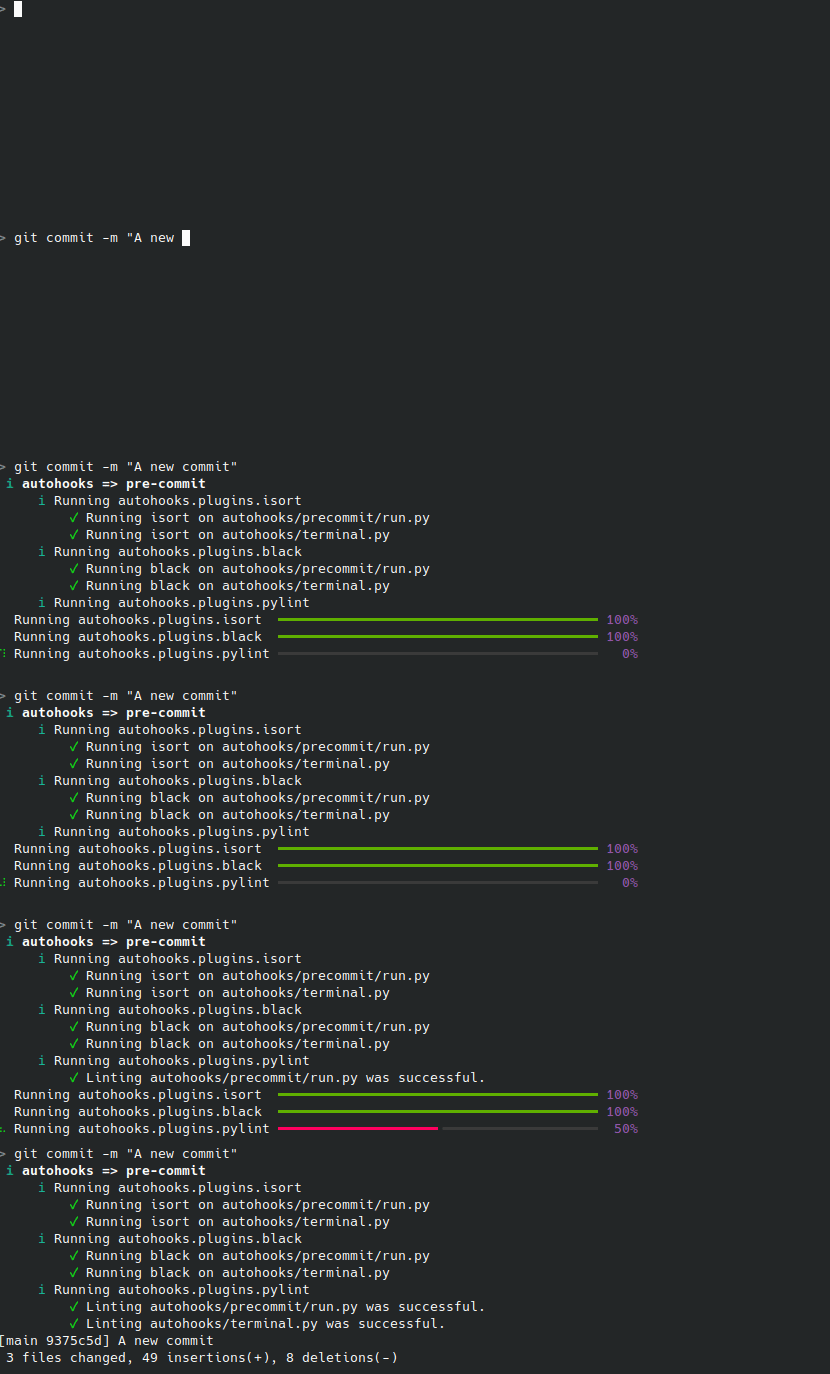
autohooks is a pure python library that installs a minimal
executable git hook.
It allows the decision of how to maintain the hook dependencies
by supporting different modes and stores its settings in the well known
pyproject.toml file.
Requirements
Python 3.10+ is required for autohooks.
Plugins
-
Python code formatting via black
-
Python code formatting via autopep8
-
Python code linting via ruff
-
Python code linting via pylint
-
Python code linting via flake8
-
Python code linting via mypy
-
Python import sorting via isort
-
Running tests via pytest
Installing autohooks
Quick installation of ruff and black plugins using poetry:
poetry add --dev autohooks autohooks-plugin-black autohooks-plugin-ruff
poetry run autohooks activate --mode poetry
poetry run autohooks plugins add autohooks.plugins.black autohooks.plugins.ruff
The output of autohooks activate should be similar to
✓ autohooks pre-commit hook installed at /autohooks-test/.git/hooks/pre-commit using poetry mode.
Autohooks has an extensible plugin model. Each plugin provides different functionality which often requires to install additional dependencies.
For managing these dependencies currently three modes are supported by autohooks:
pythonpathfor dependency management via pippoetryfor dependency management via poetry (recommended)pipenvfor dependency management via pipenvuvfor dependency management via uv
These modes handle how autohooks, the plugins and their dependencies are loaded during git hook execution.
If no mode is specified in the pyproject.toml config file
and no mode is set during activation, autohooks
will use the pythonpath mode by default.
For more details on using pip, poetry or pipenv in conjunction with these modes see the documentation.
Command Completion
autohooks comes with support for command line completion in bash
and zsh.
Setup for bash
echo "source ~/.autohooks-complete.bash" >> ~/.bashrc
autohooks --print-completion bash > ~/.autohooks-complete.bash
Alternatively, you can use the result of the completion command directly with the eval function of your bash shell:
eval "$(autohooks --print-completion bash)"
Setup for zsh
echo 'fpath=("$HOME/.zsh.d" $fpath)' >> ~/.zsh
mkdir -p ~/.zsh.d/
autohooks --print-completion zsh > ~/.zsh.d/_autohooks
Alternatively, you can use the result of the completion command directly with the eval function of your zsh shell:
eval "$(autohooks --print-completion zsh)"
Maintainer
This project is maintained by Greenbone AG.
Contributing
Your contributions are highly appreciated. Please create a pull request on GitHub. Bigger changes need to be discussed with the development team via the issues section at GitHub first.
License
Copyright (C) 2019 - 2024 Greenbone AG
Licensed under the GNU General Public License v3.0 or later.
4 maintainers


Metadata
4 maintainers
Release files for autohooks 26.9.0
For a detailed explanation of source distributions (sdists) and built distributions (wheels), please see the package formats documentation.
Source distribution (sdist)
| File | Size | Uploaded | |
|---|---|---|---|
| autohooks-26.9.0.tar.gz | 102.6 kB | Details |
Built distribution (wheel)
| File | Interpreter | ABI | Platform | Reset |
|---|---|---|---|---|
| autohooks-26.9.0-py3-none-any.whl | Python 3 | none | any | Details |
Total release size: 138.6 kB
Release files / autohooks-26.9.0.tar.gz
| Download URL | autohooks-26.9.0.tar.gz |
|---|---|
| Size | 102.6 kB |
| Tags | Source |
|
SHA-256 checksum How to use checksums |
962beca8ff5c42a87fe1068abd0f4cdf9237bfdbf0da706ad93fe87de99df863
|
|
BLAKE2b-256 checksum How to use checksums |
b81e4cfb711724436ec3bd7151304bcd178fe644b134767ba7be4106df33b923
|
| Upload date | |
|
Uploaded using Trusted Publishing? What is trusted publishing? |
Yes |
| Uploaded via |
uv/0.12.15 {"installer":{"name":"uv","version":"0.12.15","subcommand":["publish"]},"python":null,"implementation":{"name":null,"version":null},"distro":{"name":"Ubuntu","version":"24.04","id":"noble","libc":null},"system":{"name":null,"release":null},"cpu":null,"openssl_version":null,"setuptools_version":null,"rustc_version":null,"ci":true}
|
Release files / autohooks-26.9.0-py3-none-any.whl
| Download URL | autohooks-26.9.0-py3-none-any.whl |
|---|---|
| Size | 36.0 kB |
| Tags | Python 3 |
|
SHA-256 checksum How to use checksums |
165654a55d651f62863e97dad6052b1473ce1110cc61545fb1b8d42a13223f27
|
|
BLAKE2b-256 checksum How to use checksums |
7563191a1f968a02d808b48f27ae5879dd6a597c2d29b4cc746eb8ff999ba955
|
| Upload date | |
|
Uploaded using Trusted Publishing? What is trusted publishing? |
Yes |
| Uploaded via |
uv/0.12.15 {"installer":{"name":"uv","version":"0.12.15","subcommand":["publish"]},"python":null,"implementation":{"name":null,"version":null},"distro":{"name":"Ubuntu","version":"24.04","id":"noble","libc":null},"system":{"name":null,"release":null},"cpu":null,"openssl_version":null,"setuptools_version":null,"rustc_version":null,"ci":true}
|














