
awscli_bastion




Free software: Apache Software License 2.0
Documentation: https://awscli-bastion.readthedocs.io.
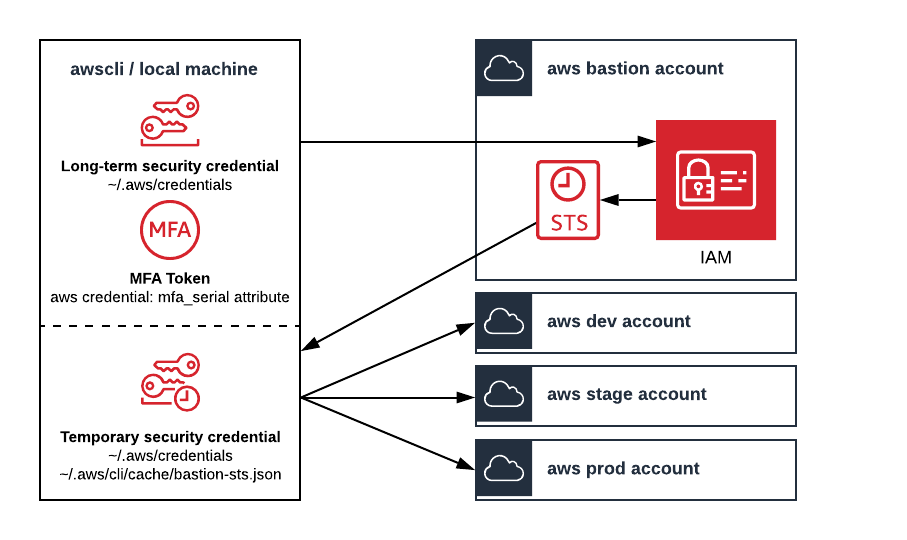
awscli-bastion extends the awscli by managing mfa protected short-lived credentials for an AWS Bastion account.
Install
$ pip install awscli-bastion
Configure
Ensure that your AWS Bastion account is configured to use multi-factor authentication and iam roles.
Ensure the awscli is configured as follows:
~/.aws/credentials:
# these are fake credentials
[bastion]
aws_access_key_id = ASIA554SXDVIHKO5ACW2
aws_secret_access_key = VLJQKLEqs37HCDG4HgSDrxl1vLNrk9Is8gm0VNfA

[bastion-sts]
mfa_serial = arn:aws:iam::123456789012:mfa/aidan-melen
credential_process = bastion get-session-token
source_profile = bastion

[dev-admin]
role_arn = arn:aws:iam::234567890123:role/admin
source_profile = bastion-sts

[stage-poweruser]
role_arn = arn:aws:iam::345678901234:role/poweruser
source_profile = bastion-sts

[prod-spectator]
role_arn = arn:aws:iam::456789012345:role/spectator
source_profile = bastion-sts
~/.aws/config:
[default]
region = us-west-2
output = json
Usage
Run aws commands normally and the credential_process, role_arn, and source_profile will handle the rest:
$ aws sts get-caller-identity --profile dev-admin
Enter MFA code for arn:aws:iam::123456789012:mfa/aidan-melen:
{
    "UserId": "AAAAAAAAAAAAAAAAAAAAA:botocore-session-1234567890",
    "Account": "123456789012",
    "Arn": "arn:aws:sts::234567890123:assumed-role/admin/botocore-session-1234567890"
}

$ aws sts get-caller-identity --profile stage
{
    "UserId": "BBBBBBBBBBBBBBBBBBBBB:botocore-session-2345678901",
    "Account": "345678901234",
    "Arn": "arn:aws:sts::345678901234:assumed-role/poweruser/botocore-session-2345678901"
}

$ aws sts get-caller-identity --profile prod
{
    "UserId": "CCCCCCCCCCCCCCCCCCCCC:botocore-session-3456789012",
    "Account": "456789012345",
    "Arn": "arn:aws:sts::456789012345:assumed-role/spectator/botocore-session-3456789012"
}
You will only be prompted for the mfa code when the cached bastion-sts credentials expire.
Special Usage
The bastion sub-commands support writing credentials to the ~/.aws/credentials file in addition to the ~/.aws/cli/cache directory. This is required for tools such as terraform that do not support the awscli cache.
Configure the aws bastion alias sub-command in the ~/.aws/cli/alias to automate the steps for each profile:
[toplevel]

bastion =
    !f() {
        if [ $# -eq 0 ]
        then
            bastion get-session-token --write-to-aws-shared-credentials-file
        else
            bastion get-session-token --write-to-aws-shared-credentials-file --mfa-code $1
        fi
        bastion assume-role dev-admin
        bastion assume-role stage-poweruser
        bastion assume-role prod-spectator
        echo "Successfully assumed roles in all AWS accounts!"
    }; f
Write sts credentials to the aws shared credentials with our aws bastion alias command:
$ aws bastion
Enter MFA code for arn:aws:iam::123456789012:mfa/aidan-melen:
Setting the 'bastion-sts' profile with sts get session token credentials.
Setting the 'dev-admin' profile with sts assume role credentials.
Setting the 'stage-poweruser' profile with sts assume role credentials.
Setting the 'prod-spectator' profile with sts assume role credentials.
Successfully assumed roles in all AWS accounts!
Now your bastion-sts and assume role profiles will be populated with sts credentials.
Bastion Minimal
If you are like me, you do not trust open-source tools and libraries to handle admin credentials for your aws accounts. awscli_bastion/minimal.py is written as a script that offers minimal bastion functionality. It is intended to be quick and easy to understand. A minimal number of python libraries are used to reduce security risks.
Configure the aws bastion-minimal alias sub-command in the ~/.aws/cli/alias to automate the steps for each profile:
[toplevel]

bastion-minimal =
    !f() {
        TOKEN_CODE=$1

        bastion-minimal dev-admin $TOKEN_CODE
        bastion-minimal stage-poweruser
        bastion-minimal prod-spectator

        if [ $? == 0 ]
        then
            echo "Successfully assumed roles in all AWS accounts!"
        else
            echo "Failed to assumed roles in all AWS accounts :("
        fi
    }; f
Write sts credentials to the ~/.aws/credentials file with our aws bastion-minimal alias command:
$ aws bastion-minimal 123456
Setting the 'bastion-sts' profile with sts get session token credentials.
Setting the 'dev-admin' profile with sts assume role credentials.
Setting the 'stage-poweruser' profile with sts assume role credentials.
Setting the 'prod-spectator' profile with sts assume role credentials.
Successfully assumed roles in all AWS accounts!
Now your bastion-sts and assume role profiles will be populated with sts credentials.
Credits
This package was created with Cookiecutter and the audreyr/cookiecutter-pypackage project template.
History
0.1.0 (2019-09-13)
First release on PyPI.
1 maintainer

Metadata
1 maintainer
Release files for awscli-bastion 0.9.6
For a detailed explanation of source distributions (sdists) and built distributions (wheels), please see the package formats documentation.
Source distribution (sdist)
| File | Size | Uploaded | Provenance | |
|---|---|---|---|---|
| awscli_bastion-0.9.6.tar.gz | 50.8 kB | Without provenance | Details |
Release files / awscli_bastion-0.9.6.tar.gz
| Download URL | awscli_bastion-0.9.6.tar.gz |
|---|---|
| Size | 50.8 kB |
| Tags | Source |
|
SHA-256 checksum How to use checksums |
9249bd88117f8fad27b1d21aa3c8ea056f10ed50c6901d5f5c08cc35df06ff7a
|
|
BLAKE2b-256 checksum How to use checksums |
70ef8394be9a196d1bbf272e6c57cd70c085271c0bf1d1e485cc9fef97fddcab
|
| Upload date | |
|
Uploaded using Trusted Publishing? What is trusted publishing? |
No |
| Uploaded via |
twine/3.4.1 importlib_metadata/3.10.0 pkginfo/1.7.0 requests/2.25.1 requests-toolbelt/0.9.1 tqdm/4.60.0 CPython/3.8.2
|
Security for awscli-bastion 0.9.6
Provenance
Provenance describes where a file came from. On PyPI, provenance is shared via attestations, which provide a verifiable record of the build or publishing details. View details, limitations and caveats.
No provenance found
None of the files in this release were uploaded with provenance metadata.
A note on package security
PyPI is a repository for distributing packages, not a service for auditing them. While third-party security researchers and our staff do their best to detect and remove malicious packages, PyPI cannot guarantee the quality, security or suitability of any given package.














