
awslog
Show the history and changes between configuration versions of AWS resources
Uses AWS Config to fetch the configuration history of resources, only works on resources supported by AWS Config.
Installation
pip install awslog
Usage
Make sure your AWS credentials are properly configured.
You can test it using the AWS CLI by issuing aws sts get-caller-identity. It should report information about your current CLI session and not raise any errors.
Make sure AWS Config is set up to record configuration changes of your resources.
CLI
usage: awslog [-h] [--type TYPE] [--number NUMBER] [--before BEFORE]
              [--after AFTER] [--deleted] [--context CONTEXT] [--no-color]
              name

positional arguments:
  name                  name or ID of the resource to query

optional arguments:
  -h, --help            show this help message and exit
  --type TYPE, -t TYPE  the type of the resource to query list of supported
                        resource types: https://docs.aws.amazon.com/config/lat
                        est/developerguide/resource-config-reference.html
  --number NUMBER, -n NUMBER
                        number of history items to show
  --before BEFORE, -b BEFORE
                        show changes more recent than the specified date and
                        time
  --after AFTER, -a AFTER
                        show changes older than the specified date and time
  --deleted, -d         include deleted resources
  --context CONTEXT, -c CONTEXT
                        number of context lines in the diffs
  --no-color, -o        disable colored output
Examples:
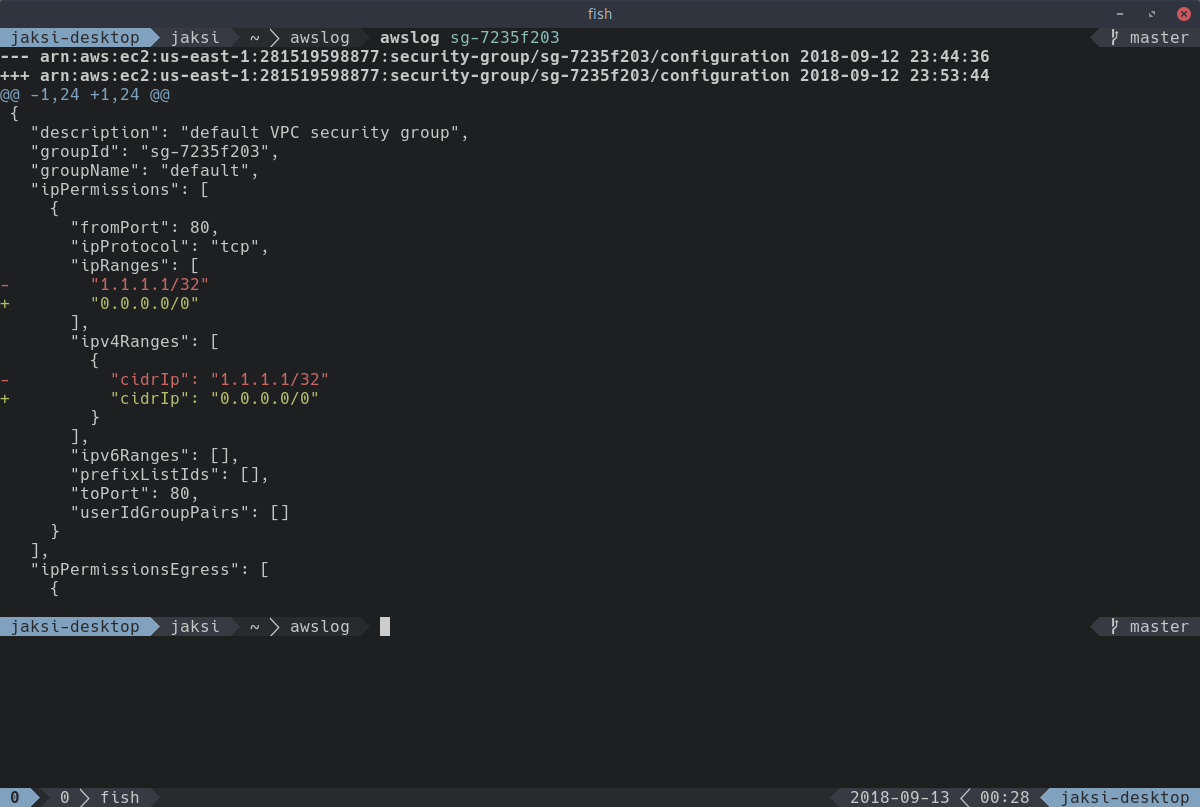
$ awslog sg-7235f203
--- arn:aws:ec2:us-east-1:281519598877:security-group/sg-7235f203/configuration	2018-09-12 23:44:36
+++ arn:aws:ec2:us-east-1:281519598877:security-group/sg-7235f203/configuration	2018-09-12 23:53:44
@@ -1,24 +1,24 @@
 {
   "description": "default VPC security group",
   "groupId": "sg-7235f203",
   "groupName": "default",
   "ipPermissions": [
     {
       "fromPort": 80,
       "ipProtocol": "tcp",
       "ipRanges": [
-        "1.1.1.1/32"
+        "0.0.0.0/0"
       ],
       "ipv4Ranges": [
         {
-          "cidrIp": "1.1.1.1/32"
+          "cidrIp": "0.0.0.0/0"
         }
       ],
       "ipv6Ranges": [],
       "prefixListIds": [],
       "toPort": 80,
       "userIdGroupPairs": []
     }
   ],
   "ipPermissionsEgress": [
     {
$ awslog --type AWS::IAM::User \
>        --number 2 \
>        --before '10 minutes ago' \
>        --after '2018-01-01' \
>        --deleted \
>        --context 3 \
>        --no-color \
>        ReadOnly
--- arn:aws:iam::281519598877:user/ReadOnly/configuration	2018-09-13 11:28:16
+++ arn:aws:iam::281519598877:user/ReadOnly/configuration	2018-09-13 11:53:02
@@ -1,10 +1,6 @@
 {
   "arn": "arn:aws:iam::281519598877:user/ReadOnly",
   "attachedManagedPolicies": [
-    {
-      "policyArn": "arn:aws:iam::aws:policy/AmazonEC2ReadOnlyAccess",
-      "policyName": "AmazonEC2ReadOnlyAccess"
-    },
     {
       "policyArn": "arn:aws:iam::aws:policy/AdministratorAccess",
       "policyName": "AdministratorAccess"

--- arn:aws:iam::281519598877:user/ReadOnly/configuration	2018-09-13 10:58:19
+++ arn:aws:iam::281519598877:user/ReadOnly/configuration	2018-09-13 11:28:16
@@ -4,6 +4,10 @@
     {
       "policyArn": "arn:aws:iam::aws:policy/AmazonEC2ReadOnlyAccess",
       "policyName": "AmazonEC2ReadOnlyAccess"
+    },
+    {
+      "policyArn": "arn:aws:iam::aws:policy/AdministratorAccess",
+      "policyName": "AdministratorAccess"
     },
     {
       "policyArn": "arn:aws:iam::aws:policy/IAMUserChangePassword",
Python module
>>> import boto3
>>> import awslog
>>> config = boto3.client('config')
>>> after, before = list(awslog.get_config_history(config, 'AWS::EC2::SecurityGroup', 'sg-7235f203'))
>>> print('\n'.join(awslog.create_diff(after, before)))
--- arn:aws:ec2:us-east-1:281519598877:security-group/sg-7235f203/configuration	2018-09-12 23:44:36
+++ arn:aws:ec2:us-east-1:281519598877:security-group/sg-7235f203/configuration	2018-09-12 23:53:44
@@ -1,24 +1,24 @@
 {
   "description": "default VPC security group",
   "groupId": "sg-7235f203",
   "groupName": "default",
   "ipPermissions": [
     {
       "fromPort": 80,
       "ipProtocol": "tcp",
       "ipRanges": [
-        "1.1.1.1/32"
+        "0.0.0.0/0"
       ],
       "ipv4Ranges": [
         {
-          "cidrIp": "1.1.1.1/32"
+          "cidrIp": "0.0.0.0/0"
         }
       ],
       "ipv6Ranges": [],
       "prefixListIds": [],
       "toPort": 80,
       "userIdGroupPairs": []
     }
   ],
   "ipPermissionsEgress": [
     {
1 maintainer

Metadata
1 maintainer
Release files for awslog 0.1.6
For a detailed explanation of source distributions (sdists) and built distributions (wheels), please see the package formats documentation.
Source distribution (sdist)
| File | Size | Uploaded | |
|---|---|---|---|
| awslog-0.1.6.tar.gz | 5.5 kB | Details |
Release files / awslog-0.1.6.tar.gz
| Download URL | awslog-0.1.6.tar.gz |
|---|---|
| Size | 5.5 kB |
| Tags | Source |
|
SHA-256 checksum How to use checksums |
0887f154c1e2afe978a59ede2ca3d79b623febcc7b4db7fbee413e583d1fd374
|
|
BLAKE2b-256 checksum How to use checksums |
614b680bef78f0829c05c2f98d2076fbc90e36af2fc1cc4d2b536ad05c904d2d
|
| Upload date | |
|
Uploaded using Trusted Publishing? What is trusted publishing? |
No |
| Uploaded via |
twine/1.13.0 pkginfo/1.5.0.1 requests/2.21.0 setuptools/40.6.2 requests-toolbelt/0.9.1 tqdm/4.31.1 CPython/3.7.2
|














