
배우다 - Beauda - Learn - Apprendre
Create Anki deck and Card from your markdown files
:package: Installation
pandoc is required on you system to allow to convert html content into markdown
Requirements
- python 3.10+
- httpx
- pypandoc
- beautifulsoup4
Install the project
create a virtualenv
python3 -m venv baeuda
cd baeuda
source bin/activate
clone the project
git clone https://github.com/foxmask/baeuda.git
cd baeuda
or
pip install baeuda
Settings
edit settings.py
# from which folder does baeuda read the note to create into anki ?
# FOLDER = '/home/foxmask/MesNotes/Corée🇰🇷/공부/Kimchi!/'
# FOLDER = '/home/foxmask/MesNotes/Corée🇰🇷/공부/Cours - Active Korean 1 - 2020-2021'
# FOLDER = '/home/foxmask/MesNotes/Corée🇰🇷/공부/Cours - Active Korean 2 - 2021-2022'
# FOLDER = '/home/foxmask/MesNotes/Corée🇰🇷/공부/Cours - Active Korean 3 - 2022-2023'
FOLDER = '/home/foxmask/MesNotes/Corée🇰🇷/공부/Cours - Active Korean 4 - 2023-2024'
# FOLDER = '/path/to/your/markdown/files'
# PYPANDOC_MARKDOWN = 'markdown_github'
PYPANDOC_MARKDOWN = 'gfm'

ANKI_URL = 'http://localhost:8765/'   # url provided by AnkiConnect https://ankiweb.net/shared/info/2055492159

# anki deck name is made by the first H1 of the Markdown
# anki deck are named : "Book name - Unit X - unit title"
#
# ANKI_DECK = 'Active Korean 3 - Unit 1'

ANKI_MODEL = "Korean (2 colonnes foxmask)"  # Coréen / Français
ANKI_FIELD_COUNT = 2   # number of columns to grab from a markdown table
ANKI_FIELDS = ['Coréen', 'Français', ]  # put the name of the fields you want to use with the "ANKI_MODEL"

# ANKI_MODEL = 'Korean (foxmask)'  # fields are front/back/romanisation
# ANKI_FIELD_COUNT = 3   # number of columns to grab from a markdown table
# ANKI_FIELDS = ['Coréen', 'Romanisation', 'Français']

DATASOURCE = 'MdFile'  # MdFile
:dvd: DataSource
Markdown files
The name of the file should have to be that way:
foobar - xxx - yyy.md
for example
Kimchi! 01 - insa - 인사.md
Baeuda will create note with xxx and yyy as tag in anki.
In our example : insa and 인사
Format of notes for Anki
To process, all the markdown files should have, at least, those content structure:
- h1 with the title of your markdown file
- h2 with tags name (optional)
- table with same headers name of the "fields" defined in the "anki type of note"
Let's see with an example :
In anki, among the provided types of notes, you can find "basic" which content 2 fields "recto" and "verso"
so in your markdown file you will have to create tables with headers named recto and verso
Title of the note - Topic - details

Recto | Verso
-------- | --------
Color on the sun ? | Yellow
Universal reply ? | 42
real example with three columns
Kimchi! Fiche 1 - 인사 - insa - salutations
Coréen | Romanisation | Français
------ | ------------ | --------
안녕하세요 | annyeonghaseyo | bonjour
Anki desktop
To add cards to Anki, you need to use an existing model (also known as "type of notes")
There are many models you can use, if none fit your needs, you can create on as I did :
tools > type of notes then add button and choose Duplicate Basic (and reversed card) then we'll add a third fields Romanisation and will change Front to Coreen and Back to Français
Then add this addon AnkiConnect to allow Anki to allow us to add the notes with the current script.
Let's Go
First of all, start Anki on your desktop
simulated process
python baeuda/run.py -a report
will display a table of all the grabbed data to create card
creating cards
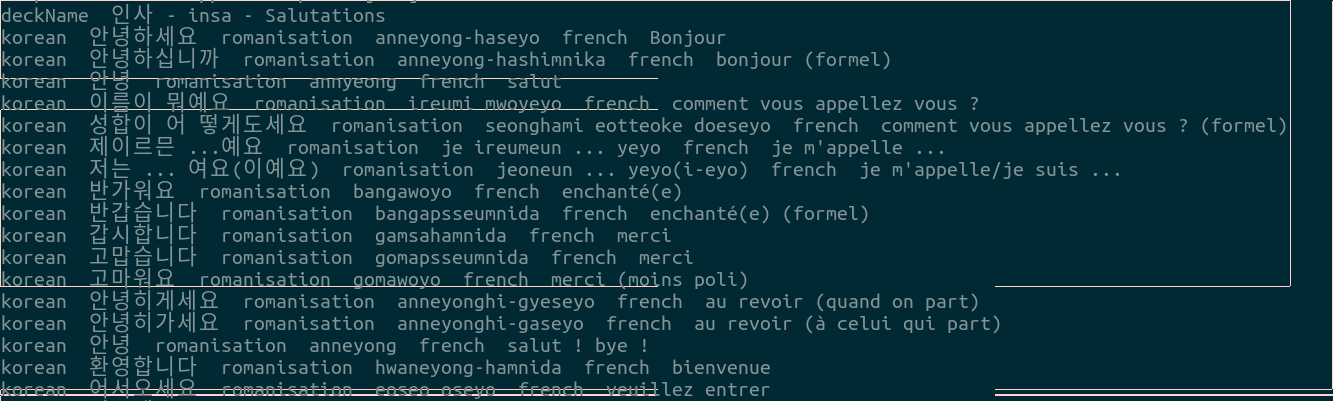
python baeuda/run.py -a go
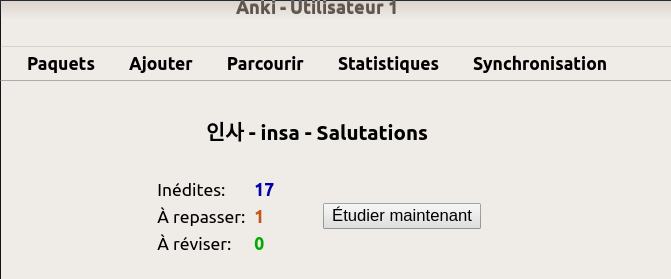
during the execution, you can have a look in anki and see the decks created and receiving cards ;)
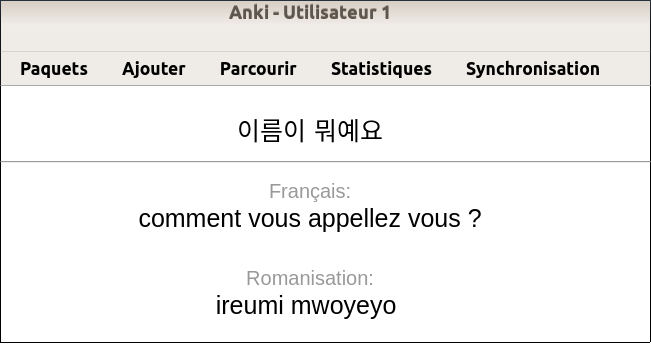
From Markdown file to Anki in images
- baeuda running in the console
- Anki with the new created decks

- the cards of the deck
- one card
(Image credits to Emojipedia)
1 maintainer

Release files for baeuda 0.5.0
For a detailed explanation of source distributions (sdists) and built distributions (wheels), please see the package formats documentation.
Source distribution (sdist)
| File | Size | Uploaded | |
|---|---|---|---|
| baeuda-0.5.0.tar.gz | 168.7 kB | Details |
Built distribution (wheel)
| File | Interpreter | ABI | Platform | Reset |
|---|---|---|---|---|
| baeuda-0.5.0-py3-none-any.whl | Python 3 | none | any | Details |
Total release size: 178.3 kB
Release files / baeuda-0.5.0.tar.gz
| Download URL | baeuda-0.5.0.tar.gz |
|---|---|
| Size | 168.7 kB |
| Tags | Source |
|
SHA-256 checksum How to use checksums |
36ada2c2d6885ddfda347202c344832410a59407e0f103257eccd04fde67b54b
|
|
BLAKE2b-256 checksum How to use checksums |
4c90a48051b57210e56c9ec32c3870f8052cf6d24f5760be5d80b73aee8b65d8
|
| Upload date | |
|
Uploaded using Trusted Publishing? What is trusted publishing? |
No |
| Uploaded via |
twine/5.1.1 CPython/3.11.2
|
Release files / baeuda-0.5.0-py3-none-any.whl
| Download URL | baeuda-0.5.0-py3-none-any.whl |
|---|---|
| Size | 9.6 kB |
| Tags | Python 3 |
|
SHA-256 checksum How to use checksums |
dde6c691cb78bfe70b0eb57b88e2bf891ee6286ef8d485b64ef1d409ff45305f
|
|
BLAKE2b-256 checksum How to use checksums |
05f45c471935d9a3b090b8e3797498984663bfa93c4e15fe5b221e95c12e9221
|
| Upload date | |
|
Uploaded using Trusted Publishing? What is trusted publishing? |
No |
| Uploaded via |
twine/5.1.1 CPython/3.11.2
|














