
bakauditor - Backup Auditor
What is this
bakauditor is an automatic backup auditor robot.
All of us have backups. Every day something is backing up on background of our desktops and somewhere on our servers. But what if backup has been failed and you haven't even received an alert about it? Probably you'll find you miss important backups only when your system is crashed and you need them.
People, who faced this problem at least once in a life, usually manually audit their backups from time to time. That's why I've decided to automate this boring stuff once and forever and created bakauditor.
What can it do
Currently, bakauditor supports backup audit via plugins:
-
file check backup, stored in file (modification time, min. size etc.)
-
dir get most recent file in directory and check it like file does
-
zfs check if ZFS snapshots exists on local or remote system
-
borg borg backup repositories, local or remote
How to use
Just run
bakauditor
and it will show you list of all your backups and their status.
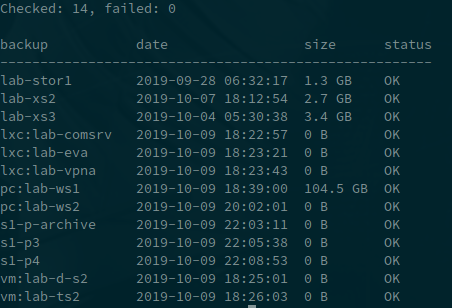
You may also run
bakauditor -x
In this case, only failed backups are printed, otherwise you get a message:
Checked: 14, failed: 0

All backups are fine
bakauditor process exits with code 0 when everything is fine, and with error codes when something is wrong. So you may just get its output and send via e-mail or what you prefer when something is wrong. And e.g. weekly receive output even if everything is fine, to check bakauditor is running and all your backups are safe.
Installation
pip3 install bakauditor
Configuration
Put configuration file to /usr/local/etc/bakauditor.yml. This is YAML file and it has the following sections.
default section
default:
    time: 2d
    min-size: 10000000
Options in this section apply to all backup configurations, unless overriden.
The size may be specified in bytes, you may also use suffix "K" for Kbytes (kilobytes, not kibitytes, 1K = 1000 bytes), "M" for MBytes, "G" for Gbytes, "T" for TBytes.
file
Example:
server1:
    type: file
    path: /export/backups/server1/server1.dump.gz
    time: 3d
    min-size: 10000000
In the above example, we ask bakauditor to check backup stored in the specified file, the file should not be older than 3 days and have a minimal size of 10 megabytes to be considered as good backup.
Options time and min-size are optional if specified in default section.
directory
Example:
server1:
    type: dir
    path: /export/backups/server1
    time: 3d
    min-size: 10000000
This example will to the same as previous, but automatically get the most recent file in the specified directory and check it. Good, when you do e.g. incremental backups.
directory of directories
Example:
server1:
    type: dod
    path: /export/backups/somebackup
    time: 3d
    min-size:
This example considers backups are stored in separate directories inside "somebackup" directory. The program will find most recently created directory and calculate its total size.
zfs
Example:
server1:
    type: zfs
    time-fmt: "snapshot-%Y-%m%-%d-%H:%M:%S"
    fs: bakpool/server1
Option time-fmt is used to get snapshot creation time from snapshot name. We can not determine when ZFS snapshot has been created (unless we perform zfs get creation for every snapshot, which could be pretty slow), but if snapshot name contains time, we can decode it and check.
Option fs specifies file system, where snapshots are located.
Optionally, you may ask bakauditor to analyze ZFS snapshot on remote server via ssh, specifying ssh option:
server1:
    type: zfs
    time-fmt: "snapshot-%Y-%m%-%d-%H:%M:%S"
    fs: bakpool/server1
    ssh: root@192.168.1.77
This option is just converted to command ssh <option_value> zfs list ... so you may specify any options for ssh program you like.
Note: min-size option for zfs snapshots is ignored.
borg
Example:
borg-local:
  type: borg
  repo: /bak
  password: 123
To check repo on remote system, add "ssh" option.
Note: plugin requires borg >= 1.1.0, for older version use borg0 instead (doesn't check backup size).
TODO
plugins for
- bacula
- HP Data Protector
- VMWare DP
- Acronis
- etc.
1 maintainer

Metadata
1 maintainer
Release files for bakauditor 0.0.15
For a detailed explanation of source distributions (sdists) and built distributions (wheels), please see the package formats documentation.
Source distribution (sdist)
| File | Size | Uploaded | |
|---|---|---|---|
| bakauditor-0.0.15.tar.gz | 6.5 kB | Details |
Release files / bakauditor-0.0.15.tar.gz
| Download URL | bakauditor-0.0.15.tar.gz |
|---|---|
| Size | 6.5 kB |
| Tags | Source |
|
SHA-256 checksum How to use checksums |
d810ce87f4f1e109bfefa35cb9ff20c1fcf1ddd62fd21626d2751c45837e3bb3
|
|
BLAKE2b-256 checksum How to use checksums |
f9e8b2620cd3ded8ccd6030a63d3c7a07ed19b9ec79974e7ac8f84b4b559a69d
|
| Upload date | |
|
Uploaded using Trusted Publishing? What is trusted publishing? |
No |
| Uploaded via |
twine/2.0.0 pkginfo/1.5.0.1 requests/2.21.0 setuptools/40.8.0 requests-toolbelt/0.9.1 tqdm/4.36.1 CPython/3.7.3
|














