
Python 1D/2D Barcode SDK
A Python wrapper for the Dynamsoft Barcode Reader SDK, providing simple and user-friendly APIs across Windows, Linux, and macOS. Compatible with desktop PCs, embedded devices, Raspberry Pi, and Jetson Nano.
Note: This is an unofficial, community-maintained wrapper. For official support and full feature coverage, consider the Dynamsoft Capture Vision Bundle on PyPI.
🚀 Quick Links
📊 Comparison: Community vs Official
| Feature | Community Wrapper | Official Dynamsoft SDK |
|---|---|---|
| Support | Community-driven | ✅ Official Dynamsoft support |
| Documentation | Basic README and limited examples | ✅ Comprehensive online documentation |
| API Coverage | Core features only | ✅ Full API coverage |
| Updates | May lag behind | ✅ Always includes the latest features |
| Testing | Tested in limited environments | ✅ Thoroughly tested |
| API Usage | ✅ Simple and intuitive | More complex and verbose |
🔧 Installation
Requirements
-
Python 3.x
-
OpenCV (for UI display)
pip install opencv-python
-
Dynamsoft Capture Vision Bundle SDK
pip install dynamsoft-capture-vision-bundle
Build from Source
# Source distribution
python setup.py sdist

# Build wheel
python setup.py bdist_wheel
🎯 Quick Start
🔑 Initialize License
import barcodeQrSDK

# Initialize with trial license
error_code, error_msg = barcodeQrSDK.initLicense("LICENSE-KEY")

if error_code != 0:
    print(f"License error: {error_msg}")
    exit()
📷 Basic Image Processing
# Create reader instance
reader = barcodeQrSDK.createInstance()

# Decode from file
results = reader.decodeFile("barcode_image.jpg")

# Process results
for barcode in results:
    print(f"Format: {barcode.format}")
    print(f"Text: {barcode.text}")
    print(f"Location: ({barcode.x1}, {barcode.y1}), ({barcode.x2}, {barcode.y2}), ({barcode.x3}, {barcode.y3}), ({barcode.x4}, {barcode.y4})")
🎥 Real-time Camera Processing
import cv2
import numpy as np

detected_barcodes = []

def on_barcode_detected(barcodes):
    """Callback function for async detection"""
    global detected_barcodes
    detected_barcodes = barcodes
    for barcode in barcodes:
        print(f"Detected: {barcode.text} ({barcode.format})")

def main():
    # Initialize
    barcodeQrSDK.initLicense("YOUR_LICENSE_KEY")
    reader = barcodeQrSDK.createInstance()

    # Start async detection
    reader.addAsyncListener(on_barcode_detected)

    # Camera capture loop
    cap = cv2.VideoCapture(0)

    while True:
        ret, frame = cap.read()
        if not ret:
            break

        # Send frame for async processing
        reader.decodeMatAsync(frame)

        # Draw detection results
        for barcode in detected_barcodes:
            # Draw bounding box
            points = np.array([
                [barcode.x1, barcode.y1], [barcode.x2, barcode.y2],
                [barcode.x3, barcode.y3], [barcode.x4, barcode.y4]
            ], dtype=np.int32)

            cv2.drawContours(frame, [points], -1, (0, 255, 0), 2)
            cv2.putText(frame, barcode.text, (barcode.x1, barcode.y1),
                       cv2.FONT_HERSHEY_SIMPLEX, 0.8, (0, 255, 0), 2)

        cv2.imshow('Barcode Scanner', frame)

        if cv2.waitKey(1) & 0xFF == ord('q'):
            break

    # Cleanup
    reader.clearAsyncListener()
    cap.release()
    cv2.destroyAllWindows()

if __name__ == '__main__':
    main()
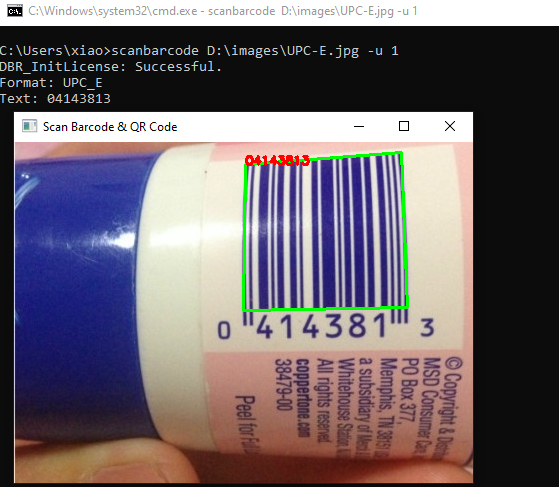
📱 Command Line Usage
# Basic scanning
scanbarcode image.jpg -l YOUR_LICENSE_KEY

# With visual display
scanbarcode image.jpg -u 1 -l YOUR_LICENSE_KEY
📚 API Reference
🏗️ Core Functions
initLicense(licenseKey: str) -> tuple
Initialize the SDK with your license key.
error_code, error_msg = barcodeQrSDK.initLicense("YOUR_LICENSE_KEY")
Returns: (error_code: int, error_message: str)
createInstance() -> BarcodeReader
Create a new barcode reader instance.
reader = barcodeQrSDK.createInstance()
🔍 BarcodeReader Class
Synchronous Detection
decodeFile(file_path: str) -> list
Decode barcodes from an image file.
results = reader.decodeFile("path/to/image.jpg")
Supported formats: JPEG, PNG, BMP, TIFF, GIF
decodeMat(mat) -> list
Decode barcodes from an OpenCV image matrix.
import cv2
image = cv2.imread("image.jpg")
results = reader.decodeMat(image)
decodeBytes(bytes, width, height, stride, pixel_format) -> list
Decode barcodes from raw image bytes.
from dynamsoft_capture_vision_bundle import EnumImagePixelFormat

results = reader.decodeBytes(
    image_bytes, 640, 480, 1920,
    EnumImagePixelFormat.IPF_RGB_888
)
Asynchronous Detection
addAsyncListener(callback) -> None
Start real-time barcode detection with callback.
def on_detection(barcodes):
    for barcode in barcodes:
        print(f"Found: {barcode.text}")

reader.addAsyncListener(on_detection)
decodeMatAsync(mat) -> None
Process OpenCV image asynchronously.
reader.decodeMatAsync(camera_frame)
decodeBytesAsync(bytes, width, height, stride, pixel_format) -> None
Process raw bytes asynchronously.
reader.decodeBytesAsync(raw_bytes, width, height, stride, pixel_format)
clearAsyncListener() -> None
Stop async detection and cleanup.
reader.clearAsyncListener()
Configuration
getParameters() -> str
Get current detection parameters as JSON.
params_json = reader.getParameters()
setParameters(params: str) -> tuple
Set detection parameters from JSON.
error_code, error_msg = reader.setParameters(modified_params)
📦 BarcodeResult Class
Each detected barcode returns a BarcodeResult object with:
class BarcodeResult:
    text: str           # Decoded text content
    format: str         # Barcode format (e.g., "QR_CODE", "CODE_128")

    # Corner coordinates
    x1, y1: float
    x2, y2: float
    x3, y3: float
    x4, y4: float
🛠️ Utility Functions
convertMat2ImageData(mat) -> ImageData
Convert OpenCV matrix to SDK format.
image_data = barcodeQrSDK.convertMat2ImageData(cv_image)
Supported Barcode Symbologies
-
Linear Barcodes (1D)
- Code 39 (including Code 39 Extended)
- Code 93
- Code 128
- Codabar
- Interleaved 2 of 5
- EAN-8
- EAN-13
- UPC-A
- UPC-E
- Industrial 2 of 5
-
2D Barcodes:
- QR Code (including Micro QR Code)
- Data Matrix
- PDF417 (including Micro PDF417)
- Aztec Code
- MaxiCode (mode 2-5)
-
Patch Code
-
GS1 Composite Code
1 maintainer

Metadata
1 maintainer
Release files for barcode-qr-code-sdk 11.2.1000
For a detailed explanation of source distributions (sdists) and built distributions (wheels), please see the package formats documentation.
Source distribution (sdist)
| File | Size | Uploaded | |
|---|---|---|---|
| barcode_qr_code_sdk-11.2.1000.tar.gz | 12.2 kB | Details |
Built distribution (wheel)
| File | Interpreter | ABI | Platform | Reset |
|---|---|---|---|---|
| barcode_qr_code_sdk-11.2.1000-py3-none-any.whl | Python 3 | none | any | Details |
Total release size: 23.3 kB
Release files / barcode_qr_code_sdk-11.2.1000.tar.gz
| Download URL | barcode_qr_code_sdk-11.2.1000.tar.gz |
|---|---|
| Size | 12.2 kB |
| Tags | Source |
|
SHA-256 checksum How to use checksums |
9827c09faa6d72aa76f87d11998b55488067b4142140b3e6019136c3d8f21ee3
|
|
BLAKE2b-256 checksum How to use checksums |
5bc1ad3f15597cd98fcee126da99c3fa531f9a5a71e76dfb2cf6238285934b69
|
| Upload date | |
|
Uploaded using Trusted Publishing? What is trusted publishing? |
No |
| Uploaded via |
twine/6.2.0 CPython/3.9.24
|
Release files / barcode_qr_code_sdk-11.2.1000-py3-none-any.whl
| Download URL | barcode_qr_code_sdk-11.2.1000-py3-none-any.whl |
|---|---|
| Size | 11.0 kB |
| Tags | Python 3 |
|
SHA-256 checksum How to use checksums |
18c889ead97b380a62b8b30b812dfa545803eea91f99225252cf2156a1a84b79
|
|
BLAKE2b-256 checksum How to use checksums |
eec0d87234f2af751d663ccf71c92b8e50c5c8dd9b017ddcfc5fc848d5415258
|
| Upload date | |
|
Uploaded using Trusted Publishing? What is trusted publishing? |
No |
| Uploaded via |
twine/6.2.0 CPython/3.9.24
|














