





Production-grade test orchestration for Python BDD.

Project description

Downloads PyPI version Python Versions Dependency Status License Build Status GitHub last commit

BehaveX

Production-grade test orchestration for Python BDD.
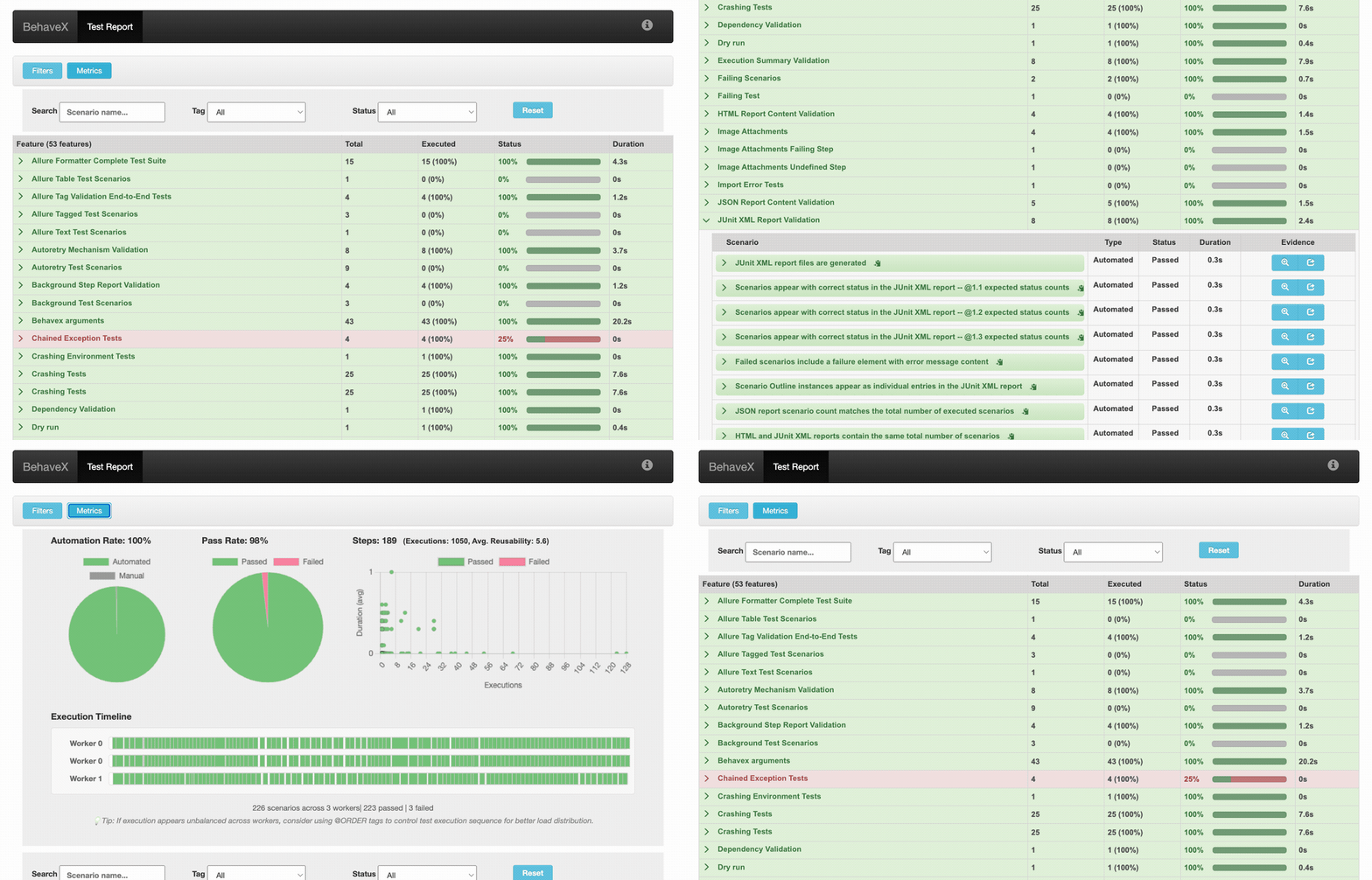
BehaveX HTML Report Demo

โœจ Latest Features

๐Ÿ” Stack Trace on Error (v4.6.2) - Click on any failed step in the HTML report to expand the full stack trace inline โ€” no more hunting through logs.

๐Ÿ“ Gherkin Rule Section Support (v4.6.2) - Full support for Rule: blocks in feature files, correctly rendered in HTML and XML reports.

๐Ÿท๏ธ Tag Expressions v2 (v4.6.0) - Native Cucumber-style tag expressions with boolean logic (and, or, not), parentheses grouping, and wildcard matching (@prefix*, @*suffix). Zero external dependencies. See Tag Expressions.

๐Ÿš€ Enhanced Behave Integration (v4.5.0) - Support for Behave >= 1.3.0 alongside 1.2.6. Major performance overhaul using direct Behave Runner class integration. See Migration to BehaveX 4.5.0.

๐Ÿ“Š Interactive Execution Timeline (v4.5.0) - Visual timeline in HTML reports showing scenario execution order, duration, and status across all parallel workers.

๐ŸŽฏ Test Execution Ordering (v4.4.1) - Control scenario and feature execution sequence in parallel runs using @ORDER_001 tags. Includes strict ordering mode (--order-tests-strict) for dependency-aware execution.

๐Ÿ“Š Allure Reports Integration (v4.2.1) - Generate Allure reports with full BehaveX support including thread labels, background steps, and evidence attachments.

๐Ÿ“ˆ Console Progress Bar (v3.2.13) - Real-time progress tracking during parallel test execution.

Table of Contents

Introduction

BehaveX is a production-grade test orchestration layer for Python BDD teams. It extends Behave with parallel execution, enterprise-grade reporting, and the operational controls needed to run test suites at scale.

It's particularly beneficial when you need to:

  • Run tests faster: Parallel execution by feature or scenario โ€” no code changes required.
  • Report with confidence: HTML, JSON, JUnit, and Allure reports with screenshots, logs, and per-scenario evidence.
  • Operate at scale: Auto-retry, test muting, execution ordering, dry runs, and CI/CD integration out of the box.
  • Gain full visibility: Execution timeline, automation rate, pass rate, and step reusability metrics in every run.

Downloaded 121,000+ times per month across teams ranging from open-source projects to enterprise QA labs.

BehaveX vs Behave

BehaveX is a zero-friction upgrade โ€” your existing feature files and step definitions work unchanged.

Capability Behave BehaveX
Parallel execution โŒ โœ… By feature or scenario, N processes
HTML report โŒ โœ… With screenshots, logs, evidence
Allure integration โŒ โœ… Full support with thread labels
Auto-retry on failure โŒ โœ… @AUTORETRY / @AUTORETRY_3
Test muting โŒ โœ… @MUTE โ€” run but exclude from CI results
Execution ordering โŒ โœ… @ORDER_001 tags for dependency-aware runs
Execution timeline โŒ โœ… Visual timeline across parallel workers
Pass rate & automation metrics โŒ โœ… Per-run dashboard in HTML report
Dry run with HTML report Basic โœ… Shareable spec report with stakeholders
Per-scenario log files โŒ โœ… Linked directly in HTML report
Screenshot evidence โŒ โœ… Via behavex-images

Who Uses BehaveX

BehaveX is trusted by teams and organizations across the industry:

  • Apache NiFi MiNiFi C++ โ€” The Apache Foundation uses BehaveX as the testing framework for their C++ dataflow agent (172โ˜…, 101 forks).
  • LambdaTest โ€” Featured in LambdaTest's official Python BDD testing documentation and examples.
  • SovereignCloudStack โ€” European sovereign cloud initiative (Gaia-X ecosystem) uses BehaveX for real-life IaaS/KaaS health monitoring.
  • Qase โ€” Official integration with the Qase enterprise test management platform.

Using BehaveX in your organization? Open a PR to be listed here.

Features

BehaveX provides the following features:

  • Parallel Test Executions: Execute tests using multiple processes, either by feature or by scenario.
  • Enhanced Reporting: Generate comprehensive reports in multiple formats (HTML, JSON, JUnit) and utilize custom formatters like Allure for advanced reporting capabilities that can be exported and integrated with third-party tools.
  • Evidence Collection: Include images/screenshots and additional evidence in the HTML report.
  • Test Logs: Automatically compile logs generated during test execution into individual log reports for each scenario.
  • Test Muting: Add the @MUTE tag to test scenarios to execute them without including them in JUnit reports.
  • Execution Metrics: Generate metrics in the HTML report for the executed test suite, including Automation Rate, Pass Rate, Steps execution counter and average execution time.
  • Dry Runs: Perform dry runs to see the full list of scenarios in the HTML report without executing the tests. It overrides the -d Behave argument.
  • Auto-Retry for Failing Scenarios: Use the @AUTORETRY tag to automatically re-execute failing scenarios. Also, you can re-run all failing scenarios using the failing_scenarios.txt file.

Test Execution Report Test Execution Report Test Execution Report

Installation Instructions

To install BehaveX, execute the following command:

pip install behavex

Behave Version Compatibility

BehaveX is compatible with the following Behave versions:

  • Behave 1.2.6 (stable, widely tested)
  • Behave >= 1.3.0

BehaveX automatically installs a compatible version of Behave. If you need to use a specific version of Behave, you can install it explicitly:

# For Behave 1.2.6 (stable)
pip install behavex behave==1.2.6

# For Behave 1.3.0 or newer (latest)
pip install behavex behave>=1.3.0

Note: BehaveX includes compatibility fixes to ensure all features work correctly with multiple Behave versions.

Migration to BehaveX 4.5.0 + Behave >= 1.3.0

When upgrading to BehaveX 4.5.0 with Behave 1.3.0 or newer, be aware of the following potential challenges:

Breaking Changes in Behave >= 1.3.0 that we experienced when moving from behave 1.2.6

  • Case-sensitive step definitions: Step definitions are case-sensitive. If the case doesn't match exactly between your feature files and step definitions, you'll encounter "undefined step" errors.

  • Trailing colons in steps: Steps with trailing colons (:) are no longer automatically cleaned by Behave and may not be detected properly.

  • Relative imports: Using relative paths in imports may cause issues. Consider updating to absolute import paths for better compatibility.

BehaveX 4.5.0 Changes

  • Error status preservation: BehaveX now preserves the original "error" status from Behave instead of converting it to "failed" (except in HTML reports for visualization). This provides more accurate status reporting but may affect tools expecting the previous behavior.

Resources

For complete details on Behave breaking changes, refer to:

Execution Instructions

Execute BehaveX in the same way as Behave from the command line, using the behavex command. Here are some examples:

  • Run scenarios tagged as TAG_1 but not TAG_2:

    # v1 syntax (all Behave versions)
    behavex -t=@TAG_1 -t=~@TAG_2
    
    # v2 syntax (Cucumber Style, supported in Behave 1.3.0+)
    behavex -t="@TAG_1 and not @TAG_2"
    
  • Run scenarios tagged as TAG_1 or TAG_2:

    # v1 syntax (all Behave versions)
    behavex -t=@TAG_1,@TAG_2
    
    # v2 syntax (Cucumber Style, supported in Behave 1.3.0+)
    behavex -t="@TAG_1 or @TAG_2"
    
  • Run scenarios tagged as TAG_1 using 4 parallel processes:

    behavex -t=@TAG_1 --parallel-processes=4 --parallel-scheme=scenario
    
  • Run scenarios located at specific folders using 2 parallel processes:

    behavex features/features_folder_1 features/features_folder_2 --parallel-processes=2
    
  • Run scenarios from a specific feature file using 2 parallel processes:

    behavex features_folder_1/sample_feature.feature --parallel-processes=2
    
  • Run scenarios tagged as TAG_1 from a specific feature file using 2 parallel processes:

    behavex features_folder_1/sample_feature.feature -t=@TAG_1 --parallel-processes=2
    
  • Run scenarios located at specific folders using 2 parallel processes:

    behavex features/feature_1 features/feature_2 --parallel-processes=2
    
  • Run scenarios tagged as TAG_1, using 5 parallel processes executing a feature on each process:

    behavex -t=@TAG_1 --parallel-processes=5 --parallel-scheme=feature
    
  • Perform a dry run of the scenarios tagged as TAG_1, and generate the HTML report:

    behavex -t=@TAG_1 --dry-run
    
  • Run scenarios tagged as TAG_1, generating the execution evidence into a specific folder:

    behavex -t=@TAG_1 -o=execution_evidence
    
  • Run scenarios with execution ordering enabled (requires parallel execution):

    behavex -t=@TAG_1 --order-tests --parallel-processes=2
    
  • Run scenarios with strict execution ordering (tests wait for lower order tests to complete):

    behavex -t=@TAG_1 --order-tests-strict --parallel-processes=2
    
  • Run complex tag expressions (Cucumber Style, supported in Behave 1.3.0+):

    # Advanced filtering with wildcards
    behavex -t="@smoke* and not @*_slow" --parallel-processes=3
    
    # Production-ready filtering
    behavex -t="(@api or @ui) and @high_priority and not @flaky" --parallel-processes=4
    
  • Run scenarios with custom order tag prefix and parallel execution:

    behavex --order-tests --order-tag-prefix=PRIORITY --parallel-processes=3
    

Tag Expressions

BehaveX supports two types of tag expressions for filtering test scenarios:

Tag Expressions v1 (Legacy Format)

Tag Expressions v1 use a simple syntax compatible with all Behave versions:

Basic Examples:

# Run scenarios with a specific tag
behavex -t=@smoke

# Exclude scenarios with a tag
behavex -t=~@slow

# Multiple conditions (AND logic)
behavex -t=@smoke -t=~@slow

# Multiple tags (OR logic)
behavex -t=@smoke,@regression

Advanced v1 Examples:

# Run smoke tests but exclude slow ones
behavex -t=@smoke -t=~@slow

# Run regression or integration tests
behavex -t=@regression,@integration

# Run critical tests but exclude known issues
behavex -t=@critical -t=~@known_issue

# Complex filtering with multiple exclusions
behavex -t=@api -t=~@slow -t=~@flaky

Tag Expressions v2 (Cucumber Style, supported in Behave 1.3.0+)

Note: Tag Expressions v2 (Cucumber Style) require Behave 1.3.0 or newer. BehaveX will automatically detect v2 syntax and use Behave's native parser.

Tag Expressions v2 support advanced boolean logic with a more intuitive syntax:

Boolean Operators:

# AND logic
behavex -t="@smoke and @api"

# OR logic
behavex -t="@smoke or @regression"

# NOT logic
behavex -t="not @slow"

# Complex combinations
behavex -t="@smoke and not @slow"

Parentheses Grouping:

# Group conditions with parentheses
behavex -t="(@smoke or @regression) and not @slow"

# Complex nested grouping
behavex -t="(@smoke and @api) or (@regression and @ui)"

# Deep nesting
behavex -t="(((@smoke or @regression) and @api) or @critical) and not @slow"

Wildcard Matching (Cucumber Style Feature, supported in Behave 1.3.0+):

# Prefix matching
behavex -t="@smoke*"                    # Matches @smoke, @smoke_test, @smoke_api

# Suffix matching
behavex -t="@*_test"                    # Matches @api_test, @ui_test, @smoke_test

# Substring matching
behavex -t="@*smoke*"                   # Matches @smoke, @smoke_test, @test_smoke

# Complex wildcard combinations
behavex -t="@smoke* and not @*_slow"    # Smoke tests excluding slow ones
behavex -t="@*_api or @*_ui"            # All API or UI tests

Advanced v2 Examples:

# Production-ready test filtering
behavex -t="(@smoke or @regression) and not (@slow or @flaky)"

# Environment-specific testing
behavex -t="@api and (@staging or @production) and not @experimental"

# Feature-based filtering with wildcards
behavex -t="@user* and (@*_positive or @*_critical) and not @*_slow"

# Complex business logic filtering
behavex -t="((@smoke and @high_priority) or @critical) and not (@known_issue or @skip)"

# Multi-level wildcard filtering
behavex -t="(@auth* or @payment*) and (@*_test or @*_check) and not @*_manual"

Multiple Tag Arguments (Combined with AND logic):

# Multiple -t arguments are combined with AND
behavex -t="@smoke or @regression" -t="not @slow"
# Equivalent to: (@smoke or @regression) and (not @slow)

# Complex multi-argument filtering
behavex -t="@api* and @*_test" -t="not @experimental" -t="@high_priority or @critical"

Version Compatibility

Feature Behave 1.2.6 Behave 1.3.0+
Tag Expressions v1 โœ… Full Support โœ… Full Support
Tag Expressions v2 โŒ Not Supported โœ… Full Support
Boolean operators (and, or, not) โŒ โœ…
Parentheses grouping โŒ โœ…
Wildcard matching โŒ โœ…

Migration from v1 to v2

When upgrading to Behave 1.3.0+, you can migrate your tag expressions:

# v1 Format                          # v2 Equivalent
behavex -t=@smoke -t=~@slow         โ†’  behavex -t="@smoke and not @slow"
behavex -t=@smoke,@regression       โ†’  behavex -t="@smoke or @regression"
behavex -t=@api -t=~@slow -t=~@flaky โ†’ behavex -t="@api and not @slow and not @flaky"

Best Practices

  • Use quotes around v2 expressions to prevent shell interpretation
  • Test expressions with --dry-run to verify scenario selection
  • Prefer v2 syntax for better readability when using Behave 1.3.0+
  • Use wildcards to reduce maintenance when tag naming follows patterns
  • Group complex logic with parentheses for clarity

Constraints

  • Not all Behave arguments are yet supported.
  • Parallel execution is implemented using concurrent Behave processes. This means that any hooks defined in the environment.py module will run in each parallel process. This includes the before_all and after_all hooks, which will execute in every parallel process. The same is true for the before_feature and after_feature hooks when parallel execution is organized by scenario.

Supported Behave Arguments

  • no_color
  • color
  • define
  • exclude
  • include
  • no_snippets
  • no_capture
  • name
  • capture
  • no_capture_stderr
  • capture_stderr
  • no_logcapture
  • logcapture
  • logging_level
  • summary
  • quiet
  • stop
  • tags
  • tags-help

Important: Some arguments do not apply when executing tests with more than one parallel process, such as stop and color.

Specific Arguments from BehaveX

  • output-folder (-o or --output-folder): Specifies the output folder for execution reports (JUnit, HTML, JSON).
  • dry-run (-d or --dry-run): Performs a dry-run by listing scenarios in the output reports.
  • parallel-processes (--parallel-processes): Specifies the number of parallel Behave processes.
  • parallel-scheme (--parallel-scheme): Performs parallel test execution by [scenario|feature].
  • show-progress-bar (--show-progress-bar): Displays a progress bar in the console during parallel test execution.
  • formatter (--formatter): Specifies a custom formatter for test reports (e.g., Allure formatter).
  • formatter-outdir (--formatter-outdir): Specifies the output directory for formatter results (default: output/allure-results for Allure).
  • no-formatter-attach-logs (--no-formatter-attach-logs): Disables automatic attachment of scenario log files to formatter reports.
  • order-tests (--order-tests): Enables sorting of scenarios/features by execution order using special order tags (only effective with parallel execution).
  • order-tests-strict (--order-tests-strict): Ensures tests run in strict order in parallel mode, with tests waiting for lower-order tests to complete (automatically enables --order-tests). May reduce parallel execution performance.
  • order-tag-prefix (--order-tag-prefix): Specifies the prefix for order tags (default: 'ORDER').

Parallel Test Executions

BehaveX manages concurrent executions of Behave instances in multiple processes. You can perform parallel test executions by feature or scenario. When the parallel scheme is by scenario, the examples of a scenario outline are also executed in parallel.

Parallel Test Executions

Examples:

behavex --parallel-processes=3
behavex -t=@TAG --parallel-processes=3
behavex -t=@TAG --parallel-processes=2 --parallel-scheme=scenario
behavex -t=@TAG --parallel-processes=5 --parallel-scheme=feature
behavex -t=@TAG --parallel-processes=5 --parallel-scheme=feature --show-progress-bar

For advanced tag filtering examples, see the Tag Expressions section.

Identifying Each Parallel Process

BehaveX populates the Behave contexts with the worker_id user-specific data. This variable contains the id of the current behave process.

For example, if BehaveX is started with --parallel-processes 2, the first instance of behave will receive worker_id=0, and the second instance will receive worker_id=1.

This variable can be accessed within the python tests using context.config.userdata['worker_id'].

Test Execution Ordering

BehaveX provides the ability to control the execution order of your test scenarios and features using special order tags when running tests in parallel. This feature ensures that tests run in a predictable sequence during parallel execution, which is particularly useful for setup/teardown scenarios, or when you need specific tests to run before others.

Purpose and Use Cases

Test execution ordering is valuable in scenarios such as:

  • Setup and Teardown: Ensure setup scenarios run first and cleanup scenarios run last
  • Data Dependencies: Execute data creation tests before tests that consume that data
  • Performance Testing: Control the sequence to avoid resource conflicts
  • Smoke Testing: Prioritize critical smoke tests to run first
  • Parallel Execution Optimization: Run slower test scenarios first to maximize parallel process utilization and minimize overall execution time

Command Line Arguments

BehaveX provides three arguments to control test execution ordering during parallel execution:

  • --order-tests or --order_tests: Enables sorting of scenarios/features by execution order using special order tags (only effective with parallel execution)
  • --order-tests-strict or --order_tests_strict: Ensures tests run in strict order in parallel mode (automatically enables --order-tests). Tests with higher order numbers will wait for all tests with lower order numbers to complete first. Note: This may reduce parallel execution performance as processes must wait for lower-order tests to complete.
  • --order-tag-prefix or --order_tag_prefix: Specifies the prefix for order tags (default: 'ORDER')

How to Use Order Tags

To control execution order, add tags to your scenarios using the following format:

@ORDER_001
Scenario: This scenario will run first
    Given I perform initial setup
    When I execute the first test
    Then the setup should be complete

@ORDER_010
Scenario: This scenario will run second
    Given the initial setup is complete
    When I execute the dependent test
    Then the test should pass

@ORDER_100
Scenario: This scenario will run last
    Given all previous tests have completed
    When I perform cleanup
    Then all resources should be cleaned up

Important Notes:

  • Test execution ordering only works when running tests in parallel (--parallel-processes > 1)
  • Lower numbers execute first (e.g., @ORDER_001 runs before @ORDER_010)
  • Scenarios without order tags will run after all ordered scenarios (Default order: 9999)
  • To run scenarios at the end of execution, you can use order numbers greater than 9999 (e.g., @ORDER_10000)
  • Regular ordering (--order-tests): When the number of parallel processes equals or exceeds the number of ordered scenarios, ordering has no practical effect since all scenarios can run simultaneously
  • Strict ordering (--order-tests-strict): Tests will always wait for lower-order tests to complete, regardless of available processes, which may reduce overall execution performance
  • Use zero-padded numbers (e.g., 001, 010, 100) for better sorting visualization
  • The order tags work with both parallel feature and scenario execution schemes
  • --order-tests-strict automatically enables --order-tests, so you don't need to specify both arguments

Execution Examples

Basic Ordering

# Enable test ordering with default ORDER prefix (requires parallel execution)
behavex --order-tests --parallel-processes=2 -t=@SMOKE

# Enable test ordering with custom prefix
behavex --order-tests --order-tag-prefix=PRIORITY --parallel-processes=3 -t=@REGRESSION

Strict Ordering (Wait for Lower Order Tests)

# Enable strict test ordering - tests wait for lower order tests to complete
behavex --order-tests-strict --parallel-processes=3 -t=@INTEGRATION

# Strict ordering with custom prefix
behavex --order-tests-strict --order-tag-prefix=SEQUENCE --parallel-processes=2

# Note: --order-tests-strict automatically enables --order-tests, so you don't need both

Ordering with Parallel Execution

# Order tests and run with parallel processes by scenario
behavex --order-tests --parallel-processes=4 --parallel-scheme=scenario

# Order tests and run with parallel processes by feature
behavex --order-tests --parallel-processes=3 --parallel-scheme=feature

# Custom order prefix with parallel execution
behavex --order-tests --order-tag-prefix=SEQUENCE --parallel-processes=2

# Strict ordering by scenario (tests wait for completion of lower order tests)
behavex --order-tests-strict --parallel-processes=4 --parallel-scheme=scenario

# Strict ordering by feature
behavex --order-tests-strict --parallel-processes=3 --parallel-scheme=feature

Understanding Regular vs Strict Ordering

Regular Ordering (--order-tests)

  • Tests are sorted by order tags but can run simultaneously if parallel processes are available
  • Example: With 5 parallel processes and tests @ORDER_001, @ORDER_002, @ORDER_003, all three tests start at the same time
  • Faster execution but less predictable completion order
  • Best for: Performance optimization, general prioritization

Strict Ordering (--order-tests-strict)

  • Tests wait for all lower-order tests to complete before starting
  • Example: @ORDER_002 tests won't start until all @ORDER_001 tests are finished
  • Slower execution but guaranteed sequential completion
  • Best for: Setup/teardown sequences, data dependencies, strict test dependencies

Performance Comparison:

# Scenario: 6 tests with ORDER_001, ORDER_002, ORDER_003 tags and 3 parallel processes

# Regular ordering (--order-tests):
# Time 0: ORDER_001, ORDER_002, ORDER_003 all start simultaneously
# Total time: ~1 minute (all tests run in parallel)

# Strict ordering (--order-tests-strict):
# Time 0: Only ORDER_001 tests start
# Time 1: ORDER_001 finishes โ†’ ORDER_002 tests start
# Time 2: ORDER_002 finishes โ†’ ORDER_003 tests start
# Total time: ~3 minutes (sequential execution)

Using Custom Order Prefixes

You can customize the order tag prefix to match your team's naming conventions:

# Using PRIORITY prefix
behavex --order-tests --order-tag-prefix=PRIORITY

# Now use tags like @PRIORITY_001, @PRIORITY_010, etc.
@PRIORITY_001
Scenario: High priority scenario
    Given I need to run this first

@PRIORITY_050
Scenario: Medium priority scenario
    Given this can run after high priority

@PRIORITY_100
Scenario: Low priority scenario
    Given this runs last

Feature-Level Ordering

When using --parallel-scheme=feature, the ordering is determined by ORDER tags placed directly on the feature itself:

@ORDER_001
Feature: Database Setup Feature
    Scenario: Create database schema
        Given I create the database schema

    Scenario: Insert initial data
        Given I insert the initial data

# This entire feature will be ordered as ORDER_001 (tag on the feature)

@ORDER_002
Feature: Application Tests Feature
    Scenario: Test user login
        Given I test user login

# This entire feature will be ordered as ORDER_002 (tag on the feature)

Feature: Unordered Feature
    Scenario: Some test
        Given I perform some test

# This feature has no ORDER tag, so it gets the default order 9999

Test Execution Reports

JSON Report

Contains information about test scenarios and execution status. This is the base report generated by BehaveX, which is used to generate the HTML report. Available at:

<output_folder>/report.json

HTML Report

A friendly test execution report containing information related to test scenarios, execution status, evidence, and metrics. Available at:

<output_folder>/report.html

JUnit Report

One JUnit file per feature, available at:

<output_folder>/behave/*.xml

The JUnit reports have been replaced by the ones generated by the test wrapper, just to support muting tests scenarios on build servers

Attaching Images to the HTML Report

You can attach images or screenshots to the HTML report using your own mechanism to capture screenshots or retrieve images. Utilize the attach_image_file or attach_image_binary methods provided by the wrapper.

These methods can be called from hooks in the environment.py file or directly from step definitions.

Example 1: Attaching an Image File

from behavex_images import image_attachments

@given('I take a screenshot from the current page')
def step_impl(context):
    image_attachments.attach_image_file(context, 'path/to/image.png')

Example 2: Attaching an Image Binary

from behavex_images import image_attachments
from behavex_images.image_attachments import AttachmentsCondition

def before_all(context):
    image_attachments.set_attachments_condition(context, AttachmentsCondition.ONLY_ON_FAILURE)

def after_step(context, step):
    image_attachments.attach_image_binary(context, selenium_driver.get_screenshot_as_png())

By default, images are attached to the HTML report only when the test fails. You can modify this behavior by setting the condition using the set_attachments_condition method.

Test Execution Report Test Execution Report Test Execution Report

For more information, check the behavex-images library, which is included with BehaveX 3.3.0 and above.

If you are using BehaveX < 3.3.0, you can still attach images to the HTML report by installing the behavex-images package with the following command:

pip install behavex-images

Attaching Additional Execution Evidence to the HTML Report

Providing ample evidence in test execution reports is crucial for identifying the root cause of issues. Any evidence file generated during a test scenario can be stored in a folder path provided by the wrapper for each scenario.

The evidence folder path is automatically generated and stored in the "context.evidence_path" context variable. This variable is updated by the wrapper before executing each scenario, and all files copied into that path will be accessible from the HTML report linked to the executed scenario.

Test Logs per Scenario

The HTML report includes detailed test execution logs for each scenario. These logs are generated using the logging library and are linked to the specific test scenario. This feature allows for easy debugging and analysis of test failures.

Metrics and Insights

The HTML report provides a range of metrics to help you understand the performance and effectiveness of your test suite. These metrics include:

  • Automation Rate: The percentage of scenarios that are automated.
  • Pass Rate: The percentage of scenarios that have passed.
  • Steps Execution Counter and Average Execution Time: These metrics provide insights into the execution time and frequency of steps within scenarios.

Dry Runs

BehaveX enhances the traditional Behave dry run feature to provide more value. The HTML report generated during a dry run can be shared with stakeholders to discuss scenario specifications and test plans.

To execute a dry run, use the --dry-run argument:

behavex --dry-run
behavex -t=@TAG --dry-run

For advanced tag filtering in dry runs, see the Tag Expressions section.

Muting Test Scenarios

In some cases, you may want to mute test scenarios that are failing but are not critical to the build process. This can be achieved by adding the @MUTE tag to the scenario. Muted scenarios will still be executed, but their failures will not be reported in the JUnit reports. However, the execution details will be visible in the HTML report.

Handling Failing Scenarios

@AUTORETRY Tag

For scenarios that are prone to intermittent failures or are affected by infrastructure issues, you can use the @AUTORETRY tag. This tag enables automatic re-execution of the scenario in case of failure.

You can also specify the number of retries by adding the total retries as a suffix in the @AUTORETRY tag. For example, @AUTORETRY_3 will retry the scenario 3 times if the scenario fails.

The re-execution will be performed right after a failing execution arises, and the latest execution is the one that will be reported.

Rerunning Failed Scenarios

After executing tests, if there are failing scenarios, a failing_scenarios.txt file will be generated in the output folder. This file allows you to rerun all failed scenarios using the following command:

behavex -rf=./<OUTPUT_FOLDER>/failing_scenarios.txt

or

behavex --rerun-failures=./<OUTPUT_FOLDER>/failing_scenarios.txt

To avoid overwriting the previous test report, it is recommended to specify a different output folder using the -o or --output-folder argument.

Note that the -o or --output-folder argument does not work with parallel test executions.

Displaying Progress Bar in Console

When running tests in parallel, you can display a progress bar in the console to monitor the test execution progress. To enable the progress bar, use the --show-progress-bar argument:

behavex --parallel-processes=3 --show-progress-bar
behavex -t=@TAG --parallel-processes=3 --show-progress-bar

For advanced tag filtering with progress bar, see the Tag Expressions section.

If you are printing logs in the console, you can configure the progress bar to display updates on a new line by adding the following setting to the BehaveX configuration file:

[progress_bar]

print_updates_in_new_lines="true"

Allure Reports Integration

BehaveX provides integration with Allure, a flexible, lightweight multi-language test reporting tool. The Allure formatter creates detailed and visually appealing reports that include comprehensive test information, evidence, and categorization of test results.

Note: Since BehaveX is designed to run tests in parallel, the Allure formatter processes the consolidated report.json file after all parallel test executions are completed. This ensures that all test results from different parallel processes are properly aggregated before generating the final Allure report.

Prerequisites

  1. Install Allure on your system. Please refer to the official Allure installation documentation for detailed instructions for your operating system.

Using the Allure Formatter

To generate Allure reports, use the --formatter argument to specify the Allure formatter:

behavex --formatter=behavex.outputs.formatters.allure_behavex_formatter:AllureBehaveXFormatter
behavex -t=@TAG --formatter=behavex.outputs.formatters.allure_behavex_formatter:AllureBehaveXFormatter

By default, the Allure results will be generated in the output/allure-results directory. You can specify a different output directory using the --formatter-outdir argument:

behavex -t=@TAG --formatter=behavex.outputs.formatters.allure_behavex_formatter:AllureBehaveXFormatter --formatter-outdir=my-allure-results

For advanced tag filtering with Allure reports, see the Tag Expressions section.

Attaching Screenshots and Evidence to Allure Reports

When using Allure reports, you should continue to use the same methods for attaching screenshots and evidence as described in the sections above:

The evidence and screenshots attached using these methods will be seamlessly integrated into your Allure reports, providing comprehensive test execution documentation.

Viewing Allure Reports

After running the tests, you can generate and view the Allure report using the following commands:

# Serve the report (opens in a browser)
allure serve output/allure-results

# Or... generate a single HTML file report
allure generate output/allure-results --output output/allure-report --clean --single-file

# Or... generate a static report
allure generate output/allure-results --output output/allure-report --clean

Disabling Log Attachments

By default, scenario.log files are attached to each scenario in the Allure report. You can disable this by passing the --no-formatter-attach-logs argument:

behavex --formatter behavex.outputs.formatters.allure_behavex_formatter:AllureBehaveXFormatter --no-formatter-attach-logs

Utilities

BehaveX includes additional utility scripts in the scripts/ folder to help with common tasks:

HTML Report Generator

Generate HTML reports from existing report.json files without re-running tests:

# Generate HTML in the same directory as the JSON file
python scripts/generate_html_from_json.py output/report.json

# Generate HTML in a specific directory
python scripts/generate_html_from_json.py output/report.json my_reports/

# Works with any BehaveX JSON report
python scripts/generate_html_from_json.py /path/to/old_execution/report.json

This utility is helpful when you want to:

  • Regenerate HTML reports after code changes
  • Create reports from archived test results
  • Generate reports in different locations without re-running tests

Get Involved

BehaveX grows through community use and contribution. If it's useful to your team:

  • โญ Star the repo โ€” helps other teams discover the project
  • ๐Ÿ› Report issues โ€” your use case helps improve BehaveX for everyone
  • ๐Ÿ”ง Contribute โ€” PRs are welcome, from docs to features
  • ๐Ÿ“ข Spread the word โ€” mention BehaveX when you talk about Python testing

Used by the Apache Foundation, LambdaTest, SovereignCloudStack, and teams worldwide.

Project details


Download files

Download the file for your platform. If you're not sure which to choose, learn more about installing packages.

Source Distribution

behavex-4.6.2.tar.gz (672.1 kB view details)

Uploaded Source

Built Distribution

If you're not sure about the file name format, learn more about wheel file names.

behavex-4.6.2-py3-none-any.whl (713.9 kB view details)

Uploaded Python 3

File details

Details for the file behavex-4.6.2.tar.gz.

File metadata

  • Download URL: behavex-4.6.2.tar.gz
  • Upload date:
  • Size: 672.1 kB
  • Tags: Source
  • Uploaded using Trusted Publishing? No
  • Uploaded via: twine/6.2.0 CPython/3.10.20

File hashes

Hashes for behavex-4.6.2.tar.gz
Algorithm Hash digest
SHA256 e838ad76597782ee111b0c32f7ed35e8e203093806ef754b1d596640e46577cd
MD5 94d201fc7457f3c59328172f4a636aca
BLAKE2b-256 76d98a4693ba33cdbe0345d9dc69bdba4f486a9987e2ef8f41f75a169c2fea5c

See more details on using hashes here.

File details

Details for the file behavex-4.6.2-py3-none-any.whl.

File metadata

  • Download URL: behavex-4.6.2-py3-none-any.whl
  • Upload date:
  • Size: 713.9 kB
  • Tags: Python 3
  • Uploaded using Trusted Publishing? No
  • Uploaded via: twine/6.2.0 CPython/3.10.20

File hashes

Hashes for behavex-4.6.2-py3-none-any.whl
Algorithm Hash digest
SHA256 27bc1469df9b86e03699db6cd8e536dfe073b021eb1bbd50f7b2b33f7466f007
MD5 dc5d450170ab47f088d7e845fff951f1
BLAKE2b-256 babe20039f685f8e7f45ed53b97e14482df3dca93704bc9274d1ddc10323da0e

See more details on using hashes here.

Supported by

AWS Cloud computing and Security Sponsor Datadog Monitoring Depot Continuous Integration Fastly CDN Google Download Analytics Pingdom Monitoring Sentry Error logging StatusPage Status page












