
benchmcmc — Benchmark analysis with MCMC
Install
Installing is as always
pip install benchmcmc
It depends on pymc3 and
matplotlib, so these are also
installed.
Quickstart
Getting started real quick:
benchmcmc --generate 69 11 10 131 10 9 --beta > bench.txt
benchmcmc bench.txt
The first command generates 200 synthetic data points and put them into
bench.txt, and the second command runs benchmcmc on the data,
displaying a trace plot of the MCMC.
Introduction
This package lets you take a series of benchmark data analyses whether there at one point was a change in performance.
Suppose that you run your benchmark tests on every commit that you have
(e.g. looping over git-rev-list),
and you see that your performance data
is (e.g. in requests per second or in seconds, or other measures)
as follows:
13.64
12.82
11.69
15.12
12.30
18.46
13.51
14.33
13.84
12.77
... (180 rows omitted)
10.93
11.02
12.45
11.78
12.12
13.51
10.66
10.18
10.81
12.19
In this data, it seems to be centered around 13+ε in the beginning, and it ends being centered around 12+ε, or visualized:
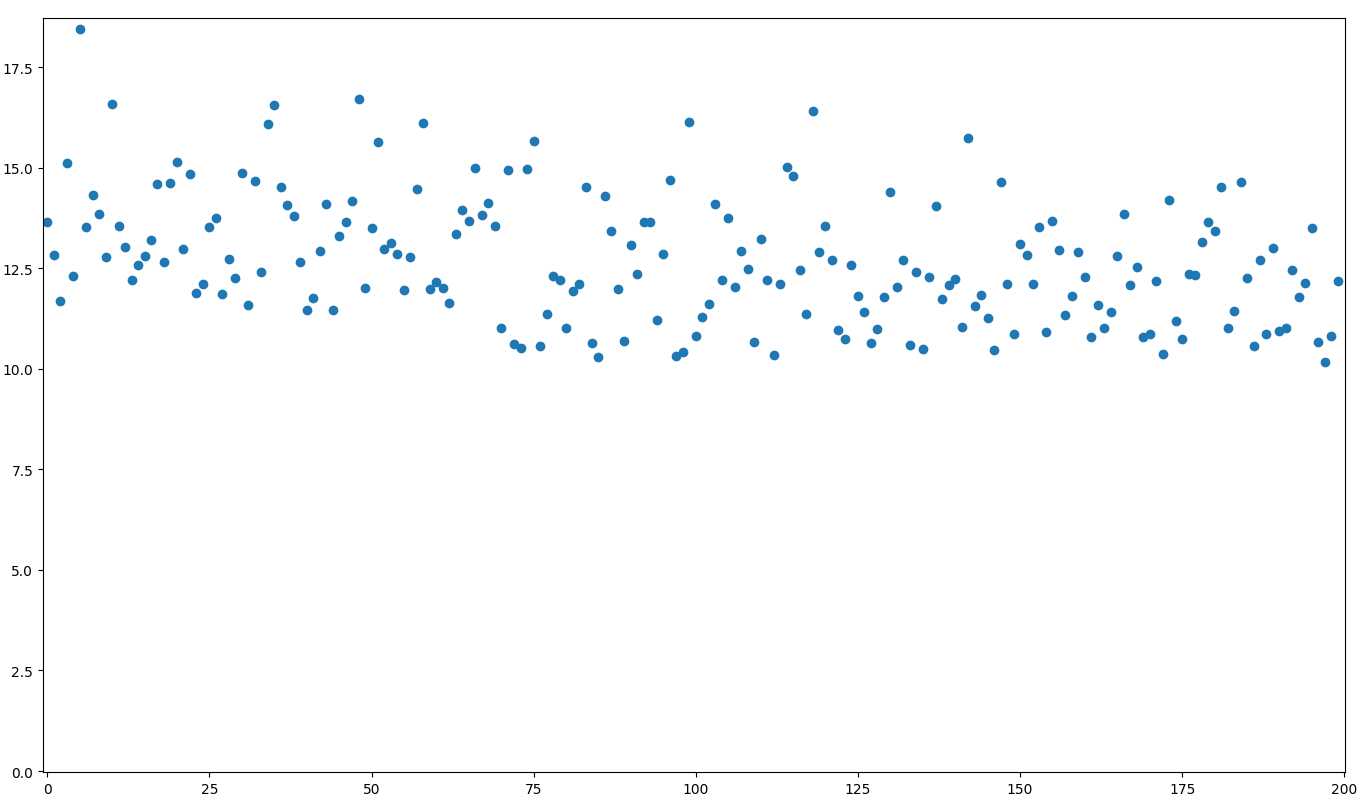
There seems to be a slight drop in values before the 100th point, but it's not easy to determine exactly where the change occurred.
Suppose that you wonder whether or not the performance at the start and at the end are likely to be from two different distributions, and if so, where the switchpoint was.
Analysis
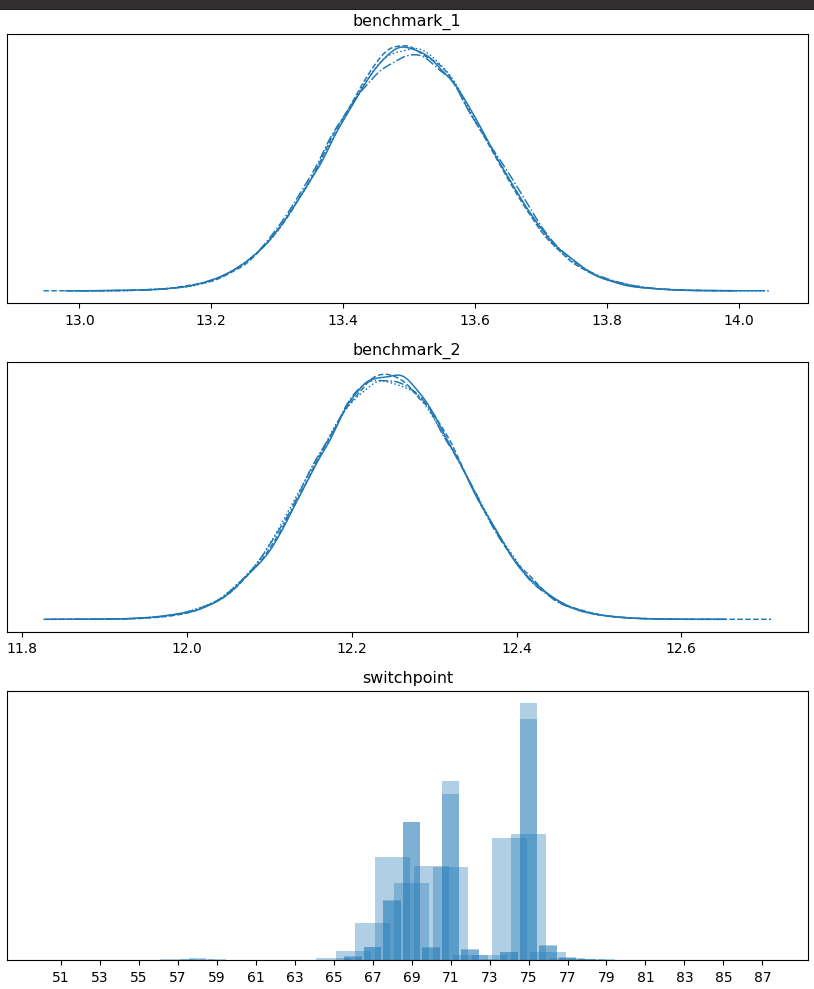
Running benchmcmc on the data gives the above plot which shows that it
is likely that the performance went from ~13.5 to ~12.25 at or around the
69th or 75th datapoints.
This helps you pin down when a performance change might have occurred.
Usage
$ benchmcmc bench.txt --draws 1000 --tune 1000 --cores 4 --target-accept 0.8
The options available are those illustrated in the above examples and
all taken from and fed into
pymc3.sampling.sample.
draws— The number of samples to draw. Defaults to 1000. The number of tuned samples are discarded by default.tune— Number of iterations to tune, defaults to 1000. Samplers adjust the step sizes, scalings or similar during tuning. Tuning samples will be drawn in addition to the number specified in the draws argument, and will be discarded.cores— The number of chains to run in parallel. IfNone, set to the number of CPUs in the system, but at most 4.target_accept: float in [0, 1] — The step size is tuned such that we approximate this acceptance rate. Higher values like 0.9 or 0.95 often work better for problematic posteriors.
Generating synthetic data
You can run benchmcmc --generate for generating synthetic benchmark
data.
$ benchmcmc --generate 100 15 3 100 14 3 [--beta] > benchmarkfile.txt
This generates 200 samples, 100 from N(mu=15, sigma=3) followed by 100
from N(mu=14, sigma=3).
If you use --beta, you get a bit more realistic performance with a
lower bound of mu, especially for lower values of mu.
Running a script on a history
Suppose that you want to run python script.py on a script that is in
your Git tree.
LOGFILE=/tmp/timescript
echo "" > $LOGFILE
for commit in $(git rev-list master)
do
    git checkout $commit
    printf "%s," "`(git rev-parse --short HEAD)`" >> $LOGFILE
    /usr/bin/time -a -o $LOGFILE --format=%e python script.py
done
tac $LOGFILE
When run in a repository, it will output time data in the format
commit,time
Here is an example of the output:
484fde8,0.04
58a1cdb,0.04
d26b797,0.04
81f4b9a,0.04
3ae1e11,0.04
7689ca2,0.04
8c76b29,0.04
43db50c,0.04
b34b146,0.04
4c56a54,0.04
9c08050,0.07
b22278d,0.07
7a9c111,0.07
065b6a5,0.07
6cc7cdd,0.07
ec7f042,0.07
b3ba887,0.08
a32ce81,0.07
9136914,0.07
b456714,0.07
504cf73,0.07
8002774,0.07
e1f5f9f,0.09
For example, you can create a script gitrun that looks as follows:
#!/usr/bin/bash

GITRUN_EXEC=$1
shift
GITRUN_ARGS=$@

for commit in $(git rev-list master)
do
  git checkout --quiet $commit
  printf "%s," "`(git rev-parse --short HEAD)`"
  sh -c "$GITRUN_EXEC $GITRUN_ARGS"
done
1 maintainer

Metadata
1 maintainer
Release files for benchmcmc 0.0.7
For a detailed explanation of source distributions (sdists) and built distributions (wheels), please see the package formats documentation.
Source distribution (sdist)
| File | Size | Uploaded | Provenance | Actions |
|---|---|---|---|---|
| benchmcmc-0.0.7.tar.gz | 5.9 kB | Without provenance | Details for benchmcmc-0.0.7.tar.gz |
Built distribution (wheel)
| File | Interpreter | ABI | Platform | Actions Reset |
|---|---|---|---|---|
| benchmcmc-0.0.7-py3-none-any.whl | Python 3 | none | any | Details for benchmcmc-0.0.7-py3-none-any.whl |
Total release size: 12.7 kB
Release files / benchmcmc-0.0.7.tar.gz
| Download URL | benchmcmc-0.0.7.tar.gz |
|---|---|
| Size | 5.9 kB |
| Tags | Source |
|
SHA-256 checksum How to use checksums |
ee8c8b2156fb73afba4fb2e8d071357ab91e079eb932a1a62bfc52d57a047454
|
|
BLAKE2b-256 checksum How to use checksums |
3374bd4e0ebbdc1957bb9d329296f92e586cb493d1fb40cf4704dae256dc31f9
|
| Upload date | |
|
Uploaded using Trusted Publishing? What is trusted publishing? |
No |
| Uploaded via |
twine/3.2.0 pkginfo/1.6.1 requests/2.25.0 setuptools/51.0.0 requests-toolbelt/0.9.1 tqdm/4.54.0 CPython/3.6.9
|
Release files / benchmcmc-0.0.7-py3-none-any.whl
| Download URL | benchmcmc-0.0.7-py3-none-any.whl |
|---|---|
| Size | 6.8 kB |
| Tags | Python 3 |
|
SHA-256 checksum How to use checksums |
0cc1017c5a387a70cf4acc29c963f92f0ac74f67a994eb24a433667128a7fe97
|
|
BLAKE2b-256 checksum How to use checksums |
783369053c2864cf1114d2a440118fc6c824740651d939b37343a5d2bed11460
|
| Upload date | |
|
Uploaded using Trusted Publishing? What is trusted publishing? |
No |
| Uploaded via |
twine/3.2.0 pkginfo/1.6.1 requests/2.25.0 setuptools/51.0.0 requests-toolbelt/0.9.1 tqdm/4.54.0 CPython/3.6.9
|
Security for benchmcmc 0.0.7
Provenance
Provenance describes where a file came from. On PyPI, provenance is shared via attestations, which provide a verifiable record of the build or publishing details. View details, limitations and caveats.
No provenance found
None of the files in this release were uploaded with provenance metadata.
A note on package security
PyPI is a repository for distributing packages, not a service for auditing them. While third-party security researchers and our staff do their best to detect and remove malicious packages, PyPI cannot guarantee the quality, security or suitability of any given package.
To learn more about protecting yourself from malicious actors, visit our package security documentation.














