

—A framework for reproducible, comparable benchmarks—







Benchopt is a benchmarking suite tailored for machine learning workflows. It is built for simplicity, transparency, and reproducibility. It is implemented in Python but can run algorithms written in many programming languages.
So far, benchopt has been tested with Python, R, Julia and C/C++ (compiled binaries with a command line interface). Programs available via conda should be compatible as well. See, for instance, an example of usage with R.
Install
It is recommended to use benchopt within a conda environment to fully benefit from benchopt Command Line Interface (CLI).
To install benchopt, start by creating a new conda environment and then activate it
conda create -n benchopt python
conda activate benchopt
Then run the following command to install the latest release of benchopt
pip install -U benchoptIt is also possible to use the latest development version. To do so, run instead
pip install git+https://github.com/benchopt/benchopt.gitGetting started
After installing benchopt, you can
replicate/modify an existing benchmark
create your own benchmark
Using an existing benchmark
Replicating an existing benchmark is simple. Here is how to do so for the L2-logistic Regression benchmark.
Clone the benchmark repository and cd to it
git clone https://github.com/benchopt/benchmark_logreg_l2
cd benchmark_logreg_l2
Install the desired solvers automatically with benchopt
benchopt install . -s lightning -s sklearnRun the benchmark to get the figure below
benchopt run . --config ./example_config.yml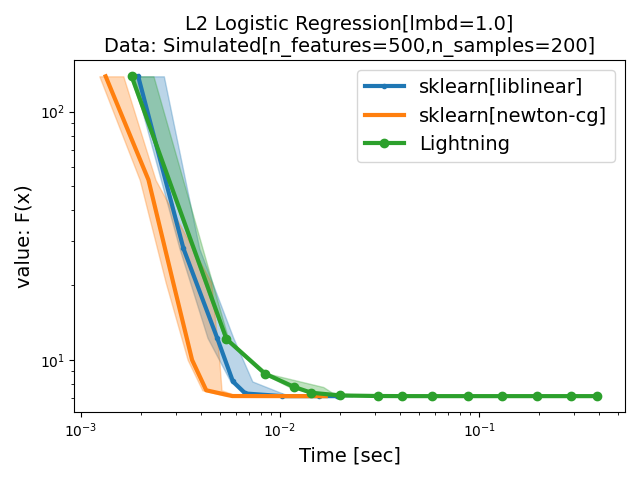
These steps illustrate how to reproduce the L2-logistic Regression benchmark. Find the complete list of the Available benchmarks. Also, refer to the documentation to learn more about benchopt CLI and its features. You can also easily extend this benchmark by adding a dataset, solver or metric. Learn that and more in the Benchmark workflow.
Creating a benchmark
The section Write a benchmark of the documentation provides a tutorial for creating a benchmark. The benchopt community also maintains a template benchmark to quickly and easily start a new benchmark.
Finding help
Join benchopt discord server and get in touch with the community! Feel free to drop us a message to get help with running/constructing benchmarks or (why not) discuss new features to be added and future development directions that benchopt should take.
Citing Benchopt
Benchopt is a continuous effort to make reproducible and transparent ML and optimization benchmarks. Join us in this endeavor! If you use benchopt in a scientific publication, please cite
@inproceedings{benchopt,
   author    = {Moreau, Thomas and Massias, Mathurin and Gramfort, Alexandre
                and Ablin, Pierre and Bannier, Pierre-Antoine
                and Charlier, Benjamin and Dagréou, Mathieu and Dupré la Tour, Tom
                and Durif, Ghislain and F. Dantas, Cassio and Klopfenstein, Quentin
                and Larsson, Johan and Lai, En and Lefort, Tanguy
                and Malézieux, Benoit and Moufad, Badr and T. Nguyen, Binh and Rakotomamonjy,
                Alain and Ramzi, Zaccharie and Salmon, Joseph and Vaiter, Samuel},
   title     = {Benchopt: Reproducible, efficient and collaborative optimization benchmarks},
   year      = {2022},
   booktitle = {NeurIPS},
   url       = {https://arxiv.org/abs/2206.13424}
}
Available benchmarks
Problem |
Results |
Build Status |
|---|---|---|




















Release files for benchopt 1.10.0
For a detailed explanation of source distributions (sdists) and built distributions (wheels), please see the package formats documentation.
Source distribution (sdist)
| File | Size | Uploaded | |
|---|---|---|---|
| benchopt-1.10.0.tar.gz | 993.5 kB | Details |
Built distribution (wheel)
| File | Interpreter | ABI | Platform | Reset |
|---|---|---|---|---|
| benchopt-1.10.0-py3-none-any.whl | Python 3 | none | any | Details |
Total release size: 1.3 MB
Release files / benchopt-1.10.0.tar.gz
| Download URL | benchopt-1.10.0.tar.gz |
|---|---|
| Size | 993.5 kB |
| Tags | Source |
|
SHA-256 checksum How to use checksums |
5aedaff13cfaf2015b9676fb591fa1988768a673bd440ab57c3ded1a8db9c014
|
|
BLAKE2b-256 checksum How to use checksums |
0bfa3ea9e20f67123a4882dd70600069cce5f19d0290dbae21df564a202458a0
|
| Upload date | |
|
Uploaded using Trusted Publishing? What is trusted publishing? |
Yes |
| Uploaded via |
twine/7.0.0 CPython/3.13.14
|
Provenance
Provenance describes where a file came from. On PyPI, provenance is shared via attestations, which provide a verifiable record of the build or publishing details. View details, limitations and caveats.


PyPI Publish Attestation
PyPI verified that this artifact, at this checksum, originated from the publisher listed below.
Signed by GitHub Actions, verified by PyPI on Sep 21, 2026.
Transparency logRelease files / benchopt-1.10.0-py3-none-any.whl
| Download URL | benchopt-1.10.0-py3-none-any.whl |
|---|---|
| Size | 319.2 kB |
| Tags | Python 3 |
|
SHA-256 checksum How to use checksums |
816e7a76e2d874499a07d8baac4e1f35d80bdbbd0e0b12e782359fb7fe1577d3
|
|
BLAKE2b-256 checksum How to use checksums |
3d0f38f78ba7cc827e5a404a0653e1dce323b79a18297de95bcfccb33ff501cb
|
| Upload date | |
|
Uploaded using Trusted Publishing? What is trusted publishing? |
Yes |
| Uploaded via |
twine/7.0.0 CPython/3.13.14
|
Provenance
Provenance describes where a file came from. On PyPI, provenance is shared via attestations, which provide a verifiable record of the build or publishing details. View details, limitations and caveats.
PyPI Publish Attestation
PyPI verified that this artifact, at this checksum, originated from the publisher listed below.
Signed by GitHub Actions, verified by PyPI on Sep 21, 2026.
Transparency log













