
SegmentaTion AwaRe cLusterING (STARLING)



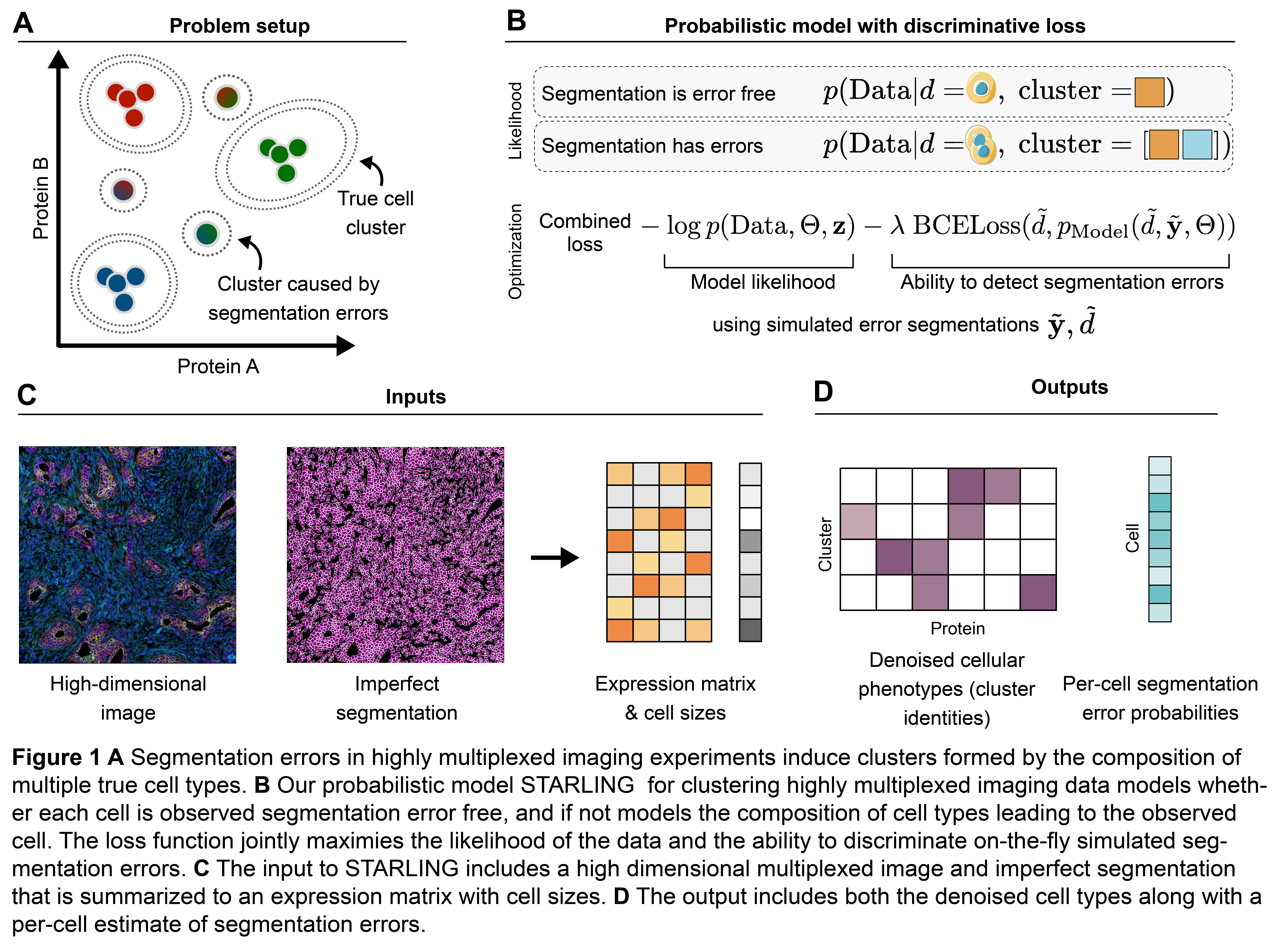
STARLING is a probabilistic model for clustering cells measured with spatial expression assays (e.g. IMC, MIBI, etc...) while accounting for segmentation errors.
It outputs:
- Clusters that account for segmentation errors in the data (i.e. should no longer show implausible marker co-expression)
- Assignments for every cell in the dataset to those clusters
- A segmentation error probability for each cell
A preprint describing the method and introducing a novel benchmarking workflow is available: Lee et al. (2024) Segmentation error aware clustering for highly multiplexed imaging
A tutorial outlining basic usage is available here.
Requirements
Python 3.9 or 3.10 are required to run starling. If your current version of python is not one of these, we recommend using pyenv to install a compatible version alongside your current one. Alternately, you could use the Docker configuration described below.
Installation
Install with pip
pip install biostarling and then import the module from starling import starling
Building from source
Starling can be cloned and installed locally (typically <10 minutes) via the Github repository,
git clone https://github.com/camlab-bioml/starling.git && cd starling
After cloning the repository, the next step is to install the required dependencies. There are three recommended methods:
1. Use requirements.txt and your own virtual environment:
We use virtualenvwrapper (4.8.4) to create and activated a standalone virtual environment for starling:
pip install virtualenvwrapper==4.8.4
mkvirtualenv starling
For convenience, one can install packages in the tested environment:
pip install -r requirements.txt
The virtual environment can be activated and deactivated subsequently:
workon starling
deactivate
2. Use Poetry and pyproject.toml.
Poetry is a packaging and dependency management tool can simplify code development and deployment. If you do not have Poetry installed, you can find instructions here.
Once poetry is installed, navigate to the starling directory and run poetry install. This will download the required packages into a virtual environment and install Starling in development mode. The location and state of the virtual environment may depend on your system. For more details, see the documentation.
3. Use Docker
If you have Docker installed on your system, you can run docker build -t starling . from the project root in order to build the image locally. You can then open a shell within the image with a command like docker run --rm -it starling bash.
Getting started
With starling installed, please proceed to the online documentation or launch the interactive notebook tutorial to learn more about the package's features.
Authors
This software is authored by: Jett (Yuju) Lee, Conor Klamann, Kieran R Campbell
Lunenfeld-Tanenbaum Research Institute & University of Toronto
1 maintainer

Metadata
1 maintainer
Release files for biostarling 0.1.4
For a detailed explanation of source distributions (sdists) and built distributions (wheels), please see the package formats documentation.
Source distribution (sdist)
| File | Size | Uploaded | Provenance | Actions |
|---|---|---|---|---|
| biostarling-0.1.4.tar.gz | 16.1 kB | Without provenance | Details for biostarling-0.1.4.tar.gz |
Built distribution (wheel)
| File | Interpreter | ABI | Platform | Actions Reset |
|---|---|---|---|---|
| biostarling-0.1.4-py3-none-any.whl | Python 3 | none | any | Details for biostarling-0.1.4-py3-none-any.whl |
Total release size: 31.7 kB
Release files / biostarling-0.1.4.tar.gz
| Download URL | biostarling-0.1.4.tar.gz |
|---|---|
| Size | 16.1 kB |
| Tags | Source |
|
SHA-256 checksum How to use checksums |
7e22cc1689215d0c7f2c2c8456ce0260cab77dc498200fee5b1f920830dcc607
|
|
BLAKE2b-256 checksum How to use checksums |
7d8c5ed2b20988807ded51d1a3873111895b45340278bd1985d332e38a39c6ba
|
| Upload date | |
|
Uploaded using Trusted Publishing? What is trusted publishing? |
No |
| Uploaded via |
twine/5.1.1 CPython/3.12.5
|
Release files / biostarling-0.1.4-py3-none-any.whl
| Download URL | biostarling-0.1.4-py3-none-any.whl |
|---|---|
| Size | 15.5 kB |
| Tags | Python 3 |
|
SHA-256 checksum How to use checksums |
58999c8ecae495a318dd3c781d0ba44a373bd90cf400ac9e789beeb2a54e6b59
|
|
BLAKE2b-256 checksum How to use checksums |
d8247304844bbdf0e6cb171233bad79ea30acc1074199359d9c35596829b77de
|
| Upload date | |
|
Uploaded using Trusted Publishing? What is trusted publishing? |
No |
| Uploaded via |
twine/5.1.1 CPython/3.12.5
|
Security for biostarling 0.1.4
Provenance
Provenance describes where a file came from. On PyPI, provenance is shared via attestations, which provide a verifiable record of the build or publishing details. View details, limitations and caveats.
No provenance found
None of the files in this release were uploaded with provenance metadata.
A note on package security
PyPI is a repository for distributing packages, not a service for auditing them. While third-party security researchers and our staff do their best to detect and remove malicious packages, PyPI cannot guarantee the quality, security or suitability of any given package.
To learn more about protecting yourself from malicious actors, visit our package security documentation.














