
BlastSight
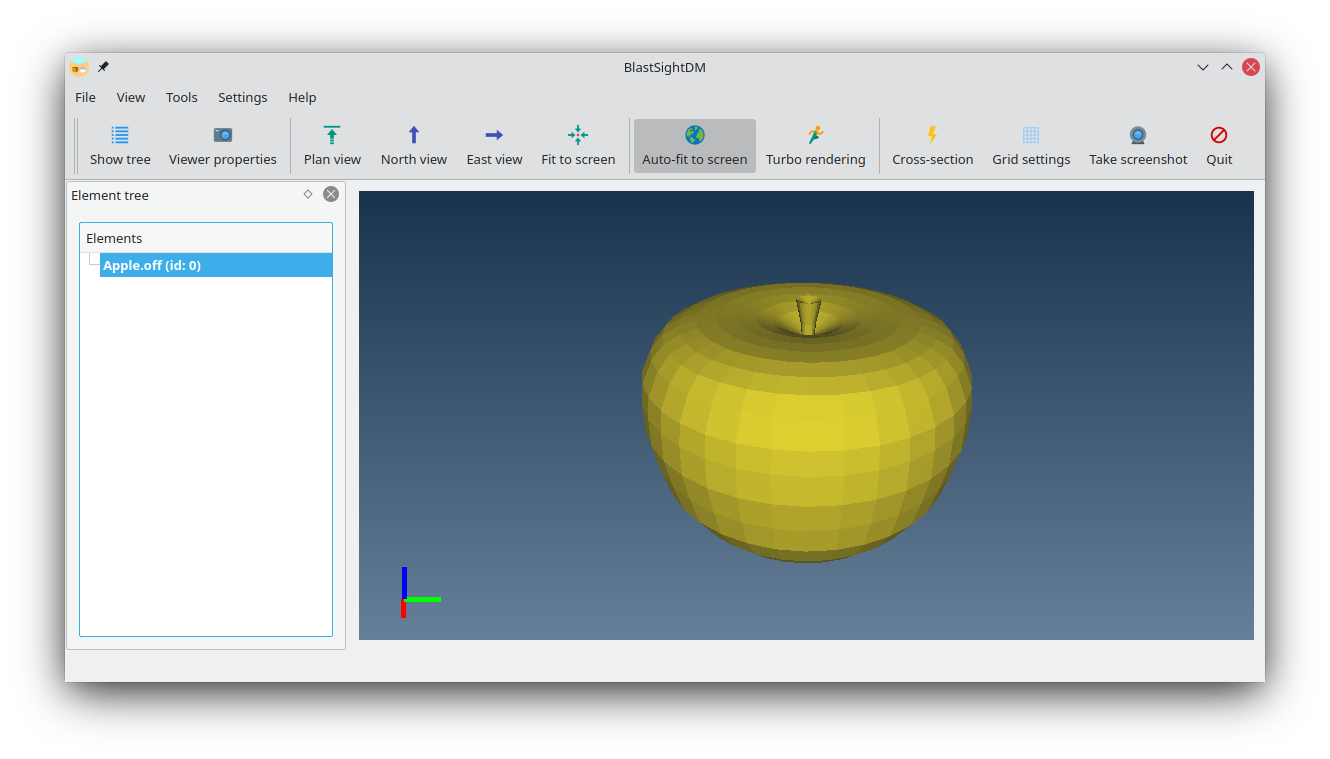
BlastSight is a 3D visualization software designed to aid in Mining research.
Installation
You can install BlastSight with the following command:
pip install blastsight
BlastSight requires the Python implementation of Qt5, and uses
qtpy to abstract backends.
This means that you need to install a backend yourself, using either of these commands:
pip install pyqt5pip install pyside2
Both backends should work, but if you find errors using one backend, try with the other! You can read the documentation from qtpy for more information.
Usage
Implemented in Python 3.7 and qtpy, it's useful as a library and as an application, so you can use it as a viewer, or integrate it to an application you're developing.
Application Mode
Start the application with python -m blastsight.
From there you can load elements with File > Load [element].
More information in Help > Help.
Integrable Mode
You can embed BlastSight's viewer within your application.
Check the following code and adapt it to your needs.
from qtpy.QtWidgets import QApplication
from qtpy.QtWidgets import QWidget
from qtpy.QtWidgets import QGridLayout
from blastsight.view.integrableviewer import IntegrableViewer


class EmbeddedViewer(QWidget):
    def __init__(self, parent=None):
        super().__init__(parent)
        self.setWindowTitle('EmbeddedViewer')
        self.resize(800, 600)
        self.viewer = IntegrableViewer(self)
        self.layout = QGridLayout(self)
        self.layout.addWidget(self.viewer, 0, 0, 1, 1)


if __name__ == '__main__':
    app = QApplication([])
    embedded = EmbeddedViewer()
    embedded.show()
    app.exec_()
Viewer Mode
You can also use BlastSight as a simple viewer when you write your own script.
Insert the following lines in your script:
from blastsight.view.viewer import Viewer
viewer = Viewer()

# Your code

viewer.show()
Basic API
The following methods can be used to render your elements directly. Keep in mind that these methods receive their arguments as kwargs, they're not positional.
# Mesh
viewer.mesh(x: list, y: list, z: list, indices: list, color: list, alpha: float, wireframe: bool, highlight: bool)

# Blocks
viewer.blocks(x: list, y: list, z: list, block_size: list, values: list, vmin: float, vmax: float, colormap: str)

# Points
viewer.points(x: list, y: list, z: list, point_size: float, values: list, vmin: float, vmax: float, colormap: str)

# Lines
viewer.lines(x: list, y: list, z: list, color: list, loop: bool)

# Tubes
viewer.tubes(x: list, y: list, z: list, color: list, loop: bool, radius: float, resolution: int)
Notes:
- An additional 'name' kwargs can be used to give each element a name.
- For every element, you can replace (x, y, z) with vertices, which is a list of positions, where each position is a list of (x, y, z).
- For meshes, the indices argument is a list of index, where index is a list of (i1, i2, i3).
- For blocks and points you can replace (values, vmin, vmax) with color, which is a list of colors for each position, where each color is a list of (r, g, b), between 0.0 and 1.0.
Examples
BlastSight comes with a folder of examples that show what you can do with it.
It's recommended to check examples/demo.py in https://github.com/gsanhueza/BlastSight/
to develop an idea of how to use this software.
1 maintainer

Metadata
1 maintainer
Release files for blastsight 0.12.0
For a detailed explanation of source distributions (sdists) and built distributions (wheels), please see the package formats documentation.
Source distribution (sdist)
| File | Size | Uploaded | Provenance | Actions |
|---|---|---|---|---|
| blastsight-0.12.0.tar.gz | 362.9 kB | Without provenance | Details for blastsight-0.12.0.tar.gz |
Built distribution (wheel)
| File | Interpreter | ABI | Platform | Actions Reset |
|---|---|---|---|---|
| blastsight-0.12.0-py3-none-any.whl | Python 3 | none | any | Details for blastsight-0.12.0-py3-none-any.whl |
Total release size: 775.5 kB
Release files / blastsight-0.12.0.tar.gz
| Download URL | blastsight-0.12.0.tar.gz |
|---|---|
| Size | 362.9 kB |
| Tags | Source |
|
SHA-256 checksum How to use checksums |
a4e318397cf449a5460f8d62a3acb28c11668569228167c4e7d133c825d7e488
|
|
BLAKE2b-256 checksum How to use checksums |
885d13d3ab9507b567853b45ea559f8a9f367eb3d78e105343547b755257bd7d
|
| Upload date | |
|
Uploaded using Trusted Publishing? What is trusted publishing? |
No |
| Uploaded via |
twine/4.0.2 CPython/3.11.7
|
Release files / blastsight-0.12.0-py3-none-any.whl
| Download URL | blastsight-0.12.0-py3-none-any.whl |
|---|---|
| Size | 412.6 kB |
| Tags | Python 3 |
|
SHA-256 checksum How to use checksums |
0bed0af9fbe73e153eb9bdaf6ca228f9ed52e6926c83c2103a1345765b78c0ff
|
|
BLAKE2b-256 checksum How to use checksums |
bd281645d28db49070d7f542f082bc3d27c2d7a05680f4904fed2148ed2e68eb
|
| Upload date | |
|
Uploaded using Trusted Publishing? What is trusted publishing? |
No |
| Uploaded via |
twine/4.0.2 CPython/3.11.7
|
Security for blastsight 0.12.0
Provenance
Provenance describes where a file came from. On PyPI, provenance is shared via attestations, which provide a verifiable record of the build or publishing details. View details, limitations and caveats.
No provenance found
None of the files in this release were uploaded with provenance metadata.
A note on package security
PyPI is a repository for distributing packages, not a service for auditing them. While third-party security researchers and our staff do their best to detect and remove malicious packages, PyPI cannot guarantee the quality, security or suitability of any given package.
To learn more about protecting yourself from malicious actors, visit our package security documentation.














