
Introduction

BLint is a Binary Linter to check the security properties, and capabilities in your executables. It is powered by lief
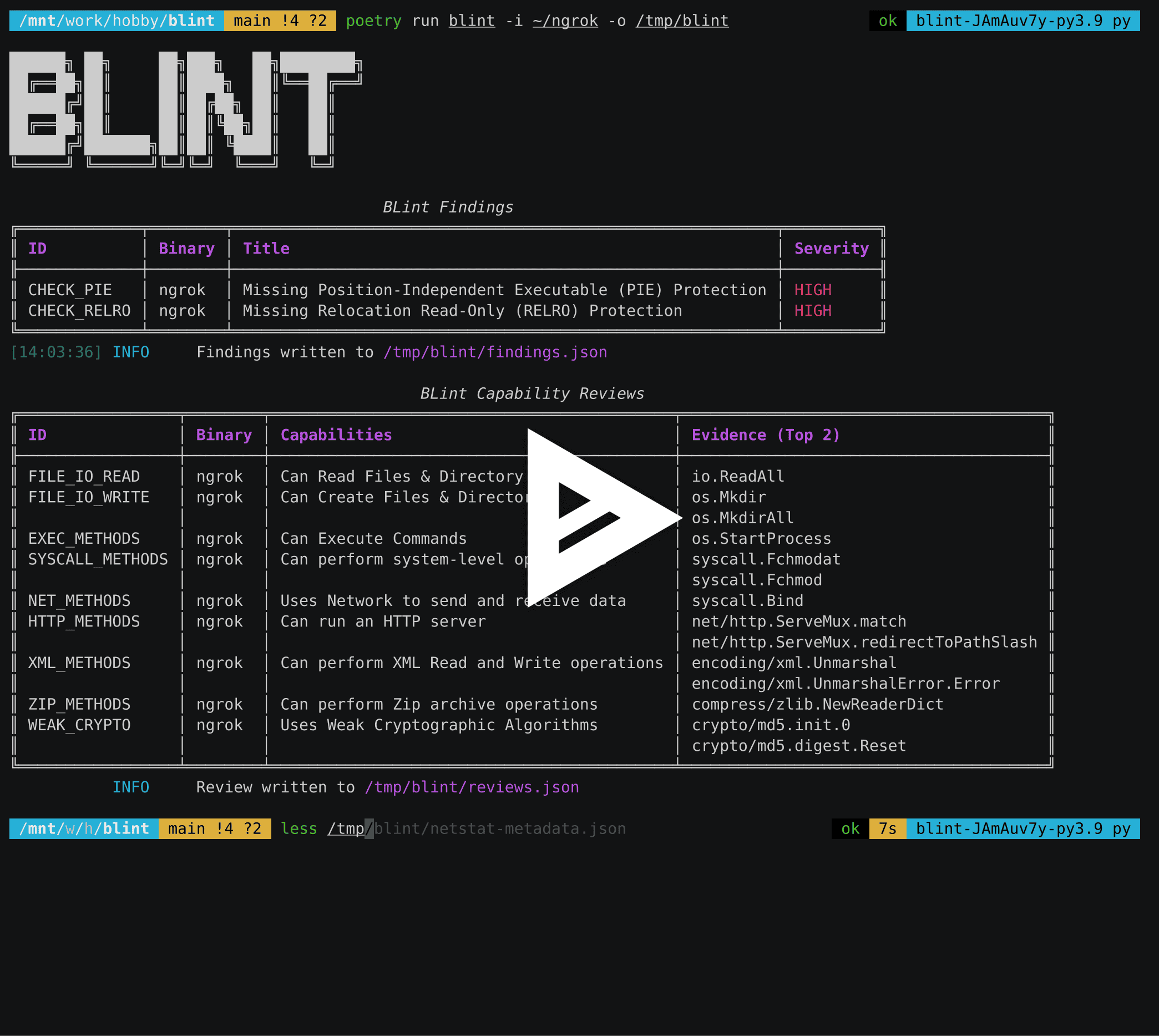
Capabilities review is supported for go and rust binaries. Support for dotnet would be available shortly.
Supported binary formats:
- ELF
- PE
- Mach-O
You can run blint on Linux, Windows and Mac against any of these binary formats.
Motivation
Nowadays, vendors distribute statically linked binaries produced by golang or rust or dotnet tooling. Users are used to running antivirus and anti-malware scans while using these binaries in their local devices. Blint augments these scans by listing the technical capabilities of a binary. For example, whether the binary could use network connections, or can perform file system operations and so on.
The binary is first parsed using lief framework to identify the various properties such as functions, static, and dynamic symbols present. Thanks to a YAML based annotations data, this information could be matched against capabilities and presented visually using a rich table.
NOTE: The presence of capabilities doesn't imply that the operations are always performed by the binary. Use the output of this tool to get an idea about a binary. Also, this tool is not suitable to review malware and other heavily obfuscated binaries for obvious reasons.
Use cases
Blint was used at ShiftLeft to review and optimize the distributed cli binary.
Installation
- Install python 3.8 or 3.9
pip3 install blint
Usage
usage: blint [-h] [-i SRC_DIR_IMAGE] [-o REPORTS_DIR] [--no-error] [--no-banner] [--no-reviews]

Linting tool for binary files powered by lief.

optional arguments:
  -h, --help            show this help message and exit
  -i SRC_DIR_IMAGE, --src SRC_DIR_IMAGE
                        Source directory or container image or binary file
  -o REPORTS_DIR, --reports REPORTS_DIR
                        Reports directory
  --no-error            Continue on error to prevent build from breaking
  --no-banner           Do not display banner
  --no-reviews          Do not perform method reviews
To test any binary including default commands
blint -i /bin/netstat -o /tmp/blint
Use -i to check any other binary. For eg: to check ngrok
blint -i ~/ngrok -o /tmp/blint
PowerShell example

References
Metadata
Release files for blint 1.0.9
For a detailed explanation of source distributions (sdists) and built distributions (wheels), please see the package formats documentation.
Source distribution (sdist)
| File | Size | Uploaded | Provenance | Actions |
|---|---|---|---|---|
| blint-1.0.9.tar.gz | 48.1 kB | Without provenance | Details for blint-1.0.9.tar.gz |
Built distribution (wheel)
| File | Interpreter | ABI | Platform | Actions Reset |
|---|---|---|---|---|
| blint-1.0.9-py3-none-any.whl | Python 3 | none | any | Details for blint-1.0.9-py3-none-any.whl |
Total release size: 98.4 kB
Release files / blint-1.0.9.tar.gz
| Download URL | blint-1.0.9.tar.gz |
|---|---|
| Size | 48.1 kB |
| Tags | Source |
|
SHA-256 checksum How to use checksums |
5d9d0e5d2c0a5cebd4ce6b3a592a6abe206169fc678e910cc1e1fb6a1e9345c9
|
|
BLAKE2b-256 checksum How to use checksums |
ef1d0d52caf776f421b2974c0acb7dc1b6c2eff608597c6d6f5bceff17b2df85
|
| Upload date | |
|
Uploaded using Trusted Publishing? What is trusted publishing? |
No |
| Uploaded via |
poetry/1.1.9 CPython/3.9.5 Linux/5.13.13-051313-generic
|
Release files / blint-1.0.9-py3-none-any.whl
| Download URL | blint-1.0.9-py3-none-any.whl |
|---|---|
| Size | 50.4 kB |
| Tags | Python 3 |
|
SHA-256 checksum How to use checksums |
b90084a73fb01412172a55e1decc9d1c6f0f651e6e66afbf61c0037a3989ce7b
|
|
BLAKE2b-256 checksum How to use checksums |
7eea7e91fe628cb6dfc005321568b27e116144cce236344ef60fc733638c6db3
|
| Upload date | |
|
Uploaded using Trusted Publishing? What is trusted publishing? |
No |
| Uploaded via |
poetry/1.1.9 CPython/3.9.5 Linux/5.13.13-051313-generic
|
Security for blint 1.0.9
Provenance
Provenance describes where a file came from. On PyPI, provenance is shared via attestations, which provide a verifiable record of the build or publishing details. View details, limitations and caveats.
No provenance found
None of the files in this release were uploaded with provenance metadata.
A note on package security
PyPI is a repository for distributing packages, not a service for auditing them. While third-party security researchers and our staff do their best to detect and remove malicious packages, PyPI cannot guarantee the quality, security or suitability of any given package.
To learn more about protecting yourself from malicious actors, visit our package security documentation.














