
Blurring - censor videos automatically




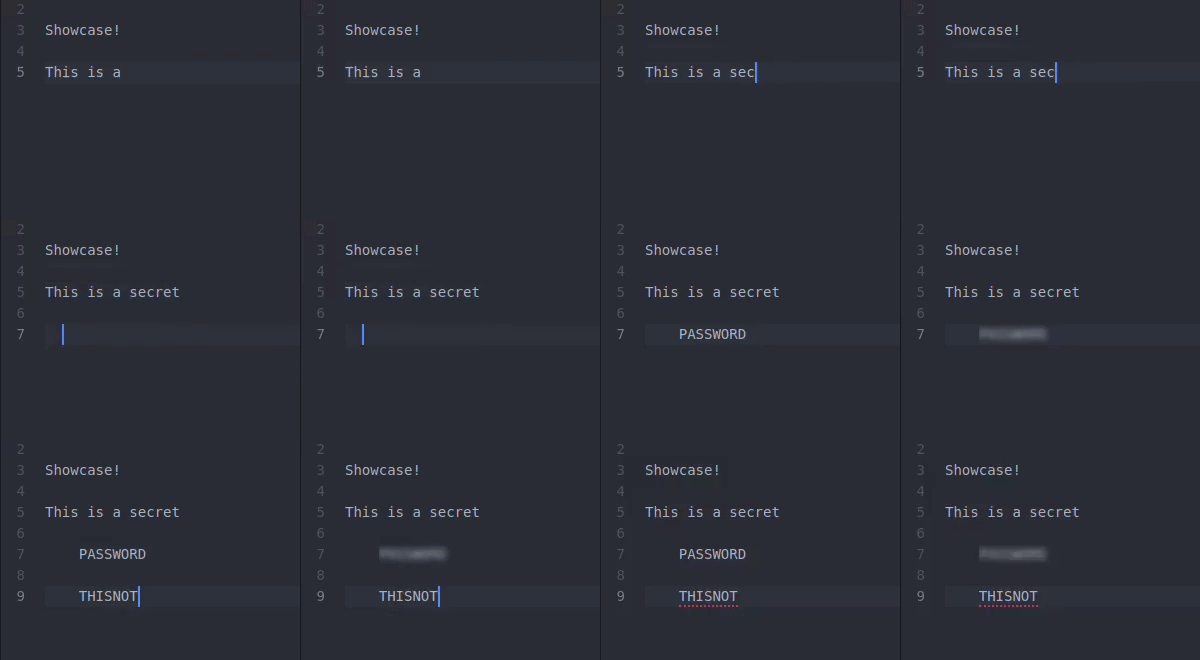
I use a simple template match to find the secret spots in the video. So this is nothing for a dynamical video. It should be used to clean up for screen records.
Why
Blurring is designed to expand Watch me Coding. I take my screen in time lapse. One second, one frame. That’s 3600 frames for an hour. An 8-hour coding day would be 28800 frames. I do not want to search for secret information in every single frame. I know my secret passwords so I can scan the video and blur them.
Install
Simple as always. Do not forget to use a virtual environment:
>>> pip install blurring
How to uses
Create a template. You can use any image. Maybe something created with gimp. Or us supplied tool “blurring-t” (I know that is a ugly name, sorry):
>>> blurring-t template
text [PASSWORD]: PASSWORD
height [18]: 18
...
Before you blur the video, checkout the original.
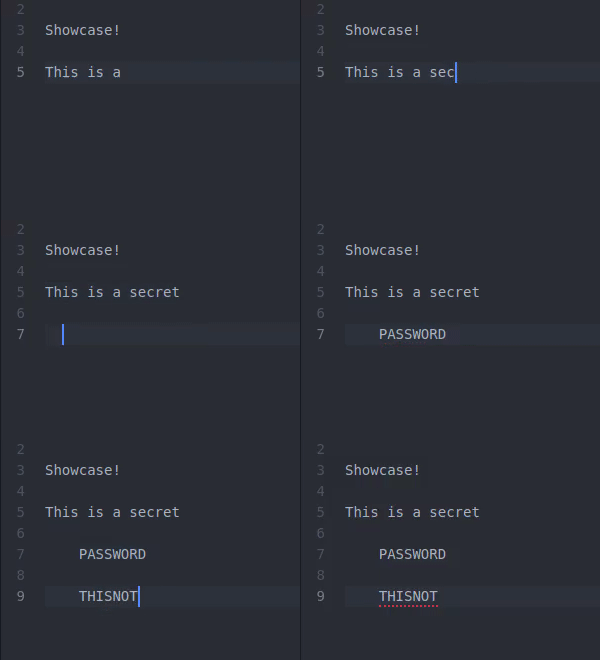
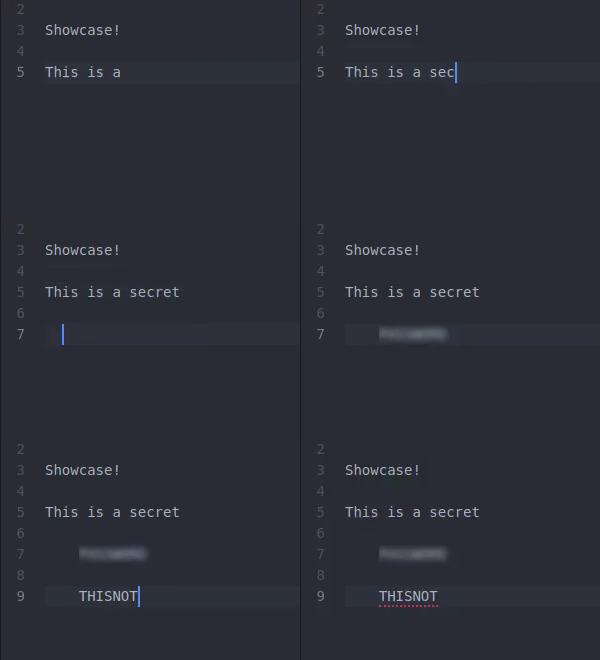
Now blur it. I use the offset to blur the password before it is completely visible:
blurring video.mp4 blurred.mp4 template.png --offset 60
This is the result.
And this would be the result without the offset.
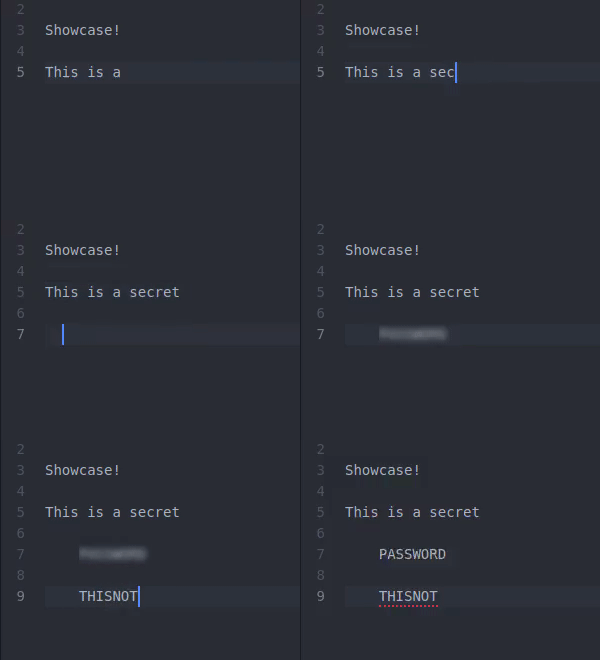
There is still something to improve, but for now I am happy.
Watch me coding integration
This is also a plugin for watch me encoding. After you have installed Blurring, there is an additional command:
>>> wmc -H
        info v0.3.3 - Print some infos
        link v0.3.3 - Concat all videos to one
      record v0.3.3 - Start the record
       setup v0.3.3 - Setup the project
    blurring v0.1.0 - Blur the final video
First create the final video:
>>> wmc link
Now create the template(s):
>>> mkdir templates
>>> blurring-t templates/dummy
text [PASSWORD]: PASSWORD
height [18]: 18
width [70]: 70
scale [0.4]: 0.4
font [0]: 0
pos_x [0]: 0
pos_y [12]: 12
It is time to blurring out the “PASSWORD”:
>>> wmc blurring
Now you have the video “full_blur.mp4”. Enjoy it.
Development
Virtual environment windows:
python -m venv venv
venv\Scripts\activate
Virtual environment linux:
python3 -m venv venv
source venv/bin/activate
Setup project:
python -m pip install --upgrade pip wheel setuptools tox flake8 pylint coverage rstcheck
python setup.py develop
Run some test:
tox
pylint src/blurring
python setup.py test
python setup.py flake8
python setup.py check
Test coverage:
coverage run --source src/blurring setup.py test
coverage report -m
Publish package:
git tag -a 1.0.0a1 -m '1.0.0a1'
rstcheck README.rst
python setup.py --version
python setup.py check
python setup.py sdist bdist_wheel
twine upload dist/*
git push origin 1.0.0a1
Create videos:
ffmpeg -i ext/video.mp4 -filter_complex "[0:v] palettegen" palette.png -y
ffmpeg -i ext/video.mp4 -i palette.png -filter_complex "[0:v][1:v] paletteuse" ext/video.gif
ffmpeg -i ext/video.mp4 -filter:v "crop=400:400:0:0" ext/video_small.mp4
ffmpeg -i ext/video.mp4 -i ext/blurred_60.mp4 -filter_complex hstack ext/combine.mp4
1 maintainer

Metadata
1 maintainer
Release files for blurring 0.2.0
For a detailed explanation of source distributions (sdists) and built distributions (wheels), please see the package formats documentation.
Source distribution (sdist)
| File | Size | Uploaded | Provenance | |
|---|---|---|---|---|
| blurring-0.2.0.tar.gz | 937.3 kB | Without provenance | Details |
Built distribution (wheel)
| File | Interpreter | ABI | Platform | Reset |
|---|---|---|---|---|
| blurring-0.2.0-py3-none-any.whl | Python 3 | none | any | Details |
Total release size: 948.0 kB
Release files / blurring-0.2.0.tar.gz
| Download URL | blurring-0.2.0.tar.gz |
|---|---|
| Size | 937.3 kB |
| Tags | Source |
|
SHA-256 checksum How to use checksums |
390c53b1d7159614fab1b66f7c402d8cdb8abafc3984184c7ae244e74de1b4a3
|
|
BLAKE2b-256 checksum How to use checksums |
98847f44c2c4bef5b3df5bc4746fb63e8ef6fce84b10bfb0ae1a05ace47de22d
|
| Upload date | |
|
Uploaded using Trusted Publishing? What is trusted publishing? |
No |
| Uploaded via |
twine/1.8.0 pkginfo/1.4.2 requests/2.18.4 setuptools/40.2.0 requests-toolbelt/0.8.0 clint/0.5.1 CPython/2.7.15+ Linux/4.15.0-64-generic
|
Release files / blurring-0.2.0-py3-none-any.whl
| Download URL | blurring-0.2.0-py3-none-any.whl |
|---|---|
| Size | 10.6 kB |
| Tags | Python 3 |
|
SHA-256 checksum How to use checksums |
55f07d871e1031aef29f7a9a0939ad548eef1e2cbe5fb0858fce9cb1438c3a39
|
|
BLAKE2b-256 checksum How to use checksums |
0057bd6750634f0d24e085ec7f9107df7a1a609f76c3ba610885eaab05dca889
|
| Upload date | |
|
Uploaded using Trusted Publishing? What is trusted publishing? |
No |
| Uploaded via |
twine/1.8.0 pkginfo/1.4.2 requests/2.18.4 setuptools/40.2.0 requests-toolbelt/0.8.0 clint/0.5.1 CPython/2.7.15+ Linux/4.15.0-64-generic
|
Security for blurring 0.2.0
Provenance
Provenance describes where a file came from. On PyPI, provenance is shared via attestations, which provide a verifiable record of the build or publishing details. View details, limitations and caveats.
No provenance found
None of the files in this release were uploaded with provenance metadata.
A note on package security
PyPI is a repository for distributing packages, not a service for auditing them. While third-party security researchers and our staff do their best to detect and remove malicious packages, PyPI cannot guarantee the quality, security or suitability of any given package.
To learn more about protecting yourself from malicious actors, visit our package security documentation.














