
bme280pi: the BME280 Sensor Reader for Raspberry Pi

Project description




bme280pi: the BME280 Sensor Reader for Raspberry Pi
How to Install
Enable the I2C Interface
sudo raspi-config- Select "Interfacing Options"
- Highlight the "I2C" option, and activate "Select" (use tab)
- Answer the question if you'd like the ARM I2C interface to be enabled with "Yes"
- Select "Ok"
- Reboot
For a walk-through with screenshots see the references below.
Install Utilities
Install python-smbus and i2ctools:
sudo apt-get update && sudo apt-get install -y python-smbus i2c-tools
Then, shut down your Raspberry Pi: sudo halt . Disconnect your Raspberry Pi power supply.
You are now ready to connect the BME280 sensor.
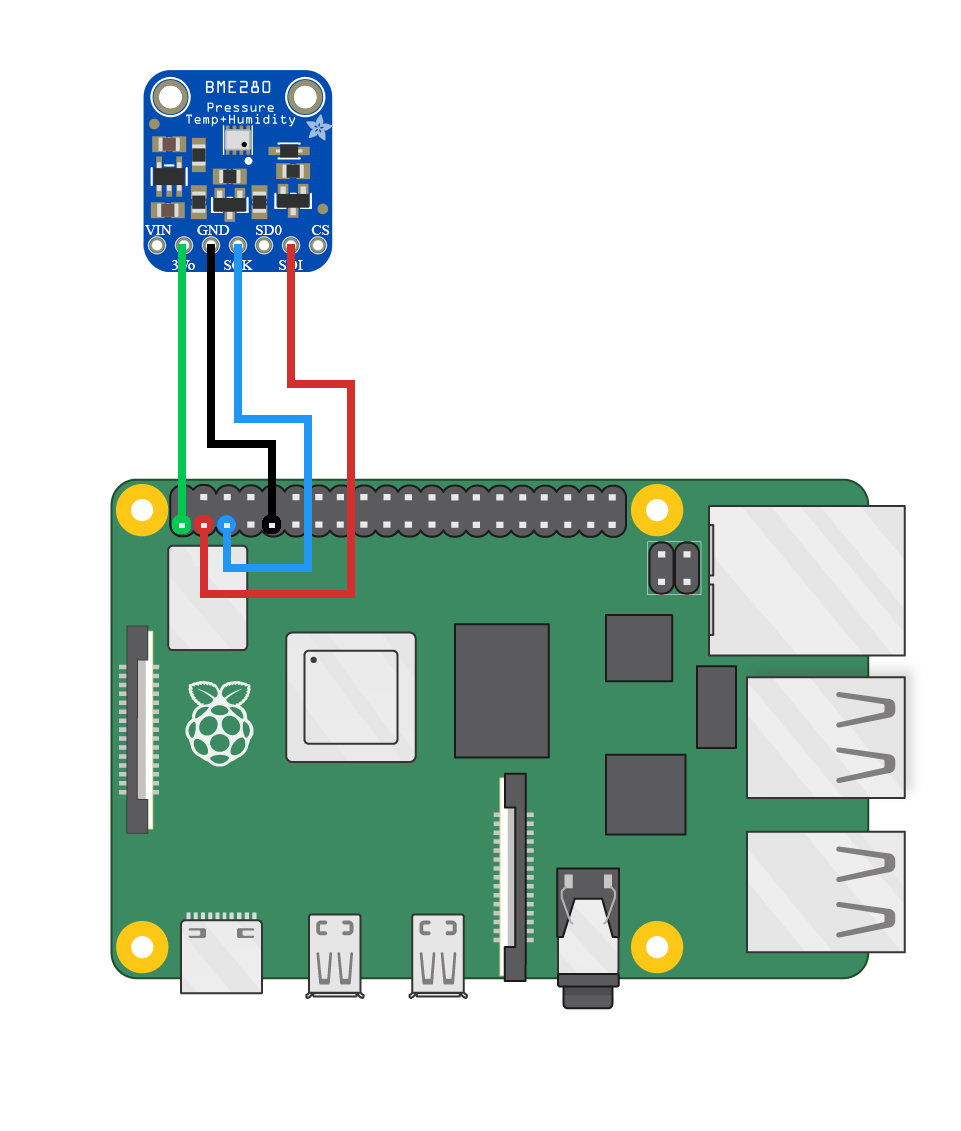
Connect the BME280 sensor
Install This Module
You can then install this module by running python setup.py install
Using it in your script
You can initialize the sensor class as follows:
from bme280pi import Sensor

sensor = Sensor()
You can then use the sensor object to fetch data, sensor.get_data(), which will return a dictionary
with temperature, humidity, and pressure readings.
You can also just get the temperature (sensor.get_temperature()),
just the pressure (sensor.get_pressure()), or
just the humidity (sensor.get_humidity()).
Note that all commands support user-specified units, e.g. sensor.get_temperature(unit='F'),
or sensor.get_pressure(unit='mmHg').
You can e.g. query the sensor every 10 seconds, and add the results to a dictionary, and then turn that into a pandas DataFrame and plot that (requires matplotlib and pandas):
import time
import datetime

import pandas
import matplotlib.pyplot as plt

from bme280pi import Sensor

measurements = {}

for i in range(20):
    measurements[datetime.datetime.now()] = sensor.get_data()
    time.sleep(10)

measurements = pd.DataFrame(measurements).transpose()

plt.figure()
plt.subplot(2, 2, 1)
measurements['temperature'].plot()
plt.title("Temperature (C)")

plt.subplot(2, 2, 2)
measurements['pressure'].plot()
plt.title("Pressure (hPa)")

plt.subplot(2, 2, 3)
measurements['humidity'].plot()
plt.title("Relative Humidity (%)")

plt.savefig("Measurements.png")
Potential issues
If you see a FileNotFoundError being raised by SMBus, then you may not have properly configured I2C.
Have a look at the instructions above to enable to I2C interface, and make sure you reboot.
References


Download files
Download the file for your platform. If you're not sure which to choose, learn more about installing packages.
Source Distribution
File details
Details for the file bme280pi-1.0.1.tar.gz.
File metadata
- Download URL: bme280pi-1.0.1.tar.gz
- Upload date:
- Size: 16.0 kB
- Tags: Source
- Uploaded using Trusted Publishing? No
- Uploaded via: twine/3.1.1 pkginfo/1.5.0.1 requests/2.24.0 setuptools/46.4.0 requests-toolbelt/0.9.1 tqdm/4.46.1 CPython/3.7.3
File hashes
| Algorithm | Hash digest | |
|---|---|---|
| SHA256 |
9b2c68d732d0a5549b8cac7fd5609fd7baf306160af68496bf0991208ea36a0b
|
|
| MD5 |
157cef3b33c4be61be441f3324a34ec4
|
|
| BLAKE2b-256 |
db6f9e6b9a80d8509703f5d4087c3fb0e6516d734ad89e968cb2c85f56b011c4
|






