
boip






boip is an abbreviation for Boiler Plate.
A library that generates code from code templates based on the answers to some questions.
I am a technical artist.
Therefore, the template to be added has a lot of code generation such as Maya related.
1. How to use.
1.1. pip install
python -m pip install boip
1.2. Run boip with CLI.
python -m boip
1.3. CD to the folder where you want to place the template.
cd "Folder path where you want to place the template."
1.4. Choose a template and answer your questions.
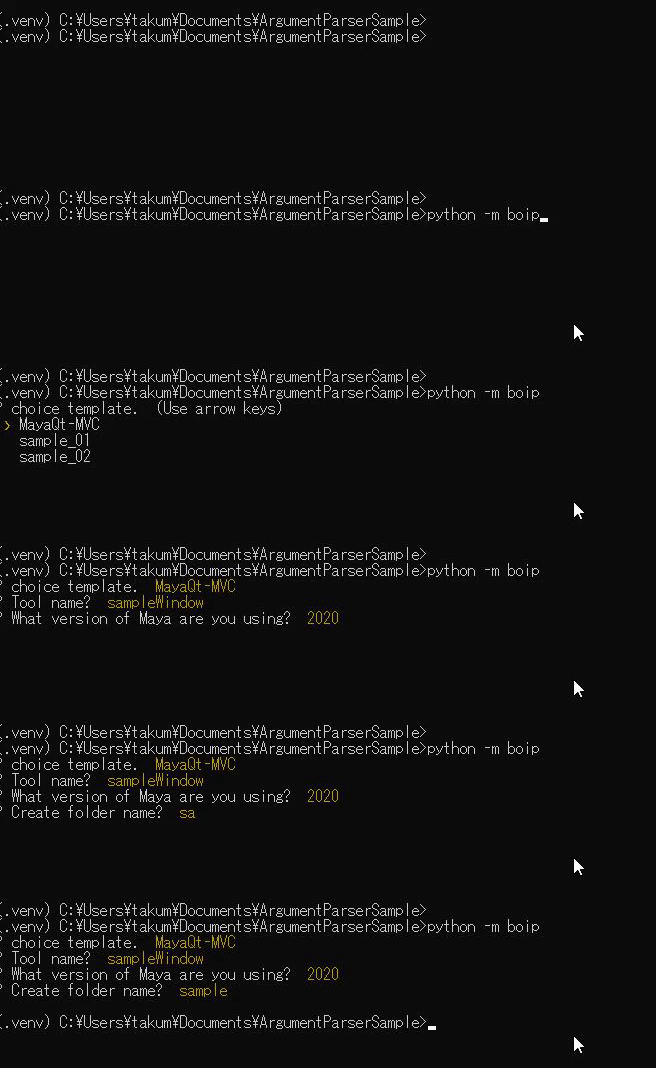
1.5. Check the generated folder.
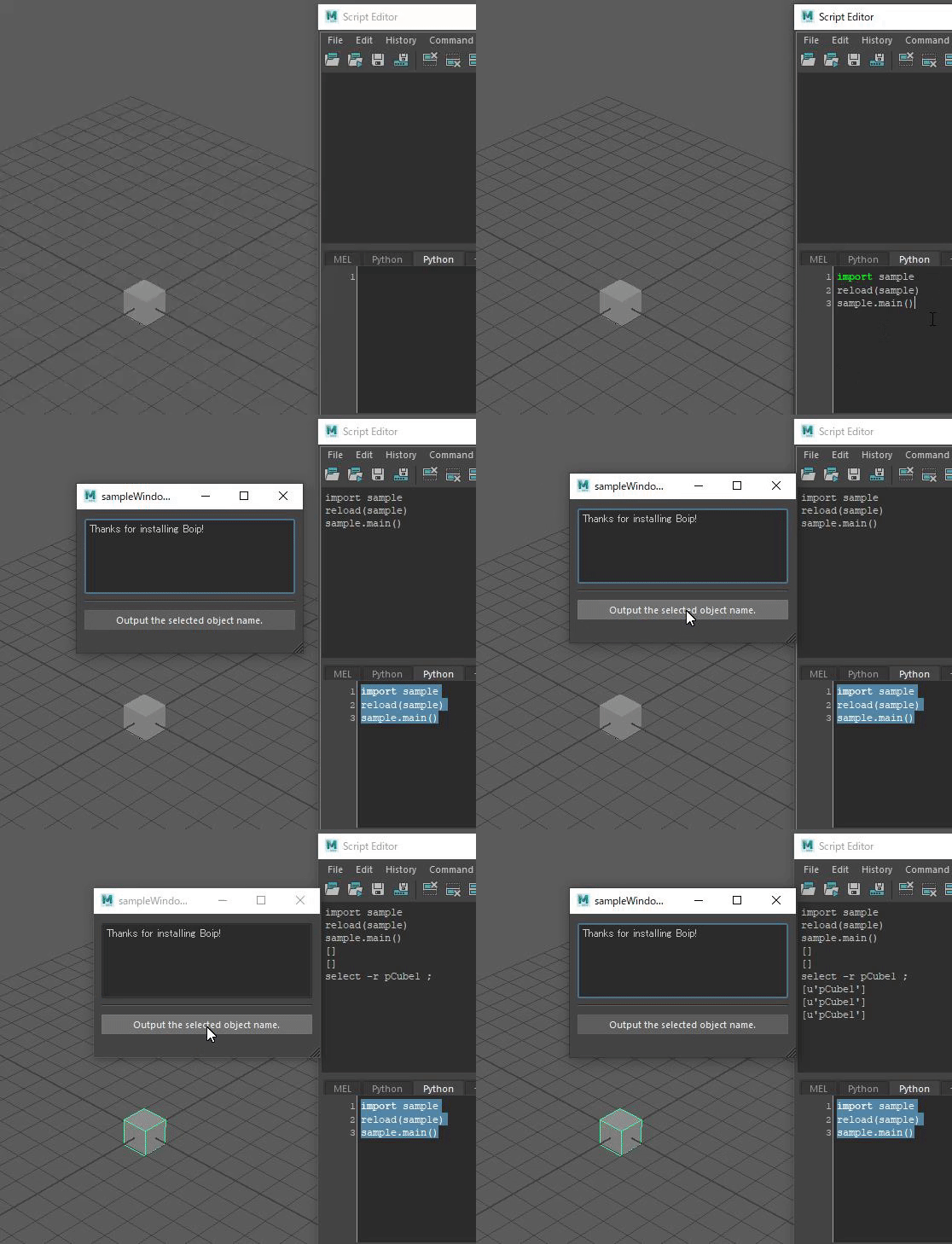
It is copied under cd with the last selected folder name.
Since I chose "Maya Qt-MVC" this time, a template of Maya + Qt + MVC pattern is generated.
2. Add your own template.
Prepare a code template (BoipSet) in advance. Then specify the folder path where BoipSet is located with the -s flag.
python -m boip -s "Target folder path."
2.1. What is BoipSet?
The following two are set as a Boip Set.
- After asking a question, a folder named "template" to use for replacement.
- Configuration file named boip.yaml.
2.1.1. How to write boip.yaml.
title: MayaQt-MVC # template name
convertExtensions: # distExtension srcExtension(The same extension is okay.)
  py: py
  ui: ui
question: # question list
  - name: tool_name # Name to use for replacement. Use with {Name} for stationery.
    message: "Tool name?" # Question.
    default: sampleWindow # Default Value.

  - name: maya_version
    message: "What version of Maya are you using?"
    default: 2020
2.1.2. How to make a template.
The folders under template will be copied. After that, the inside of {name} is converted by the answer to the question.
It is expected that automatic generation will be included in the future, but currently it is manual.
Example)In the case of "MayaQt-MVC" above.
I have two questions, {tool_name} and {maya_version}.
- template
import sys

print("{tool_name}")
print("{maya_version}")
- answer the questions.
Tool name? > sampleWindow
What version of Maya are you using? > 2020
- After generation. The answer to the question will be converted to the following.
import sys

print("sampleWindow")
print("2020")
If you have a nice template, Please make a merge request!
1 maintainer

Release files for Boip 0.0.3
For a detailed explanation of source distributions (sdists) and built distributions (wheels), please see the package formats documentation.
Source distribution (sdist)
| File | Size | Uploaded | |
|---|---|---|---|
| Boip-0.0.3.tar.gz | 12.0 kB | Details |
Built distribution (wheel)
| File | Interpreter | ABI | Platform | Reset |
|---|---|---|---|---|
| Boip-0.0.3-py2-none-any.whl | Python 2 | none | any | Details |
Total release size: 26.0 kB
Release files / Boip-0.0.3.tar.gz
| Download URL | Boip-0.0.3.tar.gz |
|---|---|
| Size | 12.0 kB |
| Tags | Source |
|
SHA-256 checksum How to use checksums |
32e60edb65671f7f4d3f7e834bb021b5ea342840746c6c339e3c5d9514f84e70
|
|
BLAKE2b-256 checksum How to use checksums |
a36e790b3be66572e52bef4ec2d8b5d295a013e83609de022edb78d0e97c5c2b
|
| Upload date | |
|
Uploaded using Trusted Publishing? What is trusted publishing? |
No |
| Uploaded via |
twine/1.15.0 pkginfo/1.5.0.1 requests/2.24.0 setuptools/44.1.1 requests-toolbelt/0.9.1 tqdm/4.49.0 CPython/2.7.18
|
Release files / Boip-0.0.3-py2-none-any.whl
| Download URL | Boip-0.0.3-py2-none-any.whl |
|---|---|
| Size | 14.0 kB |
| Tags | Python 2 |
|
SHA-256 checksum How to use checksums |
36c38e14ebbca44a21cf4053338080a0b40b9dd75e1a4dcd1980b7eb0cfd7c25
|
|
BLAKE2b-256 checksum How to use checksums |
865530a20a1d4c46d911cc3c32538f99fdebaebd09b156717bb3aac6f4eac24b
|
| Upload date | |
|
Uploaded using Trusted Publishing? What is trusted publishing? |
No |
| Uploaded via |
twine/1.15.0 pkginfo/1.5.0.1 requests/2.24.0 setuptools/44.1.1 requests-toolbelt/0.9.1 tqdm/4.49.0 CPython/2.7.18
|














