
Responsive Django Admin
If you’re looking for a version compatible with Django 1.8 just install 0.3.7.1.
Features
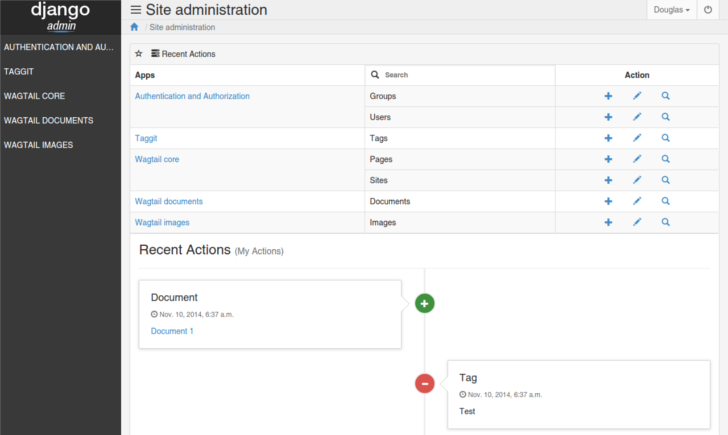
Responsive
Sidebar Menu
Easy install / setup
Support Django 1.11 and 2.1
Bootstrap 3
Python 3
Screenshots
INSTALL
from pypi (recommended)
$ pip install bootstrap-admin
And don’t forget to add bootstrap_admin in INSTALLED_APPS before the django.contrib.admin.
Example:
INSTALLED_APPS = (
    # ...
    'bootstrap_admin', # always before django.contrib.admin
    'django.contrib.admin',
    # ...
)
CUSTOMIZE
Branding - Overriding logo
If you want to use your own logo, you can achieve this by overriding the login.html and base_site.html, just like in Django Admin.
First, make sure the TEMPLATES setting in your settings.py is properly configured:
TEMPLATES = [
    {
        'BACKEND': 'django.template.backends.django.DjangoTemplates',
        'DIRS': [os.path.join(BASE_DIR, 'my_django_project/templates')],
        'APP_DIRS': True,
        # other stuff
    },
]DIRS: You must set the location of your templates, an absolute path.
I’m assuming BASE_DIR is:
BASE_DIR = os.path.dirname(os.path.dirname(os.path.abspath(__file__)))This pattern of creating a global templates folder could be useful for you to use for your base.html and other global templates.
More info: https://docs.djangoproject.com/en/2.1/ref/templates/api/#configuring-an-engine
Let me show you a project structure as an example:
├── my_django_project
│   ├── core
│   │   ├── admin.py
│   │   ├── apps.py
│   │   ├── models.py
│   │   ├── tests.py
│   │   └── views.py
│   ├── settings.py
│   ├── templates
│   │   └── admin
│   │       ├── base_site.html
│   │       └── login.html
│   ├── urls.py
│   └── wsgi.py
├── manage.py
You can see I created a global templates/ folder, with another directory inside admin/ containing login.html and base_site.html.
Their respective contents are:
base_site.html
{% extends 'admin/base_site.html' %}
{% load static %}

{% block branding %}
    <a href="{% url 'admin:index' %}" class="django-admin-logo">
        <!-- Django Administration -->
        <img height="60" src="{% static "bootstrap_admin/img/logo-140x60.png" %}" alt="{{ site_header|default:_('Django administration') }}">
    </a>
{% endblock branding %}
login.html
{% extends 'admin/login.html' %}
{% load i18n static %}

{% block branding %}
    <a href="{% url 'admin:index' %}" class="django-admin-logo">
        <!-- Django Administration -->
        <img height="60" src="{% static "bootstrap_admin/img/logo-140x60.png" %}" alt="{{ site_header|default:_('Django administration') }}">
    </a>
{% endblock branding %}
More info: https://docs.djangoproject.com/en/2.1/ref/contrib/admin/#admin-overriding-templates
Contributing
Fork it!
Create your feature branch: git checkout -b my-new-feature
Commit your changes: git commit -am 'Add some feature'
Push to the branch: git push origin my-new-feature
Submit a pull request =]
See the full list of contributors.
Open an issue if you find a bug or want something more.
1 maintainer

Metadata
1 maintainer
Release files for bootstrap-admin 0.4.4
For a detailed explanation of source distributions (sdists) and built distributions (wheels), please see the package formats documentation.
Source distribution (sdist)
| File | Size | Uploaded | Provenance | Actions |
|---|---|---|---|---|
| bootstrap_admin-0.4.4.tar.gz | 45.1 kB | Without provenance | Details for bootstrap_admin-0.4.4.tar.gz |
Built distribution (wheel)
| File | Interpreter | ABI | Platform | Actions Reset |
|---|---|---|---|---|
| bootstrap_admin-0.4.4-py3-none-any.whl | Python 3 | none | any | Details for bootstrap_admin-0.4.4-py3-none-any.whl |
Total release size: 108.1 kB
Release files / bootstrap_admin-0.4.4.tar.gz
| Download URL | bootstrap_admin-0.4.4.tar.gz |
|---|---|
| Size | 45.1 kB |
| Tags | Source |
|
SHA-256 checksum How to use checksums |
ad121d28bbb9b28291b5de5c6156a7bdb604f06255936e49ef2fb86f8c351cc2
|
|
BLAKE2b-256 checksum How to use checksums |
7a1552cd6c1af482e83d10f14cf9eab81878bdf2653139c8f53152196e26ac1d
|
| Upload date | |
|
Uploaded using Trusted Publishing? What is trusted publishing? |
No |
| Uploaded via |
twine/3.1.1 pkginfo/1.5.0.1 requests/2.23.0 setuptools/47.1.1 requests-toolbelt/0.9.1 tqdm/4.46.1 CPython/3.8.2
|
Release files / bootstrap_admin-0.4.4-py3-none-any.whl
| Download URL | bootstrap_admin-0.4.4-py3-none-any.whl |
|---|---|
| Size | 63.0 kB |
| Tags | Python 3 |
|
SHA-256 checksum How to use checksums |
be50ef3855d81da44166e5925a77af22b0347bf50c420b7da7aa0b692dffe54f
|
|
BLAKE2b-256 checksum How to use checksums |
55e7cb639c8c60be0f70970d7d129aa188ca7920ac69144f937e8cd34f25cf18
|
| Upload date | |
|
Uploaded using Trusted Publishing? What is trusted publishing? |
No |
| Uploaded via |
twine/3.1.1 pkginfo/1.5.0.1 requests/2.23.0 setuptools/47.1.1 requests-toolbelt/0.9.1 tqdm/4.46.1 CPython/3.8.2
|
Security for bootstrap-admin 0.4.4
Provenance
Provenance describes where a file came from. On PyPI, provenance is shared via attestations, which provide a verifiable record of the build or publishing details. View details, limitations and caveats.
No provenance found
None of the files in this release were uploaded with provenance metadata.
A note on package security
PyPI is a repository for distributing packages, not a service for auditing them. While third-party security researchers and our staff do their best to detect and remove malicious packages, PyPI cannot guarantee the quality, security or suitability of any given package.
To learn more about protecting yourself from malicious actors, visit our package security documentation.














