
botnikkk
Under construction! Not ready for use yet! Currently experimenting and planning!
Developed by BotNikkk / Nikkk
How To Use :
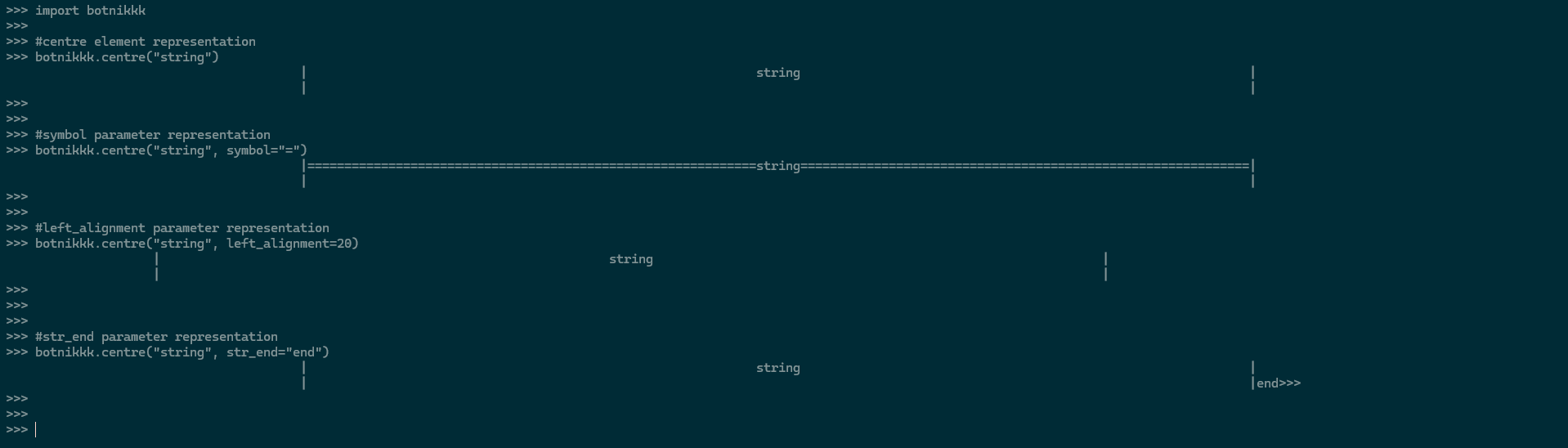
1. centre() function
Usage = Centering Elemtents.
import botnikkk


botnikkk.centre('text')
It also takes 3 extra parameters as input :
- symbol : determines what symbol will fill in the blank space, deault parameter = " "
botnikkk.centre('text',symbol='=')
- left_alignment : determines the space that will be used on the left hand side of the centred string, defaul parameter = None/calculated automatically
botnikkk.centre('text', left_alignment=23)
- str_end : determines what symbol will print as end= in print statement, deault parameter = "\n"
botnikkk.centre('text',str_end='end')
OUTPUT EXAMPLE :
2. format_input() function
Usage = centering the input variable.
import botnikkk


answer = botnikkk.format_input('input_question')
OUTPUT EXAMPLE :

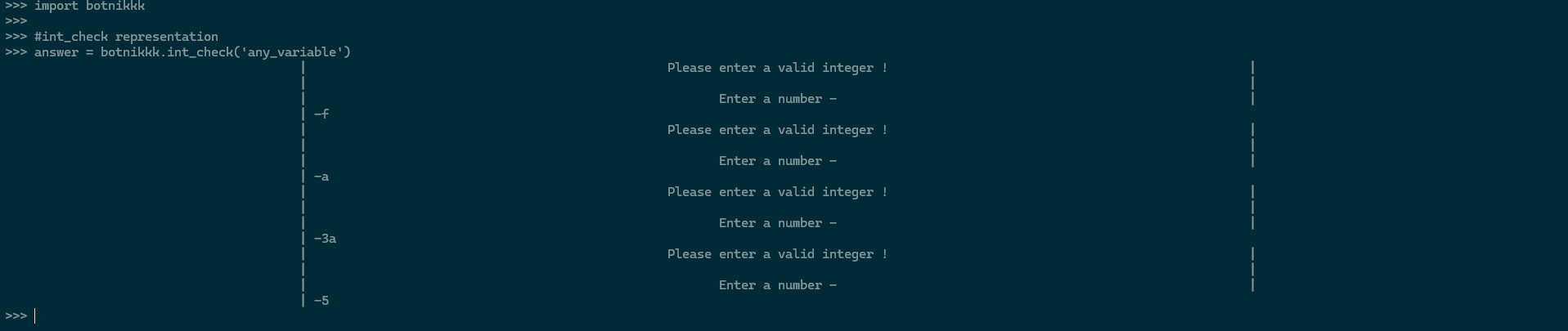
3. int_check() function
Usage = checks if an input variable is a interger or not, takes repetetive inputs if not Interger.
import botnikkk


answer = botnikkk.int_check('any_variable')
OUTPUT EXAMPLE :
4. ans_check() function
Usage = takes a list of strings as input and displays it to the user as centred options, returns the choosen option.
import botnikkk


answer = botnikkk.ans_check(['list_of_variables'])
OUTPUT EXAMPLE :

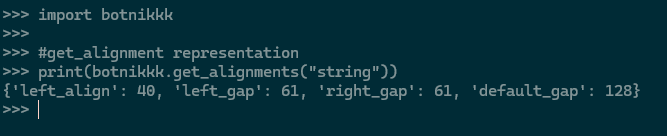
5. get_alignments() function
Usage = takes a string as input and returns a dictionary containing the designing alignments of the said string in the form :
dic= {"left_align":value , "left_gap":value, "right_gap":value, "default_gap":value }
which can be used to format a string accoring to the alignment format of package in such form :
print_string= left_align*" " + "|" + left_gap*" " + string + right_gap*" " + "|"
import botnikkk


alignments = botnikkk.get_alignments("string")
OUTPUT EXAMPLE :
6. redirect() function
Usage = takes a input string as screen name and redirects the user to the said screen in a countdown of 3 seconds. Can only be used in async functions due it's await nature.
import botnikkk

import asyncio


async def function():


    #some code

    await botnikkk.redirect("screen_name")

    #some more code


asyncio.run(function())
check out : https://botnikkk.github.io and https://github.com/Botnikkk/botnikkk-package
1 maintainer

Release files for botnikkk 0.1.3
For a detailed explanation of source distributions (sdists) and built distributions (wheels), please see the package formats documentation.
Source distribution (sdist)
| File | Size | Uploaded | |
|---|---|---|---|
| botnikkk-0.1.3.tar.gz | 4.7 kB | Details |
Built distribution (wheel)
| File | Interpreter | ABI | Platform | Reset |
|---|---|---|---|---|
| botnikkk-0.1.3-py3-none-any.whl | Python 3 | none | any | Details |
Total release size:9.3 kB
Release files / botnikkk-0.1.3.tar.gz
| Download URL | botnikkk-0.1.3.tar.gz |
|---|---|
| Size | 4.7 kB |
| Tags | Source |
|
SHA-256 checksum How to use checksums |
b20e1c8db3a41702d95195f506898e0c9f07d1475e192316042da36bf471bd48
|
|
BLAKE2b-256 checksum How to use checksums |
f2696bc757647850c68ad8d3da9f20aba53902429f0c9f8eb3f893aa40f6a8e2
|
| Upload date | |
|
Uploaded using Trusted Publishing? What is trusted publishing? |
No |
| Uploaded via |
twine/5.0.0 CPython/3.12.3
|
Release files / botnikkk-0.1.3-py3-none-any.whl
| Download URL | botnikkk-0.1.3-py3-none-any.whl |
|---|---|
| Size | 4.7 kB |
| Tags | Python 3 |
|
SHA-256 checksum How to use checksums |
dba298c19d397ab115123e78d4462dadde703829672edfb9862052c190a42164
|
|
BLAKE2b-256 checksum How to use checksums |
5f7bfd62195b4fe53175d0337e9fa493b4747183320813b8e7e1d6af314a04c0
|
| Upload date | |
|
Uploaded using Trusted Publishing? What is trusted publishing? |
No |
| Uploaded via |
twine/5.0.0 CPython/3.12.3
|














