
breakword
breakword is a small debugging utility that combines print debugging with breakpoint debugging. It aims to facilitate debugging the kind of problem where you might use print statements to quickly spot where something seems to be off, and then switch to a step by step debugger.
breakword normally requires running your program twice and will only work properly if it is deterministic.
How to use
-
Set the
PYTHONBREAKPOINTenvironment variable tobreakword.breakpoint. -
Use
breakpointlike aprintstatement:
for i in range(10):
    breakpoint(i)
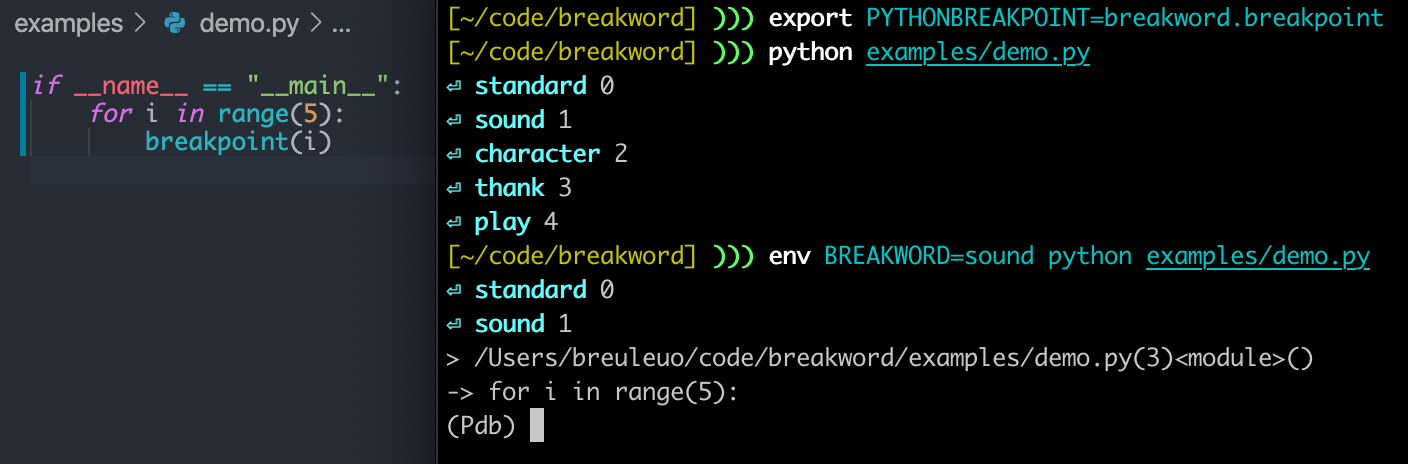
This will print out something like this:
$ python example.py
⏎ standard 0
⏎ sound 1
⏎ character 2
⏎ thank 3
⏎ play 4
⏎ however 5
⏎ fish 6
⏎ cultural 7
⏎ either 8
⏎ and 9
- Use the
BREAKWORDenvironment variable to set a breakpoint to what you want to investigate further. For instance, if you want to stop wheni == 6in the above program, you can run the following command:
$ env BREAKWORD=fish python example.py
⏎ standard 0
⏎ sound 1
⏎ character 2
⏎ thank 3
⏎ play 4
⏎ however 5
⏎ fish 6
> example.py(2)<module>()
-> for i in range(10):
(Pdb) i
6
You can also give a comma-separated list of words, e.g. BREAKWORD=sound,fish.
Note: breakpoint() with no arguments retains the normal behavior.
More functions
-
breakword.log(*things, **config): Print a word and optionally other things after it. -
breakword.brk(watch=None, **config): Sets a breakpoint to trigger afterlogprinted out the given word. IfwatchisNoneor not given, theBREAKWORDenvironment variable is consulted. If the variable is not set, nothing will happen.- This is equivalent to
breakword.after(word).breakpoint().
- This is equivalent to
-
breakword.after(watch=None, **config): Returns an object that evaluates toTrueright afterlogprinted out the given watch word. As withbrk, ifwatchisNoneor not given, theBREAKWORDenvironment variable is consulted. -
breakword.word(**config): Returns the next word as a string. You can print it yourself, in which case it's basically likelog, or you can store it in an object. -
breakword.logbrk(**config): Callslogand thenbrk. -
breakword.wordbrk(**config): Callswordand thenbrk. The word is returned. -
breakword.set_default_logger(logger): Set the logging function to use (defaults toprint)
Tracking objects
-
breakword.track(obj, all=False)will set thebreakwordattribute in the object to the next word in the list. By setting theBREAKWORDenvironment variable, you will set a breakpoint to the corresponding call totrack. Set theallargument toTrueand the attribute will contain a list. Note: this will not work ifobjis an integer or string, in those cases track will print a warning. -
breakword.track_creation(*classes)will set thebreakwordattribute on all instances of the given classes, when they are created. That way, you can set a breakpoint back to the creation of some object of interest.
Groups
Use breakword.groups.<name> to get a "word group" with the given name. Each group generates words independently and will therefore not interfere with each other. They have log, brk, after, word, etc. as methods. The default group is groups[""].
from breakword import groups

assert groups.aardvark == groups["aardvark"]

# Log "a" in the aardvark group
groups.aardvark.log("a")

# Log "b" in the pelican group
groups.pelican.log("b")

# Get the next word in the pelican group
word = groups.pelican.word()

# Conditional behavior to perform only after the word "cherry"
if groups.pelican.after("cherry"):
    print("blah")
1 maintainer

Metadata
1 maintainer
Release files for breakword 0.3.2
For a detailed explanation of source distributions (sdists) and built distributions (wheels), please see the package formats documentation.
Source distribution (sdist)
| File | Size | Uploaded | |
|---|---|---|---|
| breakword-0.3.2.tar.gz | 532.6 kB | Details |
Built distribution (wheel)
| File | Interpreter | ABI | Platform | Reset |
|---|---|---|---|---|
| breakword-0.3.2-py3-none-any.whl | Python 3 | none | any | Details |
Total release size: 542.8 kB
Release files / breakword-0.3.2.tar.gz
| Download URL | breakword-0.3.2.tar.gz |
|---|---|
| Size | 532.6 kB |
| Tags | Source |
|
SHA-256 checksum How to use checksums |
38404e7189d8bfe5a910c31333671b171dc49c95a9b139d62a9feaf72df20b5a
|
|
BLAKE2b-256 checksum How to use checksums |
4f0568b629182345322908240eadfd0a5bd83dc306b9e2a8f568983dfbf2bb7d
|
| Upload date | |
|
Uploaded using Trusted Publishing? What is trusted publishing? |
No |
| Uploaded via |
python-httpx/0.27.2
|
Release files / breakword-0.3.2-py3-none-any.whl
| Download URL | breakword-0.3.2-py3-none-any.whl |
|---|---|
| Size | 10.2 kB |
| Tags | Python 3 |
|
SHA-256 checksum How to use checksums |
fa6431e68be3fc6e668f288341dc81b804c14ca3a70c7a0c9bb487310c177ad3
|
|
BLAKE2b-256 checksum How to use checksums |
3a9e1350806e403a60373c442d1e32a77688a563817097e6aeda16f3d3b5112d
|
| Upload date | |
|
Uploaded using Trusted Publishing? What is trusted publishing? |
No |
| Uploaded via |
python-httpx/0.27.2
|














