
brew



brew: A Multiple Classifier Systems API
Features
General: Ensembling, Stacking and Blending.
Ensemble Classifier Generators: Bagging, Random Subspace, SMOTE-Bagging, ICS-Bagging, SMOTE-ICS-Bagging.
Dynamic Selection: Overall Local Accuracy (OLA), Local Class Accuracy (LCA), Multiple Classifier Behavior (MCB), K-Nearest Oracles Eliminate (KNORA-E), K-Nearest Oracles Union (KNORA-U), A Priori Dynamic Selection, A Posteriori Dynamic Selection, Dynamic Selection KNN (DSKNN).
Ensemble Combination Rules: majority vote, min, max, mean and median.
Ensemble Diversity Metrics: Entropy Measure E, Kohavi Wolpert Variance, Q Statistics, Correlation Coefficient p, Disagreement Measure, Agreement Measure, Double Fault Measure.
Ensemble Pruning: Ensemble Pruning via Individual Contribution (EPIC).
Example
import numpy as np
import matplotlib.pyplot as plt
import matplotlib.gridspec as gridspec
import itertools

import sklearn

from sklearn.linear_model import LogisticRegression
from sklearn.svm import SVC
from sklearn.ensemble import RandomForestClassifier

from brew.base import Ensemble, EnsembleClassifier
from brew.stacking.stacker import EnsembleStack, EnsembleStackClassifier
from brew.combination.combiner import Combiner

from mlxtend.data import iris_data
from mlxtend.evaluate import plot_decision_regions

# Initializing Classifiers
clf1 = LogisticRegression(random_state=0)
clf2 = RandomForestClassifier(random_state=0)
clf3 = SVC(random_state=0, probability=True)

# Creating Ensemble
ensemble = Ensemble([clf1, clf2, clf3])
eclf = EnsembleClassifier(ensemble=ensemble, combiner=Combiner('mean'))

# Creating Stacking
layer_1 = Ensemble([clf1, clf2, clf3])
layer_2 = Ensemble([sklearn.clone(clf1)])

stack = EnsembleStack(cv=3)

stack.add_layer(layer_1)
stack.add_layer(layer_2)

sclf = EnsembleStackClassifier(stack)

clf_list = [clf1, clf2, clf3, eclf, sclf]
lbl_list = ['Logistic Regression', 'Random Forest', 'RBF kernel SVM', 'Ensemble', 'Stacking']

# Loading some example data
X, y = iris_data()
X = X[:,[0, 2]]

# Plotting Decision Regions
gs = gridspec.GridSpec(2, 3)
fig = plt.figure(figsize=(10, 8))

itt = itertools.product([0, 1, 2], repeat=2)

for clf, lab, grd in zip(clf_list, lbl_list, itt):
    clf.fit(X, y)
    ax = plt.subplot(gs[grd[0], grd[1]])
    fig = plot_decision_regions(X=X, y=y, clf=clf, legend=2)
    plt.title(lab)
plt.show()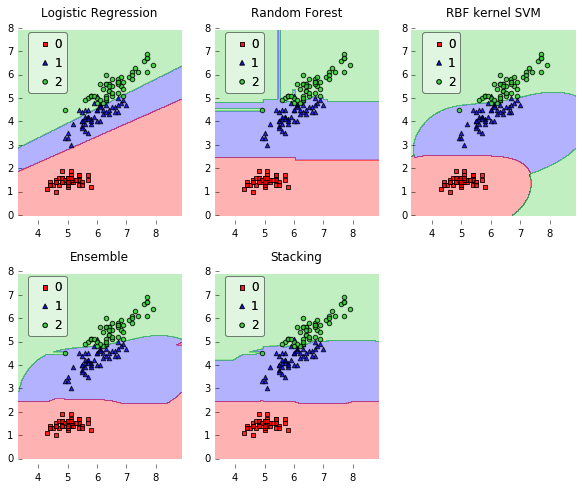
Dependencies
Python 2.7+
scikit-learn >= 0.15.2
Numpy >= 1.6.1
SciPy >= 0.9
Matplotlib >= 0.99.1 (examples, only)
mlxtend (examples, only)
Installing
You can easily install brew using pip:
pip install brew
or, if you prefer an up-to-date version, get it from here:
pip install git+https://github.com/viisar/brew.git
Important References
Kuncheva, Ludmila I. Combining pattern classifiers: methods and algorithms. John Wiley & Sons, 2014.
Zhou, Zhi-Hua. Ensemble methods: foundations and algorithms. CRC Press, 2012.
Documentation
The full documentation is at http://brew.rtfd.org.
History
0.1.0 (2014-11-12)
First release on PyPI.


Release files for brew 0.1.4
For a detailed explanation of source distributions (sdists) and built distributions (wheels), please see the package formats documentation.
Source distribution (sdist)
| File | Size | Uploaded | Provenance | Actions |
|---|---|---|---|---|
| brew-0.1.4.zip | 48.8 kB | Without provenance | Details for brew-0.1.4.zip |
Release files / brew-0.1.4.zip
| Download URL | brew-0.1.4.zip |
|---|---|
| Size | 48.8 kB |
| Tags | Source |
|
SHA-256 checksum How to use checksums |
11f23fe972631685e2a146f91747f78bbcad9dd2e20e6ea84a3058459c605948
|
|
BLAKE2b-256 checksum How to use checksums |
711975f6d42ca862c6b31e2da9864d94f59fe81978ac5d40c43937a1c17fd065
|
| Upload date | |
|
Uploaded using Trusted Publishing? What is trusted publishing? |
No |
Security for brew 0.1.4
Provenance
Provenance describes where a file came from. On PyPI, provenance is shared via attestations, which provide a verifiable record of the build or publishing details. View details, limitations and caveats.
No provenance found
None of the files in this release were uploaded with provenance metadata.
A note on package security
PyPI is a repository for distributing packages, not a service for auditing them. While third-party security researchers and our staff do their best to detect and remove malicious packages, PyPI cannot guarantee the quality, security or suitability of any given package.
To learn more about protecting yourself from malicious actors, visit our package security documentation.














