
Brutal Maze
Brutal Maze is a thrilling shoot 'em up game with minimalist art style.
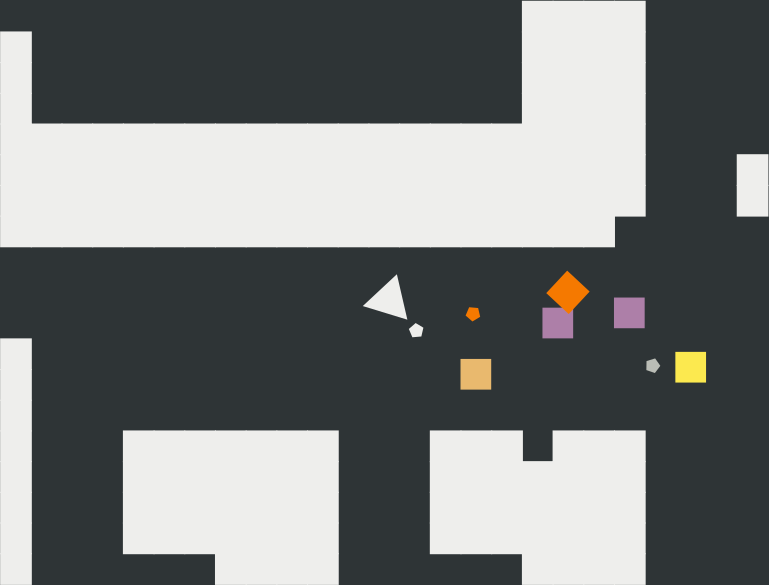
The game features a trigon trapped in an infinite maze. As our hero tries to escape, the maze's border turns into aggressive squares trying to stop per. Your job is to help the trigon fight against those evil squares and find a way out (if there is any). Be aware that the more get killed, the more will show up and our hero will get weaker when wounded.
Brutal Maze has a few notable features:
- Being highly portable.
- Auto-generated and infinite maze.
- No binary data for drawing.
- Enemies with special abilities: stun, poison, camo, etc.
- Somewhat a realistic physic and logic system.
- Resizable game window in-game.
- Easily customizable via INI file format.
- Recordable in JSON (some kind of silent screencast).
- Remote control through TCP/IP socket (can be used in AI researching).
Installation
Brutal Maze is written in Python and is compatible version 3.7 and above. The installation procedure should be as simple as follows:
- Install Python and pip. Make sure the directory for Python scripts
is in your
$PATH. - Open Terminal or Command Prompt and run
pip install --user brutalmaze.
For more information, see Installation page in the documentation.
After installation, you can launch the game by running the command
brutalmaze. Below are the default bindings, which can be configured as
shown in the next section:
F2: new gamep: toggle pausem: toggle mutea: move leftd: move rightw: move ups: move down- Left mouse: long-range attack
- Right mouse: close-range attack, also dodge from bullets
Additionally, Brutal Maze also supports touch-friendly control. In this mode, touches on different grid (empty, wall, enemy, hero) send different signals (to guide the hero to either move or attack, or start new game). Albeit it is implemented using mouse button up event, touch control is not a solution for mouse-only input, but an attempt to support mobile GNU/Linux distribution such as postmarketOS, i.e. it's meant to be played using two thumbs :-)
Configuration
Brutal Maze supports both configuration file and command-line options. Apparently, while settings for graphics, sound and socket server can be set either in the config file or using CLI, keyboard and mouse bindings are limited to configuration file only.
Settings are read in the following order:
- Default configuration (this can be copied to desired location
by
brutalmaze --write-config PATH.brutalmaze --write-configalone will print the file to stdout) - System-wide and local configuration file (these will be listed
as fallback config in
brutalmaze --help; see the Configuration documentation for more info) - Manually specified configuration file (via
brutalmaze --config PATH) - Command-line arguments
Later-read preferences will override previous ones.
Remote control
If you enable the socket server, Brutal Maze will no longer accept
direct input from your mouse or keyboard, but wait for a client to connect.
This can be done by either editing option Enable in section Server
in the configuration file or launching the game via brutalmaze --server.
The I/O format is explained in details in the Remote Control page.
Game recording
Either game played by human or client script can be recorded to JSON format.
This can be enabled by setting the output directory to a non-empty string:
brutalmaze --record-dir DIR. Navigate to Configuration for more options.
Recordings can be played using Brutal Maze HTML5 record player.
Copying
Brutal Maze's source code and its icon are released under GNU Affero General Public License version 3 or later. This means if you run a modified program on a server and let other users communicate with it there, your server must also allow them to download the source code corresponding to the modified version running there.
This project also uses Tango color palette and several sound effects, whose authors and licenses are listed in the Copying page in our documentation.
1 maintainer

Metadata
1 maintainer
Release files for brutalmaze 1.1.1
For a detailed explanation of source distributions (sdists) and built distributions (wheels), please see the package formats documentation.
Source distribution (sdist)
| File | Size | Uploaded | |
|---|---|---|---|
| brutalmaze-1.1.1.tar.gz | 1.8 MB | Details |
Built distribution (wheel)
| File | Interpreter | ABI | Platform | Reset |
|---|---|---|---|---|
| brutalmaze-1.1.1-py3-none-any.whl | Python 3 | none | any | Details |
Total release size: 3.3 MB
Release files / brutalmaze-1.1.1.tar.gz
| Download URL | brutalmaze-1.1.1.tar.gz |
|---|---|
| Size | 1.8 MB |
| Tags | Source |
|
SHA-256 checksum How to use checksums |
dc37c56480425d4a509d50e0bf9493ae201cece7dea111e406f0bae7ef29bd23
|
|
BLAKE2b-256 checksum How to use checksums |
e334f92ee1f475dc7091b7761bcbdb91c2e7af392382c91e5dbd3235139c7477
|
| Upload date | |
|
Uploaded using Trusted Publishing? What is trusted publishing? |
No |
| Uploaded via |
python-requests/2.25.1
|
Release files / brutalmaze-1.1.1-py3-none-any.whl
| Download URL | brutalmaze-1.1.1-py3-none-any.whl |
|---|---|
| Size | 1.5 MB |
| Tags | Python 3 |
|
SHA-256 checksum How to use checksums |
ceae677e26a3f4cf7362dc2b4742e0611ca3e1b57ab32a5a8cf19f0a5d7c48be
|
|
BLAKE2b-256 checksum How to use checksums |
bdbf3f9510cf6582df357ca3ce7f21620e2b6e87c5d632cc19bf563d06e7d7bd
|
| Upload date | |
|
Uploaded using Trusted Publishing? What is trusted publishing? |
No |
| Uploaded via |
python-requests/2.25.1
|














