
Cloud Assignment Manager Tool
CAM-Tool is a cloud assignment manager tool that helps you to manage your tasks across different machines. You can start several workers across different machines and upload the command to cam-tool. Cam-tool will then distribute the tasks to workers automatically.
Install
pip install cam-tool
conda install redis # only required for server machine.
conda install -c conda-forge nodejs # only required if you want to use a web-based gui
Config
The config file is located at ~/.cam.conf. You can set the server address, port, and password for redis. You can simply run cam config to edit the yaml file.
Start Server
On the server machine, simply run the following command to start the server.
cam server
Start Worker
On a worker machine, please run the following command to start a worker. You can start many worker on the same machine.
cam worker
You may also want to add more parameters as resource calculation, prefix or suffix.
cam worker "ngpu()" "sbash"
where ngpu() calculate how many GPU is idle and "sbash" is a prefix to all the command running on this server.
Add new task
Please run the following command to add a new task
cam add "ls -lah"
Status
You can see the status of eash task with the ls command:
> cam ls

ID  Time                 Command    Host
----  -------------------  ---------  -------
   3  2022-03-07 06:39:33  ls -lah    Pending
Kill tasks
You can kill task with its task id.
cam kill 3
Get the log of a worker
You can run the following command to get the log of a running or finished worker:
cam log 3
Web Console
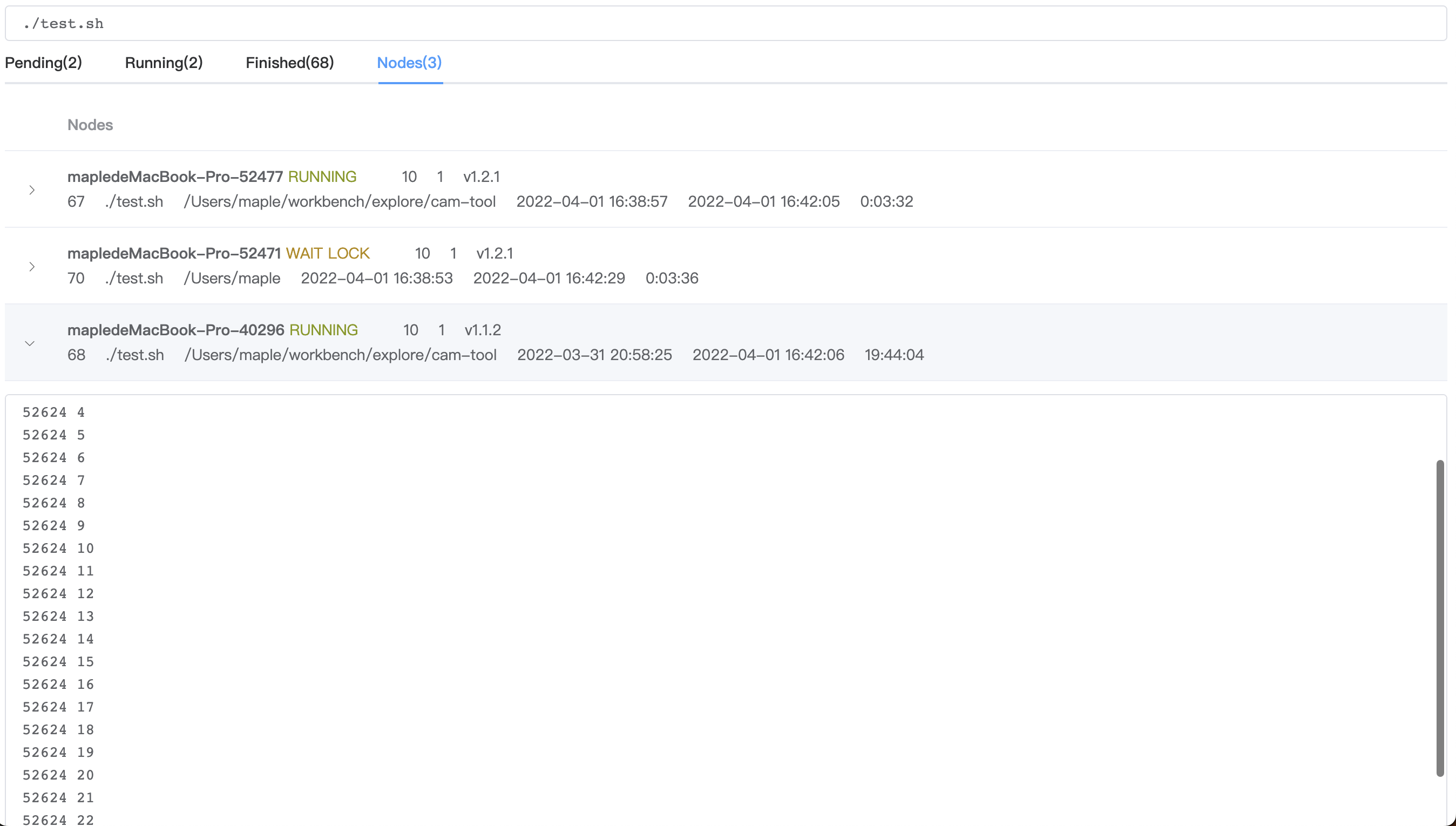
Cam tool provides a simple web console to add, kill, and watch tasks. Please install nodejs before you use this function. Just run the following code to start a web server. Never run this command on any public server.
cam web
Then open the link http://localhost:8257/ and you can see the following user interface:
1 maintainer

Release files for cam-tool 1.3.8
For a detailed explanation of source distributions (sdists) and built distributions (wheels), please see the package formats documentation.
Source distribution (sdist)
| File | Size | Uploaded | |
|---|---|---|---|
| cam-tool-1.3.8.tar.gz | 170.4 kB | Details |
Built distribution (wheel)
| File | Interpreter | ABI | Platform | Reset |
|---|---|---|---|---|
| cam_tool-1.3.8-py3-none-any.whl | Python 3 | none | any | Details |
Total release size: 342.0 kB
Release files / cam-tool-1.3.8.tar.gz
| Download URL | cam-tool-1.3.8.tar.gz |
|---|---|
| Size | 170.4 kB |
| Tags | Source |
|
SHA-256 checksum How to use checksums |
a64aa27fd89bd84870c42f0d2e004da6983062fa8b822c69466b5dd67c46b442
|
|
BLAKE2b-256 checksum How to use checksums |
7e07998651b100f094acdce351af7a74cca3f36bf776e30bbd9efc97240e84d3
|
| Upload date | |
|
Uploaded using Trusted Publishing? What is trusted publishing? |
No |
| Uploaded via |
twine/4.0.1 CPython/3.9.12
|
Release files / cam_tool-1.3.8-py3-none-any.whl
| Download URL | cam_tool-1.3.8-py3-none-any.whl |
|---|---|
| Size | 171.6 kB |
| Tags | Python 3 |
|
SHA-256 checksum How to use checksums |
3bc6015192a50cf43af68b0cebf6addc3811bae7c148d6830bda35fcc901491c
|
|
BLAKE2b-256 checksum How to use checksums |
3bc598c8aad268d9bbda71625236be2ac0df5b37f6664f6f34d907243ba1640a
|
| Upload date | |
|
Uploaded using Trusted Publishing? What is trusted publishing? |
No |
| Uploaded via |
twine/4.0.1 CPython/3.9.12
|














