
Camset
GUI for v4l2-ctl
Description
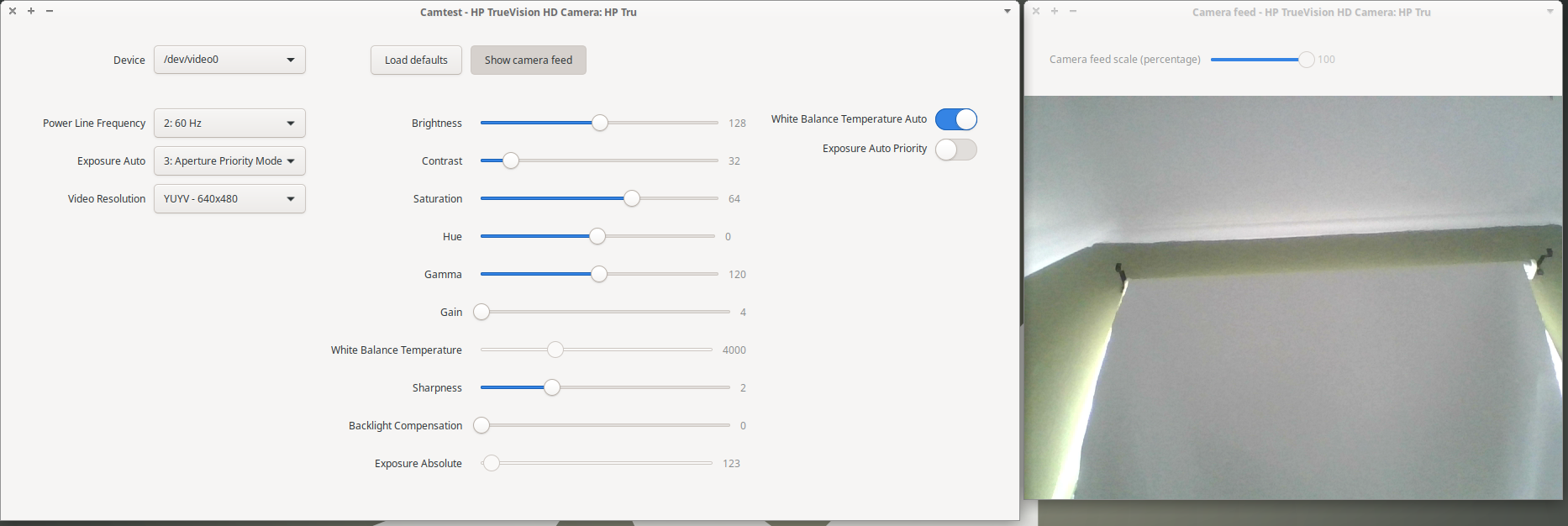
This is a tool for easy GUI adjustments of the Video4Linux (V4L) settings on Linux, using v4l2-ctl as backend. All controls are dynamically generated and the application should work with any V4L device, but has only been tested with webcams. The settings applied will remain active when using the webcam in other applications, for example Skype.
The example_ioctl folder contains some examples of direct ioctl calls for reading and setting V4L values (equivalent to v4l2-ctl --list-formats-ext, v4l2-ctl -L and v4l2-ctl -c), using the v4l2 Python bindnings library. The library has been slightly modified for compatibility with more recent Python versions (tested with 3.8.2) and is included.
Note
The application is WIP in early development, but in a functional state. Testing, issue reporting and suggestions are welcome. Do note that there are other applications that are similar and with more functionality (at least for now). This is just a small project to practice some Python.
Dependencies
Python 3
pip
v4l2-ctl
pkg-config
If running from source (not using the camset pip package) you will also need gi (PyGObject @ pip) and OpenCV (opencv-python @ pip)
Installation
For Ubuntu:
sudo apt-get install python3 python3-pip v4l-utils pkg-configpip3 install camset
(If encountering problems with the cairo dependency, installing these additional packages should resolve it:sudo apt-get install libcairo2-dev libgirepository1.0-devand then repeat step 2).
The pip install includes a .desktop file, which should be picked up by the desktop environment. If camset is not found you may need to set up your path environment, for example (open a terminal and write):
PATH=$PATH:$HOME/.local/bin
or persistently:
echo 'export PATH="$PATH:$HOME/.local/bin"' >> ~/.bashrc
Note for LinuxBrew(HomeBrew) users:
Brew can sometimes take over ld and pkg-config binaries from system installed ones depending on what apps may have been installed via brew in the past.
See: Install fails on pycairo dependency
To fix this install the requried dependencies via brew (this will install a lot of things and take a very long time):
brew install cairo pkg-config pygobject3 gtk+3
Alternatively disable or remove brew components that provide or require pkg-config and ld and then follow the Ubuntu instructions from above.
Notes
Settings can be saved and loaded. If the "Autoload settings" button is checked, camset will look in ~/.config/camset for a settings file with the same name as the device (as suggested when saving settings) and load it when starting the application or when switching to that device.
1 maintainer

Metadata
1 maintainer
Release files for camset 0.0.21
For a detailed explanation of source distributions (sdists) and built distributions (wheels), please see the package formats documentation.
Built distribution (wheel)
| File | Interpreter | ABI | Platform | Actions Reset |
|---|---|---|---|---|
| camset-0.0.21-py3-none-any.whl | Python 3 | none | any | Details for camset-0.0.21-py3-none-any.whl |
Release files / camset-0.0.21-py3-none-any.whl
| Download URL | camset-0.0.21-py3-none-any.whl |
|---|---|
| Size | 86.2 kB |
| Tags | Python 3 |
|
SHA-256 checksum How to use checksums |
f886a46dac0902523381385d2893f66b9f7cf82cb854695e3ef7bb9e1ea80158
|
|
BLAKE2b-256 checksum How to use checksums |
89ea19998afb4da6808a6d3d1e26f2dafafddf50ba3d5029b69cc98da30aa6f4
|
| Upload date | |
|
Uploaded using Trusted Publishing? What is trusted publishing? |
No |
| Uploaded via |
twine/3.8.0 colorama/0.4.4 importlib-metadata/4.6.4 keyring/23.5.0 pkginfo/1.8.2 readme-renderer/34.0 requests-toolbelt/0.9.1 requests/2.25.1 rfc3986/1.5.0 tqdm/4.57.0 urllib3/1.26.5 CPython/3.10.6
|
Security for camset 0.0.21
Provenance
Provenance describes where a file came from. On PyPI, provenance is shared via attestations, which provide a verifiable record of the build or publishing details. View details, limitations and caveats.
No provenance found
None of the files in this release were uploaded with provenance metadata.
A note on package security
PyPI is a repository for distributing packages, not a service for auditing them. While third-party security researchers and our staff do their best to detect and remove malicious packages, PyPI cannot guarantee the quality, security or suitability of any given package.
To learn more about protecting yourself from malicious actors, visit our package security documentation.














