
Camus




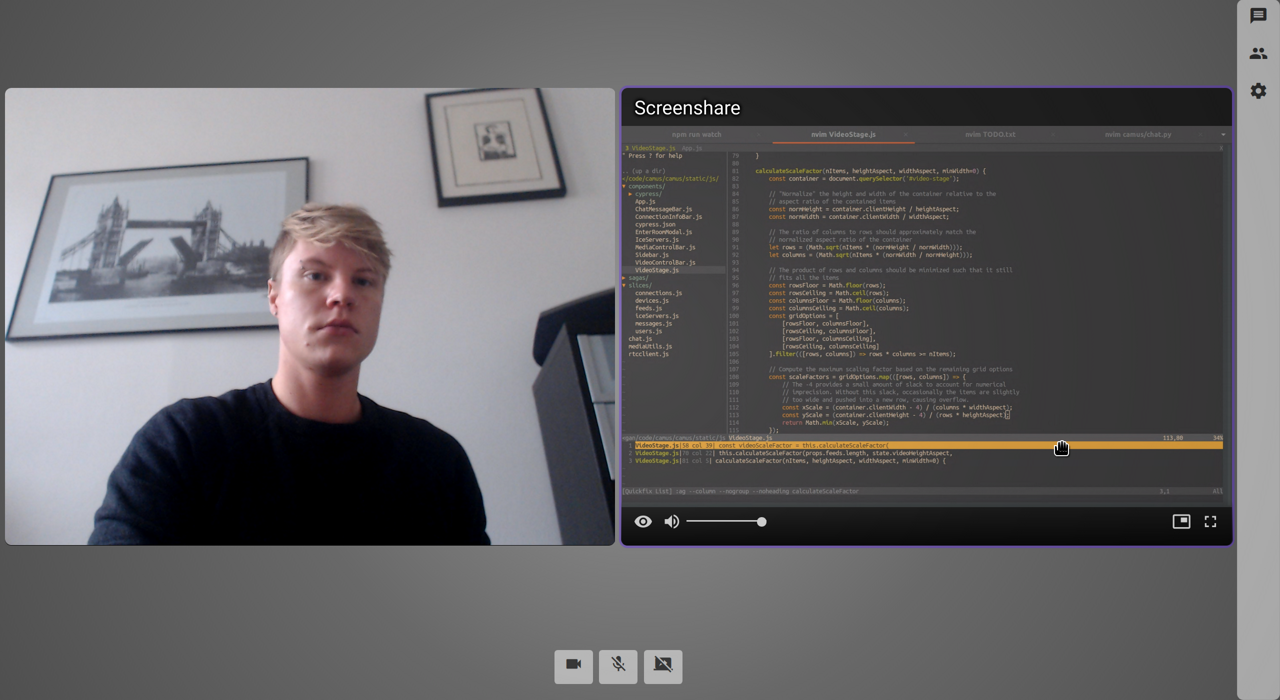
Camus is a group video chat app that uses WebRTC for direct peer-to-peer communication. Users can create and join rooms, stream audio and video with a microphone and webcam, share their screen, and send text messages. You can try a demo at https://camus.chat, or run your own server using Snap, pip, Docker, or Heroku.
Features
Create public or private rooms, optionally with a password and guest limit
Stream audio & video
Share your desktop
Send text messages
Control video feeds – set your camera resolution, toggle fullscreen or picture-in-picture, disable incoming video
Configure custom STUN and TURN servers
Responsive user interface that works on large or small screens
Installation
Snap
Make sure you have snapd installed. Install Camus:
$ sudo snap install camus
Once installed, Camus runs automatically as a Snap service. See the Snap service management documentation for details on starting and stopping services.
Go to localhost:5000 in your browser. For local testing, you can visit the same room in multiple tabs and each tab will act as a separate client.
Pip
Camus requires Python 3.7 or higher since it makes use of Quart and async syntax. As usual, it’s best to use a virtual environment.
Install Camus:
$ pip install camus-chat
Run Camus:
$ camus
Go to localhost:5000 in your browser. For local testing, you can visit the same room in multiple tabs and each tab will act as a separate client.
Docker
You can find a pre-built Docker image on Docker Hub. Use the following command to pull the image and run a container:
$ docker run -d -p 5000:5000 mrgnr/camus
Go to localhost:5000 in your browser. For local testing, you can visit the same room in multiple tabs and each tab will act as a separate client.
Heroku

Simply click the button above or see the deployment documentation for detailed instructions.
Documentation
See the official documentation at https://docs.camus.chat for more information about configuring and running Camus.
Contributing
If you want to make a contribution, please read the Contributing guidelines first.
1 maintainer

Metadata
1 maintainer
Release files for camus-chat 0.3.1
For a detailed explanation of source distributions (sdists) and built distributions (wheels), please see the package formats documentation.
Source distribution (sdist)
| File | Size | Uploaded | |
|---|---|---|---|
| camus-chat-0.3.1.tar.gz | 410.7 kB | Details |
Built distribution (wheel)
| File | Interpreter | ABI | Platform | Reset |
|---|---|---|---|---|
| camus_chat-0.3.1-py3-none-any.whl | Python 3 | none | any | Details |
Total release size: 820.0 kB
Release files / camus-chat-0.3.1.tar.gz
| Download URL | camus-chat-0.3.1.tar.gz |
|---|---|
| Size | 410.7 kB |
| Tags | Source |
|
SHA-256 checksum How to use checksums |
5079171131bec83928f06742745571c2a880326c33c56ab9e1b77224b1004096
|
|
BLAKE2b-256 checksum How to use checksums |
e0fad387328cd71cc2c33ea01f1df1c7e8f35f9ec38fac2b7b6064aa3f900c35
|
| Upload date | |
|
Uploaded using Trusted Publishing? What is trusted publishing? |
No |
| Uploaded via |
twine/3.4.1 importlib_metadata/3.7.3 pkginfo/1.7.0 requests/2.25.1 requests-toolbelt/0.9.1 tqdm/4.59.0 CPython/3.8.6
|
Release files / camus_chat-0.3.1-py3-none-any.whl
| Download URL | camus_chat-0.3.1-py3-none-any.whl |
|---|---|
| Size | 409.4 kB |
| Tags | Python 3 |
|
SHA-256 checksum How to use checksums |
5b7344d87ab6a724a786d963720501aecada4e24298d6a12472b4615bae51861
|
|
BLAKE2b-256 checksum How to use checksums |
0acdf29556465f26df1ce9395eb725f51ef52b033c5e46e5d3b34f0823698641
|
| Upload date | |
|
Uploaded using Trusted Publishing? What is trusted publishing? |
No |
| Uploaded via |
twine/3.4.1 importlib_metadata/3.7.3 pkginfo/1.7.0 requests/2.25.1 requests-toolbelt/0.9.1 tqdm/4.59.0 CPython/3.8.6
|














