





The "caos" Python library is a dependency management and task automation tool that works for Python 3.6, 3.7, 3,8, 3.9, 3.10, 3.11, and 3.12 that requires only pip and virtualenv. It simplifies the management of project dependencies and tasks within Python development. Similar to npm or pnpm in the JavaScript ecosystem, caos allows developers to do:
-
Dependency Tracking: Easily track project dependencies using semantic versioning in a YAML file, eliminating the need for a traditional requirements.txt file.
-
Dependency Installation: Seamlessly install and manage dependencies based on the specified versions, ensuring consistency and reliability in your Python projects.
-
Custom Scripting: Create custom, platform-independent scripts or tasks within the same YAML configuration, making it convenient to automate various aspects of your development workflow.
-
Enhanced Pip Integration: Build on top of pip, caos streamlines interaction with Python packages while providing a more flexible and intuitive configuration format.
Overall, the "caos" library empowers Python developers with a streamlined and user-friendly approach to dependency management and task automation, making it a valuable addition to any Python project.
Requirements
Make sure that you have a working Python >= 3.6 with pip and virtualenv installed and then execute
Example of a web project using CAOS
This code example demonstrates the development of a Flask-based web application while leveraging the "caos" library for dependency management, unit testing, and execution control.
Sample Project Structure:
my_project (Project's root Folder)
|___ caos.yml
|___ main.py
|___ tests
    |___ test.py
Key Components:
main.py: This file contains the Flask application code, including route definitions and business logic.
caos.yml: Instead of a traditional requirements.txt file, we use a YAML file to specify project dependencies and their semantic versioning constraints. "caos" manages the installation of these dependencies.
Also within this YAML file, we define custom tasks and scripts to automate various aspects of our development workflow. These tasks can include running unit tests, starting the Flask development server, or performing other project-specific actions.
Usage:
- Install "caos" using pip:
pip install caos
- Create a python application (main.py for this example)
from flask import Flask
app = Flask(__name__)


@app.route('/')
def hello():
    return "Hello World!"

if __name__ == '__main__':
    app.run(host="127.0.0.1", port="8080")
- Configure the "caos.yml" file with project dependencies and any custom tasks such as running unit tests or starting the Flask app.
virtual_environment: "venv"

dependencies:
  pip: "latest"
  flask: "~1.1.0"

tasks:
  unittest:
    - "caos python -m unittest discover -v ./tests"

  start:
    - "caos python ./main.py"

  test_and_start:
    - unittest
    - start
- Create some unit tests (test.py for this example)
import unittest
from main import app

class TestApp(unittest.TestCase):

    def test_hello_world(self):
        self.app = app.test_client()
        response = self.app.get('/')
        self.assertEqual(200, response.status_code)
        self.assertIn(b'Hello World!', response.data)


if __name__ == '__main__':
    unittest.main()
-
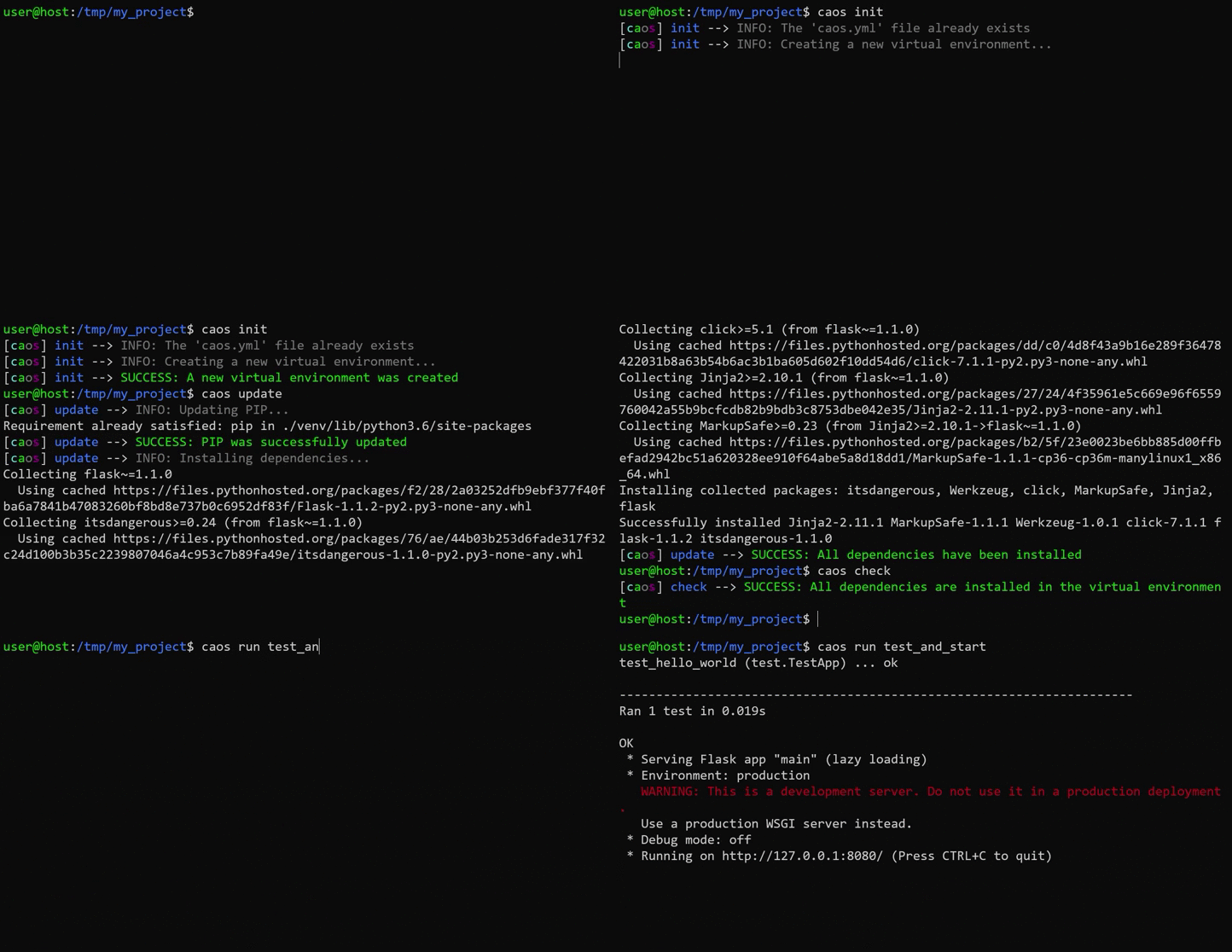
Run "caos" commands to manage dependencies and execute tasks, e.g.:
- "caos init" to create a virtual environment for the project.
- "caos update" to install project dependencies.
- "caos check" to check the right versions of the dependencies are installed.
- "caos run unittest" to run the custom step to execute unit tests.
- "caos run start" to run the custom step to start the Flask development server.
- "caos run test_and_start" to both test first and then start the Flask development server.
Benefits:
Simplified Dependency Management: Using "caos" and the "caos.yml" file streamlines the installation and tracking of project dependencies with semantic versioning.
Efficient Task Automation: Custom tasks defined in "caos.yml" facilitate automation of common development tasks, enhancing productivity.
Improved Project Maintenance: This setup ensures that the project remains organized, allowing for easier collaboration and maintenance.
For more detailed information about the commands available check the Documentation.
1 maintainer

Release files for caos 3.0.1
For a detailed explanation of source distributions (sdists) and built distributions (wheels), please see the package formats documentation.
Source distribution (sdist)
| File | Size | Uploaded | |
|---|---|---|---|
| caos-3.0.1.tar.gz | 70.1 kB | Details |
Built distribution (wheel)
| File | Interpreter | ABI | Platform | Reset |
|---|---|---|---|---|
| caos-3.0.1-py3-none-any.whl | Python 3 | none | any | Details |
Total release size: 159.0 kB
Release files / caos-3.0.1.tar.gz
| Download URL | caos-3.0.1.tar.gz |
|---|---|
| Size | 70.1 kB |
| Tags | Source |
|
SHA-256 checksum How to use checksums |
bb540438539c74c78e7c6fde239d53bd5a9fd8cc4050da29af251e53d54a704c
|
|
BLAKE2b-256 checksum How to use checksums |
defe56378624e294a74361a94198d6540c671413146ae1bc966592c6ac157bb2
|
| Upload date | |
|
Uploaded using Trusted Publishing? What is trusted publishing? |
No |
| Uploaded via |
twine/4.0.2 CPython/3.11.5
|
Release files / caos-3.0.1-py3-none-any.whl
| Download URL | caos-3.0.1-py3-none-any.whl |
|---|---|
| Size | 89.0 kB |
| Tags | Python 3 |
|
SHA-256 checksum How to use checksums |
b8c564598100113c41d89db9f85c6fd51cdf74cac237e7e9dd520c14d54e620d
|
|
BLAKE2b-256 checksum How to use checksums |
c5c816b27f645da2ed110c92a7a4b7bb1e4160088d22c2a35e6368139b08088c
|
| Upload date | |
|
Uploaded using Trusted Publishing? What is trusted publishing? |
No |
| Uploaded via |
twine/4.0.2 CPython/3.11.5
|














