
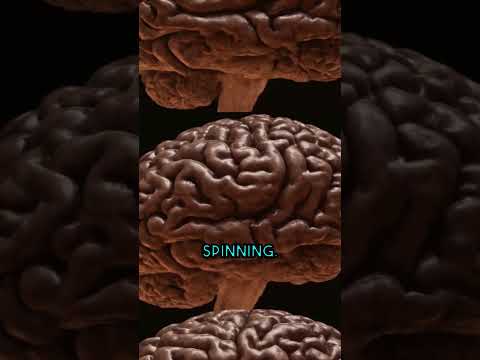
Check out these examples with captions added using Captametropolis (by CurioBurstz):

Captametropolis



Captametropolis brings next-level automated captions to your YouTube Shorts and other videos using Whisper and MoviePy.
Introduction • Features • Installation • Usage • Customization • License
👋 Welcome to Captametropolis, a tool designed to make your videos even more engaging with stunning automatic captions! The process is seamless, fast, and adds flair to your content.
Captametropolis ✨
Introduction 📖
Forked from unconv/captacity
Just like captacity, but BIGGER!
Captametropolis takes video captioning to a new level! Whether you're making YouTube Shorts, TikToks, or any other type of video content, Captametropolis helps you effortlessly add beautiful, dynamic captions with precision using Whisper for speech recognition and MoviePy for video editing.
Features 🚀
- Automatic Captions: Powered by Whisper, Captametropolis transcribes your video and adds captions with ease.
- Custom Fonts & Styles: Customize your captions with unique fonts, colors, sizes, shadows, and more.
- Highlight Words: Focus attention on important parts by highlighting specific words in real-time.
- Local & API Whisper Support: Use OpenAI's Whisper locally or via API for transcription.
- Programmatic Integration: Easily integrate Captametropolis into your Python projects.
Installation 🛠️
Prerequisites 📦
Make sure to install the following:
- FFmpeg: Download the latest version from here and ensure it’s added to your
PATH. - ImageMagick: Download from here, making sure to select:
- Install legacy utilities (e.g.
convert) - Add application directory to your system
PATH.
- Install legacy utilities (e.g.
Install Captametropolis ⚙️
To install the latest version of Captametropolis, run the following command:
pip install captametropolis -U
Once installed, you can add captions to a video by running:
captametropolis <video_file> <output_file>
Font Registration 🎨
To use custom fonts in your captions, register them with ImageMagick. Run the following in admin mode:
captametropolis register_font "path/to/your/font.ttf" -qr
Alternatively, register fonts programmatically in Python:
from captametropolis.utils import register_font

register_font("path/to/your/font.ttf", quiet_run=True)  # Will also ask for admin rights
Programmatic Use 💻
Easily add captions to your videos programmatically using Captametropolis:
import captametropolis

captametropolis.add_captions(
    video_file="my_short.mp4",
    output_file="my_short_with_captions.mp4",
    font_path="path/to/your/font.ttf",  # Use your custom font here
)
Customization 🎨
Customize your captions with full control over fonts, colors, effects, and more! Check out the customizable parameters:
captametropolis.add_captions(
    video_file="my_short.mp4",
    output_file="my_short_with_captions.mp4",

    font_path = "/path/to/your/font.ttf",
    font_size = 130,
    font_color = "yellow",

    stroke_width = 3,
    stroke_color = "black",

    shadow_strength = 1.0,
    shadow_blur = 0.1,

    highlight_current_word = True,
    highlight_color = "red",

    line_count=1,
    rel_width = 0.8,  # Relative width of the text box
)
Using Whisper Locally vs API 🧠
By default, Captametropolis uses OpenAI’s Whisper locally if the openai-whisper package is installed. If you want to use the OpenAI Whisper API instead, you can force this behavior:
captametropolis.add_captions(
    video_file="my_short.mp4",
    output_file="my_short_with_captions.mp4",
    use_local_whisper=False,  # Use the OpenAI Whisper API
)
To install Whisper locally, run:
pip install captametropolis[local] -U
Conclusion 🎉
Captametropolis makes adding captions to your videos as simple as it is powerful! Enhance your videos and reach a wider audience with engaging captions. 🚀
License 📜
This project is licensed under the MIT License. See the LICENSE file for more details.
1 maintainer

Download files
Download the file for your platform. If you're not sure which to choose, learn more about installing packages.
Source Distribution
Built Distribution
Filter files by name, interpreter, ABI, and platform.
If you're not sure about the file name format, learn more about wheel file names.
Copy a direct link to the current filters
File details
Details for the file captametropolis-1.1.3.tar.gz.
File metadata
- Download URL: captametropolis-1.1.3.tar.gz
- Upload date:
- Size: 161.4 kB
- Tags: Source
- Uploaded using Trusted Publishing? Yes
- Uploaded via:
twine/6.1.0 CPython/3.12.9
File hashes
| Algorithm | Hash digest | |
|---|---|---|
| SHA256 |
5383810c2fcf93274003cd4f1f1f4b0f3221297fefc231fa20953412baf91762
|
|
| MD5 |
070f6aa2da7806b66a67eb84ee4dd886
|
|
| BLAKE2b-256 |
10be3745db6e720b960f0f6a4a5e74d37fe04dff809fcc536b9492574cd7b3c2
|
Provenance
The following attestation bundles were made for captametropolis-1.1.3.tar.gz:
Publisher:
publish.yml on AppSolves/captametropolis
-
Statement:
-
Statement type:
https://in-toto.io/Statement/v1 -
Predicate type:
https://docs.pypi.org/attestations/publish/v1 -
Subject name:
captametropolis-1.1.3.tar.gz -
Subject digest:
5383810c2fcf93274003cd4f1f1f4b0f3221297fefc231fa20953412baf91762 - Sigstore transparency entry: 258024597
- Sigstore integration time:
-
Permalink:
AppSolves/captametropolis@2e501a2ea9c667f805ecb1977080f6eabf3fa2e8 -
Branch / Tag:
refs/tags/v1.1.3 - Owner: https://github.com/AppSolves
-
Access:
public
-
Token Issuer:
https://token.actions.githubusercontent.com -
Runner Environment:
github-hosted -
Publication workflow:
publish.yml@2e501a2ea9c667f805ecb1977080f6eabf3fa2e8 -
Trigger Event:
push
-
Statement type:
File details
Details for the file captametropolis-1.1.3-py3-none-any.whl.
File metadata
- Download URL: captametropolis-1.1.3-py3-none-any.whl
- Upload date:
- Size: 159.0 kB
- Tags: Python 3
- Uploaded using Trusted Publishing? Yes
- Uploaded via:
twine/6.1.0 CPython/3.12.9
File hashes
| Algorithm | Hash digest | |
|---|---|---|
| SHA256 |
2c32aabb8fe3932dfe2a601fd48c1353d36f0604d5ef4901923e6356826eb9ea
|
|
| MD5 |
b151729d54269db79a691cddefc49597
|
|
| BLAKE2b-256 |
dd1d9fe39c16b5db1c0ee24ef465146abbff587cd85e4794ed9d61b683c351d8
|
Provenance
The following attestation bundles were made for captametropolis-1.1.3-py3-none-any.whl:
Publisher:
publish.yml on AppSolves/captametropolis
-
Statement:
-
Statement type:
https://in-toto.io/Statement/v1 -
Predicate type:
https://docs.pypi.org/attestations/publish/v1 -
Subject name:
captametropolis-1.1.3-py3-none-any.whl -
Subject digest:
2c32aabb8fe3932dfe2a601fd48c1353d36f0604d5ef4901923e6356826eb9ea - Sigstore transparency entry: 258024604
- Sigstore integration time:
-
Permalink:
AppSolves/captametropolis@2e501a2ea9c667f805ecb1977080f6eabf3fa2e8 -
Branch / Tag:
refs/tags/v1.1.3 - Owner: https://github.com/AppSolves
-
Access:
public
-
Token Issuer:
https://token.actions.githubusercontent.com -
Runner Environment:
github-hosted -
Publication workflow:
publish.yml@2e501a2ea9c667f805ecb1977080f6eabf3fa2e8 -
Trigger Event:
push
-
Statement type:














