
capture-device-list


Simplest way to connect DirectShow Windows API with FFmpeg and list all capture devices with alternative names. The user can save the results to a file or print either "video", "audio", or both "audio, video" devices.
Screenshots
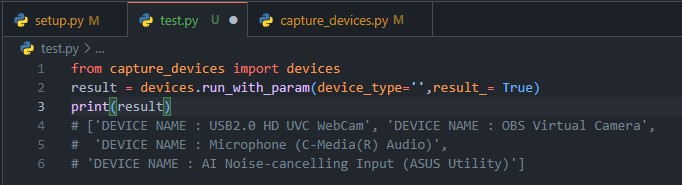
Setting Options
| Parameter | Values | Description | Type |
|---|---|---|---|
| device_type | 'audio' , 'video', 'audio_video' |
Device Type | str |
| alt_name | True , False |
Show alternative name | bool |
| result_ | True , False |
Return result | bool |
| list_all | True , False |
Show all devices | bool |
| save | True , False |
Save result to text | bool |
Setting Arguments
| Description | Values |
|---|---|
| Only audio devices | '-audio', '-a' |
| Only video devices | '-video', '-v' |
| Only audio and video devices | '-audio_video', '-av' |
| Show alternative names | '-alternative', '-alt' |
| Show all devices | '-list_all', '-l' |
| Save to text | '-save', '-s' |
Build
To build this project, follow these commands
  git clone https://github.com/egemengulpinar/capture-device-list.git
  cd capture-device-list
  python setup.py sdist bdist_wheel
Usage with Arguments
First clone the repo and go to directory. After, based on arguments table, follow the syntax below.
  python capture_devices.py -list_all -save
  # or
  python capture_devices.py -audio -alternative -save
Usage with pip
First install the packages using with pip
pip install capture-devices
After, you can import package similarly:
from capture_devices import devices
For using this library, follow these structure:
result = devices.run_with_param(device_type='audio', alt_name=True,result_= True)
print(result)

# or

devices.run_with_param(alt_name=True,list_all=True)
License
1 maintainer

Metadata
1 maintainer
Release files for capture-devices 4.2
For a detailed explanation of source distributions (sdists) and built distributions (wheels), please see the package formats documentation.
Source distribution (sdist)
| File | Size | Uploaded | |
|---|---|---|---|
| capture_devices-4.2.tar.gz | 5.2 kB | Details |
Built distribution (wheel)
| File | Interpreter | ABI | Platform | Reset |
|---|---|---|---|---|
| capture_devices-4.2-py3-none-any.whl | Python 3 | none | any | Details |
Total release size: 11.0 kB
Release files / capture_devices-4.2.tar.gz
| Download URL | capture_devices-4.2.tar.gz |
|---|---|
| Size | 5.2 kB |
| Tags | Source |
|
SHA-256 checksum How to use checksums |
336aa083d29dbe0637368039e384b545c07cc31c7810b4466a95201de4945506
|
|
BLAKE2b-256 checksum How to use checksums |
3293bc7af41c0495db89ee255abbe19a4a079b451544e88a19ebe9531f66d64f
|
| Upload date | |
|
Uploaded using Trusted Publishing? What is trusted publishing? |
No |
| Uploaded via |
twine/4.0.2 CPython/3.9.12
|
Release files / capture_devices-4.2-py3-none-any.whl
| Download URL | capture_devices-4.2-py3-none-any.whl |
|---|---|
| Size | 5.8 kB |
| Tags | Python 3 |
|
SHA-256 checksum How to use checksums |
a6ff4b4dfd400a207dd3d51c71b07b8e020b3f8b435e0d9b7fd9c237943f8212
|
|
BLAKE2b-256 checksum How to use checksums |
5d7f6947f87496670ca4b86cec5353872232905d87d5a00183e040ce27802241
|
| Upload date | |
|
Uploaded using Trusted Publishing? What is trusted publishing? |
No |
| Uploaded via |
twine/4.0.2 CPython/3.9.12
|














