
Cellular Annotation & Perception Pipeline
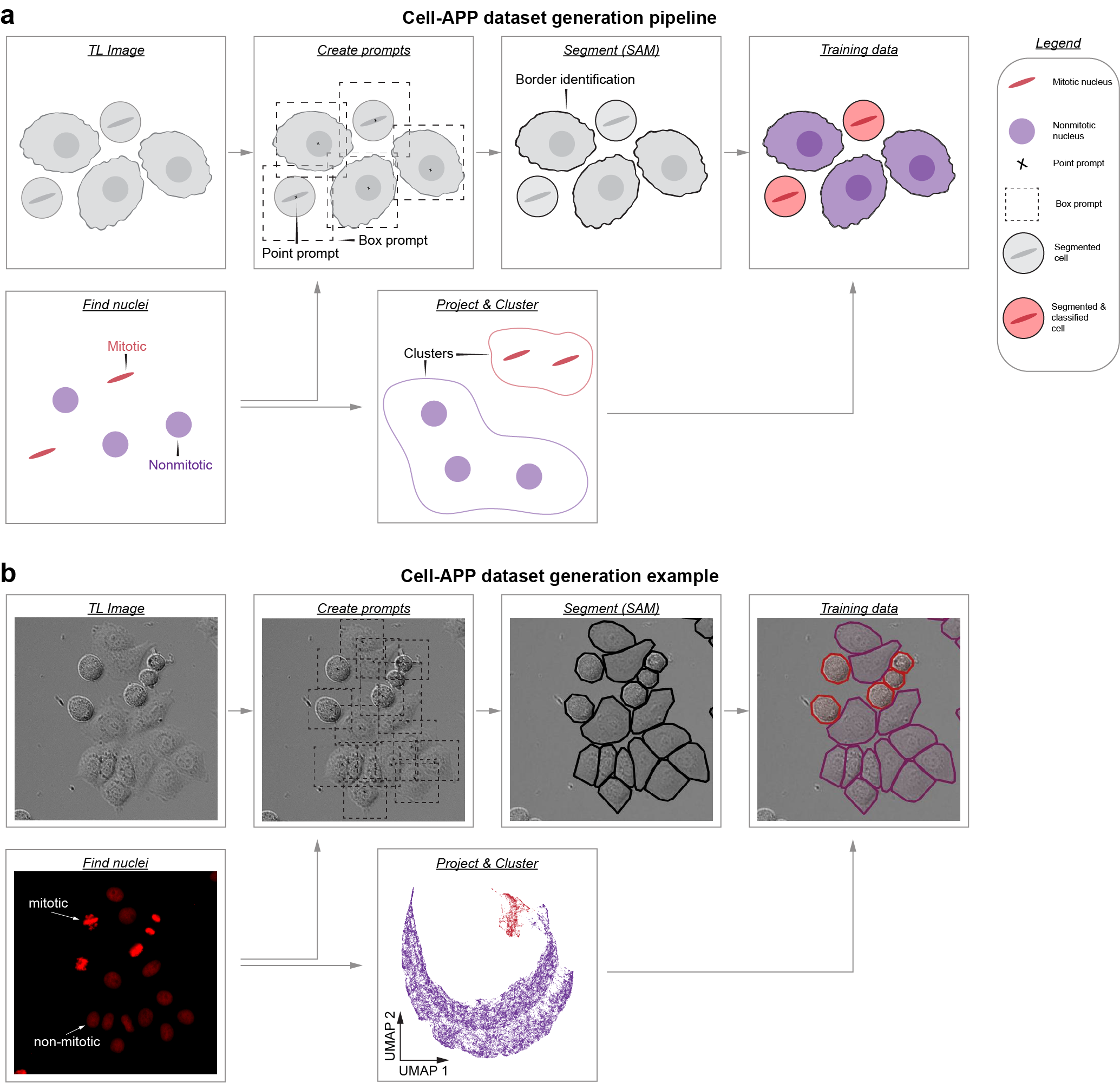
Description
Cell-APP automates the generation of cell masks (and classifications too!), enabling users to create custom instance segmentation training datasets in transmitted-light microscopy.
To learn more, read our preprint: https://www.biorxiv.org/content/10.1101/2025.01.23.634498v2.
For questions regarding installation or usage, contact: anishjv@umich.edu
Usage
-
Users who wish to segment HeLa, U2OS, HT1080, or RPE-1 cell lines may try our pre-trained model. These models can be used through our GUI (see Installation) and their weights can be downloaded at: https://zenodo.org/communities/cellapp/records?q=&l=list&p=1&s=10. To learn about using pre-trained models through the GUI, see this video:
-
Users who wish to segment their own cell lines may: (a) try our "general" model (GUI/weight download) or (b) train a custom model by creating an instance segmentation dataset via our Dataset Generation GUI (see Installation). To learn about creating custom datasets through the GUI, see this video:
Installation
cell-AAP requires Python 3.11–3.12. We recommend installing into a clean virtual environment (via conda or venv) to avoid dependency conflicts.
1. Create and activate an environment
With conda:
conda create -n cellapp -c conda-forge python=3.11
conda activate cellapp
Or with venv:
python -m venv cellapp
source cellapp/bin/activate  # Linux/Mac
cellapp\Scripts\activate     # Windows PowerShell
2. Install Pytorch:
conda install -c pytorch -c conda-forge pytorch torchvision #Mac
pip install torch torchvision #Linux/Windows
3. Install Cell-APP:
pip install cell-AAP
4. Finally, detectron2 must be built from source atop Cell-APP:
#Mac
git clone https://github.com/facebookresearch/detectron2.git
CC=clang CXX=clang++ ARCHFLAGS="-arch arm64" python -m pip install -e detectron2 --no-build-isolation

#Linux/Windows
git clone https://github.com/facebookresearch/detectron2.git
python -m pip install -e detectron2 --no-build-isolation
Napari Plugin Usage
- To open napari simply type "napari" into the command line, ensure that you are working the correct environment
- To instantiate the plugin, navigate to the "Plugins" menu and hover over "cell-AAP"
- You should see three plugin options; two relate to Usage 1; one relates to Usage 2.
1 maintainer

Metadata
1 maintainer
Release files for cell-AAP 1.0.7
For a detailed explanation of source distributions (sdists) and built distributions (wheels), please see the package formats documentation.
Source distribution (sdist)
| File | Size | Uploaded | Provenance | Actions |
|---|---|---|---|---|
| cell_aap-1.0.7.tar.gz | 73.6 MB | Without provenance | Details for cell_aap-1.0.7.tar.gz |
Built distribution (wheel)
| File | Interpreter | ABI | Platform | Actions Reset |
|---|---|---|---|---|
| cell_aap-1.0.7-py3-none-any.whl | Python 3 | none | any | Details for cell_aap-1.0.7-py3-none-any.whl |
Total release size: 73.7 MB
Release files / cell_aap-1.0.7.tar.gz
| Download URL | cell_aap-1.0.7.tar.gz |
|---|---|
| Size | 73.6 MB |
| Tags | Source |
|
SHA-256 checksum How to use checksums |
f55e3440dec5c6e45d4c08b0dcb149e5dacde5ab59842c54b89c8bca7e01b785
|
|
BLAKE2b-256 checksum How to use checksums |
7062f7dae7c4882257bf8e0edba426ee0826be351a57fb121fef61e72f3d9e4f
|
| Upload date | |
|
Uploaded using Trusted Publishing? What is trusted publishing? |
No |
| Uploaded via |
twine/6.1.0 CPython/3.12.2
|
Release files / cell_aap-1.0.7-py3-none-any.whl
| Download URL | cell_aap-1.0.7-py3-none-any.whl |
|---|---|
| Size | 60.5 kB |
| Tags | Python 3 |
|
SHA-256 checksum How to use checksums |
6e5528187ab3577fe709df04ab3c233f36d1ec3d8283cf98a73b737ea4e78a9c
|
|
BLAKE2b-256 checksum How to use checksums |
43399c56f6ddc18bdef0ea54a71e70ffb5de928ecd2b68146db37af6a9f2664b
|
| Upload date | |
|
Uploaded using Trusted Publishing? What is trusted publishing? |
No |
| Uploaded via |
twine/6.1.0 CPython/3.12.2
|
Security for cell-AAP 1.0.7
Provenance
Provenance describes where a file came from. On PyPI, provenance is shared via attestations, which provide a verifiable record of the build or publishing details. View details, limitations and caveats.
No provenance found
None of the files in this release were uploaded with provenance metadata.
A note on package security
PyPI is a repository for distributing packages, not a service for auditing them. While third-party security researchers and our staff do their best to detect and remove malicious packages, PyPI cannot guarantee the quality, security or suitability of any given package.
To learn more about protecting yourself from malicious actors, visit our package security documentation.














