
This package has moved
cellfinder-napari has merged with it's backend code and is now available as a single package called cellfinder.
We recommend you uninstall cellfinder-napari and instead use the functionality provided in the cellfinder package.
These changes are part of our wider restructuring of the BrainGlobe suite of tools and analysis pipelines, which you can keep up to date with on our blog.
cellfinder-napari














Efficient cell detection in large images (e.g. whole mouse brain images)
cellfinder-napari is a front-end to cellfinder-core to allow ease of use within the napari multidimensional image viewer. For more details on this approach, please see Tyson, Rousseau & Niedworok et al. (2021). This algorithm can also be used within the original
cellfinder software for
whole-brain microscopy analysis.
cellfinder-napari, cellfinder and cellfinder-core were developed by Charly Rousseau and Adam Tyson in the Margrie Lab, based on previous work by Christian Niedworok, generously supported by the Sainsbury Wellcome Centre.
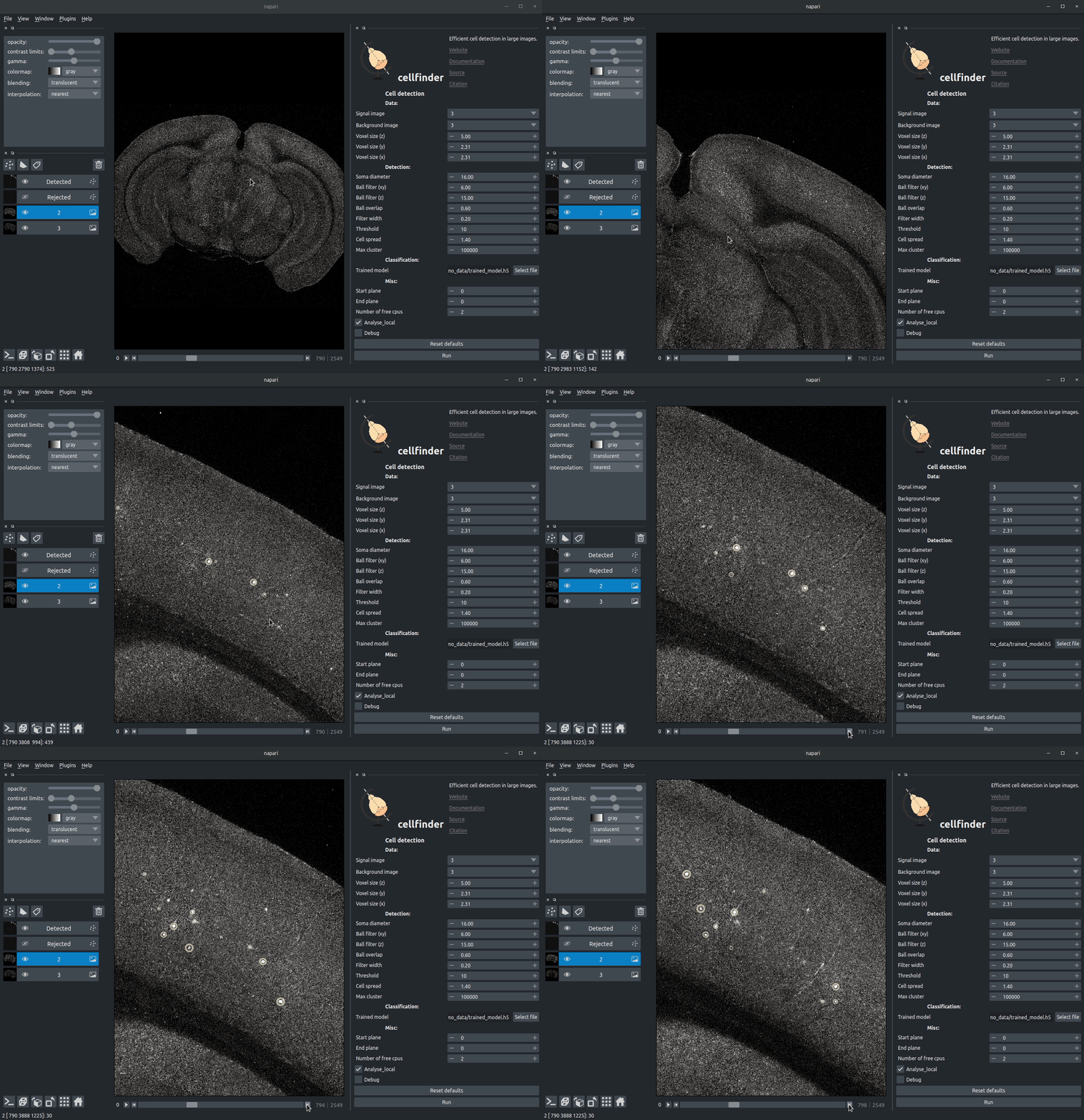
Visualising detected cells in the cellfinder napari plugin
Instructions
Installation
Once you have installed napari. You can install napari either through the napari plugin installation tool, or directly from PyPI with:
pip install cellfinder-napari
Usage
Full documentation can be found here.
This software is at a very early stage, and was written with our data in mind. Over time we hope to support other data types/formats. If you have any questions or issues, please get in touch on the forum or by raising an issue.
Illustration
Introduction
cellfinder takes a stitched, but otherwise raw dataset with at least two channels:
- Background channel (i.e. autofluorescence)
- Signal channel, the one with the cells to be detected:

Cell candidate detection
Classical image analysis (e.g. filters, thresholding) is used to find cell-like objects (with false positives):

Cell candidate classification
A deep-learning network (ResNet) is used to classify cell candidates as true cells or artefacts:

Contributing
Contributions to cellfinder-napari are more than welcome. Please see the developers guide.
Citing cellfinder
If you find this plugin useful, and use it in your research, please cite the paper outlining the cell detection algorithm:
Tyson, A. L., Rousseau, C. V., Niedworok, C. J., Keshavarzi, S., Tsitoura, C., Cossell, L., Strom, M. and Margrie, T. W. (2021) “A deep learning algorithm for 3D cell detection in whole mouse brain image datasets’ PLOS Computational Biology, 17(5), e1009074 https://doi.org/10.1371/journal.pcbi.1009074
If you use this, or any other tools in the brainglobe suite, please let us know, and we'd be happy to promote your paper/talk etc.
1 maintainer

Metadata
1 maintainer
Release files for cellfinder-napari 1.0.2
For a detailed explanation of source distributions (sdists) and built distributions (wheels), please see the package formats documentation.
Source distribution (sdist)
| File | Size | Uploaded | Provenance | Actions |
|---|---|---|---|---|
| cellfinder-napari-1.0.2.tar.gz | 50.0 kB | Without provenance | Details for cellfinder-napari-1.0.2.tar.gz |
Built distribution (wheel)
| File | Interpreter | ABI | Platform | Actions Reset |
|---|---|---|---|---|
| cellfinder_napari-1.0.2-py3-none-any.whl | Python 3 | none | any | Details for cellfinder_napari-1.0.2-py3-none-any.whl |
Total release size: 99.0 kB
Release files / cellfinder-napari-1.0.2.tar.gz
| Download URL | cellfinder-napari-1.0.2.tar.gz |
|---|---|
| Size | 50.0 kB |
| Tags | Source |
|
SHA-256 checksum How to use checksums |
e87cb277520a35e60edfe692b908a48666f390136777ef9b482fcc6e604595e8
|
|
BLAKE2b-256 checksum How to use checksums |
9bb36753552b628fc0e5e8267862a24a47d8a65e060f82b6e89b56dd26409bb3
|
| Upload date | |
|
Uploaded using Trusted Publishing? What is trusted publishing? |
No |
| Uploaded via |
twine/4.0.2 CPython/3.9.18
|
Release files / cellfinder_napari-1.0.2-py3-none-any.whl
| Download URL | cellfinder_napari-1.0.2-py3-none-any.whl |
|---|---|
| Size | 49.0 kB |
| Tags | Python 3 |
|
SHA-256 checksum How to use checksums |
43e7a3b18a707cd774bf346570d3f176dc7fa1be62f9e515ca6c9ffcd7fda646
|
|
BLAKE2b-256 checksum How to use checksums |
826e8fa377cd7a03b644b930b3ea6cca7bb92b91f68eff54ab6c8e10be923a26
|
| Upload date | |
|
Uploaded using Trusted Publishing? What is trusted publishing? |
No |
| Uploaded via |
twine/4.0.2 CPython/3.9.18
|
Security for cellfinder-napari 1.0.2
Provenance
Provenance describes where a file came from. On PyPI, provenance is shared via attestations, which provide a verifiable record of the build or publishing details. View details, limitations and caveats.
No provenance found
None of the files in this release were uploaded with provenance metadata.
A note on package security
PyPI is a repository for distributing packages, not a service for auditing them. While third-party security researchers and our staff do their best to detect and remove malicious packages, PyPI cannot guarantee the quality, security or suitability of any given package.
To learn more about protecting yourself from malicious actors, visit our package security documentation.














