
Certificates Mailer




Automate sending event's certificates by email.
Uses exported information from EventoL, generate certificates in PDF, and mail them to the corresponding receiver.
Install
virtualenv -p python3 somewhere cd somewhere source bin/activate pip install certmailer
or using fades
fades -d certmailer -x certmail
or add to your ~/.bashrc
certmail() { fades -d certmailer -x certmail $@; }
Usage
Create an account in MailJet, to send SMTP.
Configure
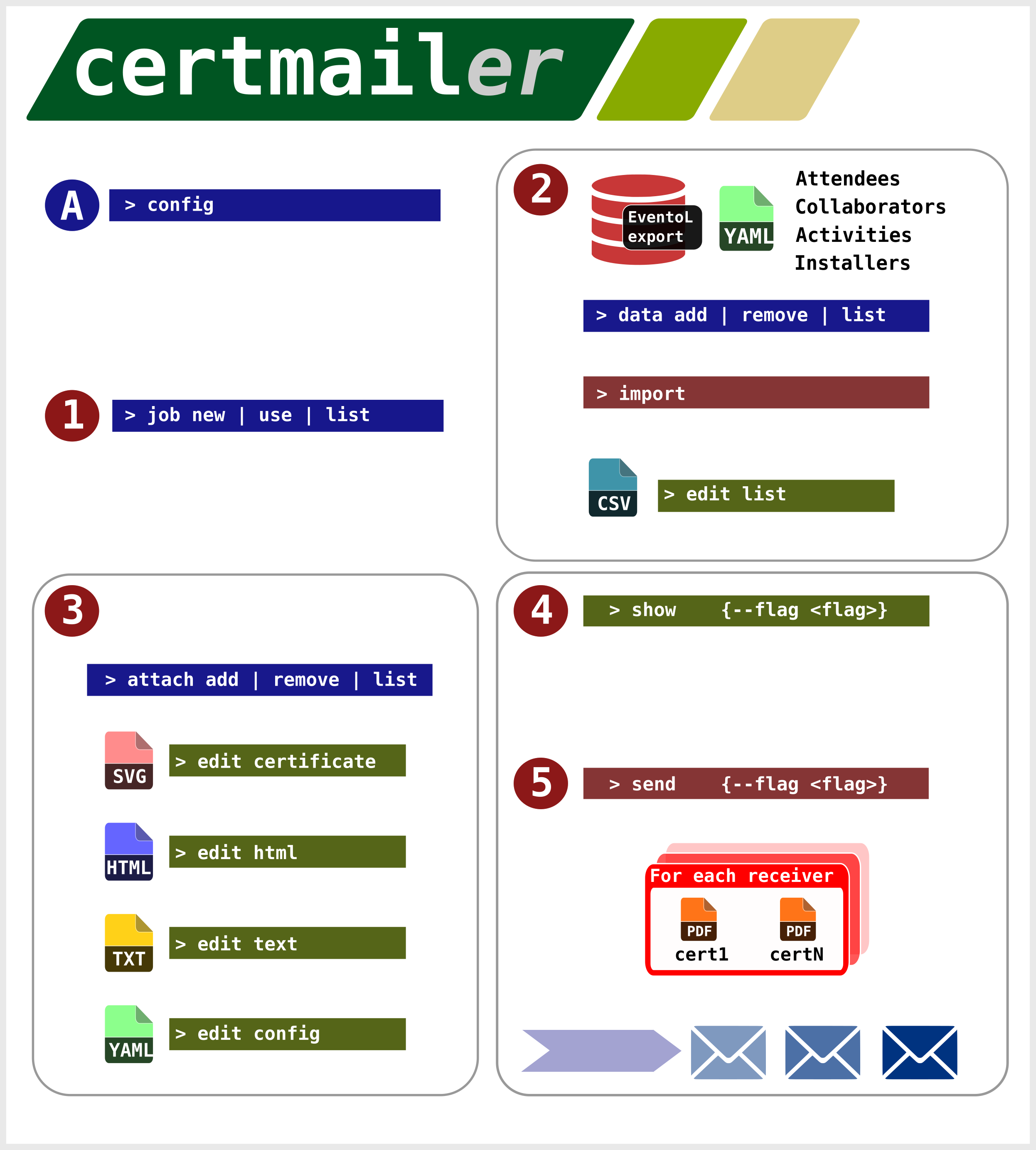
certmail config
Type the api key and the secret key give to you by MailJet service
Create a new job
certmail job new
Add data
Go to the EventoL instance, login, and choose https://eventol.domain.com/admin
Select Activity, Attendees, Collaborators and Installers, and export one by one to yaml format.
Add them using
certmail data add *.yaml
Create the list of recipients
certmail import
this will parse the yaml files exported from EventoL, and create a csv.
Check the list of receivers
certmail edit list
It'll open the default editor on every case.
If you don't want that somebody receives an email, clear «send mail?» cell.
If you want to add some certificate, add yes to the corresponding cell.
And if you don't want to send a certificate, clear the corresponding cell.
Add attachments and edit format
Add attachments using
certmail attach add
Edit email's text part
certmail edit text
Edit email's HTML part
certmail edit html
Edit certificate in InkScape
certmail edit certificate
Run everything
certmail send
This will create the certificates pdf to send, All the information will be stored on the «cache//outbox» directory.
This will send every mail. Every mail sent will be logged.
If for some reason any mail isn't sended, it will
In linux systems, uses memory to store intermediate results, to speed up and to better use hard disks.
certmail send --flag
The flag is used to send only the emails that are flagged in the send column with the word .
Requirements
- Python 3
- PyYaml
- mailjet-rest
- click
Dev Instructions
git clone git@github.com:marian-vignau/certmailer.git virtualenv env source env/bin/activate pip install -e .
Contributing
-
Fork it!
-
Create your feature branch:
git checkout -b my-new-feature -
Commit your changes:
git commit -am 'Add some feature' -
Push to the branch:
git push origin my-new-feature -
Submit a pull request :D
TODO
- Extend documentation
- Digital signature
Credits
- María Andrea Vignau
1 maintainer

Release files for certmailer 2.0.0
For a detailed explanation of source distributions (sdists) and built distributions (wheels), please see the package formats documentation.
Source distribution (sdist)
| File | Size | Uploaded | |
|---|---|---|---|
| certmailer-2.0.0.tar.gz | 19.5 kB | Details |
Built distribution (wheel)
| File | Interpreter | ABI | Platform | Reset |
|---|---|---|---|---|
| certmailer-2.0.0-py3-none-any.whl | Python 3 | none | any | Details |
Total release size: 57.7 kB
Release files / certmailer-2.0.0.tar.gz
| Download URL | certmailer-2.0.0.tar.gz |
|---|---|
| Size | 19.5 kB |
| Tags | Source |
|
SHA-256 checksum How to use checksums |
b9122459e83917c5bb44474faf5fb4a3f7f6af1a82c37e0e60d9282c9ae9e599
|
|
BLAKE2b-256 checksum How to use checksums |
4f80b32d570ecd60190307516ef60a935ad2bbe6a081038b9ea6cd38746af9cc
|
| Upload date | |
|
Uploaded using Trusted Publishing? What is trusted publishing? |
No |
| Uploaded via |
twine/3.1.1 pkginfo/1.5.0.1 requests/2.22.0 setuptools/41.2.0 requests-toolbelt/0.9.1 tqdm/4.41.1 CPython/3.8.0
|
Release files / certmailer-2.0.0-py3-none-any.whl
| Download URL | certmailer-2.0.0-py3-none-any.whl |
|---|---|
| Size | 38.2 kB |
| Tags | Python 3 |
|
SHA-256 checksum How to use checksums |
f9d8122f5c9cfc106b38413d153b016bc47b9d433dbcd4fe75b8a1818fe04a77
|
|
BLAKE2b-256 checksum How to use checksums |
d2bf5ef132e129053cad7b94891bb93a97377444cf60baf697671c4d8d51a696
|
| Upload date | |
|
Uploaded using Trusted Publishing? What is trusted publishing? |
No |
| Uploaded via |
twine/3.1.1 pkginfo/1.5.0.1 requests/2.22.0 setuptools/41.2.0 requests-toolbelt/0.9.1 tqdm/4.41.1 CPython/3.8.0
|














