


Lightweight Python wrapper for Cesium.js. Mainly intended to be used with Jupyter Notebook.
Installation
Use pip.
pip install cesiumpyExample
Running following script on Jupyter Notebook will show an embedded interactive 3D map.
>>> import cesiumpy

>>> v = cesiumpy.Viewer()
>>> v.entities.add(cesiumpy.Box(dimensions=(40e4, 30e4, 50e4),
...                             material=cesiumpy.color.RED, position=(-120, 40, 0))
>>> v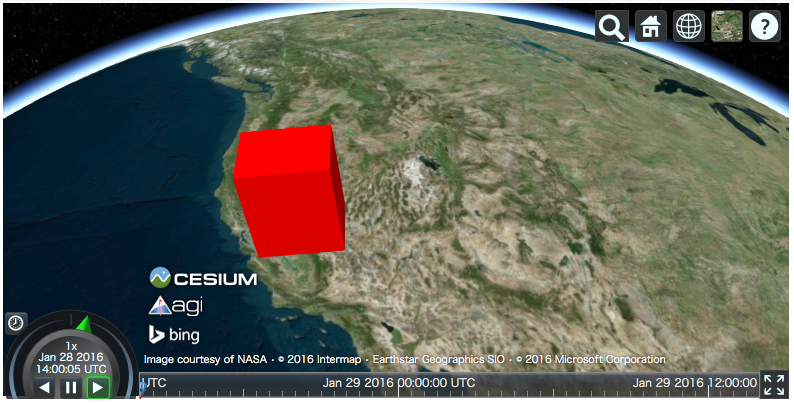
Documentation
Bundled Datasets
World countries: https://github.com/mledoze/countries (ODbL)
Dependencies
geopy, traitlets, six and enum34 (Python 3.3 or earlier)
(Optional) scipy and shapely
1 maintainer

Metadata
1 maintainer
Release files for cesiumpy 0.3.3
For a detailed explanation of source distributions (sdists) and built distributions (wheels), please see the package formats documentation.
Source distribution (sdist)
| File | Size | Uploaded | |
|---|---|---|---|
| cesiumpy-0.3.3.tar.gz | 4.6 MB | Details |
Release files / cesiumpy-0.3.3.tar.gz
| Download URL | cesiumpy-0.3.3.tar.gz |
|---|---|
| Size | 4.6 MB |
| Tags | Source |
|
SHA-256 checksum How to use checksums |
41cc3ce40dff0351fb928b39938d856627ee7c44bc96642e3fc6bd9118d9cdb8
|
|
BLAKE2b-256 checksum How to use checksums |
204d079f09eed2ab0123c21a4728470f3c62b6bf5f6c7bf00d879f6dc41bcd3d
|
| Upload date | |
|
Uploaded using Trusted Publishing? What is trusted publishing? |
No |














