
cfn-docgen - AWS CloudFormation Document Generator







Generate human-readable documents from AWS CloudFormation yaml/json templates.
Notice
We have made breaking changes from v0.7 to current versions.
Example
Given that you created some cfn template yaml file. When you use cfn-docgen cli. Then, you can generate markdown document.
$ cfn-docgen docgen \
    --format markdown \
    --source docs/sample-template.yaml \
    --dest ./docs/
[INFO] successfully generate document [./docs/sample-template.md] from template [docs/sample-template.yaml]
The left image is a source cfn template file and the right image is a generated document markdown.
For full example, see docs folder

Install and How to use
CLI
$ pip install cfn-docgen

# you can also geenrate a document from a template at S3 bucket and upload it directory.
$ cfn-docgen docgen \
  --source s3://bucket/prefix/sample-template.yaml \
  --dest s3://bucket/prefix/sample-template.md
[INFO] successfully generate document [s3://bucket/prefix/sample-template.md] from template [s3://bucket/prefix/sample-template.yaml]

# and you can generate multiple documents from templates in direcotry(or s3 bucket prefix) at once
$ tree ./templates/
./templates/
├── sample-template-1.yaml
└── subfolder
    └── sample-template-2.yaml

1 directory, 2 files
$ cfn-docgen docgen \
    --source ./templates/ \
    --dest s3://bucket/documents/
[INFO] successfully generate document [s3://bucket/documents/sample-template-1.md] from template [./templates/sample-template-1.yaml]
[INFO] successfully generate document [s3://bucket/documents/subfolder/sample-template-2.md] from template [./templates/subfolder/sample-template-2.yaml]
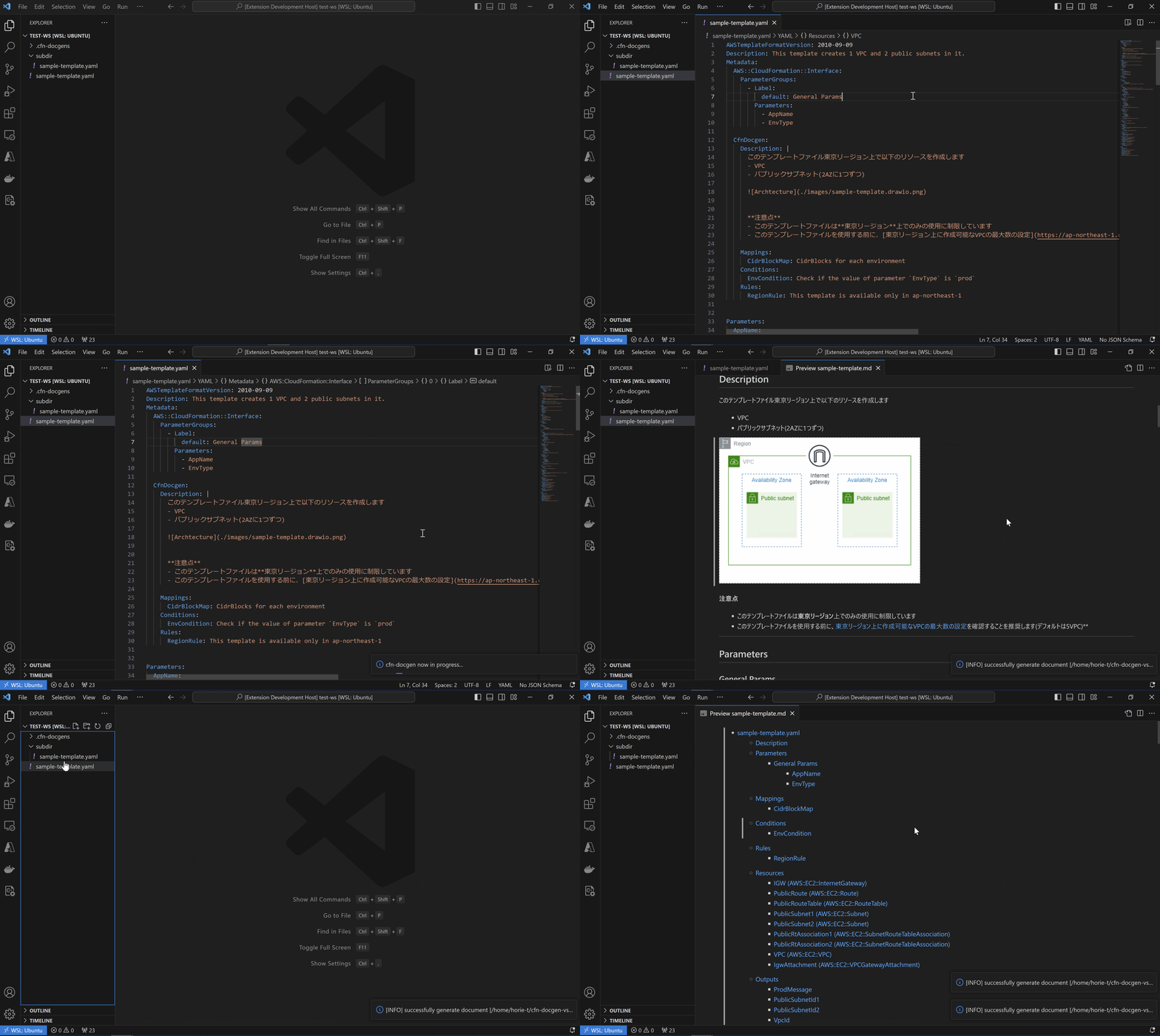
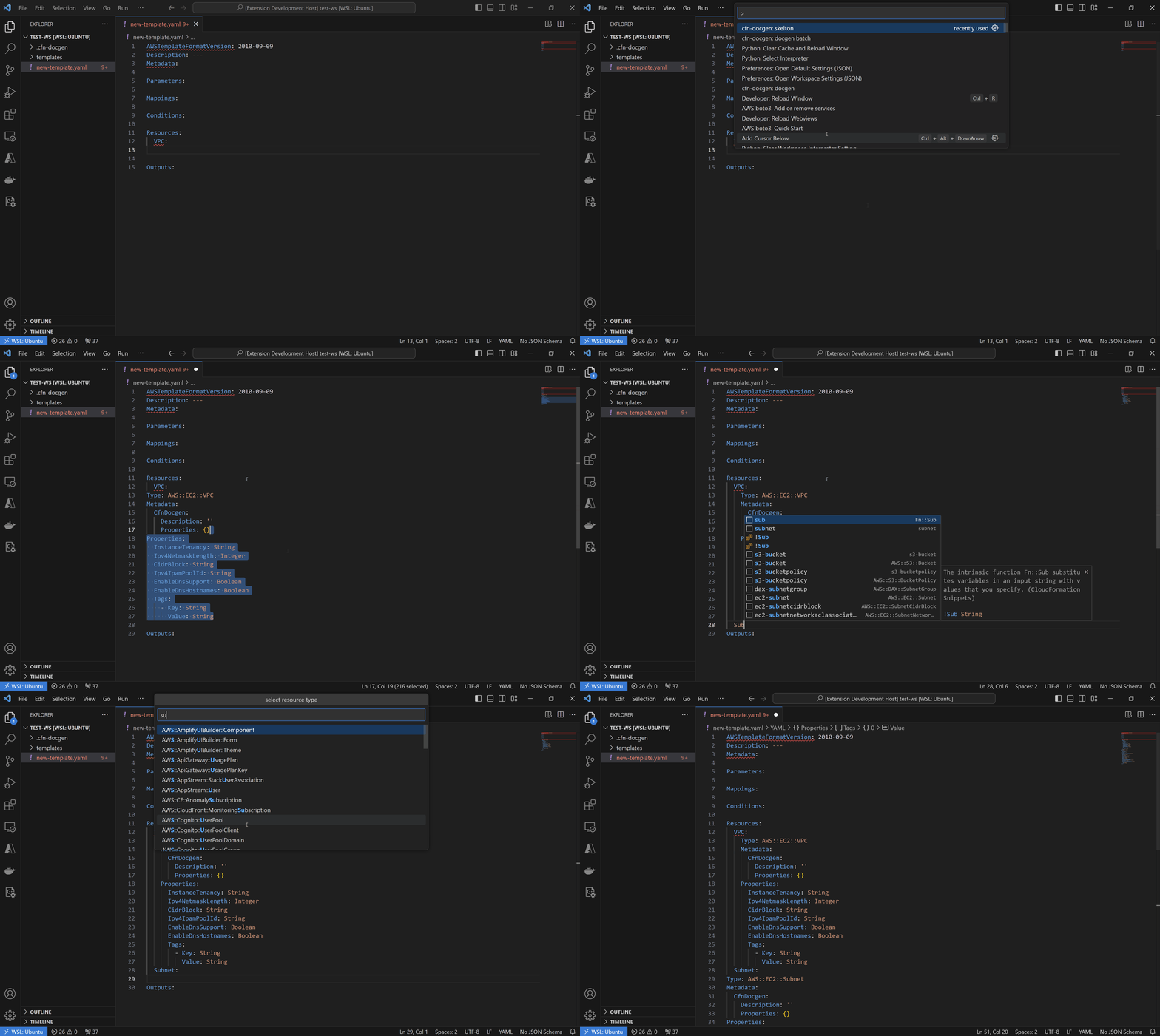
Visual Studio Code Extension
You can use cfn-docgen as Visual Studio Code Extension
Docker Image
# pull image from DockerHub
$ docker pull horietakehiro/cfn-docgen:latest

# local directory(before)
$ tree /tmp/sample/
/tmp/sample/
└── sample-template.json

0 directories, 1 files

# run as command
$ docker run \
  -v /tmp/sample/:/tmp/ \
  horietakehiro/cfn-docgen:latest docgen \
    --source /tmp/sample-template.json \
    --dest /tmp/
[INFO] successfully generate document [/tmp/sample-template.md] from template [/tmp/sample-template.json]

# local directory(after)
$ tree /tmp/sample/
/tmp/sample/
├── sample-template.json
└── sample-template.md

0 directories, 2 files
API
from cfn_docgen import (
    CfnDocgenService, CfnDocgenServiceCommandInput,
    CfnTemplateSource, CfnDocumentDestination
)
service = CfnDocgenService.with_default()
service.main(
    command_input=CfnDocgenServiceCommandInput(
        template_source=CfnTemplateSource("s3://bucket/template.yaml", service.context),
        document_dest=CfnDocumentDestination("s3://bucket/document.md", service.context),
        fmt="markdown",
    )
)
Serverless
You can also use cfn-docgen on AWS Cloud as serverless application.
You can deploy resources at AWS Serverless Application Repository.
Once deployed, tha S3 bucket named cfn-docgen-${AWS::AccountId}-${AWS::Region} is created on your account.
When you upload cfn template json/yaml files at templates/ folder of the bucket, cfn-docgen-serverless automatically will be triggered and generates markdown docments for them at documents/ folder.
Features
Embedding Descirptions
Top level descriptions
You can embed description for the template at top level Metadata section like this, then markdown document will be generated from it.
Metadata:
CfnDocgen:
Description: |
このテンプレートファイル東京リージョン上で以下のリソースを作成します
- VPC
- パブリックサブネット(2AZに1つずつ)

**注意点**
- このテンプレートファイルは**東京リージョン**上でのみの使用に制限しています
- このテンプレートファイルを使用する前に、[東京リージョン上に作成可能なVPCの最大数の設定](https://ap-northeast-1.console.aws.amazon.com/servicequotas/home/services/vpc/quotas/L-F678F1CE)を確認することを推奨します(デフォルトは5VPC)**
Then, the generated description will be like below.

You can also embed descriptions for each sections - Mappings, Conditions, Rules.
Metadata:
  CfnDocgen:
    Mappings:
      CidrBlockMap: CidrBlocks for each environment
    Conditions:
      EnvCondition: Check if the value of parameter `EnvType` is `prod`
    Rules:
      RegionRule: This template is available only in ap-northeast-1
Then, the generated description will be like below.

Resources and Properties description
You can embed descriptions for resources and their properties in Metadata section in each resources.
Resources:
  VPC:
    Metadata:
      CfnDocgen:
        Description: アプリケーションサーバを稼働させるために使用するVPC
        Properties:
          EnableDnsHostnames: アプリケーションサーバのホスト名でパブリックIPを名前解決できるように有効化する
    Type: AWS::EC2::VPC
    Properties:
      CidrBlock: ...
Then, the generated description will be like below.

Integration with AWS CDK
cfn-docgen can generate documents from AWS-CDK-generated templates, and you can also embed descriptions in cdk codes like below.
from aws_cdk import (
    Stack,
    aws_ec2 as ec2,

)
from constructs import Construct
from typing import Any
from cfn_docgen.domain.model.cfn_template import (
    CfnTemplateMetadataCfnDocgenDefinition as Metadata,
    CfnTemplateResourceMetadataDefinition as ResourceMetadata,
    CfnTemplateResourceMetadataCfnDocgenDefinition as CfnDocgen
)
class CfnDocgenSampleCdkStack(Stack):

    def __init__(self, scope: Construct, construct_id: str, **kwargs:Any) -> None:
        super().__init__(scope, construct_id, **kwargs)
        # top-level description for the stack
        self.add_metadata(
            "CfnDocgen", Metadata(
                Description="top-level-description"
            ).model_dump(),
        )
        self.vpc_construct = ec2.Vpc(self, "VpcConstruct", max_azs=1)
        # resource-level descriptions
        self.vpc_construct.node.default_child.cfn_options.metadata = ResourceMetadata(
            CfnDocgen=CfnDocgen(Description="resource-level-description")
        ).model_dump()
Then, the table of contents of generated document will be like below.

Integration with custom resource specification
You can define custom resource specification like this and generate documents for them.
$ cfn-docgen docgen \
  -s docs/sample-template.yaml \
  -s docs/sample-template.md \
  -c docs/custom-specification.json
Generate skeletons
You can generate definition skeletons for each resource types.
$ cfn-docgen skeleton --type AWS::EC2::VPC --format yaml
Type: AWS::EC2::VPC
Metadata:
  CfnDocgen:
    Description: ''
    Properties: {}
Properties:
  InstanceTenancy: String
  Ipv4NetmaskLength: Integer
  CidrBlock: String
  Ipv4IpamPoolId: String
  EnableDnsSupport: Boolean
  EnableDnsHostnames: Boolean
  Tags:
    - Key: String
      Value: String

$ cfn-docgen skeleton --type AWS::EC2::VPC --format json
{
  "Type": "AWS::EC2::VPC",
  "Metadata": {
    "CfnDocgen": {
      "Description": "",
      "Properties": {}
    }
  },
  "Properties": {
    "InstanceTenancy": "String",
    "Ipv4NetmaskLength": "Integer",
    "CidrBlock": "String",
    "Ipv4IpamPoolId": "String",
    "EnableDnsSupport": "Boolean",
    "EnableDnsHostnames": "Boolean",
    "Tags": [
      {
        "Key": "String",
        "Value": "String"
      }
    ]
  }
}
1 maintainer

Release files for cfn-docgen 1.0.1
For a detailed explanation of source distributions (sdists) and built distributions (wheels), please see the package formats documentation.
Source distribution (sdist)
| File | Size | Uploaded | |
|---|---|---|---|
| cfn-docgen-1.0.1.tar.gz | 55.6 kB | Details |
Built distribution (wheel)
| File | Interpreter | ABI | Platform | Reset |
|---|---|---|---|---|
| cfn_docgen-1.0.1-py3-none-any.whl | Python 3 | none | any | Details |
Total release size: 127.1 kB
Release files / cfn-docgen-1.0.1.tar.gz
| Download URL | cfn-docgen-1.0.1.tar.gz |
|---|---|
| Size | 55.6 kB |
| Tags | Source |
|
SHA-256 checksum How to use checksums |
57861850fe0bf3f89d13e85f623d7cfc98abc998fa9334884c4619ffd76deca1
|
|
BLAKE2b-256 checksum How to use checksums |
dbcf660e62087cac14c0b7ba8fbbe3c8e828ad8bb1d36a5cbb336b2eda774d60
|
| Upload date | |
|
Uploaded using Trusted Publishing? What is trusted publishing? |
No |
| Uploaded via |
twine/4.0.2 CPython/3.10.12
|
Release files / cfn_docgen-1.0.1-py3-none-any.whl
| Download URL | cfn_docgen-1.0.1-py3-none-any.whl |
|---|---|
| Size | 71.5 kB |
| Tags | Python 3 |
|
SHA-256 checksum How to use checksums |
2d9c7bf41ca3ca3a7e98cc7a422f4dc1a71ed3eee0e008c3dc1b09aed8f32021
|
|
BLAKE2b-256 checksum How to use checksums |
4d57bb0f9902fe5b391a22fd31b5431376213dfea1043ad765302336d3f75350
|
| Upload date | |
|
Uploaded using Trusted Publishing? What is trusted publishing? |
No |
| Uploaded via |
twine/4.0.2 CPython/3.10.12
|














