
Chameleon Partials
Simple reuse of partial HTML page templates in the Chameleon template language for Python web frameworks. (There is also a Jinja2/Flask version here.)
Overview
When building real-world web apps with Chameleon, it's easy to end up with repeated HTML fragments. Just like organizing code for reuse, it would be ideal to reuse smaller sections of HTML template code. That's what this library is all about.
Documentation
Full documentation lives at mkennedy.codes/docs/chameleon-partials, including the complete API reference generated from the library's docstrings.
Example
This project comes with a sample Pyramid application (see the example folder). This app displays videos
that can be played on YouTube. The image, author subtitle, and view count are reused throughout the
app. Here's a visual:
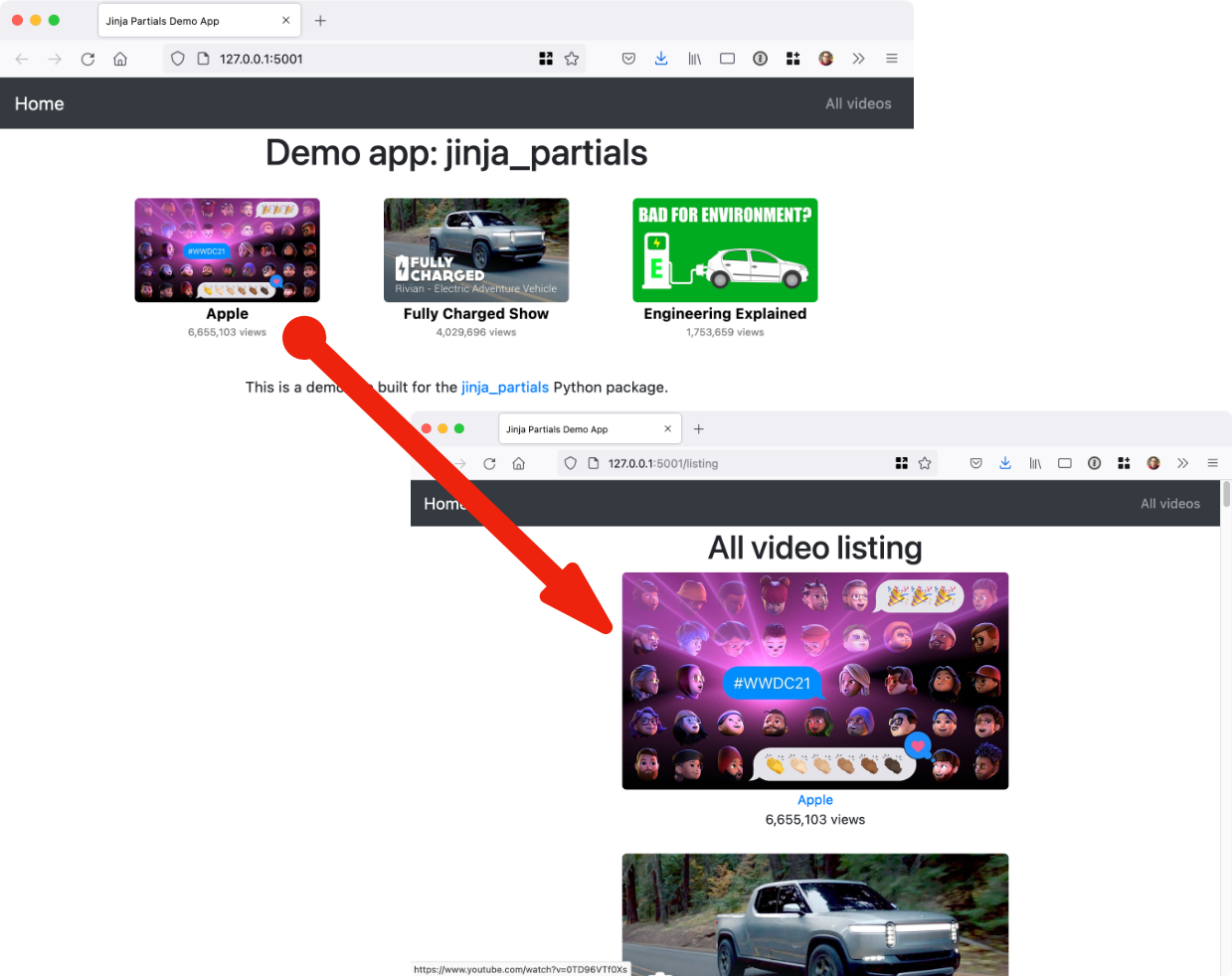
Check out the demo / example application to see it in action.
Installation
It's just pip install chameleon-partials and you're all set with this pure Python package.
Usage
Using the library is incredibly easy. The first step is to register the partial method with Chameleon. Do this once at app startup:
from pathlib import Path

from pyramid.config import Configurator

import chameleon_partials

def main(_, **settings):
    """ This function returns a Pyramid WSGI application.
    """
    with Configurator(settings=settings) as config:
        config.include('pyramid_chameleon')
        config.include('.routes')
        config.scan()

        # Register the extension for working with Chameleon.
        folder = (Path(__file__).parent / "templates").as_posix()
        chameleon_partials.register_extensions(folder, auto_reload=True, cache_init=True)

    return config.make_wsgi_app()
Next, you define your main HTML (Chameleon) templates as usual. Then define your partial templates. I recommend locating and naming them accordingly:
├── templates
│   ├── errors
│   │   └── 404.pt
│   ├── home
│   │   ├── index.pt
│   │   └── listing.pt
│   └── shared
│       ├── _layout.pt
│       └── partials
│           ├── video_image.pt
│           └── video_square.pt
Notice the partials subfolder in the templates/shared folder.
The templates are just HTML fragments. Here is a stand-alone one for the YouTube thumbnail from the example app:
<img src="https://img.youtube.com/vi/${ video.id }/maxresdefault.jpg"
     class="img img-responsive ${ ' '.join(classes or []) }"
     alt="${ video.title }"
     title="${ video.title }">
Notice that an object called video and a list of classes are passed in as the model.
Templates can also be nested. Here is the whole single video fragment with the image as well as other info linking out to YouTube:
<div>
    <a href="https://www.youtube.com/watch?v=${ video.id }" target="_blank">
        ${ render_partial('shared/partials/video_image.pt', video=video, classes=[]) }
    </a>
    <a href="https://www.youtube.com/watch?v=${ video.id }" target="_blank"
       class="author">${ video.author }</a>
    <div class="views">${ "{:,}".format(video.views) } views</div>
</div>
Now you see the render_partial() method. It takes the subpath into the templates folder and
any model data passed in as keyword arguments.
We can finally generate the list of video blocks as follows:
<span class="video" tal:repeat="v videos">
    ${ render_partial('shared/partials/video_square.pt', video=v) }
</span>
This time, we reframe each item in the list from the outer template (called v) as the video model
in the inner HTML section.
The View Methods
In order to share the render_partial() function with your template, you'll need to pass it along to the
template with your model (dictionary).
If you are using the Pyramid web framework, you can add this file as middleware. Just drop it into
your views folder:
# views/partials_middleware.py
from pyramid.events import subscriber, BeforeRender

import chameleon_partials


@subscriber(BeforeRender)
def add_global(event):
    event['render_partial'] = chameleon_partials.render_partial
For other frameworks using Chameleon (e.g. FastAPI), you can add render_partial to the
resulting dictionary. We've built a simple function to keep this fool-proof:
chameleon_partials.extend_model(model)
Here's a typical view method that uses render_partial, notice the use of extending the
model before passing it to the template (the example app's views skip this because the
middleware above handles it):
@view_config(route_name='listing', renderer='demo_chameleon_partials:templates/home/listing.pt')
def listing(_):
    videos = video_service.all_videos()
    model = dict(videos=videos)
    return chameleon_partials.extend_model(model)
Again: If you are using Pyramid, use the middleware. Otherwise, use the extend_model() method or something
similar to the middleware in your framework.
1 maintainer

Metadata
1 maintainer
Release files for chameleon_partials 0.2.1
For a detailed explanation of source distributions (sdists) and built distributions (wheels), please see the package formats documentation.
Source distribution (sdist)
| File | Size | Uploaded | Provenance | Actions |
|---|---|---|---|---|
| chameleon_partials-0.2.1.tar.gz | 9.8 kB | Without provenance | Details for chameleon_partials-0.2.1.tar.gz |
Built distribution (wheel)
| File | Interpreter | ABI | Platform | Actions Reset |
|---|---|---|---|---|
| chameleon_partials-0.2.1-py3-none-any.whl | Python 3 | none | any | Details for chameleon_partials-0.2.1-py3-none-any.whl |
Total release size: 18.2 kB
Release files / chameleon_partials-0.2.1.tar.gz
| Download URL | chameleon_partials-0.2.1.tar.gz |
|---|---|
| Size | 9.8 kB |
| Tags | Source |
|
SHA-256 checksum How to use checksums |
7159e6013296ce31c669b8505f5ce638483335df283523fe9bde0a3b78a0b5d5
|
|
BLAKE2b-256 checksum How to use checksums |
d7525f591e445c5f8a8328bf6e863103dcd7050a3f4bef9211aa7734cac47fa3
|
| Upload date | |
|
Uploaded using Trusted Publishing? What is trusted publishing? |
No |
| Uploaded via |
uv/0.13.6 {"installer":{"name":"uv","version":"0.13.6","subcommand":["publish"]},"python":null,"implementation":{"name":null,"version":null},"distro":{"name":"macOS","version":null,"id":null,"libc":null},"system":{"name":null,"release":null},"cpu":null,"openssl_version":null,"setuptools_version":null,"rustc_version":null,"ci":null}
|
Release files / chameleon_partials-0.2.1-py3-none-any.whl
| Download URL | chameleon_partials-0.2.1-py3-none-any.whl |
|---|---|
| Size | 8.5 kB |
| Tags | Python 3 |
|
SHA-256 checksum How to use checksums |
8cf2c316921857aad34b8b15512b8fc3695f375ac1419166850fedee05a779c9
|
|
BLAKE2b-256 checksum How to use checksums |
444273b9e2fb4c7756a7b05da4169be30fa791ca55bfd580b9ccf386444b237d
|
| Upload date | |
|
Uploaded using Trusted Publishing? What is trusted publishing? |
No |
| Uploaded via |
uv/0.13.6 {"installer":{"name":"uv","version":"0.13.6","subcommand":["publish"]},"python":null,"implementation":{"name":null,"version":null},"distro":{"name":"macOS","version":null,"id":null,"libc":null},"system":{"name":null,"release":null},"cpu":null,"openssl_version":null,"setuptools_version":null,"rustc_version":null,"ci":null}
|
Security for chameleon_partials 0.2.1
Provenance
Provenance describes where a file came from. On PyPI, provenance is shared via attestations, which provide a verifiable record of the build or publishing details. View details, limitations and caveats.
No provenance found
None of the files in this release were uploaded with provenance metadata.
A note on package security
PyPI is a repository for distributing packages, not a service for auditing them. While third-party security researchers and our staff do their best to detect and remove malicious packages, PyPI cannot guarantee the quality, security or suitability of any given package.
To learn more about protecting yourself from malicious actors, visit our package security documentation.














