
ChatBotMaker
This project aims to automate plateform messaging where the plateform support message forwarding.
Description
This module is based around a bot class in which you inject the necessary code / objects:
- Messenger (An object that sends message or event back)
- Dispatcher (An object that contains all the logic rule)
- Database (An object that allows database interaction)
General Idea
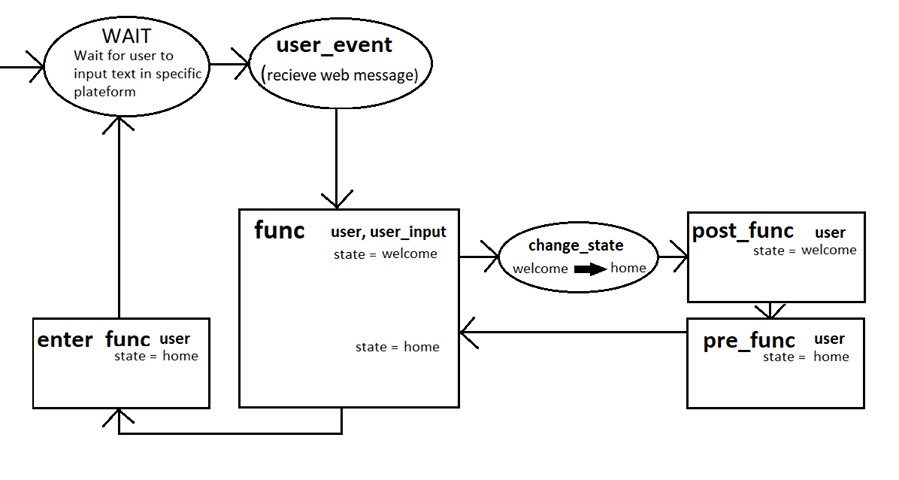
User are in states and define what action should be executed.
A state is composed of 3 event and 1 input event (or main event):
- func(user, user_input): main function called with the user's input
- enter_func(user): called every time before the user sends text in its current state
- pre_func(user): called when entering a state (ie. during change_state)
- post_func(user): called when exiting a state (ie. during change_state)
Components
Messenger
You can create your own messenger class that should inherit the
chatbotmaker.Messenger class.
It must implement a send(user_id: str, message:str)
method and can implement other optional methods.
Dispatcher
The dispatcher recieves your config as a dictionnary in the following format:
{
  'actions': {
    'handle_name': {
        'enter_func': lambda user: user.send_message('Hi there every time'),
        'pref_func': lambda user: user.send_message('Hi there'),
        'func': lambda user, user_input: user.change_state('home'),
        'post_func': lambda user: user.send_message('You are redirected'),
    },
    'home': {
        'pref_func': lambda user: user.send_message('Welcome back!'),
        'func': 'lambda user, user_input: user.change_state(user_input)',
    },
    'input': {
        'func': 'lambda user, user_input: (
                    user.store_argument('input', user_input),
                    user.change_state('home'),
                )',
    },
    'help': Dispatcher.DEFAULT,
  }
}
DEFAULT
You can associate function by their name to make the binding process easier. You must name your functions with {key}_{handle_name} (eg: func_help, pre_func_help, post_func_help). You then must pass the binding table dictionary to the Dispatcher constructor alongside the config __init__(self, config, env=None) . This generally are locals() or globals().
How does it work?
The user is the orm User class to whom we add some method (redirect failing attribute calls):
- send_message(message: str)
- change_state(state: str)
- get_argument(name: str)
- store_argument(name: str, value: str)
- self.messenger, self.dispatcher, self.database (the one onjected in the bot)
Database
The given database database follows the following architecture:
- users:
- id = Column(Integer, primary_key=True)
- fb_id = Column(String)
- state = Column(String)
- arguments = relationship('Argument', back_populates='user', lazy='dynamic')
- arguments:
- id = Column(Integer, primary_key=True)
- name = Column(String)
- value = Column(String)
- user_id = Column(Integer, ForeignKey('users.id'))
- user = relationship('User', uselist=False, back_populates='arguments')
The database expects a config (sqlachemy.config) object to initialize the database. Please check sqlalchemy configuration for more information.
Custom tables / ORM classes
You can add custom tables (thus ORM classes). To do so create your own base (declarative_base() from sqlalchemy) and with it your own models . Then inject it in the database object database([...], base=my_base).
In case you want to create relationships with default classes, it is possible. A function add_relationship(class_to_add, name, value) is available in the database module.
Usage
Default components
To avoid re-inventing the wheel, some "common" components have already been coded. They are in chatbotmaker.default.
- FacebookMessenger(authentication_token)
- facebook_route(request, facebook_check_token, bot)
- this flask routing should be called directly from the routing function
Dev
We have the dev file containing:
- DevMessenger() # prints everythin in console
Installation
Using PIP since its a pip module repository:
42sh$ : pip install chatbotmaker
Contributing
Do no hesitate to make a pull request or launch a discussion. I am looking foreward to expand the default capabilites.
Authors and acknowledgment
Author:
Dominique MICHEL dominique.michel@epita.fr
Status
The project has reached its first final phase. Now there will be:
- need to think about the design and facilitate user-database integration
- Good work done here, maybe allow any orm engiine ine the future
- need of tests (why not make a CI pipeline)
- tests must tests more the content of the calls
- github ci pipeline is so confusing coming from gitlab :o
Once the backend is functional and robust, i aim to make a frontend plateform to allow non-programming people to create bots too.
1 maintainer

Metadata
1 maintainer
Release files for chatbotmaker 0.0.13
For a detailed explanation of source distributions (sdists) and built distributions (wheels), please see the package formats documentation.
Source distribution (sdist)
| File | Size | Uploaded | Provenance | |
|---|---|---|---|---|
| chatbotmaker-0.0.13.tar.gz | 90.8 kB | Without provenance | Details |
Built distribution (wheel)
| File | Interpreter | ABI | Platform | Reset |
|---|---|---|---|---|
| chatbotmaker-0.0.13-py3-none-any.whl | Python 3 | none | any | Details |
Total release size: 101.9 kB
Release files / chatbotmaker-0.0.13.tar.gz
| Download URL | chatbotmaker-0.0.13.tar.gz |
|---|---|
| Size | 90.8 kB |
| Tags | Source |
|
SHA-256 checksum How to use checksums |
61dbb6bc9f2497a9ff6175058a12b5805a201586c3f65489a2955ac47179e364
|
|
BLAKE2b-256 checksum How to use checksums |
f2ea3cfee07152477f79525e955762952386db7e9c0ac361b60dd358fc73c968
|
| Upload date | |
|
Uploaded using Trusted Publishing? What is trusted publishing? |
No |
| Uploaded via |
twine/3.2.0 pkginfo/1.5.0.1 requests/2.24.0 setuptools/49.6.0 requests-toolbelt/0.9.1 tqdm/4.48.2 CPython/3.8.5
|
Release files / chatbotmaker-0.0.13-py3-none-any.whl
| Download URL | chatbotmaker-0.0.13-py3-none-any.whl |
|---|---|
| Size | 11.1 kB |
| Tags | Python 3 |
|
SHA-256 checksum How to use checksums |
99e1225a5b835e85e95ede7496220e200b7928bf02c805da68841271c4a828a7
|
|
BLAKE2b-256 checksum How to use checksums |
f97b2078e2ba0dc0a14cc14316b64a8628fbb294c0e9c756ac4d5c768a301b51
|
| Upload date | |
|
Uploaded using Trusted Publishing? What is trusted publishing? |
No |
| Uploaded via |
twine/3.2.0 pkginfo/1.5.0.1 requests/2.24.0 setuptools/49.6.0 requests-toolbelt/0.9.1 tqdm/4.48.2 CPython/3.8.5
|
Security for chatbotmaker 0.0.13
Provenance
Provenance describes where a file came from. On PyPI, provenance is shared via attestations, which provide a verifiable record of the build or publishing details. View details, limitations and caveats.
No provenance found
None of the files in this release were uploaded with provenance metadata.
A note on package security
PyPI is a repository for distributing packages, not a service for auditing them. While third-party security researchers and our staff do their best to detect and remove malicious packages, PyPI cannot guarantee the quality, security or suitability of any given package.














