
chinese is a Chinese text analyzer.
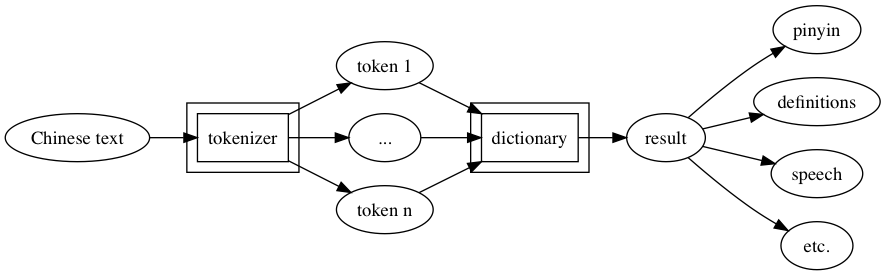
NOTE: Python 2.* is not supported.
Getting Started
Install chinese using pip:
$ pip install chinese
$ pynlpir update
Start analyzing Chinese text:
>>> from chinese import ChineseAnalyzer
>>> analyzer = ChineseAnalyzer()
>>> result = analyzer.parse('我很高兴认识你')
>>> result.tokens()
['我', '很', '高兴', '认识', '你']
>>> result.pinyin()
'wǒ hěn gāoxìng rènshi nǐ'
>>> result.pprint()
{'original': '我很高兴认识你',
 'parsed': [{'dict_data': [{'definitions': ['I', 'me', 'my'],
                          'kind': 'Simplified',
                          'match': '我',
                          'pinyin': ['wo3']}],
           'token': ('我', 0, 1)},
           {'dict_data': [{'definitions': ['(adverb of degree)',
                                         'quite',
                                         'very',
                                         'awfully'],
                          'kind': 'Simplified',
                          'match': '很',
                          'pinyin': ['hen3']}],
           'token': ('很', 1, 2)},
           {'dict_data': [{'definitions': ['happy',
                                         'glad',
                                         'willing (to do sth)',
                                         'in a cheerful mood'],
                          'kind': 'Simplified',
                          'match': '高興',
                          'pinyin': ['gao1', 'xing4']}],
           'token': ('高兴', 2, 4)},
           {'dict_data': [{'definitions': ['to know',
                                         'to recognize',
                                         'to be familiar with',
                                         'to get acquainted with sb',
                                         'knowledge',
                                         'understanding',
                                         'awareness',
                                         'cognition'],
                          'kind': 'Simplified',
                          'match': '認識',
                          'pinyin': ['ren4', 'shi5']}],
           'token': ('认识', 4, 6)},
           {'dict_data': [{'definitions': ['you (informal, as opposed to '
                                         'courteous 您[nin2])'],
                          'kind': 'Simplified',
                          'match': '你',
                          'pinyin': ['ni3']}],
           'token': ('你', 6, 7)}]}
>>> result = analyzer.parse('我喜歡這個味道', traditional=True)
>>> print(res)
{'味道': [{'definitions': ['flavor', 'smell', 'hint of'],
      'kind': 'Traditional',
      'match': '味道',
      'pinyin': ['wei4', 'dao5']}],
 '喜歡': [{'definitions': ['to like', 'to be fond of'],
      'kind': 'Traditional',
      'match': '喜欢',
      'pinyin': ['xi3', 'huan5']}],
 '我': [{'definitions': ['I', 'me', 'my'],
      'kind': 'Traditional',
      'match': '我',a
      'pinyin': ['wo3']}],
 '這個': [{'definitions': ['this', 'this one'],
      'kind': 'Traditional',
      'match': '这个',
      'pinyin': ['zhe4', 'ge5']}]}
Features
parse() returns a ChineseAnalyzerResult object.
>>> from chinese import ChineseAnalyzer
>>> analyzer = ChineseAnalyzer()
# Basic usage.
>>> result = analyzer.parse('你好世界')
# If the traditional option is set to True, the analyzer tries to parse the
# provided text as 繁体字.
>>> result = analyzer.parse('你好世界', traditional=True)
# The default tokenizer uses jieba's. You can also use pynlpir's to tokenize.
>>> result = analyzer.parse('你好世界', using=analyzer.tokenizer.pynlpir)
# In addition, a custom tokenizer can be passed to the method.
>>> from chinese.tokenizer import TokenizerInterface
>>> class MyTokenizer(TokenizerInterface): # Custom tokenizer must inherit from TokenizerInterface.
...     # Custom tokenizer must implement tokenize() method.
...     def tokenize(self, string):
...         # tokenize() must return a list of tuples containing at least
...         # a string as a first element.
...         # For example: [('token1', ...), ('token2', ...), ...].
...
>>> my_tokenizer = MyTokenizer()
>>> result = analyzer.parse('你好世界', using=my_tokenizer)
# You can also specify the dictionary used for looking up each token.
# You specify a path to a dictionary file for that and the file must have
# the CC-CEDICT's dictionary file structure.
# CC-CEDICT's dictionary is used for looking up by default.
>>> result = analyzer.parse('你好世界', dictionary='path/to/dict')
original() returns the supplied text as is.
>>> result = analyzer.parse('我最喜欢吃水煮肉片')
>>> result.original()
'我最喜欢吃水煮肉片'
tokens() returns tokens in the provided text.
>>> result = analyzer.parse('我的汉语马马虎虎')
>>> result.tokens()
['我', '的', '汉语', '马马虎虎']
>>> result.tokens(details=True) # If the details option is set to True, additional information is also attached.
[('我', 0, 1), ('的', 1, 2), ('汉语', 2, 4), ('马马虎虎', 4, 8)] # In this case, the positions of tokens are included.
>>> result = analyzer.parse('的的的的的在的的的的就以和和和')
>>> result.tokens(unique=True) # You can get a unique collection of tokens using unique option.
['的', '在', '就', '以', '和']
freq() returns a Counter object that counts the number of occurrences for each token.
>>> result = analyzer.parse('的的的的的在的的的的就以和和和')
>>> result.freq()
Counter({'的': 9, '和': 3, '在': 1, '就': 1, '以': 1})
sentences() returns a list of paragraphs in a provided text.
>>> s = '''您好。请问小美在家吗?
...
... 在。请稍等。'''
>>> result = analyzer.parse(s)
>>> result.sentences()
['您好', '请问小美在家吗', '在', '请稍等']
search() returns a list of sentences containing the argument string.
>>> s = '自然语言处理是计算机科学领域与人工智能领域中的一个重要方向。它研究能实现人与计算机之间用自然语言进行有效通信的各种理论和方法。自然语言处理是一门融语言学、计算机科学、数学于一体的科学。因此,这一领域的研究将涉及自然语言,即人们日常使用的语言,所以它与语言学的研究有着密切的联系,但又有重要的区别。自然语言处理并不是一般地研究自然语言,而在于研制能有效地实现自然语言通信的计算机系统,特别是其中的软件系统。因而它是计算机科学的一部分。'
>>> result = analyzer.parse(s)
>>> result.search('数学')
['自然语言处理是一门融语言学、计算机科学、数学于一体的科学']
paragraphs() returns a list of sentences in a provided text.
>>> s = '''您好。请问小美在家吗?
...
... 在。请稍等。'''
>>> result = analyzer.parse(s)
>>> result.paragraphs()
['您好。请问小美在家吗?', '在。请稍等。']
pinyin() returns a pinyin representation of the provided text.
>>> result = analyzer.parse('我喜欢Python。')
>>> result.pinyin()
'wǒ xǐhuan Python.'
>>> result = analyzer.parse('下个月我去涩谷')
>>> result.pinyin() # Sometimes the analyzer cannot find a correponding pinyin.
'xiàgèyuè wǒ qù 涩谷'
>>> result.pinyin(force=True) # The force option forces it to try to convert an unknown word to pinyin.
'xiàgèyuè wǒ qù sègǔ'
pprint() prints a formatted description of the parsed text.
>>> result = analyzer.parse('我爱看书')
>>> result.pprint()
{'original': '我爱看书',
 'parsed': [{'dict_data': [{'definitions': ['I', 'me', 'my'],
                            'kind': 'Simplified',
                            'match': '我',
                            'pinyin': ['wo3']}],
             'token': ('我', 0, 1)},
            {'dict_data': [{'definitions': ['to love',
                                            'to be fond of',
                                            'to like',
                                            'affection',
                                            'to be inclined (to do sth)',
                                            'to tend to (happen)'],
                            'kind': 'Simplified',
                            'match': '愛',
                            'pinyin': ['ai4']}],
             'token': ('爱', 1, 2)},
            {'dict_data': [{'definitions': ['to read', 'to study'],
                            'kind': 'Simplified',
                            'match': '看書',
                            'pinyin': ['kan4', 'shu1']}],
             'token': ('看书', 2, 4)}]}
say() converts the provided text to Chinese audible speech (macOS only).
>>> result = analyzer.parse('您好,我叫Ting-Ting。我讲中文普通话。')
>>> result.say()              # Output the speech.
>>> result.say(out='say.aac') # Save the speech to out.
Get the number of tokens.
>>> result = analyzer.parse('我是中国人')
>>> result.tokens()
['我', '是', '中国', '人']
>>> len(result)
4
Check whether a token is in the result.
>>> result = analyzer.parse('我是中国人')
>>> '中国' in result
True
>>> '我是' in result
False
Extract the lookup result.
>>> result = analyzer.parse('你叫什么名字?')
>>> result.tokens()
['你', '叫', '什么', '名字', '?']
>>> shenme = result['什么'] # It's just a list of lookup results.
>>> len(shenme)             # It has only one entry.
1
>>> print(shenme[0])        # Print that entry.
{'definitions': ['what?', 'something', 'anything'],
 'kind': 'Simplified',
 'match': '什麼',
 'pinyin': ['shen2', 'me5']}
>>> shenme_info = shenme[0]
>>> shenme_info.definitions # Definitions of the token.
['what?', 'something', 'anything']
>>> shenme_info.match       # The corresponding 繁体字.
'什麼'
>>> shenme_info.pinyin      # The pinyin of the token.
['shen2', 'me5']
License
MIT License
Thanks
jieba and PyNLPIR are used to tokenize a Chinese text.
CC-CEDICT is used to lookup information for tokens.
1 maintainer

Metadata
1 maintainer
Release files for chinese 0.2.1
For a detailed explanation of source distributions (sdists) and built distributions (wheels), please see the package formats documentation.
Built distribution (wheel)
| File | Interpreter | ABI | Platform | Reset |
|---|---|---|---|---|
| chinese-0.2.1-py3-none-any.whl | Python 3 | none | any | Details |
Release files / chinese-0.2.1-py3-none-any.whl
| Download URL | chinese-0.2.1-py3-none-any.whl |
|---|---|
| Size | 12.6 MB |
| Tags | Python 3 |
|
SHA-256 checksum How to use checksums |
04a8052166fd9524ef5a6022810223da2a765b394b6280b6014f33de635842b1
|
|
BLAKE2b-256 checksum How to use checksums |
15fe35c1cd7792f0c899fbeae66d35491721cae6be6d8a128d4f77e6e3479b3a
|
| Upload date | |
|
Uploaded using Trusted Publishing? What is trusted publishing? |
No |














