
chval — Parallel getmail calls, with progress bars
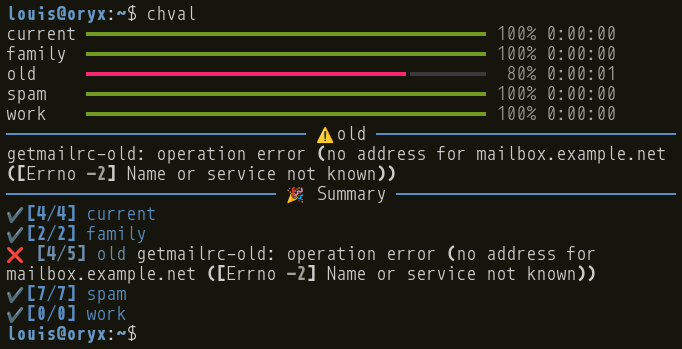
Program Ch'val (abbreviated chval) is a wrapper for getmail:
- it looks for your configuration files, and run getmail on all of them;
- it executes
getmailcalls in parallel; - it displays a nice progress bar, and a summary at the end (as well as error messages, if getmail failed).
Configuration
Chval takes no configuration, and does not require any specific getmail configuration. The only assumption are that:
- getmail configuration files are located in the default getmail folder
~/.config/getmail; - getmail configuration files have a name starting with
getmailrc-(e.g.getmailrc-work); - getmail does not prompt for a password (it is either stored in plain text in the configuration file, or in a password manager (see option
--store-password-in-keyring)).
That way, Ch'val can automatically find your getmail configuration files.
Installation
-
Install this program from Pypi:
python3 -m pip install chval -
Quick and dirty Debian (and Ubuntu?) package (requires
stdeb <https://github.com/astraw/stdeb>):python3 setup.py --command-packages=stdeb.command bdist_deb sudo dpkg -i deb_dist/chval-<VERSION>_all.deb
History
The name comes from Ferdinand Cheval, known as le facteur Cheval (Postman Cheval), a famous French postman and naive architect. Cheval means horse in French, and may be orally shortened to ch'val.
In 2010, the only way to provide a password to getmail was by storing it in plain text in the configuration file (not really secure), or by providing it when prompted (combersome when you check your 5 or 10 email addresses several times a day). I (back then, a yound and inexperimented programmer) started this project (then named gams, for get all mails), that wrapped getmail by storing the passwords in an encrypted file : a server would call getmail when prompted by the client, which would provide, once, the master password to decrypt the email passwords. I also added a home-made progress bar.
Three years later (in 2013), I started to experiment with twisted to replace the named pipe used by the client and server to communicate. This never led to anything…
Eight years later (in 2021), I wondered if it would be possible to use an existing keyring software (like Seahorse) to store password keys, and to communicate with it using dbus. This never led to anything.
The very same year, I noticed that getmail had a new feature (which already existed for several years) to use a keyring to store the password. My software was outdated, and I happily dropped support for it.
About a year later, I missed the ability to run getmail on all my mailboxes at once, and the progress bar, so I revived Ch'val from the dead: the initial goal (storing password) is no longer relevant, but the progress bar, which was then an incidental feature, became the main purpose.
A more technical history can be found in the changelog.
License
Copyright 2010-2023 Louis Paternault
Ch'val is licensed under the GNU GPL 3 license, or any later version.
1 maintainer

Release files for chval 1.2.0
For a detailed explanation of source distributions (sdists) and built distributions (wheels), please see the package formats documentation.
Source distribution (sdist)
| File | Size | Uploaded | |
|---|---|---|---|
| chval-1.2.0.tar.gz | 80.9 kB | Details |
Built distribution (wheel)
| File | Interpreter | ABI | Platform | Reset |
|---|---|---|---|---|
| chval-1.2.0-py3-none-any.whl | Python 3 | none | any | Details |
Total release size: 99.8 kB
Release files / chval-1.2.0.tar.gz
| Download URL | chval-1.2.0.tar.gz |
|---|---|
| Size | 80.9 kB |
| Tags | Source |
|
SHA-256 checksum How to use checksums |
9d484b069294770e376b774a8b8a342847fe24894b84d379248e39c5a8f54698
|
|
BLAKE2b-256 checksum How to use checksums |
77103c284e2d8e8c71301302a78c5991079138a7ebb821d018b1413bc80f0f37
|
| Upload date | |
|
Uploaded using Trusted Publishing? What is trusted publishing? |
No |
| Uploaded via |
twine/4.0.2 CPython/3.11.5
|
Release files / chval-1.2.0-py3-none-any.whl
| Download URL | chval-1.2.0-py3-none-any.whl |
|---|---|
| Size | 18.8 kB |
| Tags | Python 3 |
|
SHA-256 checksum How to use checksums |
1e1091feee77a46ed337868dd8d8501089b9117025814869db0df1b4ad68879f
|
|
BLAKE2b-256 checksum How to use checksums |
04dfe1eca244bb2cdd57c64015edacaa95103d2bae67496fd32450dea4bde3bd
|
| Upload date | |
|
Uploaded using Trusted Publishing? What is trusted publishing? |
No |
| Uploaded via |
twine/4.0.2 CPython/3.11.5
|














