
CIDER Python Package
Paper Available: https://doi.org/10.1371/journal.pone.0299490
CIDER (Context Informed Dictionary and sEntiment Reasoner) is a Python library used to improve domain-specific sentiment analysis.
It generates, filters, and substitutes polarities into VADER. The approach taken to generate polarities is taken from SocialSent.
Contents
Installation
Before you begin, ensure you have met the following requirements:
- You have installed Python 3.7 or later.
- You have a Windows/Linux/Mac machine.
To install CIDER, follow these steps:
pip install ciderpolarity
Overview
The easiest way to use the package is as follows:
from ciderpolarity import CIDER

# download test data from: https://github.com/jcy204/ciderPolarity/tree/main/tests/test_data.csv
# data input is either a one column csv file where each row is a text entry, or list of strings

input_data = 'test_data.csv'
output_folder = '/path/to/output/folder/'

cdr = CIDER(input_data, output_folder)
results = cdr.fit_transform()
This trains the model, creating a customised VADER classifier, before classifying the provided input using the model. A ficticious example output is as follows:
results = [
    ['Really hate this heat. Just want AC', {"neg":0.6, "neu":0.4, "pos":0.0, "compound":-0.6}],
    ['I love an icecream in this heat!', {"neg":0.0, "neu":0.5, "pos":0.5, "compound":0.6}],
    ['I’m melting - terrible weather!', {"neg":0.7, "neu":0.3, "pos":0.0, "compound":-0.7}],
    ['Very dehydrated in this heat', {"neg":0.5, "neu":0.4, "pos":0.0, "compound":-0.5}],
            ...
    ['this sunny weather is great', {"neg":0.0, "neu":0.2, "pos":0.8, "compound":0.7}],
    ['Oh my icecream is melting', {"neg":0.3, "neu":0.4, "pos":0.3, "compound":0.0}],
    ['My AC is broken! 🥵', {"neg":0.6, "neu":0.4, "pos":0.0, "compound":-0.6}]
]
Examples
Some alternative ways to use the library are as follows:
Applying CIDER to a list of strings, adding custom seed words, custom stopwords, and tuning various parameters:
POS_seeds = {'lovely':1, 'excellent':2, 'fortunate':4, 'excited':1, 'loves':2, '♥':1, '🙂':2}
NEG_seeds = {'bad':1, 'horrible':2, 'hate':4, 'crappy':1, 'sad':2, 'bitch':1, 'hates':2}

input_data = ['list of strings']
output = '/path/to/output/test_outputs/'

cdr_example = CIDER(input_data,                   # input data
                    output,                       # output path
                    iterations=100,               # number of iterations for bootstrapped label propagation
                    stopwords=['i', 'it', 'the'], # custom stopwords, alternativly set as 'default' for the nltk set
                    keep=['code', 'python'],      # words to force into the final lexicon
                    no_below=5,                   # exclude words that occur fewer times than this
                    max_polarities_returned=3000, # maximum number of words returned
                    pos_seeds=POS_seeds,          # positive seeds with custom weighting
                    neg_seeds=NEG_seeds,          # negative seeds with custom weighting
                    verbose=False)                # whether to print progress or not
If the model only requires training, the following can be executed:
cdr_example.fit()
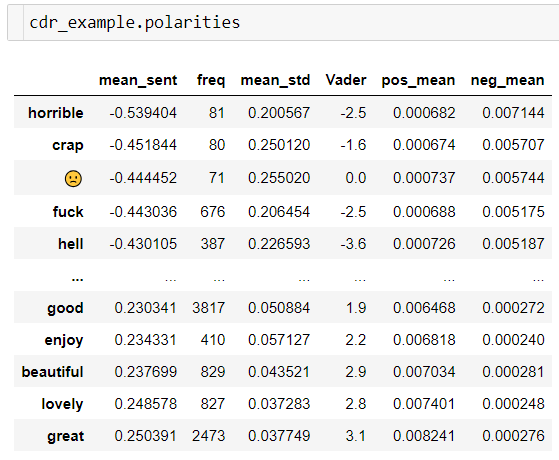
And the resulting polarities (before filtering and scaling) can be viewed:
Generating Seedwords
Whilst CIDER has built in seed words (found here), custom seed words can be generated and suggested. The following shows how this is carried out:
Pos, Neg = cdr_example.generate_seeds(['good','brilliant','love'],['bad','terrible','hate'], n=20, sentiment = True)
Which looks at strongly polarised words which occur both often, are close to one seed set, and distant from the opposing seed set.
The following returns all words in the data, alongside their seed word suitability.
df = cdr_example.generate_seeds(['good','brilliant','love'],['bad','terrible','hate'], return_all = True, sentiment = True)
Alternative Scales
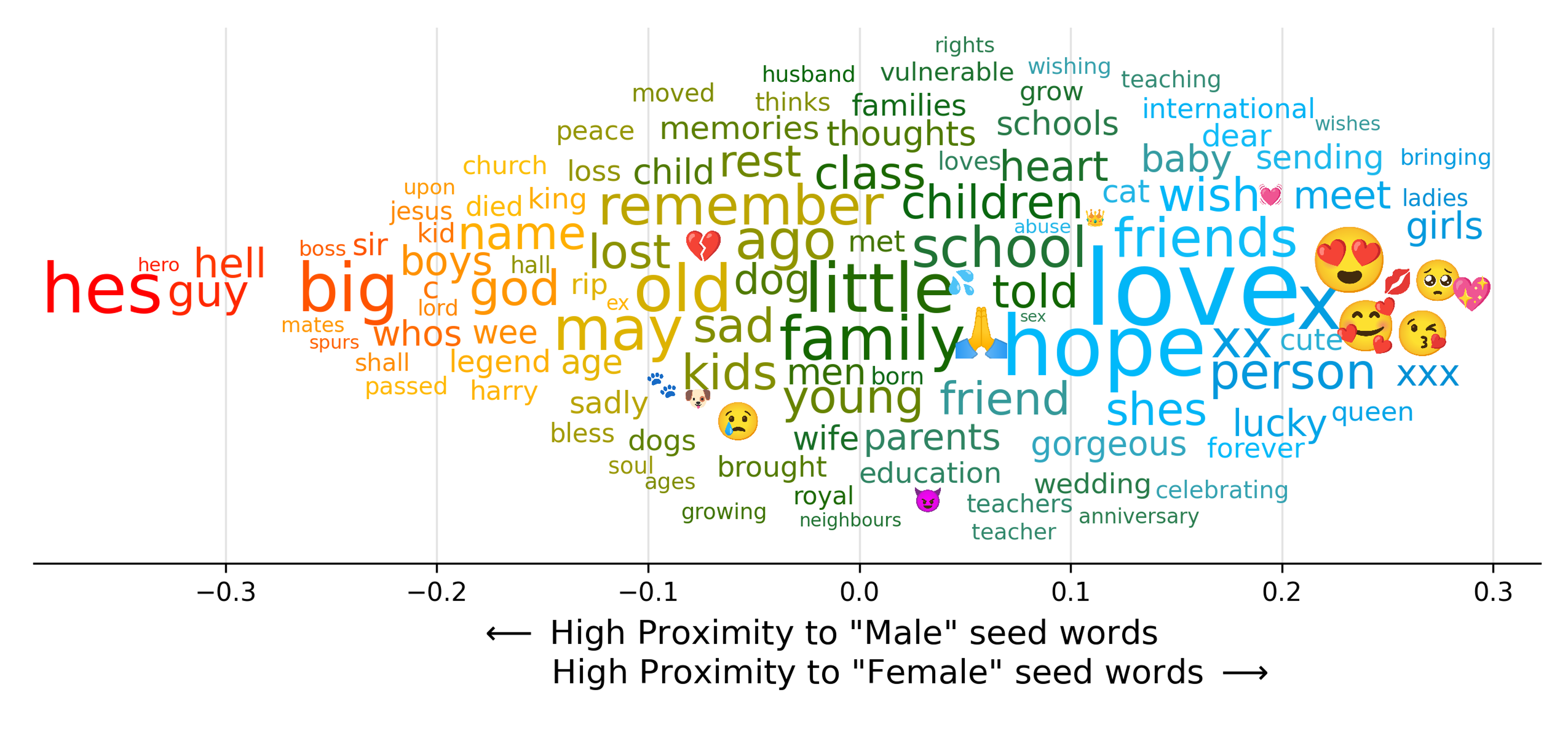
CIDER is not limited to sentiment. By initiating the model with alternative sets of seed words, non-intuitive linguistic scales can be produced. For instance:
from ciderpolarity import CIDER

input_data = 'test_data.csv'
output_folder = '/path/to/output/folder/'

cdr = CIDER(input_data, output_folder, predefined_seeds = 'gender')
cdr.fit()
The above creates a linguistic scale based off of proximity to gendered seed words (i.e. 'he', 'him', 'brother' and 'she', 'her', 'sister').
Below shows a sample output for this scale when applied to all of the tweets from the UK in 2020.
1 maintainer

Metadata
1 maintainer
Release files for ciderpolarity 0.3.3
For a detailed explanation of source distributions (sdists) and built distributions (wheels), please see the package formats documentation.
Source distribution (sdist)
| File | Size | Uploaded | Provenance | |
|---|---|---|---|---|
| ciderpolarity-0.3.3.tar.gz | 19.7 kB | Without provenance | Details |
Built distribution (wheel)
| File | Interpreter | ABI | Platform | Reset |
|---|---|---|---|---|
| ciderpolarity-0.3.3-py3-none-any.whl | Python 3 | none | any | Details |
Total release size: 39.7 kB
Release files / ciderpolarity-0.3.3.tar.gz
| Download URL | ciderpolarity-0.3.3.tar.gz |
|---|---|
| Size | 19.7 kB |
| Tags | Source |
|
SHA-256 checksum How to use checksums |
20127efd5ad9a1c6a4815fc186bdb9be0875f345f91f5d2f688682f21c2e948f
|
|
BLAKE2b-256 checksum How to use checksums |
aca351fd41894dd59066416ea6f07a653c4a96490b4a8467fc786a50a54f8ea4
|
| Upload date | |
|
Uploaded using Trusted Publishing? What is trusted publishing? |
No |
| Uploaded via |
poetry/1.5.1 CPython/3.10.10 Linux/6.5.0-41-generic
|
Release files / ciderpolarity-0.3.3-py3-none-any.whl
| Download URL | ciderpolarity-0.3.3-py3-none-any.whl |
|---|---|
| Size | 20.0 kB |
| Tags | Python 3 |
|
SHA-256 checksum How to use checksums |
0e19a83f633c6d851fc2ffe8b99eec6814b966b6810770b48133c8a1386a5fa5
|
|
BLAKE2b-256 checksum How to use checksums |
1173aaacae3d368a59297db38c7f75dda17309aa2e8b38d34f43b380fc2df098
|
| Upload date | |
|
Uploaded using Trusted Publishing? What is trusted publishing? |
No |
| Uploaded via |
poetry/1.5.1 CPython/3.10.10 Linux/6.5.0-41-generic
|
Security for ciderpolarity 0.3.3
Provenance
Provenance describes where a file came from. On PyPI, provenance is shared via attestations, which provide a verifiable record of the build or publishing details. View details, limitations and caveats.
No provenance found
None of the files in this release were uploaded with provenance metadata.
A note on package security
PyPI is a repository for distributing packages, not a service for auditing them. While third-party security researchers and our staff do their best to detect and remove malicious packages, PyPI cannot guarantee the quality, security or suitability of any given package.
To learn more about protecting yourself from malicious actors, visit our package security documentation.














