
cimetrics


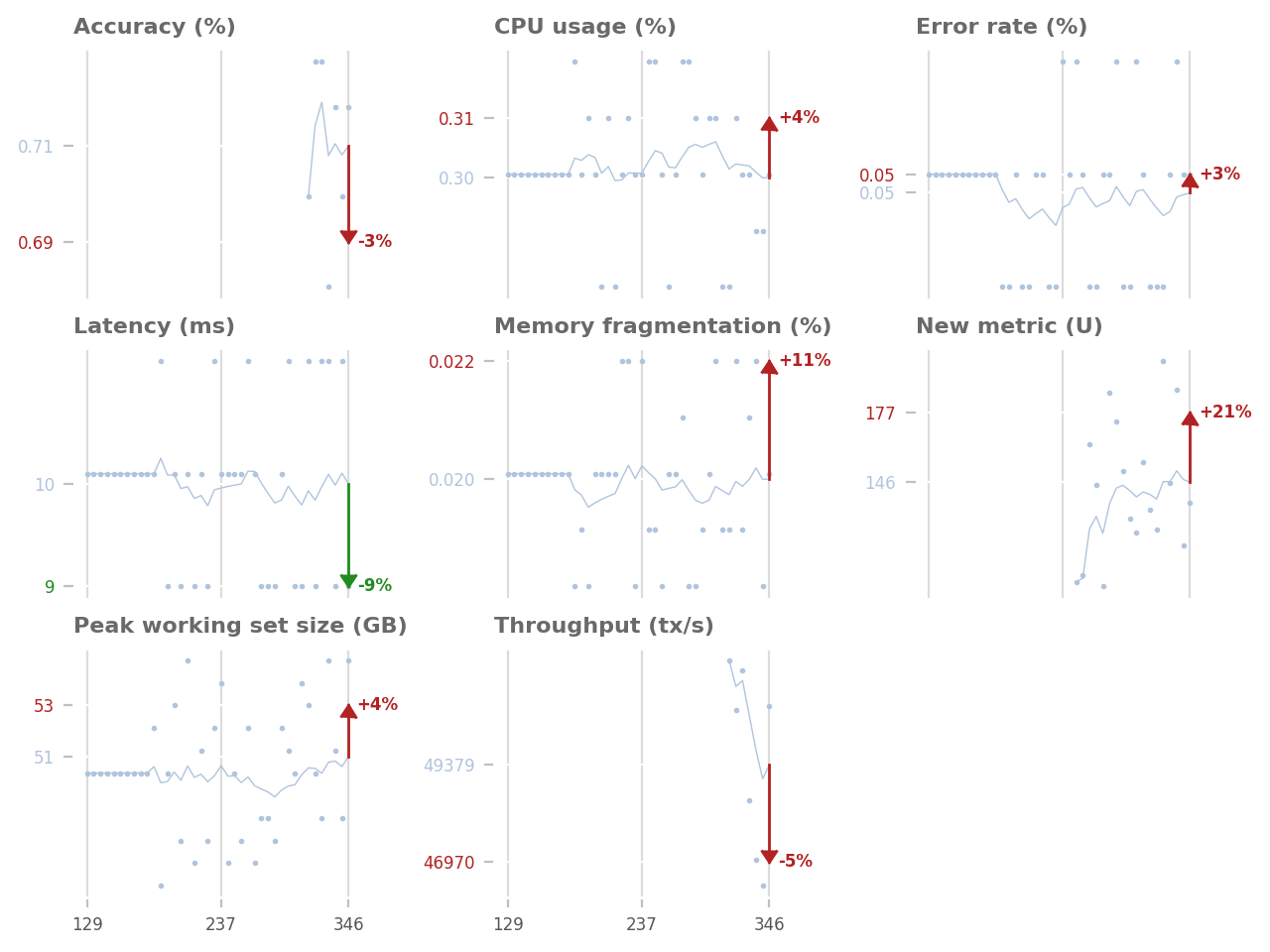
cimetrics lets you track crucial metrics to avoid unwanted regressions. It is easy to integrate with your existing projects and automatically provides quick feedback in your GitHub Pull Requests. See it in action here.
Install
pip install cimetrics
Using cimetrics
Setup storage
Metrics data are stored in any MongoDB-compatible database.
An easy way to get storage set up is to spin up a Cosmos DB instance in Azure. The connection string should be stored as the METRICS_MONGO_CONNECTION secret variable in your CI system.
Pushing metrics from your tests
You can use the simple Python API to push your metrics to your storage:
import cimetrics.upload

with cimetrics.upload.metrics() as metrics:
  # Run some tests and collect some data
  metrics.put("metric1 name (unit)", metric_1)
  metrics.put("metric2 name (unit)", metric_2)
Note that metric_1 and metric_2 must be instances of numbers.Real, for example float or int.
If a build publishes metrics from multiple instances of a cimetrics.upload.Metrics, for example because
it is running multiple concurrent jobs, it it necessary to publish those as "incomplete",
and to publish a "complete" entry only once they have all run. This is to prevent metrics comparison from
happening against an incomplete set of metrics for a build.
For example:
# Job 1
with cimetrics.upload.metrics(complete=False) as metrics:
  metrics.put("metric1 name (unit)", metric_1)

# Job 2
with cimetrics.upload.metrics(complete=False) as metrics:
  metrics.put("metric2 name (unit)", metric_2)

# Job running after Job 1 and 2 are complete
with cimetrics.upload.metrics() as metrics:
  pass
It is often convenient to use the same job to mark a set of metrics as complete and to plot them. A convenience entry-point is supplied to mark the metrics complete for a build:
python -m cimetrics.upload_complete
Setup the CI
Your CI is responsible for rendering the metrics report and posting them to your Pull Requests in GitHub. For this, you should create a personal authentication token with Write access to the repository for the account you want to post on behalf of cimetrics. Then, you should set up the token as the GITHUB_TOKEN secret variable in your CI system. Don't forget to add that user as a personal contributor (Write access) to your Github repository as well.
Then, you should add the following steps to your CI configuration file, e.g. for Azure Pipelines:
# Your application. This step collects and uploads your metrics
# to your MongoDB instance.
- script: python app/main.py
  env:
    METRICS_MONGO_CONNECTION: $(METRICS_MONGO_CONNECTION)
  displayName: 'Run app and collect metrics'

# This step generates a graph reporting the differences between
# your branch and the target branch.
# Only run on Pull Requests build.
- script: python -m cimetrics.plot
  env:
    METRICS_MONGO_CONNECTION: $(METRICS_MONGO_CONNECTION)
  displayName: 'Plot metrics'
  condition: eq(variables['Build.Reason'], 'PullRequest')

# This step publishes a report comment on the GitHub Pull Request
# using GITHUB_TOKEN as authentication (use secret variables!)
# Only run on Pull Requests build.
- script: python -m cimetrics.github_pr
  env:
    GITHUB_TOKEN: $(GITHUB_TOKEN)
  displayName: 'Post metrics graphs as PR comment'
  condition: eq(variables['Build.Reason'], 'PullRequest')
See azure-pipelines.yml for a full working example.
Create the metrics.yml file
The last step is to create a new metrics.yml configuration file at the root of your repository. The file should specify the name of the database and collection used for MongoDB. For example:
db: 'metrics'
collection: 'metrics_performance'
That's it! The next time you create a Pull Request, your CI will automatically store your metrics and publish a graph comparing your metrics against the same metrics on the branch you are merging to. Note that the cimetrics PR comment is updated for each subsequent build.
Caveats
- If the CI has never run on the target branch (e.g.
main- likely to happen when you first set upcimetrics), the report will only show the values that have been uploaded, without any comparison. - The rendered images are currently hosted in the target GitHub repository itself, under the
cimetricsbranch, in thecimetricsdirectory.
Supported CI pipelines
CI Metrics currently supports Azure Pipelines, but it should be very easy to add support for other build pipelines by subclassing GitEnv and providing the right attributes.
1 maintainer

Metadata
1 maintainer
Release files for cimetrics 0.3.15
For a detailed explanation of source distributions (sdists) and built distributions (wheels), please see the package formats documentation.
Source distribution (sdist)
| File | Size | Uploaded | Provenance | |
|---|---|---|---|---|
| cimetrics-0.3.15.tar.gz | 14.9 kB | Without provenance | Details |
Release files / cimetrics-0.3.15.tar.gz
| Download URL | cimetrics-0.3.15.tar.gz |
|---|---|
| Size | 14.9 kB |
| Tags | Source |
|
SHA-256 checksum How to use checksums |
2c94734e1a5d359073698fc47e4626b9d5d7214bdab9a779c1197edeee28c772
|
|
BLAKE2b-256 checksum How to use checksums |
d2a3755e4c8d40488e63ba52d82d93c485cf7e0f614b755e400bd5aa8eb1ef19
|
| Upload date | |
|
Uploaded using Trusted Publishing? What is trusted publishing? |
No |
| Uploaded via |
twine/4.0.2 CPython/3.8.16
|
Security for cimetrics 0.3.15
Provenance
Provenance describes where a file came from. On PyPI, provenance is shared via attestations, which provide a verifiable record of the build or publishing details. View details, limitations and caveats.
No provenance found
None of the files in this release were uploaded with provenance metadata.
A note on package security
PyPI is a repository for distributing packages, not a service for auditing them. While third-party security researchers and our staff do their best to detect and remove malicious packages, PyPI cannot guarantee the quality, security or suitability of any given package.
To learn more about protecting yourself from malicious actors, visit our package security documentation.














