
Crowdmark Labeler
This is a Python package which automatically labels exams outputted by Crowdmark using the names of students provided in a pandas dataframe. This script depends on pdfrw, reportlab, and pandas. This is designed for assessments which have the "Enable automated matching" option enabled when booklets are generated in Crowdmark. The script will fill the name box that looks like this:
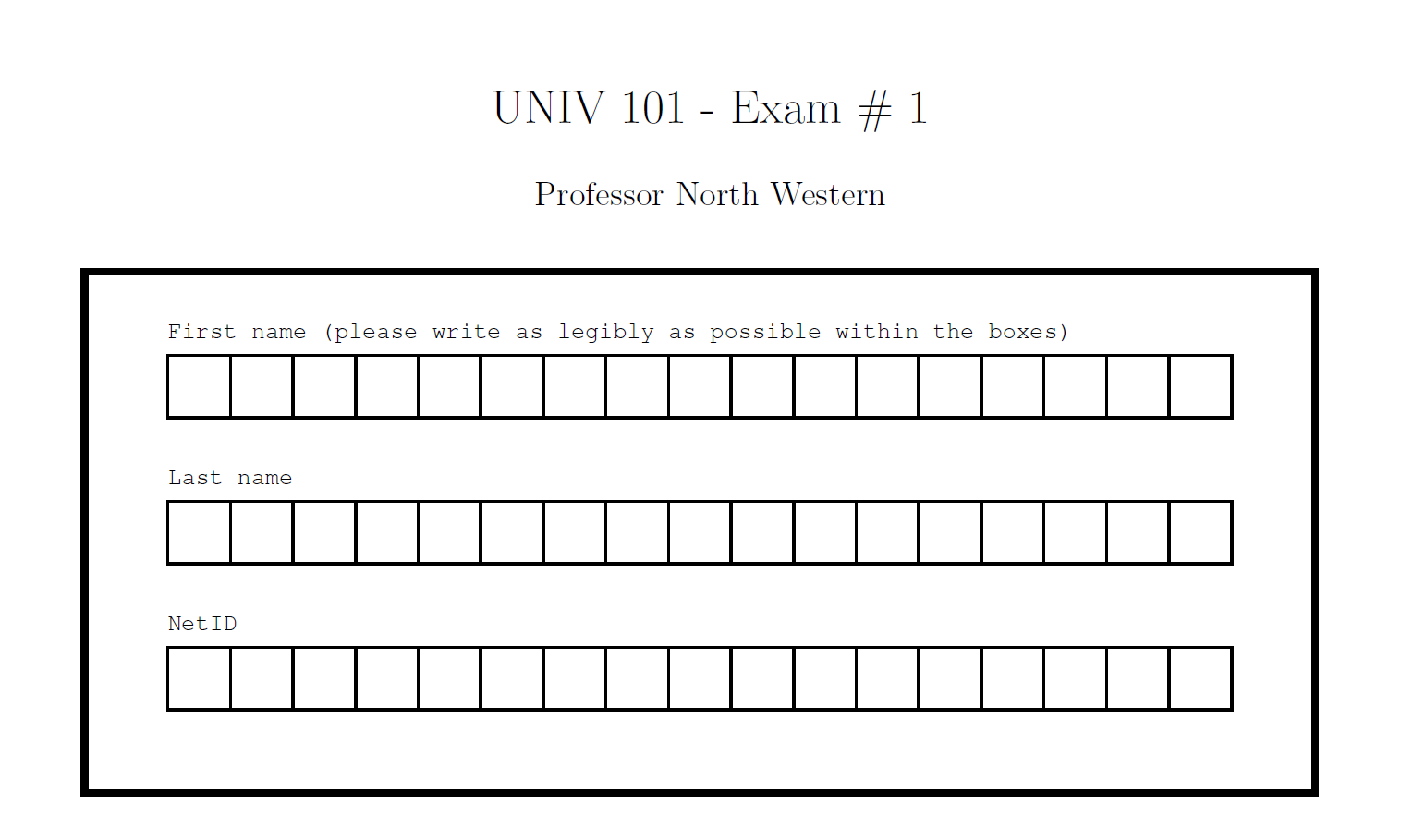
to make it look like this
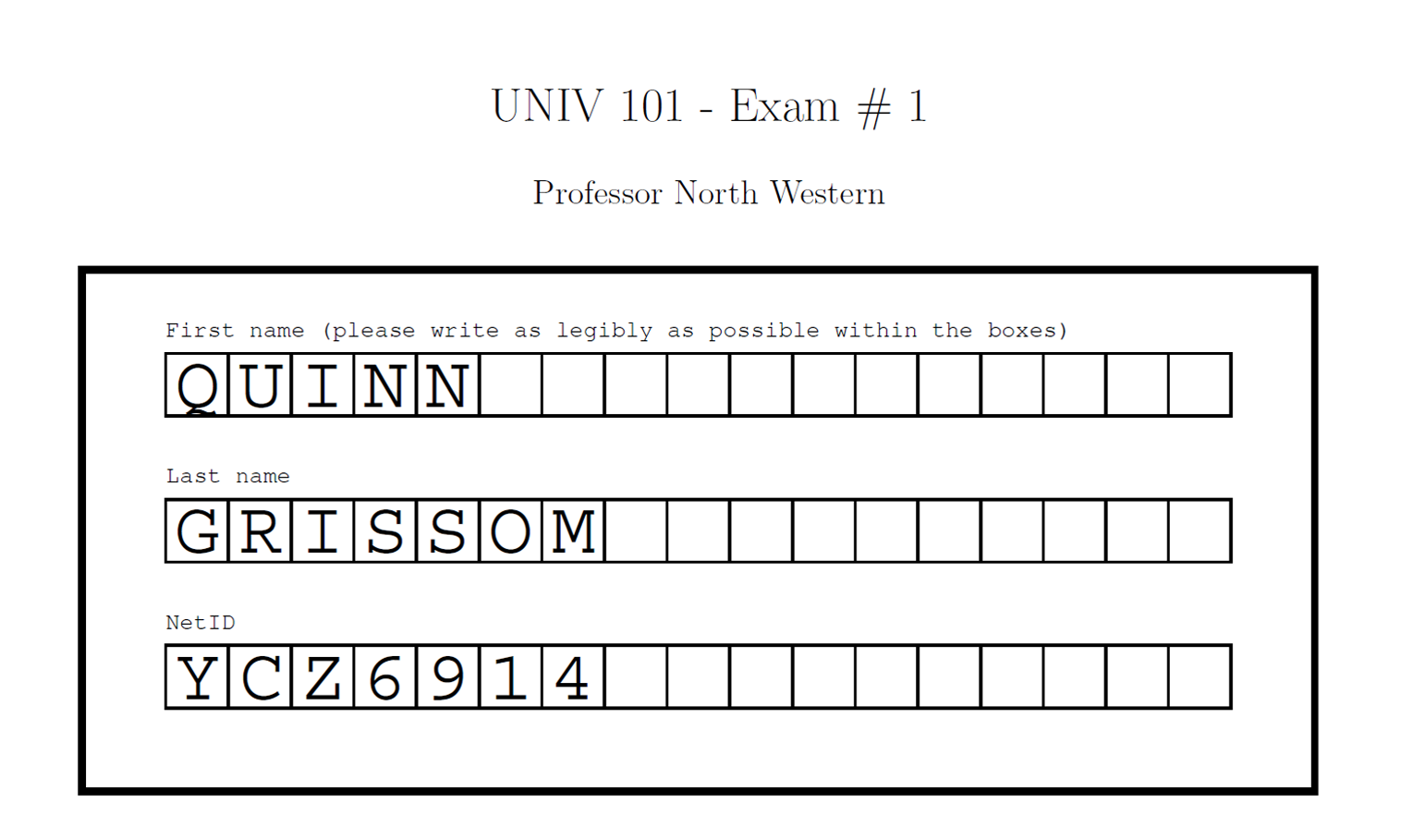
Enviroment
You can install this package with:
pip install clabeler
CLI
This package can be called from the command line using the clabeler command. It has three required arguments and several optional arguments to set the output and to allow for different column labels in the inputted data.
usage: clabeler [-h] [-O OUTPUT] [--colfname COLFNAME] [--collname COLLNAME] [--colid COLID] labels booklets pagecount

Label exam PDFs from Crowdmark with names of students.

positional arguments:
  labels               path to a csv containing labels
  booklets             path to PDF of unlabeled exams
  pagecount            number of pages per exam

optional arguments:
  -h, --help           show this help message and exit
  -O OUTPUT            path to output unlabeled exams
  --colfname COLFNAME  column label for student's first name
  --collname COLLNAME  column label for student's last name
  --colid COLID        column label for student ID
Function
In addition to the command line interface, this package defines the function labelbooklets defined in the following way:
def labelbooklets(labels, pagecount, booklets="booklets.pdf", output="labeled_booklets.pdf", colfname="fname", collname="lname", colid="netID"):
the function takes the same arguments:
- labels: A pandas dataframe containing the student names and netIDs
- pagecount: The number of pages in each exam
- booklets: The path to the exam booklets generated by Crowdmark; defaults to "booklets.pdf" in the working directory
- output: The path to output the labeled booklets; defaults to "labeled_booklets.pdf" in the working directory
- colfname: The name of your student first name column in your labels dataframe; defaults to "fname"
- collname: The name of your student last name column in your labels dataframe; defaults to "lname"
- colid: The name of your student ID column in your labels dataframe; defaults to "netID"
Example
An example is provided in the example folder. It contains:
- an excel spreadsheet of fake names called
labels.xlsxand an identical tab delimited file calledlabels.txt - a fake exam with a Crowdmark name box called
booklets.pdf - a script that calls the
labelbookletsfunction calledexample.py
The output of this example is the included labeled_booklets.pdf
License
Crowdmark Labeler is licensed under the MIT License.
FAQ
Why does the inserted text look different/bad on my device?
The script uses the font "Courier" when inserting text. While all versions of Acrobat reader, Windows, and Mac OSX have this font, not all readers and systems do (eg. Android). This is not a limitation unless you intend to print with a device that does not support this font.
Does this support documents with A4, legal, etc. paper?
No, it only supports letter paper at the moment. It should be easy to add other formats. Please create an issue (or pull request) if you would like to see any other paper size supported.
1 maintainer

Metadata
1 maintainer
Release files for clabeler 1.0.2
For a detailed explanation of source distributions (sdists) and built distributions (wheels), please see the package formats documentation.
Source distribution (sdist)
| File | Size | Uploaded | Provenance | Actions |
|---|---|---|---|---|
| clabeler-1.0.2.tar.gz | 4.4 kB | Without provenance | Details for clabeler-1.0.2.tar.gz |
Built distribution (wheel)
| File | Interpreter | ABI | Platform | Actions Reset |
|---|---|---|---|---|
| clabeler-1.0.2-py3-none-any.whl | Python 3 | none | any | Details for clabeler-1.0.2-py3-none-any.whl |
Total release size: 9.8 kB
Release files / clabeler-1.0.2.tar.gz
| Download URL | clabeler-1.0.2.tar.gz |
|---|---|
| Size | 4.4 kB |
| Tags | Source |
|
SHA-256 checksum How to use checksums |
b835576e94ee638dc00bb109137cd26fca2dea10bb3c5a9e5e3d5c3831626bd7
|
|
BLAKE2b-256 checksum How to use checksums |
c9a82c4ef3db801e0435128a70d80aa5c29a1c907c9db360e8c20ae12432017a
|
| Upload date | |
|
Uploaded using Trusted Publishing? What is trusted publishing? |
No |
| Uploaded via |
twine/3.3.0 pkginfo/1.7.0 requests/2.22.0 setuptools/45.2.0 requests-toolbelt/0.9.1 tqdm/4.59.0 CPython/3.8.5
|
Release files / clabeler-1.0.2-py3-none-any.whl
| Download URL | clabeler-1.0.2-py3-none-any.whl |
|---|---|
| Size | 5.5 kB |
| Tags | Python 3 |
|
SHA-256 checksum How to use checksums |
6b47d73f9236df58b5bb1f822fc0bc5b16f524017dd2c77b603e47fb905fd1e2
|
|
BLAKE2b-256 checksum How to use checksums |
1a04784865376770c57b289a263cd713127a88f4cbcfd5dbcc7e27b2ec90600a
|
| Upload date | |
|
Uploaded using Trusted Publishing? What is trusted publishing? |
No |
| Uploaded via |
twine/3.3.0 pkginfo/1.7.0 requests/2.22.0 setuptools/45.2.0 requests-toolbelt/0.9.1 tqdm/4.59.0 CPython/3.8.5
|
Security for clabeler 1.0.2
Provenance
Provenance describes where a file came from. On PyPI, provenance is shared via attestations, which provide a verifiable record of the build or publishing details. View details, limitations and caveats.
No provenance found
None of the files in this release were uploaded with provenance metadata.
A note on package security
PyPI is a repository for distributing packages, not a service for auditing them. While third-party security researchers and our staff do their best to detect and remove malicious packages, PyPI cannot guarantee the quality, security or suitability of any given package.
To learn more about protecting yourself from malicious actors, visit our package security documentation.














