
classgraphic




Interactive classification diagnostic plots for scikit-learn.
We classify things for the purpose of doing something to them. Any classification which does not assist manipulation is worse than useless. - Randolph S. Bourne, "Education and Living", The Century Co (April 1917)
Major features:
Plotly based tables for:
- class_imbalance_table
- classification_table
- confusion_matrix_table
- describe (dataframe stats)
- prediction_table
- table
And the following charts:
- class_imbalance
- class_error
- det
- feature_importance
- missing
- precision_recall
- roc
- prediction_histogram
- threshold
For clustering:
- Delauney triangulations
- Voronoi tessalations
Try it
By trying it on binder, you'll see all the details and interactivity. The quickstart below has static images, but if you run these commands in a jupyter notebook, ipython or IDE you will be able to interact with them.
Quickstart
from classgraphic.essential import *

# loading the data
df = px.data.iris()

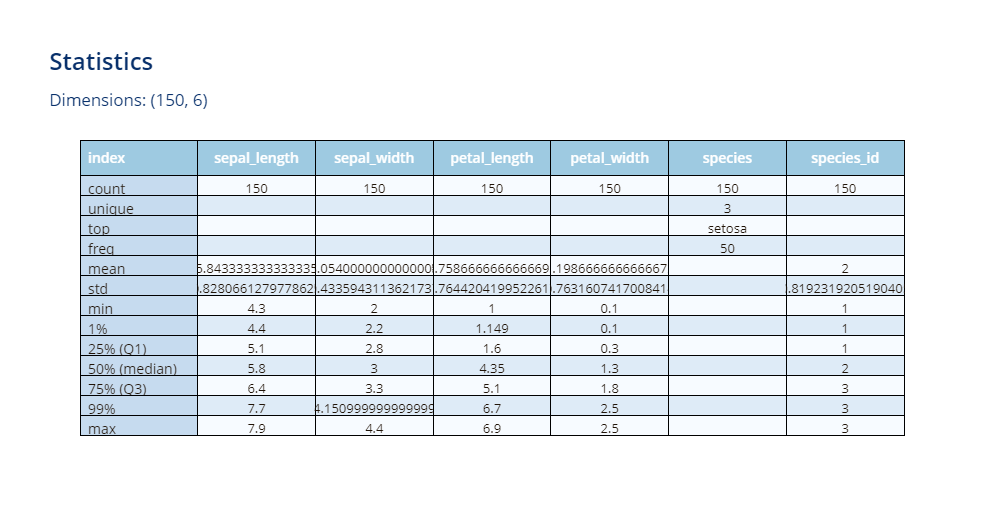
# let's see what kind of data we have
describe(df, transpose=True).show()
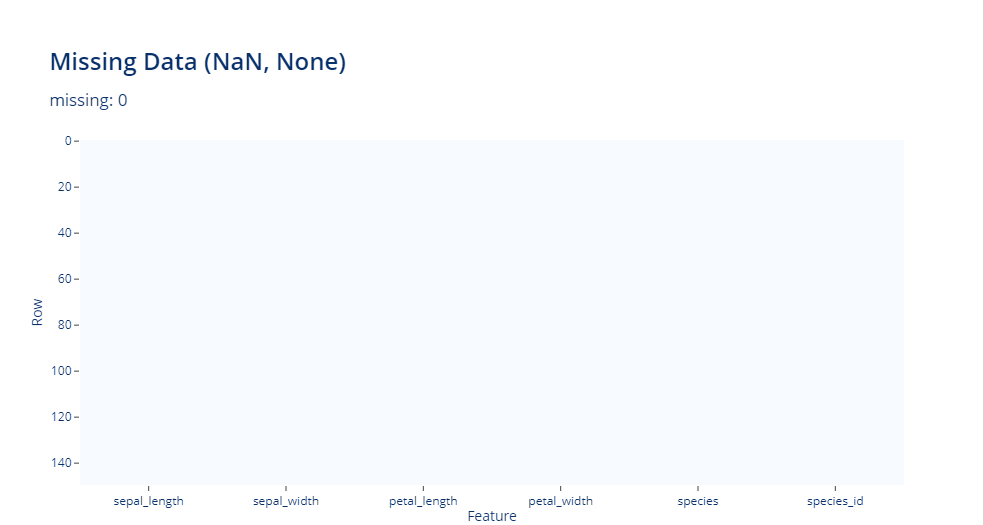
# any missing?
missing(df)
# features
X = df.drop(columns=["species", "species_id"])

#target
y = df["species"]

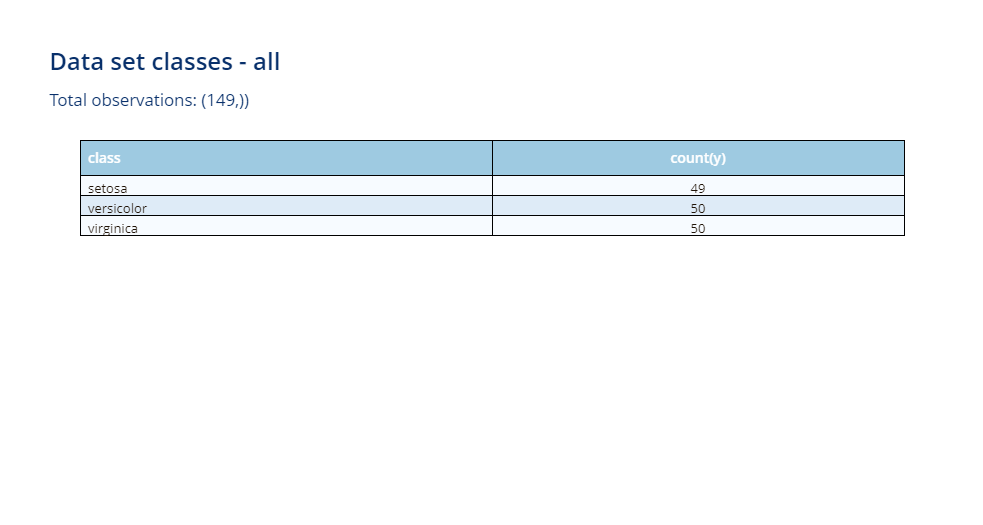
# Let's check our classes we will be training on and predicting
class_imbalance_table(y, condition="all")
# train / test split
X_train, X_test, y_train, y_test = train_test_split(
    X, y, test_size=0.5, random_state=random_state
)

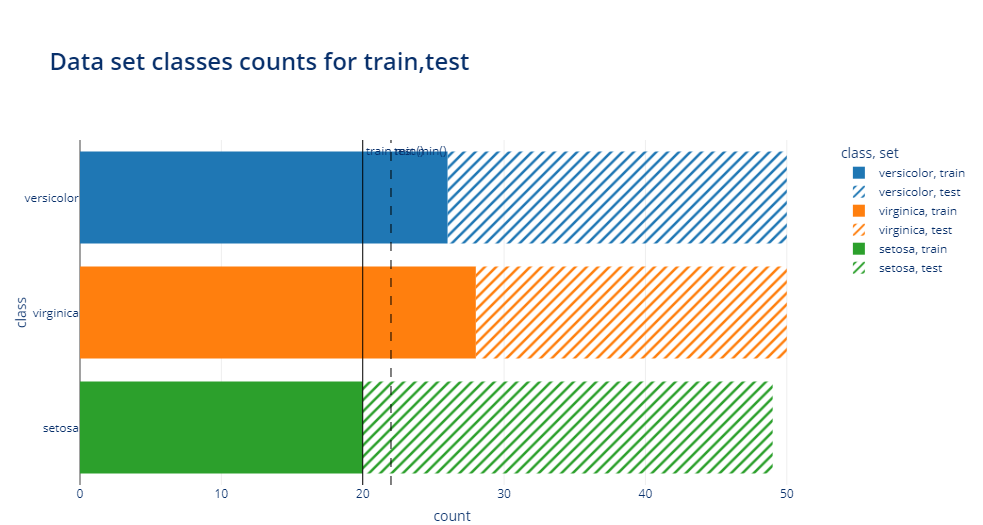
# we want to see total count for each, default for bars is to be stacked, so that works
# we could also pass to class_imbalance barmode="overlay" if we prefer
class_imbalance(y_train, y_test, condition="train,test")
# model
model = LogisticRegression(max_iter=max_iter, random_state=random_state)
model.fit(X_train, y_train)

# predictions
y_score = model.predict_proba(X_test)
y_pred = model.predict(X_test)

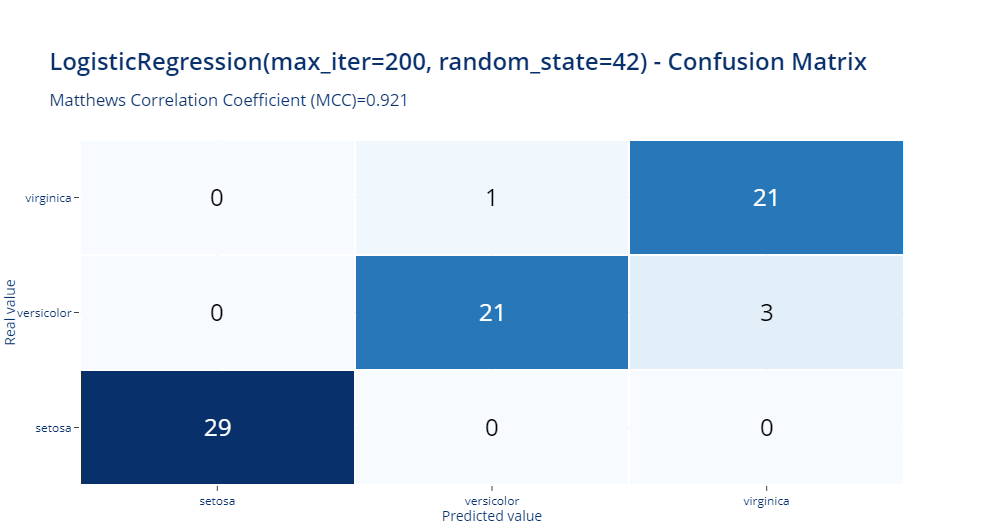
confusion_matrix_table(model, y_test, y_pred).show()
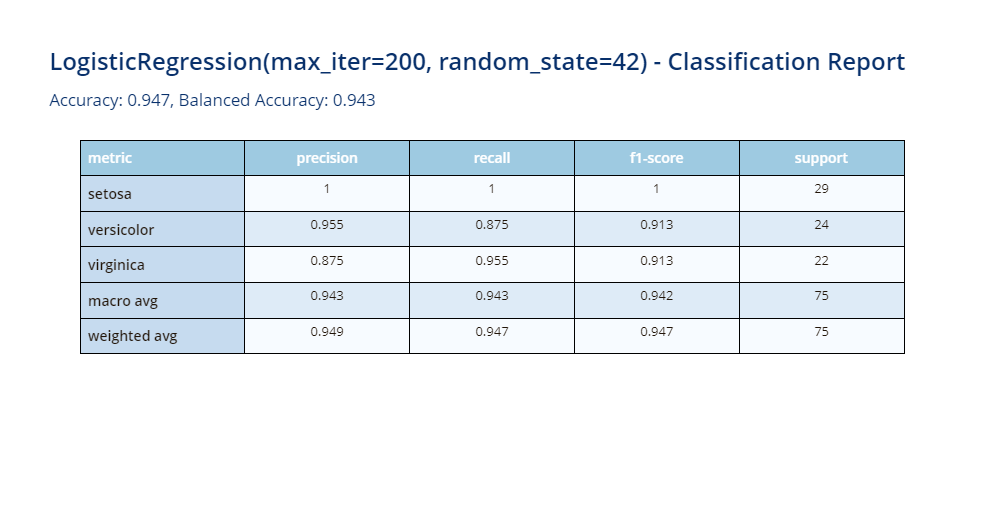
classification_table(model, y_test, y_pred)
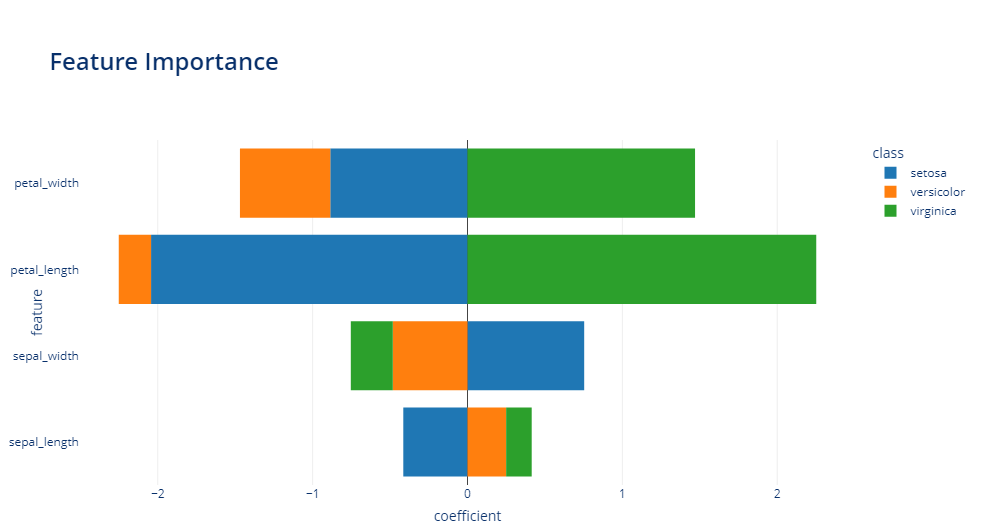
feature_importance(model, y, transpose=True)
This concludes the quickstart. There are many more visualizations and tables to explore.
See the notebooks and docs folders on github and the documentation
web site for more information.
Requirements
- Python 3.8 or later
- numpy
- pandas
- plotly>=5.0
- scikit-learn
- nbformat
Install
If you use conda, create an environment named classgraphic, then activate it:
-
in Linux:
source activate pilot -
In Windows:
conda activate pilot
If you use another environment management create and activate your environment using the normal steps.
Then execute:
python setup.py install
or for installing in development mode:
python -m pip install -e . --no-build-isolation
or alternatively
python setup.py develop
To install from github instead:
pip install git+https://github.com/dionresearch/classgraphic
See also
- stemgraphic python package for visualization of data and text
- Hotelling one and two sample Hotelling T2 tests, T2 and f statistics and univariate and multivariate control charts and anomaly detection
History
0.3.1 (2023-09-20)
- bugfix for describe with pandas 2.x
0.3.0 (2023-05-01)
- added 2D clustering visualization
- defaults to Voronoi tessalation
- optional Delauney triangulation
0.2.1 (2022-09-20)
- fixed image not showing on pypi
- fixed feature importance error
- warning = False didn't prevent warning to show
0.2.1 (2022-09-19)
- added binary classification notebook example
- fixed issue with non dataframe binary classification
0.2.0 (2022-09-18)
The previous version was a first step to doing a public release. This release added:
- documented
- updated the code to be in line with plotly 5.x
It was released to github and pypy.
0.1.0 (2019-10-27)
- First private release
Origins
Inspired by Dion Research LLC Internal EDA/anomaly and end to end data science platform. A dozen charts and tables were initially designed to provide better diagnostic reporting. Some can also be used for exploratory or explanatory purposes.
See: https://blog.dionresearch.com/2019/10/visualizations-explanatory-exploratory.html
1 maintainer

Metadata
1 maintainer
Release files for classgraphic 0.3.1
For a detailed explanation of source distributions (sdists) and built distributions (wheels), please see the package formats documentation.
Source distribution (sdist)
| File | Size | Uploaded | Provenance | Actions |
|---|---|---|---|---|
| classgraphic-0.3.1.tar.gz | 546.3 kB | Without provenance | Details for classgraphic-0.3.1.tar.gz |
Built distribution (wheel)
| File | Interpreter | ABI | Platform | Actions Reset |
|---|---|---|---|---|
| classgraphic-0.3.1-py3-none-any.whl | Python 3 | none | any | Details for classgraphic-0.3.1-py3-none-any.whl |
Total release size: 566.5 kB
Release files / classgraphic-0.3.1.tar.gz
| Download URL | classgraphic-0.3.1.tar.gz |
|---|---|
| Size | 546.3 kB |
| Tags | Source |
|
SHA-256 checksum How to use checksums |
75803f1e09d4990661d03e08c0ce73278782e08835da8970f24ea07012f029d5
|
|
BLAKE2b-256 checksum How to use checksums |
8d953cd340432d090a24c87c3c8429534fd4485419f4dab0f368a6331b973247
|
| Upload date | |
|
Uploaded using Trusted Publishing? What is trusted publishing? |
No |
| Uploaded via |
twine/4.0.2 CPython/3.11.0
|
Release files / classgraphic-0.3.1-py3-none-any.whl
| Download URL | classgraphic-0.3.1-py3-none-any.whl |
|---|---|
| Size | 20.2 kB |
| Tags | Python 3 |
|
SHA-256 checksum How to use checksums |
d0e5a9cd816845f583d156a11b4b8f1782b694ba85b9b1c08941db3c777a127b
|
|
BLAKE2b-256 checksum How to use checksums |
e11ee16382d15f79f855f6f9c75263dc93535daccb9c5cdea71f549001a4c25c
|
| Upload date | |
|
Uploaded using Trusted Publishing? What is trusted publishing? |
No |
| Uploaded via |
twine/4.0.2 CPython/3.11.0
|
Security for classgraphic 0.3.1
Provenance
Provenance describes where a file came from. On PyPI, provenance is shared via attestations, which provide a verifiable record of the build or publishing details. View details, limitations and caveats.
No provenance found
None of the files in this release were uploaded with provenance metadata.
A note on package security
PyPI is a repository for distributing packages, not a service for auditing them. While third-party security researchers and our staff do their best to detect and remove malicious packages, PyPI cannot guarantee the quality, security or suitability of any given package.
To learn more about protecting yourself from malicious actors, visit our package security documentation.














