clients-scanner
Local network clients scanner with deauth feature
Info
- while creating app I was inspired by Android Fing application
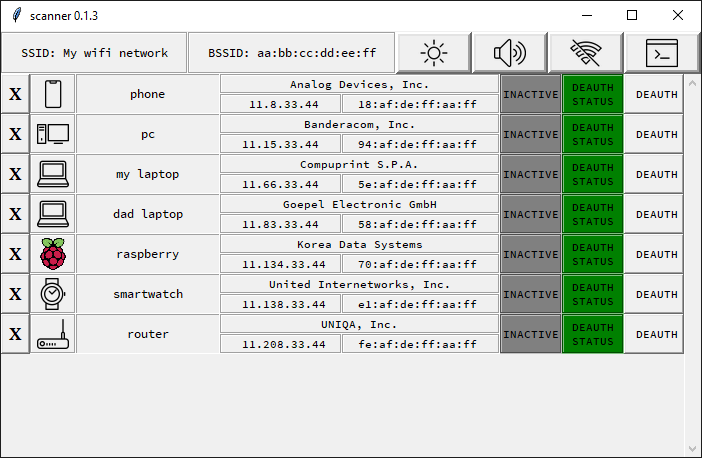
- application shows local network devices
- discovered devices are stored in clients.json file under home directory
- application allows to perform deauthentication(disconnecting devices connected over WiFi)
- deauthentication bases on: https://github.com/roglew/wifikill
- icons by Icons8: https://icons8.com/
- sounds comes from: https://mixkit.co/
Install
.. code-block:: python
pip install clients-scanner
or
.. code-block:: bash
pip install git+https://github.com/streanger/clients-scanner.git
Important: scapy requires Npcap (https://npcap.com/#download) or Winpcap (https://www.winpcap.org/install/) on Windows and libpcap on Linux. Please install needed package manually
Windows:
.. code-block:: bash
# Npcap -> https://npcap.com/#download
# Winpcap -> https://www.winpcap.org/install/
# or Npcap included in nmap using command:
choco install nmap -y
Linux
.. code-block:: bash
sudo apt-get install libpcap-dev
Important: you may need to run script as sudo under Linux to work properly
Usage
Main scanner gui
.. code-block:: python
# from Python
from clients_scanner import scanner
scanner()
.. code-block:: bash
# from command-line
scanner
ScapyScanner
.. code-block:: python
from clients_scanner import ScapyScanner
scapy_scanner = ScapyScanner()

# get clients directly
clients = scapy_scanner.get_clients('192.168.0.1/24', timeout=2)
for (IP, mac) in clients:
    print(IP, mac)

# get enriched clients data from queue
scapy_scanner.run()
while True:
    item = scapy_scanner.clients_queue.get()
    print(item)
    # Client(mac='XXXX', ip='XXXX', bssid='XXXX', ssid='XXXX', time=XXXX)
Deauthenticator
.. code-block:: python
from clients_scanner import Deauthenticator
deauth = Deauthenticator(gateway_ip='192.168.0.1', gateway_mac='aa:bb:cc:dd:ee:ff')
deauth.run()
victim_ip = '192.168.0.123'
victim_mac = 'aa:bb:cc:dd:ee:ff'
status = False
deauth.deauth_queue.put((victim_mac, victim_ip, status))
Example view
.. image:: https://raw.githubusercontent.com/streanger/clients-scanner/master/images/scanner.png
Changelog
-
v. 0.1.2- reshaped gui
- night mode
- scan on/off mode
- debug mode
- "removing clients" feature
- scrollable area
- more friendly sound
- config files in user home directory
-
v. 0.1.0 - 0.1.1- gui with limited rows number
- deauth feature
Issues
If you encounter anny issue, error, bug or you want to enchant project, please describe it in issues section <https://github.com/streanger/clients-scanner/issues>_
1 maintainer

Metadata
1 maintainer
Release files for clients-scanner 0.1.2
For a detailed explanation of source distributions (sdists) and built distributions (wheels), please see the package formats documentation.
Built distribution (wheel)
| File | Interpreter | ABI | Platform | Actions Reset |
|---|---|---|---|---|
| clients_scanner-0.1.2-py2.py3-none-any.whl | Python 2, Python 3 | none | any | Details for clients_scanner-0.1.2-py2.py3-none-any.whl |
Release files / clients_scanner-0.1.2-py2.py3-none-any.whl
| Download URL | clients_scanner-0.1.2-py2.py3-none-any.whl |
|---|---|
| Size | 219.8 kB |
| Tags | Python 2 Python 3 |
|
SHA-256 checksum How to use checksums |
1516d76f577f7f24ff5e7ee2bdc6d0df67de04c9b5845b63a5fd710337e93a0d
|
|
BLAKE2b-256 checksum How to use checksums |
c0853a0ad56789ebe220e1fc7101f01e4f00ddf9d5cc7811b8084c01527a9212
|
| Upload date | |
|
Uploaded using Trusted Publishing? What is trusted publishing? |
No |
| Uploaded via |
twine/4.0.2 CPython/3.9.10
|
Security for clients-scanner 0.1.2
Provenance
Provenance describes where a file came from. On PyPI, provenance is shared via attestations, which provide a verifiable record of the build or publishing details. View details, limitations and caveats.
No provenance found
None of the files in this release were uploaded with provenance metadata.
A note on package security
PyPI is a repository for distributing packages, not a service for auditing them. While third-party security researchers and our staff do their best to detect and remove malicious packages, PyPI cannot guarantee the quality, security or suitability of any given package.
To learn more about protecting yourself from malicious actors, visit our package security documentation.