
Cloud Device Management Toolkit
Support
- azure iotedge
- list/get device/module info
- list/get/edit device/module twin
- subscribe device D2C message
- invoke device/module direct command
- azure iot device
- list/get device info
- list/get/edit device twin
- subscribe device D2C message
- invoke device direct command
- aws iot device
- list/get thing info
- list/get/edit thing shadow
- subscribe device D2C message
- invoke thing job
- aws greengrass (TODO)
- aliyun (TODO)
Setup
- git clone this repo
- cd to this folder
- edit auth configuration (setting.ini) :
#--------------------------------------------------------------------------------
# aws credentials help
# - access_key_id, secret_access_key
#   * https://aws.amazon.com/tw/premiumsupport/knowledge-center/create-access-key/
# - root_ca_path
#   * https://www.amazontrust.com/repository/AmazonRootCA1.pem
#--------------------------------------------------------------------------------
[aws]
region_name = ap-northeast-1
host = test.iot.ap-northeast-1.amazonaws.com
access_key_id = test
secret_access_key = test
fleet_indexing = true
root_ca_path = ./aws/awsRootCA.crt

#--------------------------------------------------------------------------------------------------------------------------
# azure credentials help  (using the Azure CLI from cloud shell, https://docs.microsoft.com/zh-tw/azure/cloud-shell/quickstart)
# - connection_string
#   * az iot hub show-connection-string --name MyIotHub
# - eventhub_connection_string
#   * Endpoint
#      - az iot hub show --query properties.eventHubEndpoints.events.endpoint --name {your IoT Hub name}
#   * EntityPath
#      - az iot hub show --query properties.eventHubEndpoints.events.path --name {your IoT Hub name}
#   * SharedAccessKey for the SharedAccessKeyName="service"
#      - az iot hub policy show --name service --query primaryKey --hub-name {your IoT Hub name}
#--------------------------------------------------------------------------------------------------------------------------
[azure]
connection_string = HostName=${HostName};SharedAccessKeyName=${SharedAccessKeyName};SharedAccessKey=${SharedAccessKey}
eventhub_connection_string = Endpoint=${Endpoint};SharedAccessKeyName=${SharedAccessKeyName};SharedAccessKey=${SharedAccessKey};EntityPath=${EntityPath}
consumer_group = $default
- enter env
docker run -it --rm --name sample-cli \
    -v $(pwd):/data --net host \
    bibbylong/device-mgmt:1.0.9-amd64 bash
python3 ./sample.py -h
- or run by docker-compose
docker-compose run --rm sample -h
Sample
-
help
~ python3 ./sample.py -h
usage: sample.py [-h] [-t TARGET] [-m MODE] [-T TOPIC] [-D DEVICE]
                 [-C COMMAND_NAME] [-P COMMAND_PAYLOAD] [-S DESIRED_PAYLOAD]
                 [--pretty]

optional arguments:
  -h, --help            show this help message and exit
  -t TARGET, --target TARGET
                        connection target
  -m MODE, --mode MODE  Operation modes: ['subscribe', 'list', 'command',
                        'device', 'desired']
  -T TOPIC, --topic TOPIC
                        Targeted topic
  -D DEVICE, --device DEVICE
                        control device
  -C COMMAND_NAME, --command COMMAND_NAME
                        control command name
  -P COMMAND_PAYLOAD, --payload COMMAND_PAYLOAD
                        control command payload
  -S DESIRED_PAYLOAD, --desired_payload DESIRED_PAYLOAD
                        desired payload
  --pretty              pretty json output
-
list devices
~ python3 ./sample.py --pretty \
    -t azure \
    -m list
[
  {
    "name": "mydev1",
    "desired": {},
    "reported": {},
    "timestamp": "0001-01-01T00:00:00Z",
    "connected": false
  }
]
-
get device
~ python3 ./sample.py --pretty \
    -t azure \
    -m device \
    -D mydev1
{
  "name": "mydev1",
  "desired": {},
  "reported": {},
  "timestamp": "0001-01-01T00:00:00Z",
  "connected": false
}
get module under device (azure)
~ python3 ./sample.py --pretty \
    -t azure \
    -m device \
    -D mydev1?module=myModule
{
  "name": "mydev1?module=myModule",
  "desired": {},
  "reported": {},
  "timestamp": "0001-01-01T00:00:00Z",
  "connected": false
}
-
update device twin
~ python3 ./sample.py \
    -t azure \
    -m desired \
    -D mydev1 \
    --desired_payload '{"enable":true}'
200
update module twin (azure)
python3 ./sample.py \
  -t azure \
  -m desired \
  -D mydev1?module=myModule \
  --desired_payload '{"enable":true}'
-
subscribe D2C message
all message
~ python3 ./sample.py -t azure -m subscribe -T '#'
specify topic
~ python3 ./sample.py -t azure -m subscribe -T 'test'
specify device (azure)
~ python3 ./sample.py -t azure -m subscribe -T 'mydev'
-
invoke method
~ python3 ./sample.py --pretty \
    -t azure \
    -m command \
    -D mydev1 \
    -C api-v1 \
    -P '{"path":"/device/ethernets","method":"GET"}'
code: 200
response: {
    "data": [
        {
            "id": 1,
            "enable": true,
            "ip": "192.168.3.3"
        },
        {
            "id": 2,
            "enable": true,
            "ip": "192.168.3.4"
        }
    ]
}
module under device (azure)
~ python3 ./sample.py --pretty \
    -t azure \
    -m command \
    -D mydev1?module=myModule \
    -C api-v1 \
    -P '{"path":"/device/ethernets","method":"GET"}'
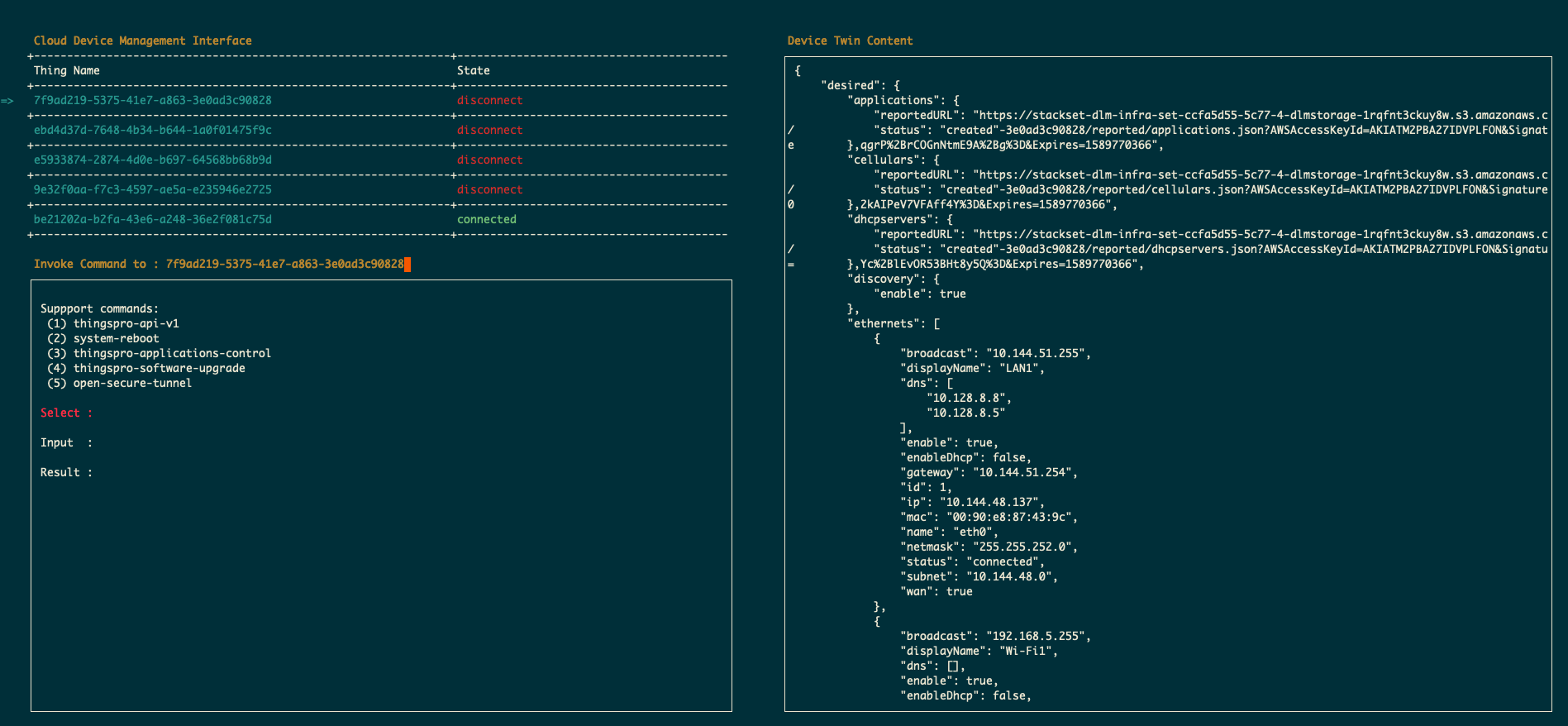
Cloud Device Management Console
docker-compose run --rm device-mgmt -t aws
1 maintainer

Metadata
1 maintainer
Release files for cloud-toolkit 1.0.9
For a detailed explanation of source distributions (sdists) and built distributions (wheels), please see the package formats documentation.
Source distribution (sdist)
| File | Size | Uploaded | |
|---|---|---|---|
| cloud-toolkit-1.0.9.tar.gz | 11.6 kB | Details |
Release files / cloud-toolkit-1.0.9.tar.gz
| Download URL | cloud-toolkit-1.0.9.tar.gz |
|---|---|
| Size | 11.6 kB |
| Tags | Source |
|
SHA-256 checksum How to use checksums |
42e5849c230d97df1e2e66d2985eb24c9f5ee86b7f1a630733e7c787733f58d1
|
|
BLAKE2b-256 checksum How to use checksums |
9b573e80326ea1c1e74e7229be788f3ee2309d81b941256e0a3495aa75a9bf3a
|
| Upload date | |
|
Uploaded using Trusted Publishing? What is trusted publishing? |
No |
| Uploaded via |
twine/3.2.0 pkginfo/1.5.0.1 requests/2.22.0 setuptools/45.2.0 requests-toolbelt/0.9.1 tqdm/4.48.2 CPython/3.8.2
|














