

@cloudcomponents/cdk-developer-tools-notifications





#slack / msteams / email notifications for developer tools: CodeCommit, CodeBuild, CodeDeploy, CodePipeline
Install
TypeScript/JavaScript:
npm i @cloudcomponents/cdk-developer-tools-notifications
Python:
pip install cloudcomponents.cdk-developer-tools-notifications
MSTeams
- Navigate to the channel where you want to add the webhook and select (•••) More Options from the top navigation bar.
- Choose Connectors from the drop-down menu and search for Incoming Webhook.
- Select the Configure button, provide a name, and, optionally, upload an image avatar for your webhook.
- The dialog window will present a unique URL that will map to the channel. Make sure that you copy and save the URL—you will need to provide it to the outside service.
- Select the Done button. The webhook will be available in the team channel.
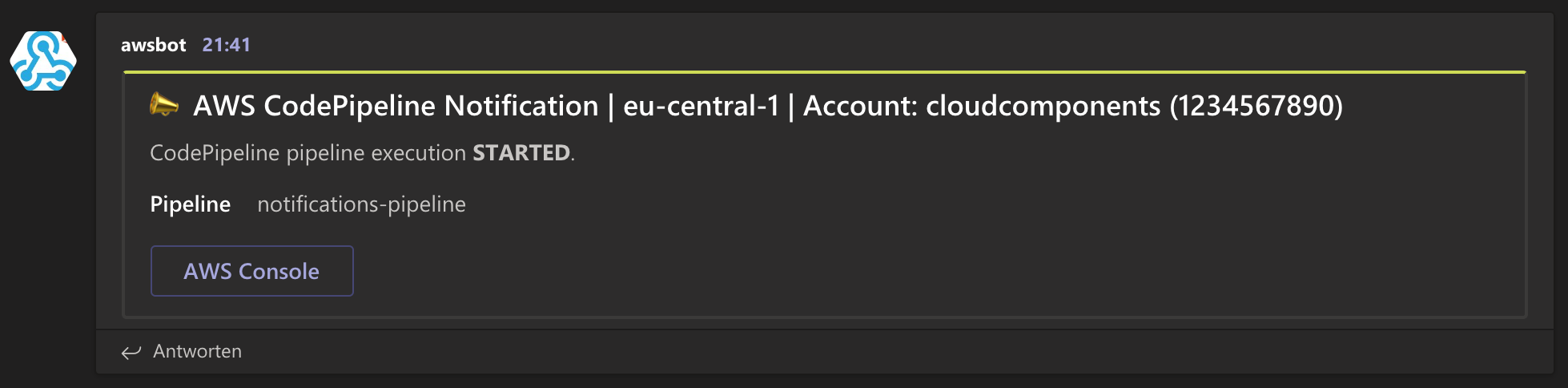
#Slack
Notifications for AWS developer tools
How to use
import { SlackChannelConfiguration, MSTeamsIncomingWebhookConfiguration, AccountLabelMode } from '@cloudcomponents/cdk-chatops';
import {
  RepositoryNotificationRule,
  PipelineNotificationRule,
  RepositoryEvent,
  PipelineEvent,
  SlackChannel,
  MSTeamsIncomingWebhook,
} from '@cloudcomponents/cdk-developer-tools-notifications';
import { Stack, StackProps } from 'aws-cdk-lib';
import { Repository } from 'aws-cdk-lib/aws-codecommit';
import { Pipeline, Artifact } from 'aws-cdk-lib/aws-codepipeline';
import { CodeCommitSourceAction, ManualApprovalAction } from 'aws-cdk-lib/aws-codepipeline-actions';
import { Construct } from 'constructs';

export class NotificationsStack extends Stack {
  constructor(scope: Construct, id: string, props?: StackProps) {
    super(scope, id, props);

    const repository = new Repository(this, 'Repository', {
      repositoryName: 'notifications-repository',
    });

    if (typeof process.env.SLACK_WORKSPACE_ID === 'undefined') {
      throw new Error('environment variable SLACK_WORKSPACE_ID undefined');
    }
    if (typeof process.env.SLACK_CHANNEL_ID === 'undefined') {
      throw new Error('environment variable SLACK_CHANNEL_ID undefined');
    }
    const slackChannel = new SlackChannelConfiguration(this, 'SlackChannel', {
      slackWorkspaceId: process.env.SLACK_WORKSPACE_ID,
      configurationName: 'notifications',
      slackChannelId: process.env.SLACK_CHANNEL_ID,
    });

    if (typeof process.env.INCOMING_WEBHOOK_URL === 'undefined') {
      throw new Error('environment variable INCOMING_WEBHOOK_URL undefined');
    }
    const webhook = new MSTeamsIncomingWebhookConfiguration(this, 'MSTeamsWebhook', {
      url: process.env.INCOMING_WEBHOOK_URL,
      accountLabelMode: AccountLabelMode.ID_AND_ALIAS,
      themeColor: '#FF0000',
    });

    new RepositoryNotificationRule(this, 'RepoNotifications', {
      name: 'notifications-repository',
      repository,
      events: [RepositoryEvent.COMMENTS_ON_COMMITS, RepositoryEvent.PULL_REQUEST_CREATED, RepositoryEvent.PULL_REQUEST_MERGED],
      targets: [new SlackChannel(slackChannel), new MSTeamsIncomingWebhook(webhook)],
    });

    const sourceArtifact = new Artifact();

    const sourceAction = new CodeCommitSourceAction({
      actionName: 'CodeCommit',
      repository,
      output: sourceArtifact,
    });

    const approvalAction = new ManualApprovalAction({
      actionName: 'Approval',
    });

    const pipeline = new Pipeline(this, 'Pipeline', {
      pipelineName: 'notifications-pipeline',
      stages: [
        {
          stageName: 'Source',
          actions: [sourceAction],
        },
        {
          stageName: 'Approval',
          actions: [approvalAction],
        },
      ],
    });

    new PipelineNotificationRule(this, 'PipelineNotificationRule', {
      name: 'pipeline-notification',
      pipeline,
      events: [
        PipelineEvent.PIPELINE_EXECUTION_STARTED,
        PipelineEvent.PIPELINE_EXECUTION_FAILED,
        PipelineEvent.PIPELINE_EXECUTION_SUCCEEDED,
        // PipelineEvent.ACTION_EXECUTION_STARTED,
        // PipelineEvent.ACTION_EXECUTION_SUCCEEDED,
        // PipelineEvent.ACTION_EXECUTION_FAILED,
        PipelineEvent.MANUAL_APPROVAL_NEEDED,
        PipelineEvent.MANUAL_APPROVAL_SUCCEEDED,
        // PipelineEvent.MANUAL_APPROVAL_FAILED,
        // PipelineEvent.STAGE_EXECUTION_STARTED,
        // PipelineEvent.STAGE_EXECUTION_SUCCEEDED,
        // PipelineEvent.STAGE_EXECUTION_FAILED,
      ],
      targets: [new SlackChannel(slackChannel), new MSTeamsIncomingWebhook(webhook)],
    });
  }
}
API Reference
See API.md.
Example
See more complete examples.
License
1 maintainer

Metadata
1 maintainer
Release files for cloudcomponents.cdk-developer-tools-notifications 2.4.0
For a detailed explanation of source distributions (sdists) and built distributions (wheels), please see the package formats documentation.
Source distribution (sdist)
| File | Size | Uploaded | Provenance | |
|---|---|---|---|---|
| cloudcomponents.cdk-developer-tools-notifications-2.4.0.tar.gz | 95.0 kB | Without provenance | Details |
Built distribution (wheel)
| File | Interpreter | ABI | Platform | Reset |
|---|---|---|---|---|
| cloudcomponents.cdk_developer_tools_notifications-2.4.0-py3-none-any.whl | Python 3 | none | any | Details |
Total release size: 188.6 kB
Release files / cloudcomponents.cdk-developer-tools-notifications-2.4.0.tar.gz
| Download URL | cloudcomponents.cdk-developer-tools-notifications-2.4.0.tar.gz |
|---|---|
| Size | 95.0 kB |
| Tags | Source |
|
SHA-256 checksum How to use checksums |
a2d81cc6e1d1f8ee7cb1a03fbfed15d1ac20dfbc74d42d2f70a885ba4bb77abe
|
|
BLAKE2b-256 checksum How to use checksums |
e076fc301c6b450ebeb786dc0cb43b5e4ff556c6de0ad8bf79f7bb7526d98e48
|
| Upload date | |
|
Uploaded using Trusted Publishing? What is trusted publishing? |
No |
| Uploaded via |
twine/5.0.0 CPython/3.12.2
|
Release files / cloudcomponents.cdk_developer_tools_notifications-2.4.0-py3-none-any.whl
| Download URL | cloudcomponents.cdk_developer_tools_notifications-2.4.0-py3-none-any.whl |
|---|---|
| Size | 93.6 kB |
| Tags | Python 3 |
|
SHA-256 checksum How to use checksums |
3a359f31b59c4ee9143f29401267f39d805c5f729469c2239adeb93b81b22e6e
|
|
BLAKE2b-256 checksum How to use checksums |
81868bae3ff199f5156d125bec78865170bdd8bc9050f2d657a1b50b190ba2ce
|
| Upload date | |
|
Uploaded using Trusted Publishing? What is trusted publishing? |
No |
| Uploaded via |
twine/5.0.0 CPython/3.12.2
|
Security for cloudcomponents.cdk-developer-tools-notifications 2.4.0
Provenance
Provenance describes where a file came from. On PyPI, provenance is shared via attestations, which provide a verifiable record of the build or publishing details. View details, limitations and caveats.
No provenance found
None of the files in this release were uploaded with provenance metadata.
A note on package security
PyPI is a repository for distributing packages, not a service for auditing them. While third-party security researchers and our staff do their best to detect and remove malicious packages, PyPI cannot guarantee the quality, security or suitability of any given package.
To learn more about protecting yourself from malicious actors, visit our package security documentation.














