
CloudFlare Fuzzy Finder





cloudflare-fuzzy-finder aims at checking DNS record more easily. It will connect to CloudFlare's API and get all DNS records from your account, and allow to search on fuzzy finder. Once pressing Enter on highlighted record, it will popup to the CloudFlare website for you to manage the record on that domain.
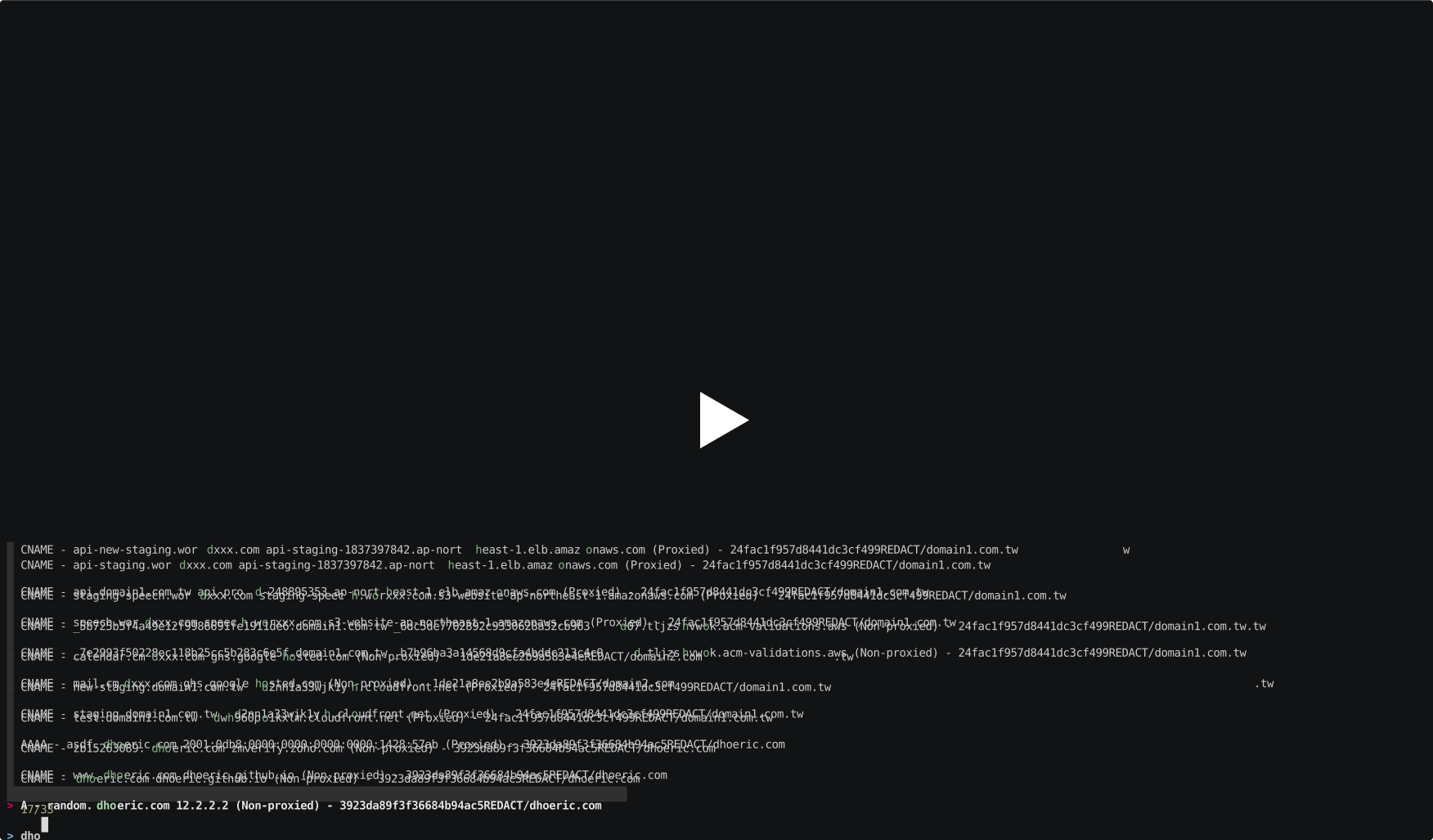
It is inspired by pmazurek/aws-fuzzy-finder and built on top of fzf binaries and python-cloudflare.
Installation
To install use the following command:
pip install cloudflare-fuzzy-finder
This package uses cloudflare-python to authenticate, so if you haven't used before,
you have to get the api key from your profile and put into following files like:
$ cat ~/.cloudflare/cloudflare.cfg
[CloudFlare]
email = user@example.com
token = 00000000000000000000000000000000
certtoken = v1.0-...
extras =
More information on alternative ways of configuring your CF_API_EMAIL, CF_API_KEY and CF_API_CERTKEY variables can be found here: https://github.com/cloudflare/python-cloudflare#providing-cloudflare-username-and-api-key
Settings
The loading time on records list highly dependent on the API calls to CloudFlare to fetch all the DNS records across the domain belongs to you.
The cache on DNS records is turn on by default and keep for 1 hour.
If you want to fine tune the duration on keeping the record locally, you can update by CF_FUZZ_CACHE_EXPIRY.
Or if you want to perform the search without using the cache, cau use cf-fuzzy --no-cache.
Or you can append this to your ~/.bashrc to make the settings permamant:
export CF_FUZZ_USE_CACHE=true
export CF_FUZZ_CACHE_EXPIRY=3600 # in terms of seconds
export CF_RECORD_TYPES=cname,a
Remeber that every change to ~/.bashrc requires you to re-load it: source ~/.bashrc or restart terminal.
Usage
To run, use the following command:
cf-fuzzy
To search any records other than CNAME & A, use the following command:
cf-fuzzy --record-types mx,txt
Cache
If you are managing lots of domains and downloading the data takes too long, you can use the built in cache. To enable it set the following variables in your .bashrc:
export CF_FUZZ_USE_CACHE=true
export CF_FUZZ_CACHE_EXPIRY=3600 # in terms of seconds
To invalidate cache and refresh data, run with --no-cache param
Cache will be stored as a file in ~/.cloudflare_fuzzy_finder.cache.
1 maintainer

Metadata
1 maintainer
Release files for cloudflare-fuzzy-finder 0.1.4
For a detailed explanation of source distributions (sdists) and built distributions (wheels), please see the package formats documentation.
Source distribution (sdist)
| File | Size | Uploaded | Provenance | Actions |
|---|---|---|---|---|
| cloudflare-fuzzy-finder-0.1.4.tar.gz | 3.5 MB | Without provenance | Details for cloudflare-fuzzy-finder-0.1.4.tar.gz |
Built distribution (wheel)
| File | Interpreter | ABI | Platform | Actions Reset |
|---|---|---|---|---|
| cloudflare_fuzzy_finder-0.1.4-py3-none-any.whl | Python 3 | none | any | Details for cloudflare_fuzzy_finder-0.1.4-py3-none-any.whl |
Total release size: 7.0 MB
Release files / cloudflare-fuzzy-finder-0.1.4.tar.gz
| Download URL | cloudflare-fuzzy-finder-0.1.4.tar.gz |
|---|---|
| Size | 3.5 MB |
| Tags | Source |
|
SHA-256 checksum How to use checksums |
08e33fcb0f02bc3f082b35511616ada0657fd00d04c768b73f7733f7643b5de8
|
|
BLAKE2b-256 checksum How to use checksums |
3f653a2f4a4c8762b04e7153e1d55fd506e493d3d8cfd245cc36f5fef640a54f
|
| Upload date | |
|
Uploaded using Trusted Publishing? What is trusted publishing? |
No |
| Uploaded via |
twine/1.13.0 pkginfo/1.5.0.1 requests/2.19.1 setuptools/39.2.0 requests-toolbelt/0.9.1 tqdm/4.31.1 CPython/3.7.0
|
Release files / cloudflare_fuzzy_finder-0.1.4-py3-none-any.whl
| Download URL | cloudflare_fuzzy_finder-0.1.4-py3-none-any.whl |
|---|---|
| Size | 3.5 MB |
| Tags | Python 3 |
|
SHA-256 checksum How to use checksums |
a91b6f4d40f6d0df92133c14aa59bd2ab8decb8f42e632c7c9df4c2463f3f42b
|
|
BLAKE2b-256 checksum How to use checksums |
39dc2eebd9f4caeb747e57f2a052cae80599947bcfd283d9248f8babdd991dd2
|
| Upload date | |
|
Uploaded using Trusted Publishing? What is trusted publishing? |
No |
| Uploaded via |
twine/1.13.0 pkginfo/1.5.0.1 requests/2.19.1 setuptools/39.2.0 requests-toolbelt/0.9.1 tqdm/4.31.1 CPython/3.7.0
|
Security for cloudflare-fuzzy-finder 0.1.4
Provenance
Provenance describes where a file came from. On PyPI, provenance is shared via attestations, which provide a verifiable record of the build or publishing details. View details, limitations and caveats.
No provenance found
None of the files in this release were uploaded with provenance metadata.
A note on package security
PyPI is a repository for distributing packages, not a service for auditing them. While third-party security researchers and our staff do their best to detect and remove malicious packages, PyPI cannot guarantee the quality, security or suitability of any given package.
To learn more about protecting yourself from malicious actors, visit our package security documentation.














