
Cloudia
Tools to easily create a word cloud.
from string
from str or List[str]
from cloudia import Cloudia

text1 = "text data..."
text2 = "text data..."

# from str
Cloudia(text1).plot()

# from list
Cloudia([text1, text2]).plot()
example from : 20 Newsgroups
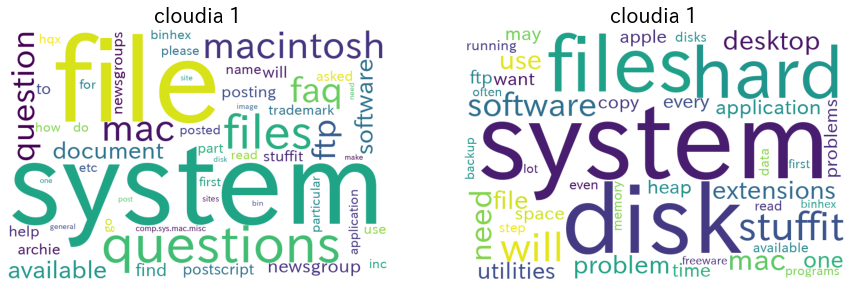
We can also make it from Tuple.
from cloudia import Cloudia

text1 = "text data..."
text2 = "text data..."
Cloudia([ ("cloudia 1", text1), ("cloudia 2", text2) ]).plot()
Tuple is ("IMAGE TITLE", "TEXT").
from pandas
We can use pandas.
df = pd.DataFrame({'wc1': ['sample1','sample2'], 'wc2': ['hoge hoge piyo piyo fuga', 'hoge']})

# plot from df
Cloudia(df).plot()

# add df method
df.wc.plot(dark_theme=True)
from pandas.DataFrame or pandas.Series.

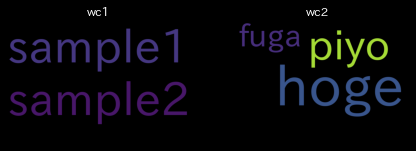
We can use Tuple too.
Cloudia( ("IMAGE TITLE", pd.Series(['hoge'])) ).plot()
from japanese
We can process Japanese too.
text = "これはCloudiaのテストです。WordCloudをつくるには本来、形態素解析の導入が必要になります。Cloudiaはmecabのような形態素解析器の導入は必要はなくnagisaを利用した動的な生成を行う事ができます。nagisaとjapanize-matplotlibは、形態素解析を必要としてきたWordCloud生成に対して、Cloudiaに対して大きく貢献しました。ここに感謝の意を述べたいと思います。"

Cloudia(text).plot()
from japanese without morphological analysis module.
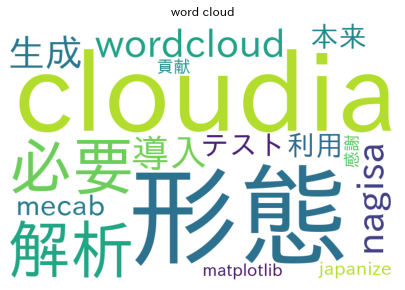
No need to introduce morphological analysis.
Install
pip install cloudia
Args
Cloudia args.
Cloudia(
  data,    # text data
  single_words=[],    # It's not split word list, example: ["neural network"]
  stop_words=STOPWORDS,    # not count words, default is wordcloud.STOPWORDS
  extract_postags=['名詞', '英単語', 'ローマ字文'],    # part of speech for japanese
  parse_func=None,    # split text function, example: lambda x: x.split(',')
  multiprocess=True,    # Flag for using multiprocessing
  individual=False    # flag for ' '.join(word) with parse
)
plot method args.
Cloudia().plot(
    dark_theme=False,    # color theme
    title_size=12,     # title text size
    row_num=3,    # for example, 12 wordcloud, row_num=3 -> 4*3image
    figsize_rate=2    # figure size rate
)
save method args.
Cloudia().save(
    file_path,    # save figure image path
    dark_theme=False,
    title_size=12,
    row_num=3,
    figsize_rate=2
)
pandas.DataFrame, pandas.Series wc.plot method args.
DataFrame.wc.plot(
  single_words=[],    # It's not split word list, example: ["neural network"]
  stop_words=STOPWORDS,    # not count words, default is wordcloud.STOPWORDS
  extract_postags=['名詞', '英単語', 'ローマ字文'],    # part of speech for japanese
  parse_func=None,    # split text function, example: lambda x: x.split(',')
  multiprocess=True,    # Flag for using multiprocessing
  individual=False,    # flag for ' '.join(word) with parse
  dark_theme=False,    # color theme
  title_size=12,     # title text size
  row_num=3,    # for example, 12 wordcloud, row_num=3 -> 4*3image
  figsize_rate=2    # figure size rate
)
If we use wc.save, setting file_path args.
Thanks
1 maintainer

Metadata
1 maintainer
Release files for cloudia 0.2.2
For a detailed explanation of source distributions (sdists) and built distributions (wheels), please see the package formats documentation.
Source distribution (sdist)
| File | Size | Uploaded | Provenance | Actions |
|---|---|---|---|---|
| cloudia-0.2.2.tar.gz | 7.0 kB | Without provenance | Details for cloudia-0.2.2.tar.gz |
Built distribution (wheel)
| File | Interpreter | ABI | Platform | Actions Reset |
|---|---|---|---|---|
| cloudia-0.2.2-py3-none-any.whl | Python 3 | none | any | Details for cloudia-0.2.2-py3-none-any.whl |
Total release size: 14.8 kB
Release files / cloudia-0.2.2.tar.gz
| Download URL | cloudia-0.2.2.tar.gz |
|---|---|
| Size | 7.0 kB |
| Tags | Source |
|
SHA-256 checksum How to use checksums |
9bf5419d5c1316bd1d0192409864694b8cb0c8fd605b681e75ad6463fb4a5491
|
|
BLAKE2b-256 checksum How to use checksums |
aca736ac48e008455d13372d1ddd1d317b8985256c50a8d0868219eeb06afa9e
|
| Upload date | |
|
Uploaded using Trusted Publishing? What is trusted publishing? |
No |
| Uploaded via |
poetry/1.0.5 CPython/3.8.2 Linux/5.0.0-1035-azure
|
Release files / cloudia-0.2.2-py3-none-any.whl
| Download URL | cloudia-0.2.2-py3-none-any.whl |
|---|---|
| Size | 7.8 kB |
| Tags | Python 3 |
|
SHA-256 checksum How to use checksums |
a4965b3a1ec13558eca12269f2e185dd4097d18157ff14963d1216f0ae3ffba9
|
|
BLAKE2b-256 checksum How to use checksums |
0ca86851c2b02da6aec9da00448e2852679fe57d453a4a3618e3792be839c423
|
| Upload date | |
|
Uploaded using Trusted Publishing? What is trusted publishing? |
No |
| Uploaded via |
poetry/1.0.5 CPython/3.8.2 Linux/5.0.0-1035-azure
|
Security for cloudia 0.2.2
Provenance
Provenance describes where a file came from. On PyPI, provenance is shared via attestations, which provide a verifiable record of the build or publishing details. View details, limitations and caveats.
No provenance found
None of the files in this release were uploaded with provenance metadata.
A note on package security
PyPI is a repository for distributing packages, not a service for auditing them. While third-party security researchers and our staff do their best to detect and remove malicious packages, PyPI cannot guarantee the quality, security or suitability of any given package.
To learn more about protecting yourself from malicious actors, visit our package security documentation.














