
FZF Cloud Select






You may find a documentation at the Read The Docs

Environments
- Amazon Web Services (AWS)
- Hetzner cloud
- Kubernetes
- Discovery results from a local command
Purpose
We should jump between nodes quickly, having a pack of cloud accounts. Each account could be in a different region. Some nodes are publicity available, some of them not. Dozen of nodes sit behind bastion hosts. And a few of them sit behind a group of jump points. And they all have different SSH keys.
There is a ~/.ssh/config, but it is not enough because of the dynamic nature of the cloud. It is too clumsy and not suitable for cases when IP addresses are changing instantly, and instances are creating and destroying in minutes.
I tried to structure that chaos with shell scripts, but the shell is not enough. I believe that tools like C/C++/Java/Node.JS/Go?/Rust are too heavy for this case. Python is the exact thing. I like to have a dynamic and lightweight solution. Cloud Select is fast enough to go through thousands of nodes. Maybe if my scope will be higher, then I'll create something other.
Cloud Select is useful for diving inside geo-distributed onion enterprise environments with weird security settings.
Implementation
CloudSelect retrieves node list from the cloud, passes that list to FZF, adds some useful information to selected nodes (like jump hosts, sudo -i command, etc...), and returns dictionary that could be used by other programs. CloudSelect is a team player in a shell environment. We can automatically open interactive SSH sessions in parallel and provide passwords to sudo -i under TMUX environment.
Demo
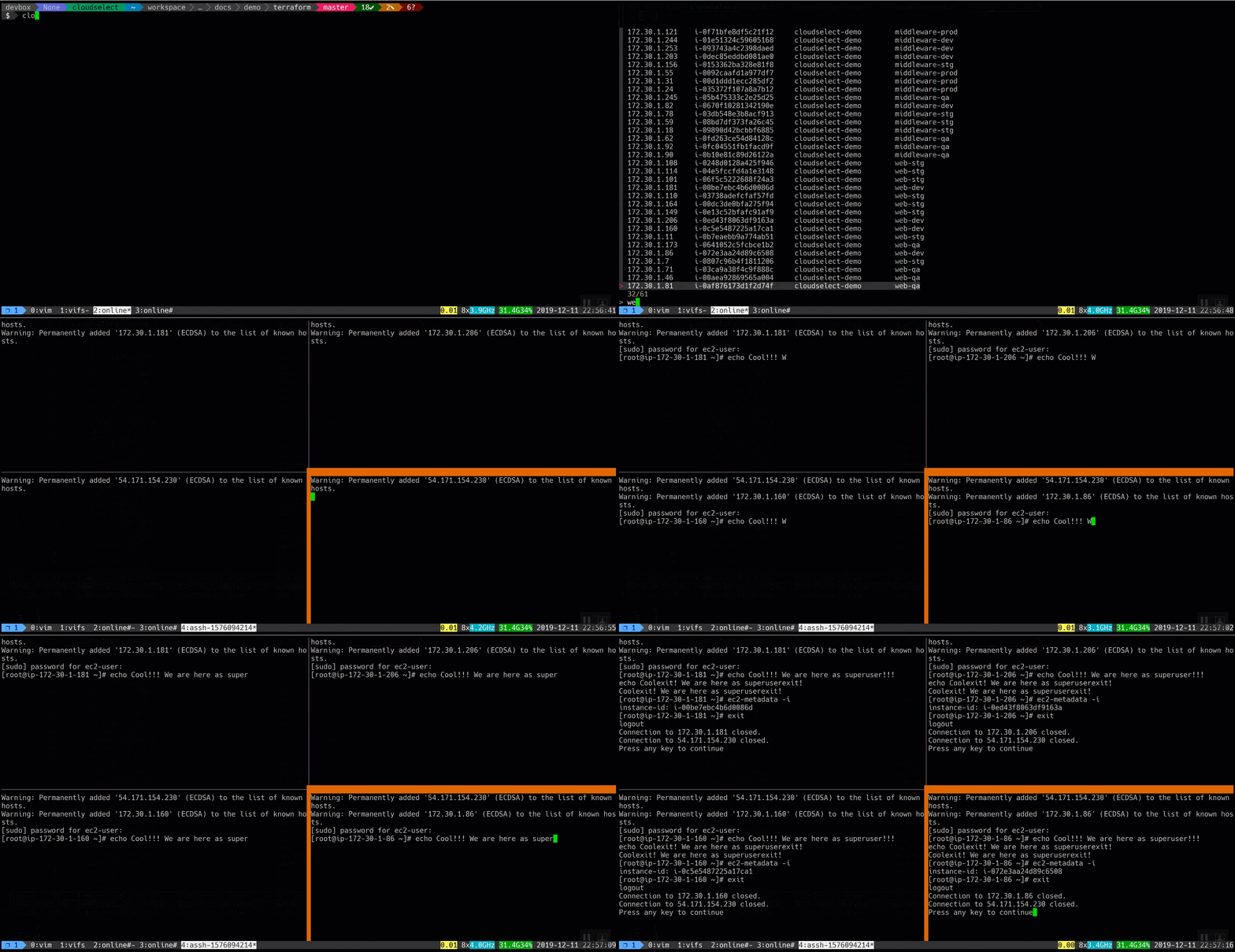
The tool is:
- connecting to bastion host with public IP 54.171.154.230
- using locally stored key on bastion because the usage of ssh-agent is restricted by security team ?lol? and sshd settings are
AllowTcpForwarding no,GatewayPorts no - jumping to 4 EC2 web instances in development environment that located in private subnet 172.30.x.x
- running
sudo -iat startup - entering
sudopassword 12345678
And after that, we have four ready to use interactive sessions in our terminal...
You may find a demo files in docs/demo directory.
Basic usage
- Connect to a single known_hosts server
- Connect to a single EC2 AWS instance
Advanced usage
- Connect to multiple known_hosts servers, run
sudo -icommand at startup and entersudopassword - Connect to multiple EC2 AWS instances, run
sudo -icommand at startup and entersudopassword - Connect to multiple EC2 AWS instances through a bastion host, run
sudo -icommand at startup and entersudopassword
Features
:rocket: We may use jump hosts even if jump host hasn't been configured to allow remote port forwarding and we have the following settings in sshd_config:
AllowTcpForwarding no
GatewayPorts no
Installation
CloudSelect is on PyPi! You can install CloudSelect with a simple pip command:
pip install cloudselect
Add profile bash completion:
complete -C cloudselect_completer cloudselect
You may copy suitable wrapper from example directory.
License
MIT © Alexey Aksenov et al
1 maintainer

Release files for cloudselect 20.1.14
For a detailed explanation of source distributions (sdists) and built distributions (wheels), please see the package formats documentation.
Source distribution (sdist)
| File | Size | Uploaded | |
|---|---|---|---|
| cloudselect-20.1.14.tar.gz | 21.0 kB | Details |
Built distribution (wheel)
| File | Interpreter | ABI | Platform | Reset |
|---|---|---|---|---|
| cloudselect-20.1.14-py3-none-any.whl | Python 3 | none | any | Details |
Total release size:63.1 kB
Release files / cloudselect-20.1.14.tar.gz
| Download URL | cloudselect-20.1.14.tar.gz |
|---|---|
| Size | 21.0 kB |
| Tags | Source |
|
SHA-256 checksum How to use checksums |
ec69e68e42f3edd809b99e0a9af779c48dc6b6c77b0e81d6a7d91fc78ea9585e
|
|
BLAKE2b-256 checksum How to use checksums |
5e2d96fb1f53710b9c2b8602690f0fab6615f18751721876f19a785f6a536642
|
| Upload date | |
|
Uploaded using Trusted Publishing? What is trusted publishing? |
No |
| Uploaded via |
twine/3.1.1 pkginfo/1.5.0.1 requests/2.23.0 setuptools/45.2.0 requests-toolbelt/0.9.1 tqdm/4.43.0 CPython/3.6.7
|
Release files / cloudselect-20.1.14-py3-none-any.whl
| Download URL | cloudselect-20.1.14-py3-none-any.whl |
|---|---|
| Size | 42.1 kB |
| Tags | Python 3 |
|
SHA-256 checksum How to use checksums |
47c3c1d102b1821d4ba9b7cfbb80c297aa79086b872ef3ff8dfe970feaafbb3b
|
|
BLAKE2b-256 checksum How to use checksums |
21226d1757c25dc65b50da569221008a9e99b6925f3eb6cd410f2e259889e70a
|
| Upload date | |
|
Uploaded using Trusted Publishing? What is trusted publishing? |
No |
| Uploaded via |
twine/3.1.1 pkginfo/1.5.0.1 requests/2.23.0 setuptools/45.2.0 requests-toolbelt/0.9.1 tqdm/4.43.0 CPython/3.6.7
|














