
CNKI_2_BibTeX
Converting the NoteExpress (.net) file exported by CNKI (中国知网) to BibTeX (.bib) file.
将中国知网导出的 NoteExpress 文献记录转换成 BibTeX 文献记录。中文 README




Getting Started
Prerequisites
- Python3
Installation
pip install cnki2bib
Using
Make sure it's in your PATH.
cnki2bib [OPTIONS] [INPUTFILE]
Arguments:
INPUTFILE:- The input .net file to be converted. If left blank, the contents in the clipboard will be used.
Options:
-
-c, --copy / -nc, --no-copy- Whether or not to copy the result to clipboard.
- Default:
True
-
-od, --outputDefault / -nod, --no-outputDefault- Whether or not to create a default .bib file.
- It has the same name as the source .net file in its directory.
- Or if the input source is clipboard, it will be 'out.bib' in current working directory.
- Default:
True
-
-o, --outputfile FILENAME- Create a certain output .bib file.
-
-f, --id-format [title|nameyear]- Choose the format of the ID of BibTeX entries.
- The first several words (or their pinyin) in the title
- The first author (or the pinyin) plus year.
- Default:
title - Once you have assigned a format, your choice will be saved in
~/.cnki2bib.cfg. It is unnecessary to type this choice since then.
- Choose the format of the ID of BibTeX entries.
-
--help- Show this message and exit.
Finally...
Start using BibTeX to manage the literature references.
Double-click to use
You can find cnki2bib.exe in your Python/Scripts and set it as the default program to open the .net file.
Then when you double-click a .net file, the corresponding BibTeX Entries will be copied to your clipboard, and a .bib file would be created on the same directory.
Use the console to check for Exception if it does not work as expected, and issue is welcomed.
Export NoteExpress .net File on CNKI
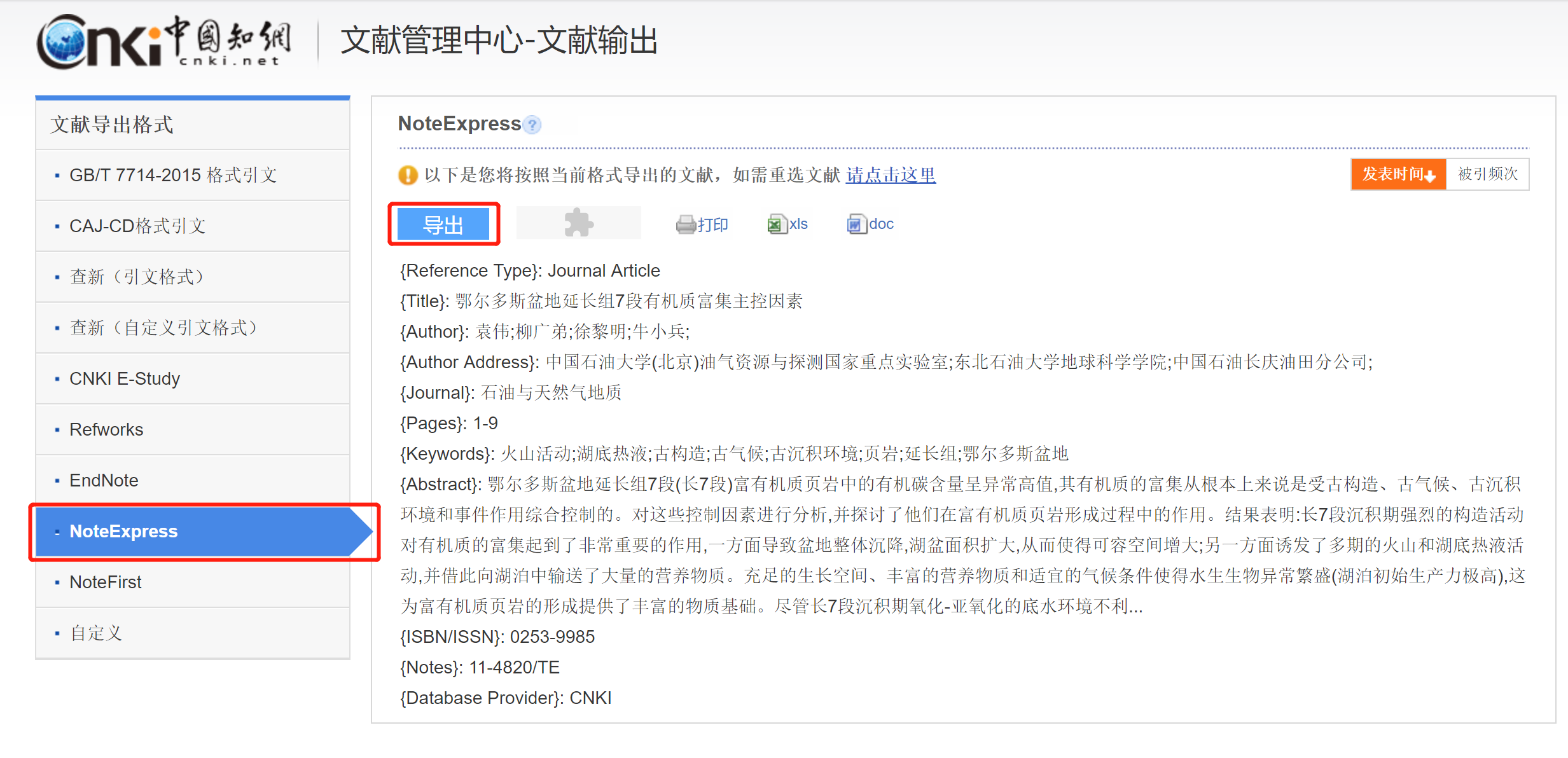
Copy NoteExpress Entry content to the clipboard.
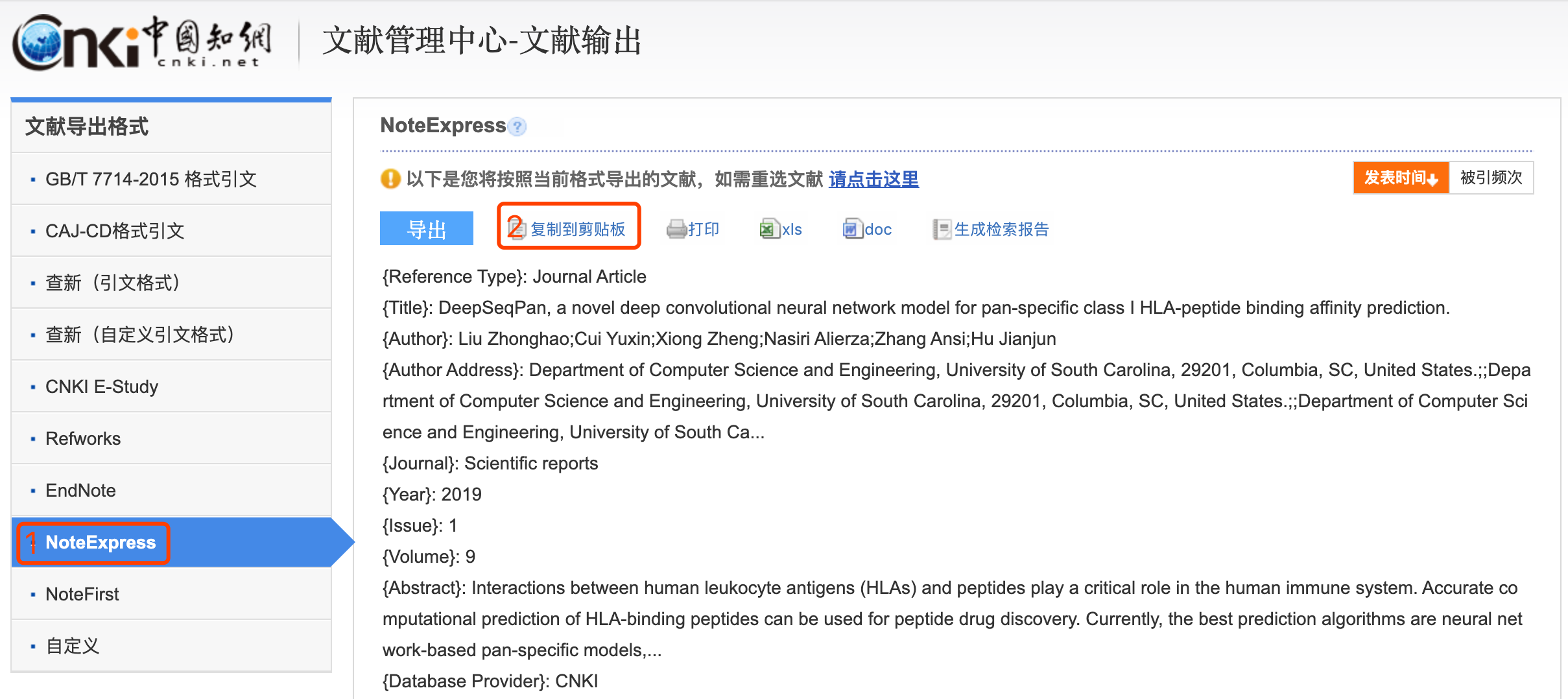
You have to enable Flash to see the "Copy to clipboard" button.
Then just run cnki2bib in the terminal. The corresponding BibTeX Entries will be copied to your clipboard, and an 'out.bib' file is created at the current directory. 😄
1 maintainer

Metadata
1 maintainer
Release files for cnki2bib 0.2.8
For a detailed explanation of source distributions (sdists) and built distributions (wheels), please see the package formats documentation.
Source distribution (sdist)
| File | Size | Uploaded | Provenance | Actions |
|---|---|---|---|---|
| cnki2bib-0.2.8.tar.gz | 8.4 kB | Without provenance | Details for cnki2bib-0.2.8.tar.gz |
Built distribution (wheel)
| File | Interpreter | ABI | Platform | Actions Reset |
|---|---|---|---|---|
| cnki2bib-0.2.8-py3-none-any.whl | Python 3 | none | any | Details for cnki2bib-0.2.8-py3-none-any.whl |
Total release size: 19.0 kB
Release files / cnki2bib-0.2.8.tar.gz
| Download URL | cnki2bib-0.2.8.tar.gz |
|---|---|
| Size | 8.4 kB |
| Tags | Source |
|
SHA-256 checksum How to use checksums |
a06667b729a43c4db16817e2faee7b88f5eae75e73d6a5b184351f4ea9b8ab6c
|
|
BLAKE2b-256 checksum How to use checksums |
8c1a68a58d878c95cf2dee81cd4598142c97414db17c5f266bd7a4e1746be71c
|
| Upload date | |
|
Uploaded using Trusted Publishing? What is trusted publishing? |
No |
| Uploaded via |
twine/4.0.2 CPython/3.11.1
|
Release files / cnki2bib-0.2.8-py3-none-any.whl
| Download URL | cnki2bib-0.2.8-py3-none-any.whl |
|---|---|
| Size | 10.6 kB |
| Tags | Python 3 |
|
SHA-256 checksum How to use checksums |
ba9acd6caa7681ea023728265ae42ae396930f3a8822e72d194c1ff6ea3f6a65
|
|
BLAKE2b-256 checksum How to use checksums |
0aebedbc41fb49cd7e566eb4a5bdd8fe8c1144b2beda50a1e623aad2a90beab9
|
| Upload date | |
|
Uploaded using Trusted Publishing? What is trusted publishing? |
No |
| Uploaded via |
twine/4.0.2 CPython/3.11.1
|
Security for cnki2bib 0.2.8
Provenance
Provenance describes where a file came from. On PyPI, provenance is shared via attestations, which provide a verifiable record of the build or publishing details. View details, limitations and caveats.
No provenance found
None of the files in this release were uploaded with provenance metadata.
A note on package security
PyPI is a repository for distributing packages, not a service for auditing them. While third-party security researchers and our staff do their best to detect and remove malicious packages, PyPI cannot guarantee the quality, security or suitability of any given package.
To learn more about protecting yourself from malicious actors, visit our package security documentation.














